📬 Write better emails, faster — without sending data offshore.
Join our FREE 30-min webinar for health, legal & finance pros.
✔️ Draft emails from notes
✔️ Match your tone
✔️ Keep data in 🇦🇺
🗓 Thurs 17 July, 11:30 AM AEST
🔗 https://t.co/ktC6oiWwlL
We're releasing a preview of OpenAI o1—a new series of AI models designed to spend more time thinking before they respond.
These models can reason through complex tasks and solve harder problems than previous models in science, coding, and math. https://t.co/peKzzKX1bu
Just a month later and the first AI model that can generate live and interactive playable dynamic worlds is here
It's called GameNGen and is trained on the classic game DOOM
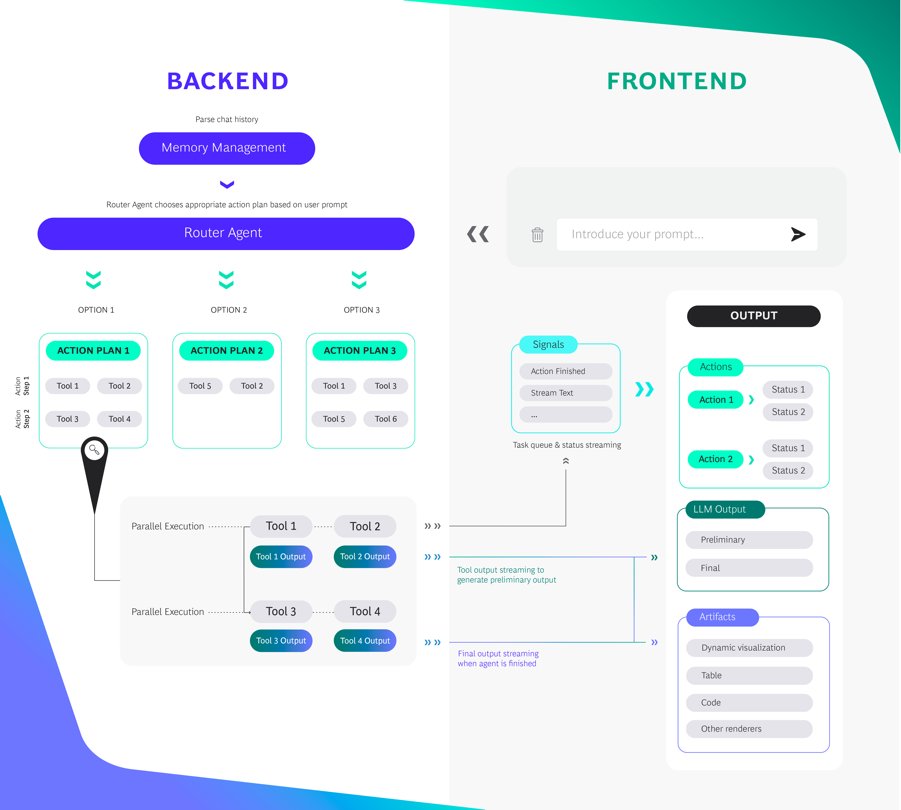
🤖BCG X Releases AgentKit, a Full-Stack Starter Kit for Building Constrained Agents
AgentKit is a LangChain-based starter kit to build constrained agents, developed by our partners at BCG X
We've often found that in order to productionalize agentic applications, you need to develop them in a fairly constrained way. This will help with that!
This is a full stack application, built on NextJS, FastAPI, and LangChain
BCG X has already used this to develop:
🧪Generating drafts of complex clinical documents, such as clinical trial protocols, for a global pharma company
🚢Controlling and orchestrating supply chain optimization systems using a helpful agent assistant
🚗Developing a chatbot that helps a major automotive player service its customers
Check out the code here: https://t.co/NsMZilpHzW
Read the full blog here: https://t.co/NwY5hdcnFe
Check out this job at LAVO: https://t.co/sKWgFEimSI
This is a great opportunity to innovate in the renewable energy sector with a diverse range of software systems. Come join our experienced team and change the way people use electricity!
Blown away by how smooth the debugging workflow is with @langchain’s LangSmith🦜⚒️Took it for a spin to build an AI assistant that
⚡Gets my top performing starred repos
⚡Assesses how useful each repo is for me
⚡Sends an analysis via Discord
Very excited about what’s next!
Introducing Custom instructions! This feature lets you give ChatGPT any custom requests or context which you’d like applied to every conversation. Custom instructions are currently available to Plus users, and we plan to roll out to all users soon! https://t.co/3aFa1q6LyI
Here are some use cases we’ve heard from our early testers:
- Expertise calibration: Sharing your level of expertise in a specific field to avoid unnecessary explanations.
- Language learning: Seeking ongoing conversation practice with grammar correction.
- Localization: Establishing an ongoing context as a lawyer governed by their specific country’s laws.
- Novel writing: Using character sheets to help ChatGPT maintain consistent understanding of story characters in ongoing interactions.
- Response format: Instructing ChatGPT to consistently output code updates in a unified format.
- Writing style personalization: Applying the same voice and style as provided emails to all future email writing requests.
👀 I used OpenAI's Code Interpreter to make Flappy Bird 🐦in 7 minutes:
Code Interpreter/GPT-4 for code generation.
Pre-existing or AI-generated assets for graphics.
---
Here's how to make the game in only 6 steps:
(1): Enter the following prompt:
"write p5.js code for Flappy Bird where you control a yellow bird continuously flying between a series of green pipes. The bird flaps every time you left click the mouse. If the bird falls to the ground or hits a pipe, you lose. This game goes on infinitely until you lose and you get points the further you go".
(2): Use generative AI or existing game assets and spirits. I searched "flappy bird assets" on Google and used the first link, a GitHub repo with pngs from the original Flappy Bird.
(3): Use this prompt to link assets to the code:
"Please generate the entire file again based on the fact I'm using a unique background, spirits for the bird, and pipes. Here is the list of assets I'm using: [list of file names]."
Code Interpreter should modify the code accordingly to include the list of file names.
(4) Make an account OpenProcessing -> create a sketch -> paste in the code generated by Code Interpreter -> upload in-game assets from step (2).
(5) (Optional) Ask ChatGPT to make changes to improve the in-game experience e.g., adding a high score, restarting the game when the bird dies, etc. Copy the new code into your OpenProcessing sketch and reload the game.
(6) If something doesn't work, ask GPT4 to fix it. Copy and paste the error message and ask it to regenerate the code.
---
Bonus Tips:
- Iteratively test code. Each time you make a change using Code Interpreter, test the updated code by playing the game so you catch new bugs early.
- Learn programming by asking questions: "Act as a senior programmer very good at explaining concepts to a beginner. Tell me how gravity works in this game and how you used code to make this happen."Code Interpreter/GPT4 for code generation. Download Pre-existing assets or generate new images for graphics.
Excited to see what you make!
I’m still on vacation in Colorado this week but I’ve been playing with Code Interpreter in the evenings after the kids are asleep. It’s a HUGE upgrade to ChatGPT. Rounding up all the cool ways people are using it to share in a video when I’m back.
Here are some of the cool uses I’ve seen or played with:
- Upload two images and create an animation that merges between the two.
- Upload a CSV file of YouTube data and analyze it to recommend future videos.
- Upload a JS file from GitHub and have it explain what the code does in plain English.
- Upload multiple CSV datasets and look for correlations between the two (ie YouTube data and Google Trends data on the niche).
- Convert a video file into an animated gif.
- Generate a QR code from a URL.
- Create a visual word cloud from a dataset to visualize how often a term shows up.
- Create colorful and 3D data visualizations from CSV files.
- Analyze html, css, or js code to find improvements or vulnerabilities.
Feel free to share some cool ways you’ve used it. I want to focus on practical use cases for the average person. I might shout you out in an upcoming vid. :)
🔮@JinaAI_ + LangChain🔮
Handling chat memory can be a challenge when building LLM apps. The Jina Chat service takes care of preserving conversation history for you, and now you can try it in LangChain!
Jina chat: https://t.co/Q8dtAawkOk
LC docs: https://t.co/NwMbSifUPM
Code Interpreter Beta (rolling out to ChatGPT Plus) is quite powerful. It's your personal data analyst: can read uploaded files, execute code, generate diagrams, statistical analysis, much more. I expect it will take the community some time to fully chart its potential.
To turn on:
In ChatGPT on bottom left click on name > Settings > Beta features > turn on Code Interpreter.
AI news doesn't stop 🤯
In the last 5 days:
EU AI Act
GPT-Engineer
Meta Voicebox
Adobe AI Insurance
AI Speech Classifier
OpenAI API Cheaper
Free LLM from Meta
Google Virtual Try-On
ChatGPT + Mercedes
HF: Free AI QR Codes
Google: Replace MRIs
Here's what you need to know: