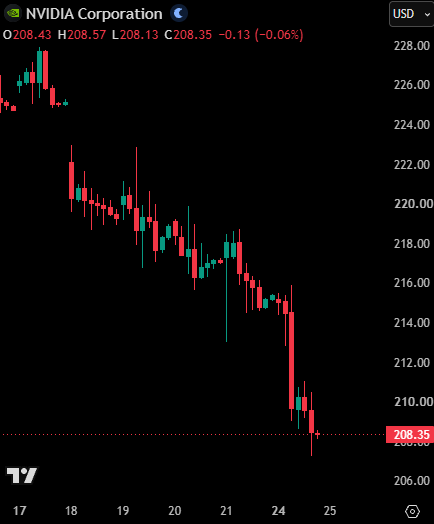
BREAKING: Nvidia, $NVDA, falls for the 7th-straight trading day and officially posts its longest losing streak since 2022.
The company is set to report earnings on Wednesday.
Windows Desktop fails to locate Codex CLI after update when installed on non-system drive
Environment
- OS: Windows 11 x64
- ChatGPT / Codex Desktop installed on: `F:\OpenAI`
- Subscription: ChatGPT Plus
- Codex session directory: `C:\Users\Administrator\.codex\sessions`
Issue
After a ChatGPT/Codex Desktop update, the application failed to start with:
```text
ChatGPT failed to start.
Unable to locate the Codex CLI binary.
Set CODEX_CLI_PATH or ensure the Electron resources include bin/codex.
```
However, the Codex CLI binary was present and executable at:
```text
F:\OpenAI\Codex\bin\codex.exe
```
Running:
```powershell
& "F:\OpenAI\Codex\bin\codex.exe" --version
```
worked correctly.
Manually setting:
```text
CODEX_CLI_PATH=F:\OpenAI\Codex\bin\codex.exe
```
allowed the Desktop app to start.
Secondary issue
The bundled CLI at that location was an old version:
```text
codex-cli 0.130.0-alpha.5
```
After the app started, recent conversations could not be restored and showed:
```text
failed to read thread
rollout ... does not start with session metadata
```
The affected sessions had been created by newer CLI versions:
```text
0.148.0-alpha.15
0.149.0-alpha.4.3
```
I inspected the affected `.jsonl` files and confirmed:
```text
UTF8_BOM = False
JSONValid = True
FirstType = session_meta
```
So the session files themselves were valid.
Workaround
Installing the latest standalone Codex CLI and setting:
```text
CODEX_CLI_PATH=C:\Users\Administrator\.codex\packages\standalone\current\bin\codex.exe
```
resolved both the application startup problem and the thread restore problem.
Suspected cause
The Windows Desktop updater appears to lose or incorrectly resolve the Codex CLI path when the application is installed on a non-system drive.
The fallback CLI located under the custom installation directory may also remain outdated, causing compatibility problems with sessions created by newer Desktop versions.
Expected behavior
After updating:
1. Desktop should correctly locate its bundled/current Codex CLI regardless of installation drive.
2. The updater should keep the bundled CLI version synchronized with the Desktop version.
3. Users should not need to manually configure `CODEX_CLI_PATH`.
4. Desktop should avoid selecting an outdated fallback CLI when newer compatible CLI installations are available.