Stress-testing AI agents & multi-agent swarms to their limits.
Building full-stack web apps and more with Antigravity and Claude. Sharing some raw telemetry.
Checked my actual local Antigravity logs from the last 72h (1,541 steps) to see if the rumors about Gemini 4 Neon burning quota / broken prompt caching are real.
The numbers are wild:
Prompt caching on Neon isn't completely broken (still ~74–90% overall), BUT it suffers from massive mid-conversation cache drops (cache_read = 0 right in the middle of active sessions):
• Neon (all tiers): 53 mid-conversation cache drops in 540 steps
→ ~10.3M uncached input tokens wasted (74% of ALL my uncached Neon input!)
→ Neon Medium/Low/Orchestrator dropped cache on 14%–21% of steps
• Flash Worker: 6 drops in 441 steps (1.4%)
• Claude Sonnet: 0 drops in 87 steps (0.0%)
To be fair: running heavy multi-agent swarms definitely amplified my total usage.
But when parallel agents hit a full cache reset every 5–7 steps, your quota evaporates fast.
@antigravity@GoogleDeepMind@_mohansolo@adhidesign@vibe__coder please look into Neon's mid-session cache invalidation 🙏
Neon just dropped and I’m very soon locked out for 5 days after stress-testing /swarm.
Pitch: Antigravity Community Events.
If we burn 5 trillion tokens in 48h, everyone unlocks a quota reset.
Deal?
@antigravity#Antigravity#Gemini#AgenticAI#GoogleDeepMind#AICoding
How Antigravity could solve this permanently (so all skills can stay active at ~0 cost):
1. Two-Tier Lazy Bundles: Inject one ~20-token summary line per plugin instead of 40+ separate skill descriptions, expanding them only when that domain is needed.
2. Workspace File Gating: Just like glob triggers on Rules, auto-sleep database or bio skills when a repo has no matching files (.sql, .ipynb, etc.).
@adhidesign@antigravity
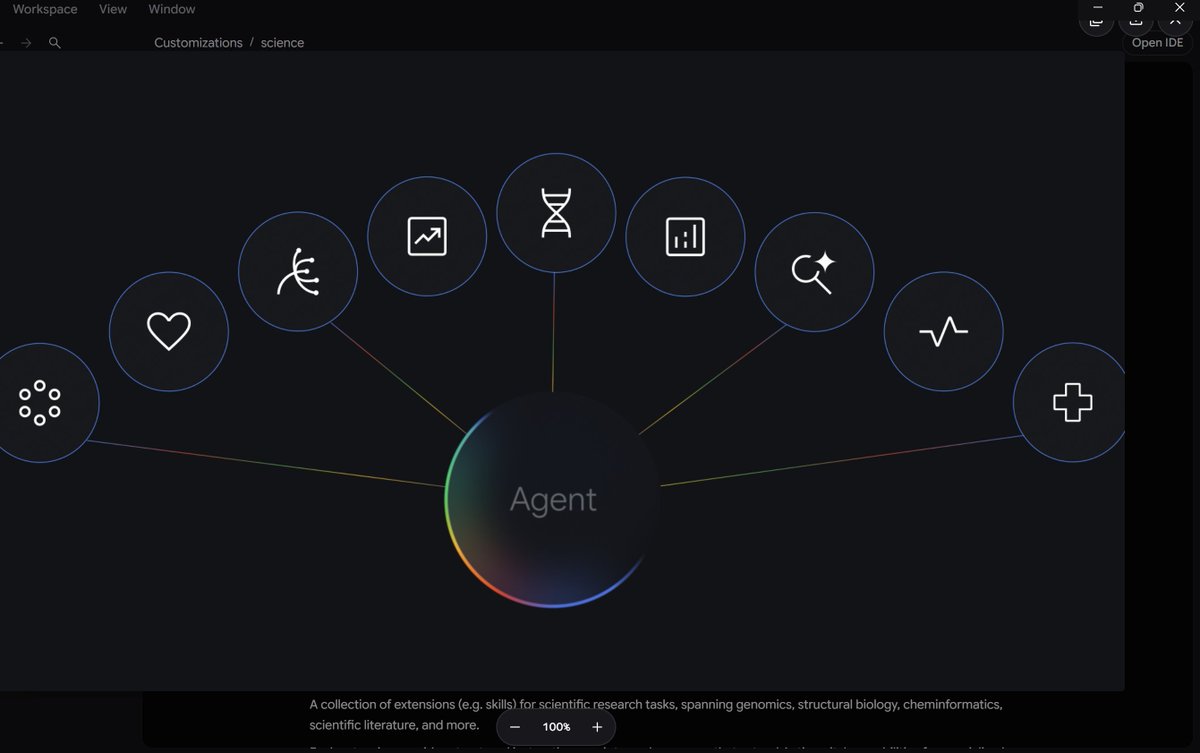
PSA for Google Antigravity users: Check your "Settings → Projects → Customizations" token bar. Unused global skills silently burn tokens on every turn—and can even kick out core tools.
Even though Antigravity only loads full SKILL.md files on demand, every enabled skill still injects its name, path, and description into the system prompt on EVERY turn (across your main chat AND every /swarm worker).
Real numbers from my last project (605M total tokens across 4,590 LLM calls):
• My 20,000-token Customizations budget was sitting at 90.9% (18,186 tokens).
• 74 unrelated skills (~13,650 tokens/turn) were loading in the background: 30 orphaned BigQuery/GCP skills left in ~/.gemini/config/skills/ by an already-disabled extension, plus 44 forgotten genomics/WordPress plugin skills.
• Total waste: ~62.6M tokens (>10% of the entire project!) spent sending DNA and BigQuery descriptions to WebGL and audio agents.
• Worse: Because the 20k budget was 91% full, Antigravity silently evicted its own built-in "browser" subagent ("excluded due to context budget limits: browser").
Quick fix today:
Check ~/.gemini/config/skills/ for orphaned folders and toggle off heavy domain plugins you aren't using. Mine dropped from 90.9% to ~22% and immediately restored the browser subagent.
Introducing Gemini 4 Neon! Pushing the frontier across domains and punching above its model class in a meaningful way. To me, Neon feels like the right balance of intelligence, speed, and usability. Available now across @GoogleAIStudio, the API, and more!
Small UX friction point in Antigravity on Windows (on a Galaxy Book5 Pro): when scaling up/enlarging a generated image, the top-right action buttons (close, save, upload, etc.) partially overlap with the native Windows window controls (minimize, maximize, close). Makes saving/closing a bit tricky.
Worth a quick CSS tweak! Appreciate all the insane updates lately.
@adhidesign@melvinjohnsonp
(2/2)
6. /learn & Workspace Rules (GEMINI.md, AGENTS.md, .agents/rules/)
• What they do: /learn distills corrections and hard-won fixes from your current session into persistent rules or skills so the agent stops repeating the same mistake.
• Keep rules lean: Store project guardrails in GEMINI.md, AGENTS.md, or .agents/rules/*.md. Antigravity caps individual rule files at 24 KB and shares a 20,000-token inline budget across always-on rules (anything over budget gets demoted to file pointers)—so keep rules short and deterministic.
7. Custom Skills (.agents/skills/<name>/SKILL.md) & /run-workflow
• Any skill placed in .agents/skills/<name>/SKILL.md automatically becomes a native /<name> slash command (and is semantically auto-discovered when relevant), replacing deprecated .agents/workflows/ files.
• When orchestration itself needs to be code (fanning out across dozens of files or staged pipelines), /run-workflow lets the agent script parallel subagent execution in Python.
Voice-to-Text (Dictation) Tips That Actually Matter:
If you dictate prompts instead of typing them, here is what really trips agents up (and what doesn't):
• Don't stress about "/" syntax: Even if dictation drops or spaces out the slash, Antigravity infers intent from plain speech. Use the UI slash menu mainly when you want a specific command template guaranteed upfront.
• Watch out for "thinking out loud": Spoken prompts naturally include mid-sentence self-corrections ("build X, wait actually try Y, no stick to X"). Autonomous loops read transcripts literally and often attempt both. For long dictated brain-dumps, spend one quick turn turning the transcript into a clean numbered spec before firing /swarm or /goal.
• Phonetic mangling of names & paths: Voice engines constantly butcher camelCase filenames, package names, and technical terms. Attach exact files via @ mentions in the UI instead of dictating file paths out loud.
• Add one typed stop condition at the end: Spoken prompts focus on what to start doing, rarely how to verify it's finished. Before hitting Enter, add one final line defining the exact verification command and exit condition.
Which command or setup is doing the heaviest lifting in your Antigravity workflow right now?
(1/2)
Google Antigravity Slash Commands: What They Actually Do & Hard Lessons From Running Heavy Multi-Agent Builds
Most wasted tokens, stalled runs, and quota headaches happen when every task gets thrown into a single generic chat prompt. After stress-testing Antigravity on massive multi-agent audiovisual builds (running dozens of agents across coding, audio DSP, shaders, and QA), here is what the core commands actually do, when to use them, and what breaks in practice.
1. /swarm — Multi-Agent Orchestration
• What it does: Spawns a coordinator plus parallel worker and verifier agents collaborating through a shared message board.
• When to use it: Larger multi-file features, parallel frontend/backend/QA tracks, or tasks that need an independent verifier checking the builders' work.
• Hard lessons from the trenches:
- Enforce strict file ownership (or isolated share/branch workspaces): Without clear file boundaries in a shared workspace, parallel workers silently overwrite each other.
- Keep swarms lean: Every active worker draws from your shared quota pool. If a worker hits a 429 limit, nothing restarts on its own—cap active workers (around 3–4 builders + 1 verifier) instead of spawning an army at once.
- Isolate heavy media inspection: Workers that accumulate dozens of audio or image attachments in one conversation start hitting 5-minute stream idle timeouts. Use fresh, disposable verifiers for media checks instead of letting one worker hoard assets.
- Note for voice users: You don't even have to type "/"—saying "use the swarm" in plain speech triggers it too, though typing /swarm guarantees a clean coordinator setup from turn one.
2. /grill-me — Interactive Spec & Decision Interview
• What it does: Turns the agent into an interviewer that asks you one question at a time (with recommended answers) to lock down architecture, scope, and edge cases before any code is written.
• When to use it: Right before launching /swarm or /goal on anything non-trivial.
• Why it matters: Swarm workers start fresh with zero memory of your unspoken intent. Running /grill-me first turns vague ideas into concrete decisions so workers don't invent missing context.
3. /goal — Autonomous Mission Autopilot
• What it does: Instructs the agent to work straight through long-running, multi-step tasks without stopping prematurely until the objective is fully verified.
• How to prompt it:
- Always attach a machine-verifiable "Definition of Done" (a test suite, build check, or automated QA script)—never just "improve performance."
- Define an escalation rule (e.g., "If the same check fails 3 times in a row, pause and report the root cause instead of patching around the test").
4. /plan, /boost & /compact — Planning, Deep Reasoning & Context Hygiene
• /plan forces a structured step-by-step roadmap before touching files—ideal when you want to review the architecture first.
• /boost pushes deeper multi-perspective analysis and stricter verification on stubborn bugs.
• /compact summarizes and compresses long sessions to free up the context window before quality degrades on marathon runs.
5. /browser — Live UI & Web Verification
• What it does: Delegates web navigation, localhost inspection, DOM/console checks, and visual UI testing to the browser subagent.
• When to use it: Never trust "build succeeded" alone—point /browser at your local port to catch black screens, runtime console errors, and rendering glitches visually.
Tulsee Doshi called the Periodic Table naming a fun experiment so models are easier to tell apart than “Pro-2.”
Still, Neon lands in a weirdly precise spot. It’s the noble gas right above Argon, but it sits in Carbon’s denser Period 2. Ten protons pulling on a tiny second shell — highest electronegativity of any element. In model terms: maximum instruction lock, almost zero drift under long system prompts.
Same logic as a He-Ne laser: Helium (Hydrogen) pumps the raw energy, Neon emits the coherent beam. Liquid Neon also cools ~40× better than Helium. It isn’t built to be the biggest model. It’s built to be the cool-running orchestrator that routes Hydrogen swarms without melting the loop.
That matches the leaks: $3/$15 (exactly 2× Hydrogen, 25 % under Carbon/Argon standard) and the Pro-orchestrator slot in Antigravity. Argon was the heavy early checkpoint. Neon is the missing mid-tier that actually fits the daily agent workflow.
Naming started as branding. The atomic properties just describe the role better than most model names do.
#Gemini4Neon #Gemini4 #PeriodicTable
@OfficialLoganK
Yea we are definitely entering the era but the real problem is proliferation. Once a blueprint like this goes public (the one from Google), actors worldwide replicate it immediately.
You don't need Western models with guardrails anymore—open-weights and unaligned AI ecosystems in China & beyond let anyone run this locally. We're already in that era.
@chanduuu_cs I totally get that. A screenshot gets 5k views (I'm pretty new and just starting to post actively so for me thats a lot), while a project I worked hard on only gets like 300 or so.