Halloween 2026 should be fun.
Son's requests get more ambitious every year.
Animatronics, lights, sound, and interactive AI integration.
I'm finding I do less manual CAD work and have AI write @Onshape FeatureScripts. Very fast iteration and suitable for Halloween 👻
I haven't played with any CAD MCPs, but look forward to trying that some day.
@Raspberry_Pi@ElevenLabs
Computers harnessed information.
The internet made information shareable.
Mobile and Satellite comms made information available anywhere at any time.
AI makes that information more consumable.
Unfortunately, there are fewer excuses for not knowing something 😅
Science and engineering is magic.
@veritasium does an incredible job showing just how insanely complex the fabrication of modern computer chips is.
These machines are here in Arizona at TSMC. I wonder if they give tours 🤔
https://t.co/TUWSG6rvdC
The @github repository has all the info.
https://t.co/SbIqV8JlRC
Used AI to add some Harry Potter flair to the original technically oriented https://t.co/polbv5Z1oo file 🪄 🧙
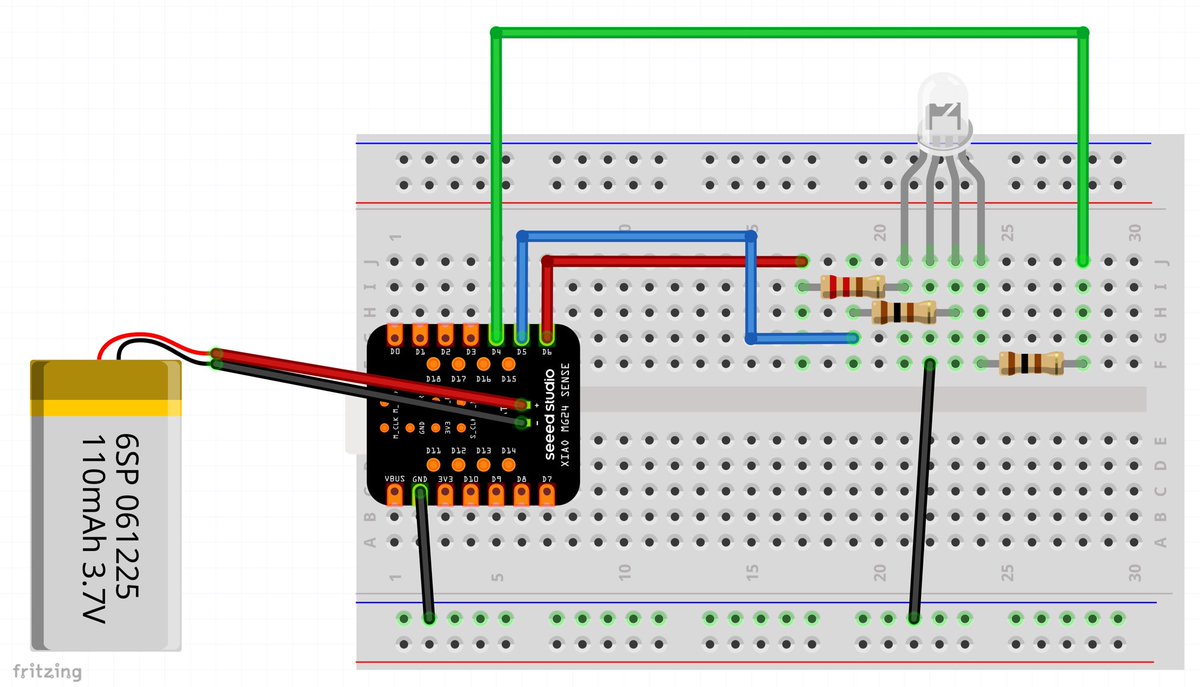
Each Halloween the kids and I think and build together. This year we had limited time and went for simplicity.
We are reading Harry Potter, so son wanted a custom wand.
This year AI did most of coding for translating accelerometer data to light patterns.
https://t.co/obpkHtPCSE
Biggest things we learned is that there are very small Arduino compatible boards with different sensors.
We found one with a built in accelerometer which saved a lot of work.
It also has built in pads and electronics for charging a lithium ion battery.
We can plug it into my phone to recharge while trick-or-treating.
You can now connect GitHub repos to deep research in ChatGPT. 🐙
Ask a question and the deep research agent will read and search the repo’s source code and PRs, returning a detailed report with citations. Hit deep research → GitHub to get started.
We are quickly approaching the “why isn’t AI integrated into this workflow” phase.
People ( including myself ) expect that AI should be always available to handle the mundane.
A little scary. I need to check myself before I wreck my own problem solving and critical thinking skills.
Such a weird time in human history.
The brilliance of MCP is in how it decouples capabilities from the model itself.
MCP introduces three main concepts: hosts, clients, and servers.
1. MCP Host
The host is the application that users interact with. Examples include Claude Desktop, Cursor, Windsurf, and soon the ChatGPT desktop app.
Any application implementing the MCP protocol to allow connections to MCP servers is a host.
2. MCP Client
The host maintains a client for each connected server. This is an internal detail you typically don’t need to worry about, unless you’re implementing the protocol yourself.
Each client is responsible for managing a single server connection. This is important because it prevents accidental cross-task or shared state across servers.
3. MCP Server
The MCP server is the most interesting concept for 99% of us. The server is the program that exposes a set of capabilities to the host application.
If you want to allow a host to read emails, you can connect it to a Gmail MCP Server. If you want the host to post in Slack, you connect it to a Slack MCP Server. If you have some custom functionality you want an LLM to perform, you can build a new MCP server.
This is awesome. We can extend any host with new capabilities without retraining the model or reimplementing custom function calls for each new tool.
I like the USB analogy:
"MCP acts like a "USB port", providing AI applications with a universal interface to access relevant context and perform actions on other systems."
(The above quote comes from my https://t.co/iZifcK7UTF cohort. Classes start on Monday, and MCP is one of the topics we'll cover.)
Best way to go from here:
1. Check the MCP specification (Google it). It's a very light read, and it explains everything you need to know.
2. Experiment connecting Claude Desktop, Cursor, or Windsurf with an existing MCP server. There are thousands of them!
3. Build a simple MCP server yourself. It doesn't need to be something fancy. Building one is the best way to learn how it works.
Have fun!
Step 1: Create powerful animation library
Step 2: Decide which awesome features to highlight
Step 3: Design an interactive website that integrates ALL the highlighted features in a delightful way
Well done. Will have to play around with this one, especially the mixing of WebGL and CSS.
After 5 years in the making, I'm very happy to finally release Anime.js v4, my dream animation library:
🧩 New modular API
⚡️ Highly performant
🖱️ Scroll-linked animations
🫵 Draggables
↔️ Responsive
✨ Additive animations
🪽 WAAPI support
And so much more!
Link below👇
Gemini 2.5 Pro really is impressive...
"Can you create a simple 3d car simulator with Three.js in a single HTML? Please add clouds, mountains, a road, some trees and a train going around. Make sure it works on mobile."