@itsalexvacca sorting replies on a conceptual level, and establishing the intent first is highly underrated.
you don't want to just burn your credits to enrich a huge list of engagers who might not even be interested in your solution in the first place.
@itsalexvacca every team should perhaps measure meetings books vs what happened those booked meetings
track only the former, and you're ultimately left with an incomplete picture..
We run outbound across 70+ clients. Here are the 5 plays we use to turn a signal into pipeline:
1. Awareness scoring
↳ Not every account deserves the same effort.
↳ Score each one by how many signals it's firing and how strong they are.
↳ Then work the top 10% that are actually in-market, and let the rest keep warming.
↳ (Clay + your CRM + a scoring agent)
↳ Result: reps only spend time on accounts ready to buy.
2. Trigger automated outreach
↳ The moment a signal fires, the account auto-enrolls into a sequence.
↳ No manual list-building. No weekly pull.
↳ The copy references the exact trigger, so it lands relevant, not random.
↳ (Clay to Instantly / lemlist)
↳ Result: you reach them in hours, not weeks, while intent is still hot.
3. Slack and CRM alerts for manual outreach
↳ For your highest-intent signals, skip the automation.
↳ Fire a Slack alert straight to the rep who owns the account, with full context.
↳ They send one personal, well-timed message by hand.
↳ (n8n to Slack + Attio)
↳ Result: one human touch on a warm account beats 100 cold sends.
4. Customer expansion monitoring
↳ Signals aren't just for net-new.
↳ Point them at your existing base: new hires on the buying team, a champion changing jobs, a usage spike.
↳ Each one is an expansion or a save waiting to happen.
↳ (Common Room + UserGems)
↳ Result: expansion revenue and fewer churned logos, no new accounts needed.
5. Targeted ABM lists
↳ Turn a signal into a list.
↳ Everyone who just raised, opened the role, or added a competing tool becomes a tight ABM tier.
↳ Your account list is built on intent, not a guess.
↳ (Clay + Crunchbase + Ocean)
↳ Result: every account already has a reason to talk.
Stop being the 47th identical cold email in your prospect's inbox.
Everyone pulls from LinkedIn, ZoomInfo and Apollo, so everyone emails the same people on the same day.
I mapped 60+ sources that surface buyers before your competitors ever see them.
1. Product Hunt founders the day they launch
2. G2 reviewers calling out a competitor by name
3. GitHub users publishing the exact stack you sell into.
Every one is a live buying signal you pull with an Apify scraper and Clay.
Check all the data sources in the map below (bookmark for later)
Claude Code can run your entire cold email operation from a few prompts.
You tell it who to target. It sources the accounts, enriches them, finds the decision-makers, verifies the emails, and hands you a campaign ready to send.
It runs on 6 APIs. Here is where each one sits:
1. AI Ark (@_AI_Ark). A 70M+ company database that builds your raw account universe.
2. CompanyEnrich. 30M+ companies for firmographics: size, industry, revenue, headcount.
3. PredictLeads (@predictleads). The signal layer that flags a fit account as in-market: hiring surges, funding rounds, tech changes.
4. BlitzAPI. Finds the decision-makers inside the account, so you reach someone who can sign.
5. Limadata. The email layer that turns a name and a company into a deliverable address.
6. FullEnrich (@FullEnrich). The fallback layer that cascades 20+ providers and hits a 95% match rate on the contacts you found.
@InstantlyAI sits at the end and sends.
There are three versions of Claude, and most people pick one and use it for everything.
Each is built for a different job. Bookmark this and open the right one every time.
For thinking, open Claude Desktop. Reasoning through a problem or drafting a strategy in conversation.
For building, open Claude Code. Shipping an n8n workflow, a Railway service, a Python script. Code touches your files, runs commands, and holds a whole project in context.
For delegating, open Claude Co-Work. The home for a task you want running while you step away.
I have spent 600+ hours in Claude Code. Almost everything I run lives there: n8n workflows, Railway services, Python scripts, and six AI agents on autopilot.
Most people build inside a chat window, then hit the wall when it cannot touch their files. Match the surface to the job and Claude can run your stack.
I have sent 23M+ cold emails across 70+ clients.
If I were building a cold email machine from zero in 2026, this is the infrastructure I would stand up before writing one line of copy.
1. Secondary domains only. Keep your primary domain out of sending entirely. If one gets burned, it should never be the domain your company runs on. I would register 20.
2. 40 mailboxes, each on its own IP. Your volume comes from the number of mailboxes, so you spread sends across 40 inboxes instead of overloading a few.
3. 20-25 sends per mailbox per day. Forty mailboxes at that rate is real volume and keeps every inbox under the spam threshold.
4. A 2-week warm-up before the first cold send. A new domain has no reputation, so you build it for two weeks or it lands in spam.
5. SPF, DKIM, and DMARC on every domain. Miss one authentication record and the inbox providers flag you on arrival.
6. Replace domains every 9-12 months, because sending reputation decays.
Do this and you land 95%+ in the primary inbox.
I have watched teams rewrite subject lines for a month while the real problem was a domain with no warm-up.
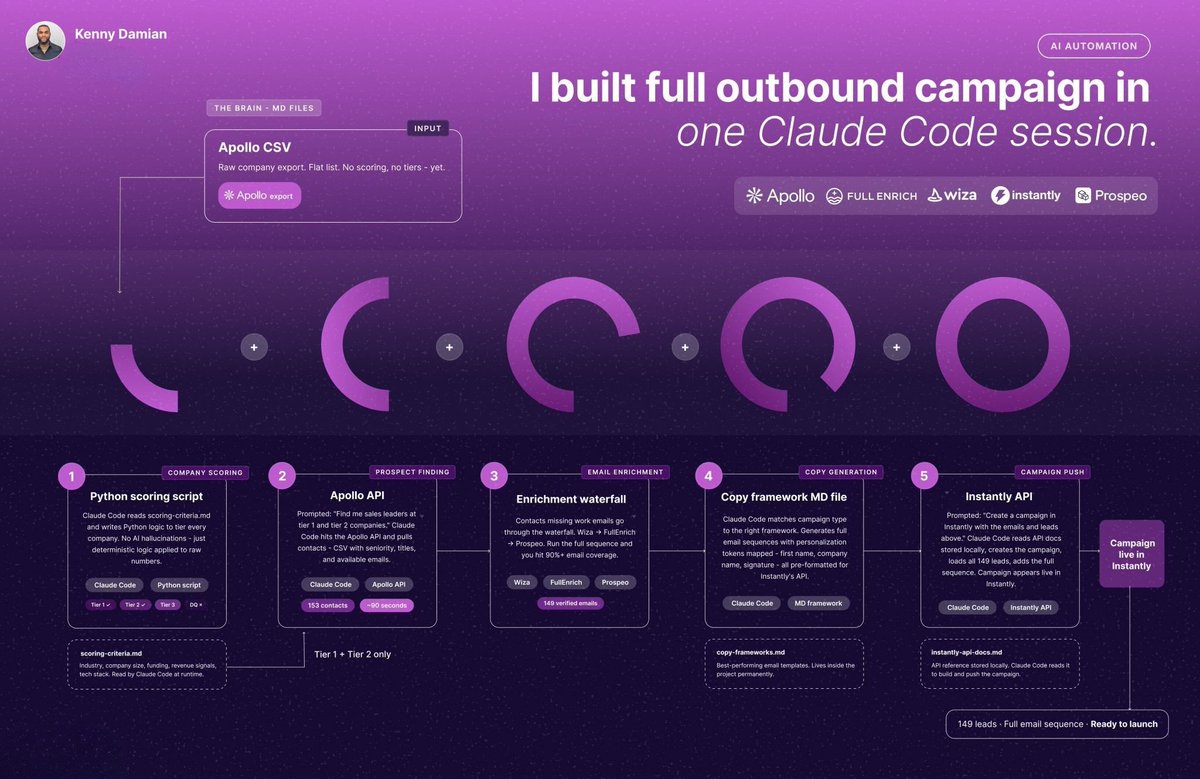
You can build an entire outbound campaign from scratch in one terminal window.
I run this across 70+ clients. The last campaign I built: 153 contacts in a few minutes, 140 with verified emails, live in Instantly.
Every step:
1. Define the ICP in plain English. Open Claude Code and describe who you want. Titles, company size, industry, region, accounts to exclude. No filters to click.
2. Pull the list through the Apollo API. Claude hits Apollo and returns 153 contacts in 90 seconds. Most teams still export those by hand, one CSV page at a time.
3. Run an enrichment waterfall. One provider always leaves gaps that show up as "no email found." So you cascade. Wiza, then FullEnrich, then Prospeo. Coverage past 90%, and the list closed at 149 verified.
4. Write the first line from the enriched data. Claude already has the firmographics and the signal in context, so the opening line references a real detail it pulled, like a recent funding round or a tech change.
5. Push into Instantly. The list loads and the campaign goes live. No manual import.
You add your API keys and debug the occasional failed step. Every other step runs unattended.
That afternoon of CSV exports, tab-switching, and single-provider gaps is gone.