@JVCom Un bon 13/20 , c'était bien , pas les annonces du siècle mais des truc sympa toujours mieux que chez Sony qui pour moi a un 8/20 . Ils auraient pu mieux faire
J'ai mis des billes dans ce projet et je sers à quelque chose (je râle quand ça va pas) https://t.co/HsUyqpylI0
Si vous voulez préco et/ou le mettre en wishlist vous seriez des amours ça vous prend quelques secondes: https://t.co/lrqHrTQjq9 🫶
Je crois énormément dans ce projet, des anciens dev de qualité (GTA, AC entre autre)
Et on peut faire des bites volantes 🙏
🚨 NEW Windows Low Latency Mode?
You can enable it using ViVeTool GUI:
1. Update Windows
2. Install ViVeTool GUI
3. Go to Enable/Disable
4. Enter Feature ID: 61391826
5. Click Enable
6. Reboot your PC
This makes Windows temporarily push the CPU harder for short bursts when you launch apps, open menus or trigger high priority actions. It boosts CPU frequency for around 1–3 seconds, helping Windows feel faster and more responsive rather than waiting for the CPU to slowly ramp up.
The difference is CRAZY
J'ai un soucis j'ai perdu mon compte Discord et impossible de me reco ne cliquez sur absolument rien si on vous envoie des choses svp
Si il est possible de RT ce tweet et si quelqu'un a un contact Discord pour shut down le compte c'est giga urgent merci @discord@discord_support
Your GPU has been talking to your CPU the wrong way since you built your PC.
By default, Windows puts your GPU on "Line-Based Interrupts" — a legacy method where your GPU queues signals to the CPU in a shared line like it's 2003. This creates DPC latency, which is the actual root cause of microstutters, inconsistent frame pacing, and audio crackling mid-game.
The fix is called MSI Mode. It gives your GPU a direct, modern communication path to your CPU over PCIe — the way the hardware was designed to work.
How to do it:
→ Search "Sathango MSI Utility v3" on GitHub (free, open source)
→ Run as Administrator
→ The tool shows your current mode instantly — check before assuming
→ If you're on Line-Based, switch to MSI
→ Leave priority at Normal — do NOT set it to High
→ Reboot
Who this actually helps:
GTX 1000/2000/3000 series and older AMD cards see the biggest gains. RTX 4000+ and modern AMD have less to gain but it still doesn't hurt. Most valuable if you're experiencing microstutters or frame pacing issues in Warzone, Valorant, or CS2. Note: NVIDIA driver updates can reset this — re-check after major driver installs.
You won't get +50 FPS. You'll get cleaner, more consistent frame delivery and a tighter feel. Free. 2 minutes. Fully reversible.
Test it in your games for a day. Fully reversible — just uncheck MSI and reboot if it doesn’t feel better.
PRAGMATA ist jetzt #RTXON – mit Path Tracing und DLSS 4!
Zur Feier verlosen wir diese einzigartige GeForce RTX 5090 mit Hugh und Diana – perfekt für dein nächstes Abenteuer auf dem Mond.
Du willst sie haben? Schreib „PRAGMATA RTX“ in die Kommentare, um teilzunehmen!
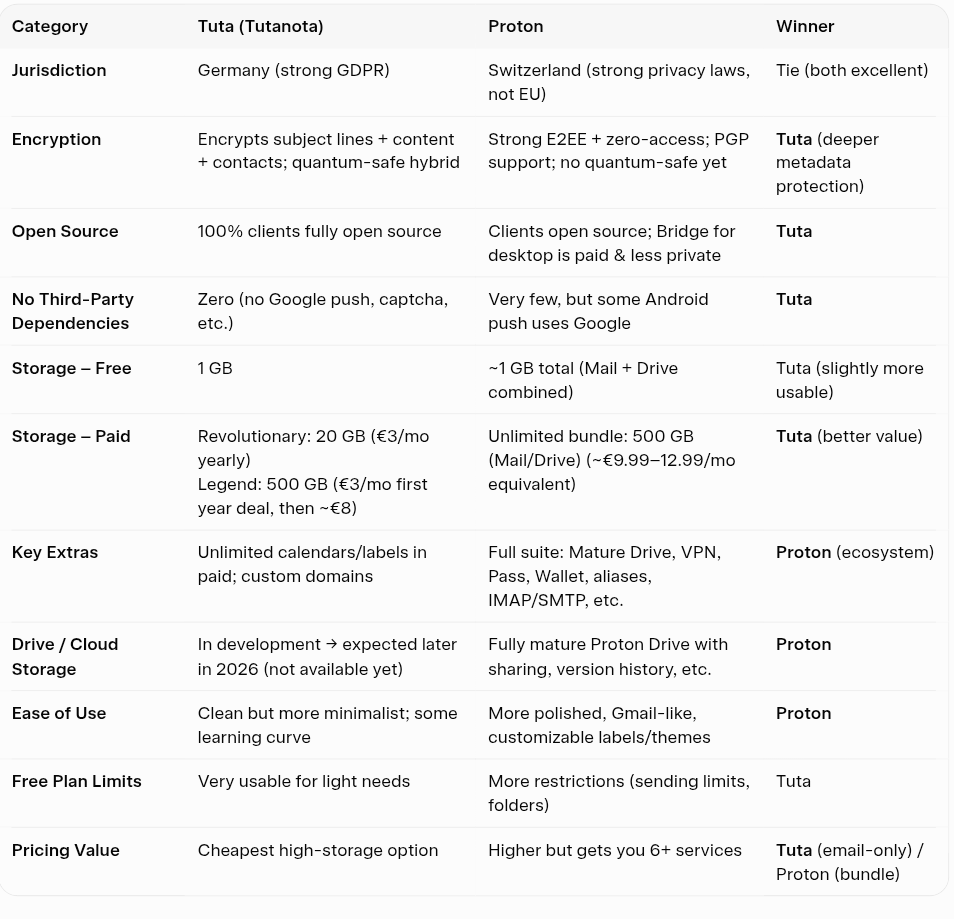
Tuta vs Proton.
Both claim privacy.
But they’re built very differently.
Here’s the breakdown:
Privacy:
• Tuta → Encrypts subject lines, email content, contacts, and metadata; uses quantum-safe encryption
• Proton → Strong end-to-end encryption + PGP support; zero-access architecture
→ Winner: Tuta
Tech:
• Tuta → Fully open-source clients + zero third-party dependencies (no Google services, no tracking)
• Proton → Open-source clients; minimal third-party usage, but Android push relies on Google
→ Winner: Tuta
Storage:
• Tuta → More affordable high-storage plans (great for email-heavy users)
• Proton → Shared storage across Mail, Drive, Photos (ecosystem-based usage)
→ Winner: Depends on use
Features:
• Tuta → Focused ecosystem (Mail + Calendar), unlimited calendars/labels in paid plans
• Proton → Full suite: Mail, Drive, VPN, Pass, Calendar, aliases, IMAP/SMTP support
→ Winner: Proton
UX:
• Tuta → Minimal, privacy-first design; slightly steeper learning curve
• Proton → Polished, Gmail-like experience; better customization (labels, themes)
→ Winner: Proton
Free Plan:
• Tuta → Very usable for basic email needs with fewer restrictions
• Proton → More limits (sending, folders), but includes access to ecosystem
→ Winner: Tuta
Pricing:
• Tuta → Cheaper long-term, especially for high storage
• Proton → Higher cost, but includes multiple services in one bundle
→ Winner: Tuta (email-only) / Proton (bundle)
Verdict:
• Want maximum privacy + best value → Tuta
• Want a full privacy ecosystem → Proton
Different philosophies.
Different users.
Which one are you picking?
@ChNourss@conkerax Et après on s'étonne d'avoir des voitures qui éblouissent sur la route avec ce genre de mécano de parking quand on utilise ce genre de technique , y'a un outil si tu la pas tu touches pas et tu vas faire règlé dans un centre avec une facture pour la sécurité de tous