Folks, Entra News #155 is out. A handful of things this week that deserve a spot on your radar 👇
🔐 SSPR is changing. From Sep 7, 2026, Entra ID self-service password reset will require registered authentication methods. Translation: get your auth method registration sorted now, so users don't get locked out of resets later. This one has a hard date, so don't sit on it.
🚦 Conditional Access: enforcement is tightening for policies with resource exclusions. If you lean on exclusions in your CA design, go re-read how those policies actually evaluate. "Improved enforcement" is good for security, but it can quietly change behaviour you were relying on.
🥷 Security research worth your time: NetSPI showed a way to bypass Conditional Access via Nested App Authentication. NAA is powerful, but every new token-brokering pattern is also a new bypass surface. Worth understanding how it works before someone else uses it on you.
🤖 For the builders: entra-local, a local Entra ID emulator that lets you mock authentication without touching a real tenant. No more burning a dev tenant just to test sign-in flows.
Phishing-resistant MFA now surfaces in SAML AMR. Small change, real impact. Downstream apps can finally make authorization decisions based on how the user authenticated, not just that they did.
Also inside: B2C to External ID migration tooling, detecting directory enumeration in Graph Activity Logs, and a solid session on securing the identity of AI agents with Agent ID.
Featuring @ellishlomo, @NVISO_Labs, @janbakker_, @rbrayb, @12Knocksinna, @_dirkjan, @DanielatOCN, @fabian_bader and more!
Get it at https://t.co/LpMUfu4Kkh
150 issues. 150 weeks. Not a single week missed. 🎉
This week marks Issue #150 of Entra News.
What started in July 2023 as a simple weekly roundup has grown into a community of 19,000 subscribers, incredible contributors from around the world, and 150 paid subscribers who support us every month.
A huge thank you to every reader, contributor, subscriber, and friend of Entra News: thank you. 🙏
Issue #150 is live: https://t.co/iP9KnYIRI3
Featuring @alitajran, @welkasworld, @janbakker_, @tr1ana, @rbrayb, @sfm_cwcos and more!
Hey all, I'm going to be joining @merill on Entra Chat again! We are going to talk about some of those pesky gotchas with APIs, secrets EVERYWHERE!, hidden risks of application owners you would only know if you RTFM and some post-exploitation attack surface you may not be thinking about, and Zero Trust to Hero Trust with Managed Device requirements to access M365 resources.
Also, is your enterprise ready to respond in M365? We will talk about my favorite log sources when performing investigations.
👋 Here's a quick birds eye view of Microsoft Agent 365 licensing
Enjoy!
Disclaimer: I'm not a licensing person. Please refer to the official licensing FAQ for details https://t.co/fdlvvskauh
Stop playing "cat and mouse" with phishers 🐬😂.
It’s time to change the locks. 🔒
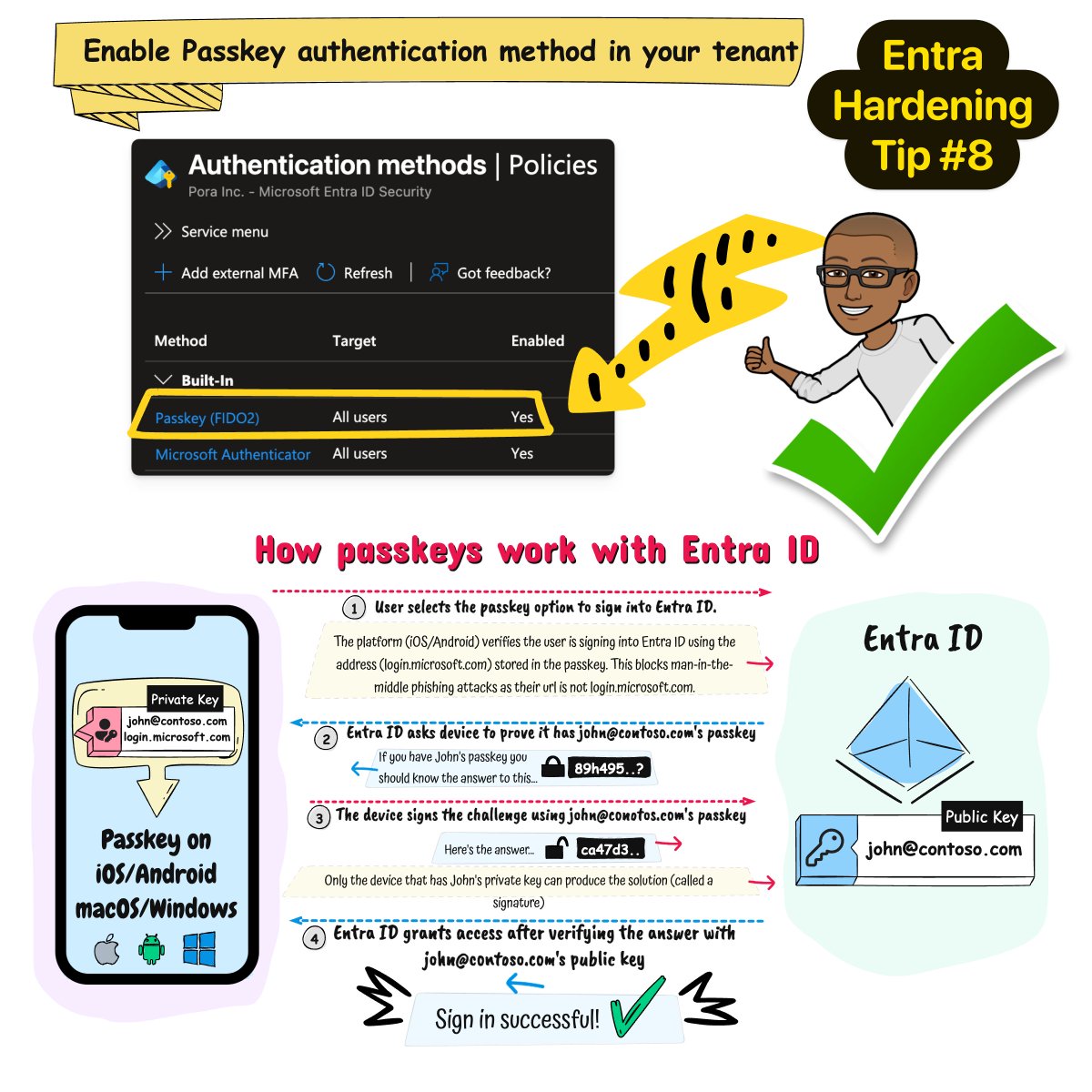
Entra ID - Hardening Tip #8
If your organization is still relying on traditional passwords - even with standard MFA - you’re leaving the door cracked for Adversary-in-the-Middle (AiTM) attacks and token theft.
Passkeys: The Un-Phishable Standard 🛡️
When Passkey authentication isn't enabled in Microsoft Entra ID, you’re vulnerable to:
🔻 Credential Theft: Traditional passwords can be phished, stolen, or guessed.
🔻 MFA Bypass: Attackers are getting smarter at intercepting "simple" MFA codes.
🔻 Persistent Access: Once an attacker has a token, they’re in and they’re staying.
Passkeys: The Un-Phishable Standard 🛡️
Passkeys provide phishing-resistant authentication through cryptographic proof. Because they are tied to a specific device and use public-key cryptography, there is nothing for an attacker to intercept, phish, or replay.
By enabling passkeys, you don't just add a layer of security; you eliminate the foundational vulnerability that enables most modern attack chains.
✅ Learn how to enable the passkey authentication method https://t.co/wpAUVRyntv
✅ Learn how to plan a phishing-resistant passwordless authentication deployment
https://t.co/ulqln2OFPn
If you’re an IT admin and you’ve never had your internal environment pentested and can’t afford one right now, do this instead:
1. Run Locksmith - fix anything that’s a High risk
2. Run ADeleginator - make sure everyone, authenticated users, domain users and domain computers doesn’t have any unsafe permissions
3. Run ScriptSentry - check for credentials in logon scripts
4. Run PingCastle - check the control paths section. It’s like bloodhound. Look for non-admins that have control paths
If you do this, your environment will be much better when you’re done fixing everything.
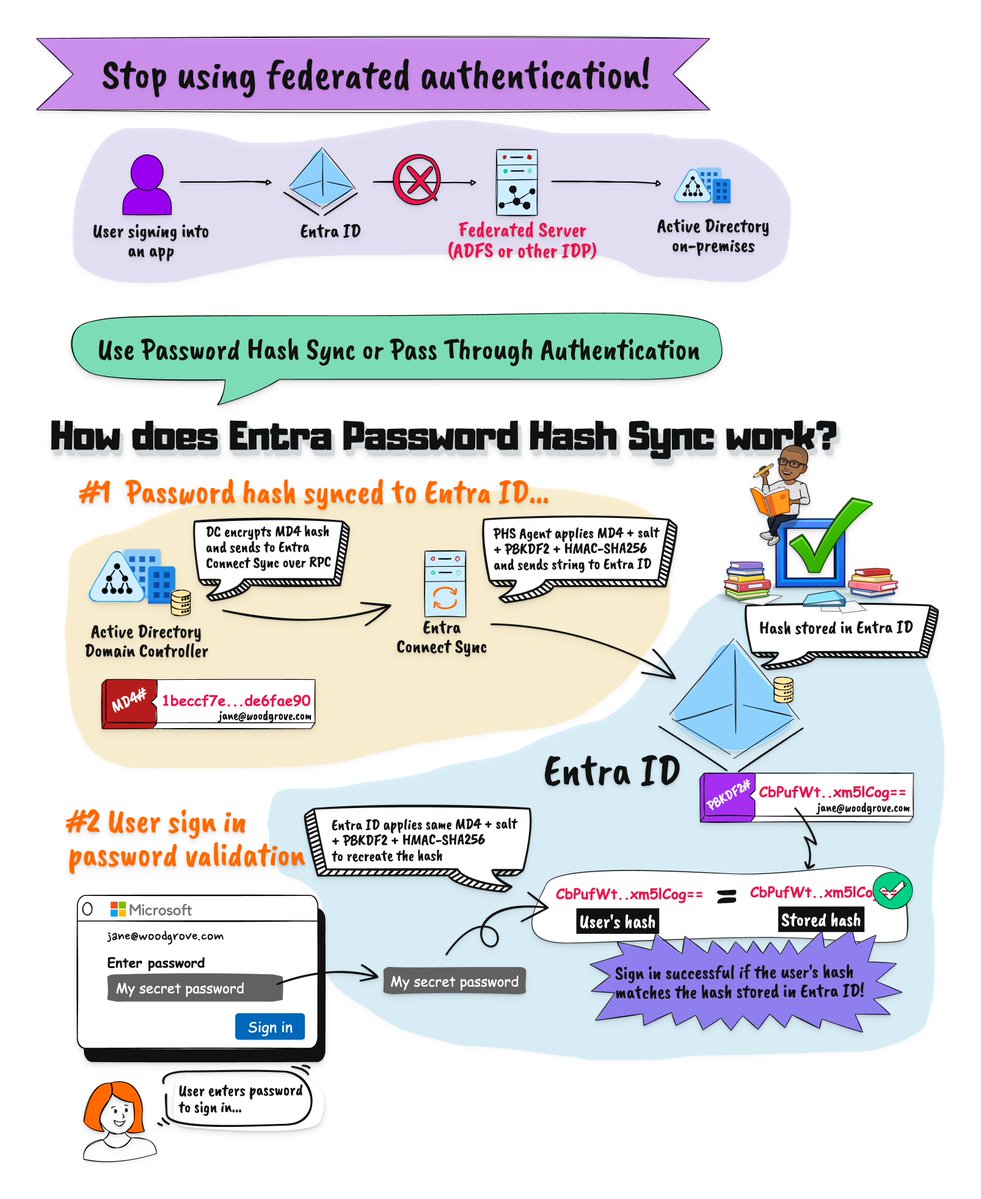
🛡️ Entra Hardening Tip #7: Is your Federation server a liability?
If you’re still using on-premises federation (like AD FS), you’re maintaining a high-value target for attackers. It’s the "Golden Ticket" to your cloud.
The Risk:
Attackers exploit unpatched infrastructure, Kerberos vulnerabilities, or phished admin credentials to compromise the federation server. Once inside, they can forge security tokens, impersonate any user, and pivot directly into your cloud environment - often completely undetected.
The Fix: Stop managing a bridge that attackers love to cross.
🚀 Migrate to Microsoft Entra Password Hash Sync (PHS).
✅ Moving to cloud-native authentication eliminates the on-premises attack surface and simplifies your security stack.
Find out how to start planning this: https://t.co/QolQGy80BL
For referece one of the most successful and recently popular attacks that involved ADFS in the flow was Solorigate.
https://t.co/MqFZw5K3Su
#IdentitySecurity #EntraID #CyberSecurity #CloudSecurity #ZeroTrust
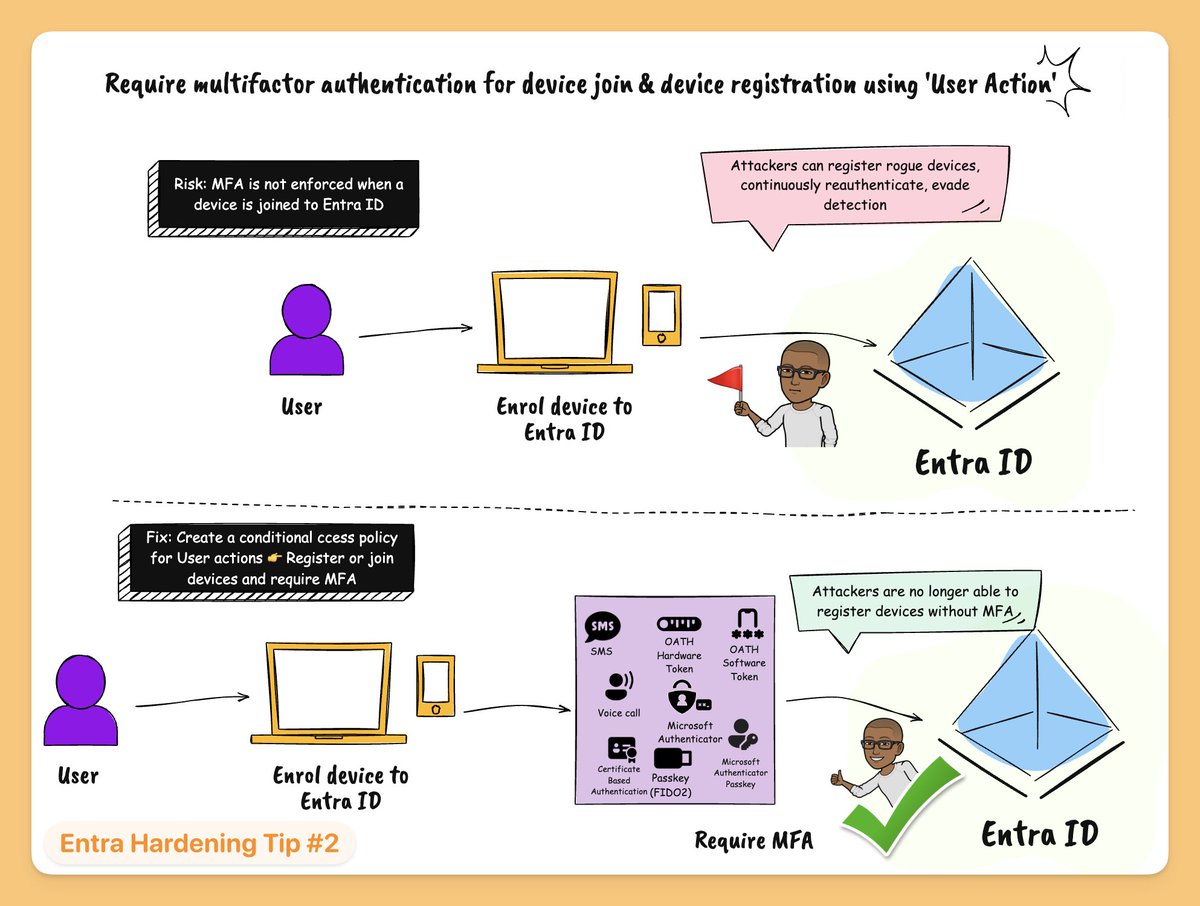
Entra Hardening Tip #2: Require MFA for device join & device registration using 'User Action'
If you don’t enforce a Conditional Access policy for “Register or join devices”, you’re leaving a gap.
Attackers can take advantage of this and register new devices without MFA.
Once they’re in, they can:
🚩 Stay persistent
🚩 Bypass controls that rely on trusted devices
From there, it opens the door to:
🚩 Data exfiltration
🚩Dropping malicious apps
🚩 Moving laterally across your environment
🚩Recon of your device configuration and compliance policies
The fix:
Create a CA policy
→ Include: All users
→ Target: User Action = Register or join devices
→ Grant access: Require authentication strength - MFA
👋 Folks, I'm starting a new series of Entra Hardening tips from today.
Here's how it will work. One new tip every weekday (I take a break on weekends).
----
Tip #1: Privileged accounts in Entra ID should be cloud native identities
If your privileged accounts in Entra ID are synced from on-prem AD then you have a problem.
Attackers that compromise your on-prem infrastructure can pivot to the cloud, into Entra ID and gain access to the cloud servers, data, Microsoft 365 and other SaaS apps.
Why?
We've seen this happen multiple times. The biggest ones have been Solorigate (compromise ADFS and pivot to cloud), other examples include Storm-0501 (compromise AAD Connect server) and more.
The Fix?
Reduce the blast surface. Don't allow accounts synced from on-prem to be granted privileged roles.
Instead create admin accounts natively in Entra ID and grant privileged roles to these cloud only accounts.
Wow! I have just got my new certificate in Fundamentals of Non-Human Identity Management. See it for yourself! https://t.co/2r4wihEeHS https://t.co/K4DEhQHd4e
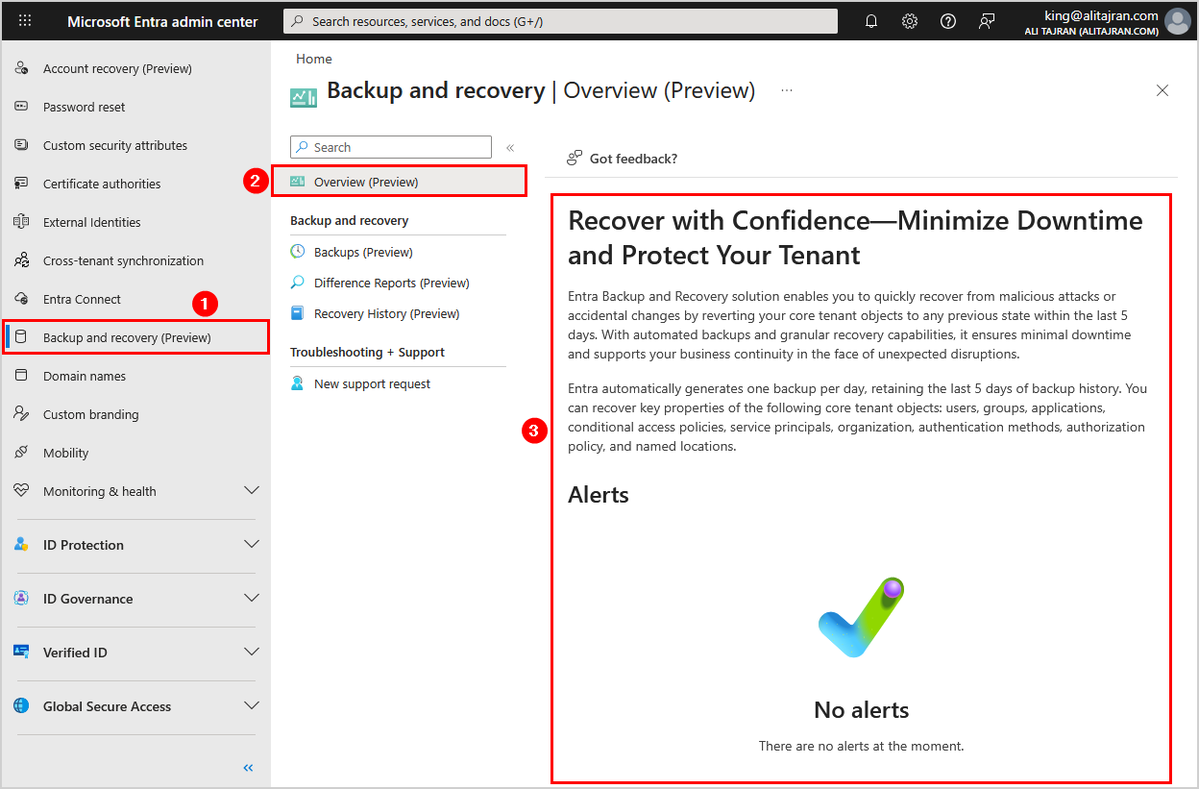
Microsoft introduces Backup and Recovery for Microsoft Entra ID!
Entra Backup and Recovery solution enables you to quickly recover from malicious attacks or accidental changes by reverting your core tenant objects to any previous state within the last 5 days.
With automated backups and granular recovery capabilities, it ensures minimal downtime and supports your business continuity in the face of unexpected disruptions.
Entra automatically generates one backup per day, retaining the last 5 days of backup history.
You can recover key properties of the following core tenant objects:
- Users
- Groups
- Applications
- Conditional access policies
- Service principals
- Organization
- Authentication methods
- Authorization policy
- Named locations
#EntraID #Microsoft365 #Microsoft
Two years ago, a developer I know launched a small product here in Nigeria.
Everything was going fine.
Users were signing up, logging in, and using the platform daily.
Then one morning he woke up to something strange.
Several users were complaining their accounts had been accessed… without their permission.
Kindly bookmark for yourself and retweet so others too can learn
Good afternoon. Kindly help us share this with adults who live in the North West (United Kingdom) to register their interest to participate in a short interview. They don’t require a Cybersecurity background. I will really appreciate it 🙏🏾
More details are in the flyer. Here is the link to indicate their interest 👇🏾
https://t.co/hOdpZWYXPX
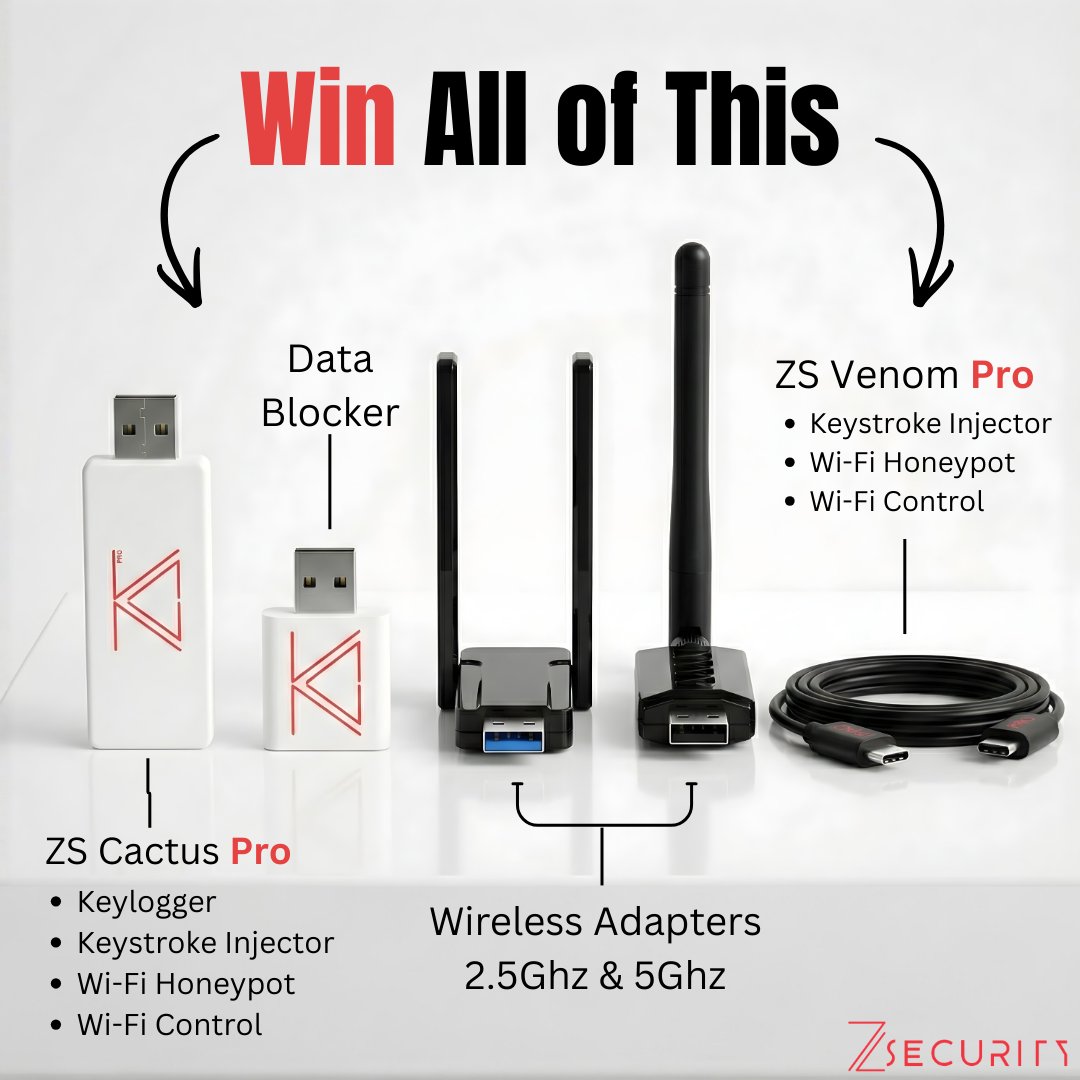
We're giving away all of these hacking devices for absolutely FREE to celebrate hitting 600,000 subscribers on YouTube 🎉
Thank you so much for your love and support 🙏
✅ How to Enter
Follow us on X
Comment on this post what you want us to teach next.
Repost this to complete your entry!
🗓️ Ends: March 13th
🎁 Each winner will receive a powerhouse kit including:
🔥 ZS Cactus PRO: Combine keystroke injection capabilities, hardware keylogging and Wi-Fi phishing with wireless control.
🔥 ZS Venom PRO: Keystroke injection capabilities and Wi-Fi phishing with wireless control all inside a normal charging cable!
🔥 Atheros AR9271 WiFi Adapter: The gold standard for wireless hacking. It supports monitor mode and packet injection out of the box with rock-solid Linux compatibility.
🔥 Realtek RTL8812AU WiFi Adapter: Need 5Ghz? This dual-band adapter gives you high-gain performance and modern 802.11ac support for auditing high-speed networks.
🔥 Data Blocker: Stay secure on the go. This "USB condom" prevents accidental data exchange and juice jacking when charging your devices in public spaces.