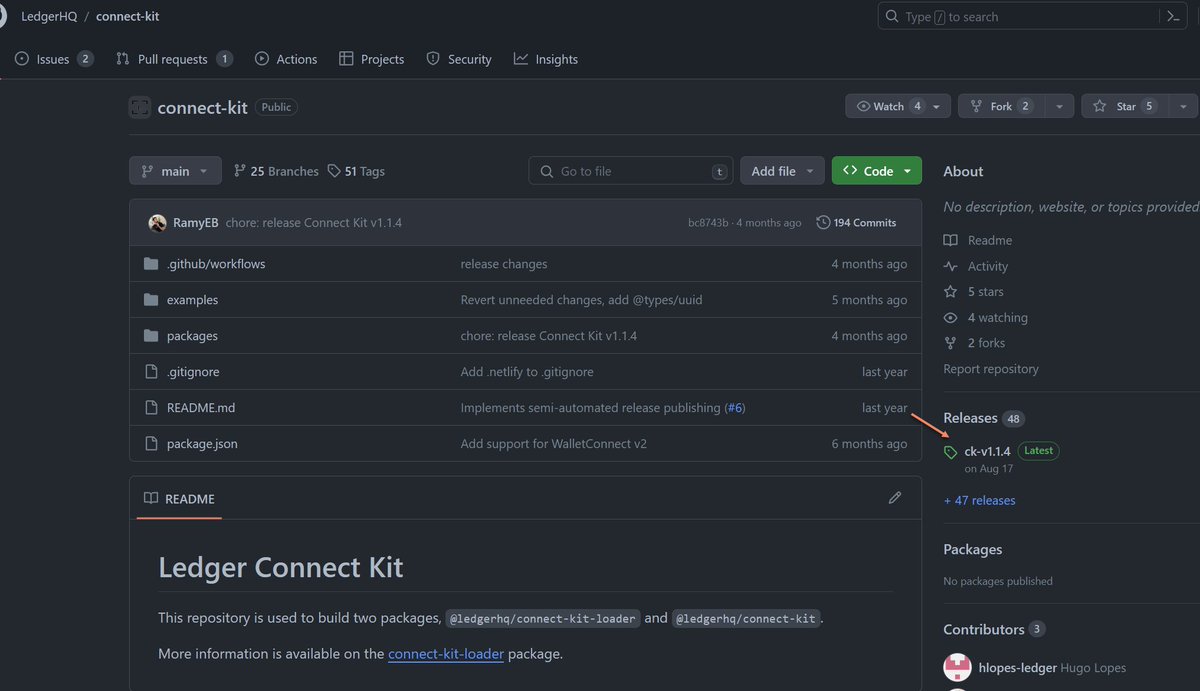
Found a funky bug yesterday in Geth. Since the merge, Geth does not enforce the configured minimum miner tip. 😅
We never detected it because on mainnet there are always enough transactions that pay the tip that sub-tip txs don't really get their turn ever. 1/N
we've spent the last three years trying to work with cdk and cloudformation
unfortunately we've hit a ceiling - they're both fundamentally flawed and we're out of clever workarounds
but the future looks better than ever - we detailed it all in a huge blog post
link in reply
@peter_szilagyi any idea what causes Geth to start consuming storage like this? Seems to happen every few months. This node was snap synced and is running in archive mode. Geth got OOM reaped yesterday if that makes any difference (despite 30GB RAM & 15GB swap).
@LefterisJP Frontend JS is full of this stuff. I remember trying to add csp headers to graphql playground, finding it loads the latest versions of some js libs via cdn. Millions of weekly downloads, sometimes used with sensitive credentials, compromiseable with no update.
😝 Here is the full disclosure of the Twitter XSS + CSRF vulnerability.
Clicking a crafted link or going to some crafted web pages would allow attackers to take over your account (posting, liking, updating your profile, deleting your account, etc.)
@samlambert and can save lots of time and money compared to 100% uptime which is unrealistic anyway since service providers (eg cloudflare, AWS) have multiple outages a year that take down your site regardless
Erigon’s Roadmap to 2024 is out
- introducing Erigon++
- Caplin Full Consensus Archive Node
- timeline for the release of Erigon 3
- more focus on code quality and user support
more details in this 👉 blog post: https://t.co/9jjtctSY2c (Astrid, Otterscan)
A reminder for everyone that you can't speedrun the database game. Databases are too critical. Uptime and data integrity are too important. It can take decades to build stable and scalable software.
Few Postgres psql config recommendations (set in your .psqlrc in your home directory):
\set QUIET 1
\pset null '👻'
\x auto
\timing
\set HISTFILE ~/.psql_history- :DBNAME
\set HISTCONTROL ignoredups
\set COMP_KEYWORD_CASE upper
\unset QUIET
I hope Postgres will get native support of ULIDs soon: https://t.co/WZHxIx3cPA (status: needs review)
Meanwhile, for the new https://t.co/j1E54xnah2 bot we're developing, we keep generating ULIDs on the client side
Interested in having free GPT-4 Turbo for @PostgreSQL topics?
For a couple of months, we have been building our new bot – https://t.co/BHM0AWWGWC bot.
What it is right now:
1) GPT-4 Turbo with all new features (Assistants API).
2) Large Postgres knowledge base (50k documents and counting) – the main documentation (split to pieces, so it gives direct #-links to sections) and articles from reliable sources.
3) Source code included to the knowledge base too – you can literally "talk to Postgres source code". Especially helpful when the docs are not enough.
In next one-two weeks we're adding two important "bridges to reality":
- full-fledged synthetic benchmarks triggered by bot on user's request and then analyzed (with graphs).
- real SQL execution on DBLab clones for all current Postgres versions.
Currently, https://t.co/BHM0AWWGWC bot lives in Slack only, later will be extended to other places.
It's alpha, rapidly changing – but already super impressive, I use it daily for my own work.
I'm planning to keep the basic version of the bot free for all – it means, free GPT-4 Turbo for Postgres topics.
I welcome all my followers to join closed testing, if you have Slack: add our community workspace https://t.co/5dYOIc2bfQ and send me a message there (username: nik). First 10 people I'll add to the testing channel right away, and then will gradually be inviting others.
Especially join if you're skeptical to GPT/LLM craziness, but open to fair testing.
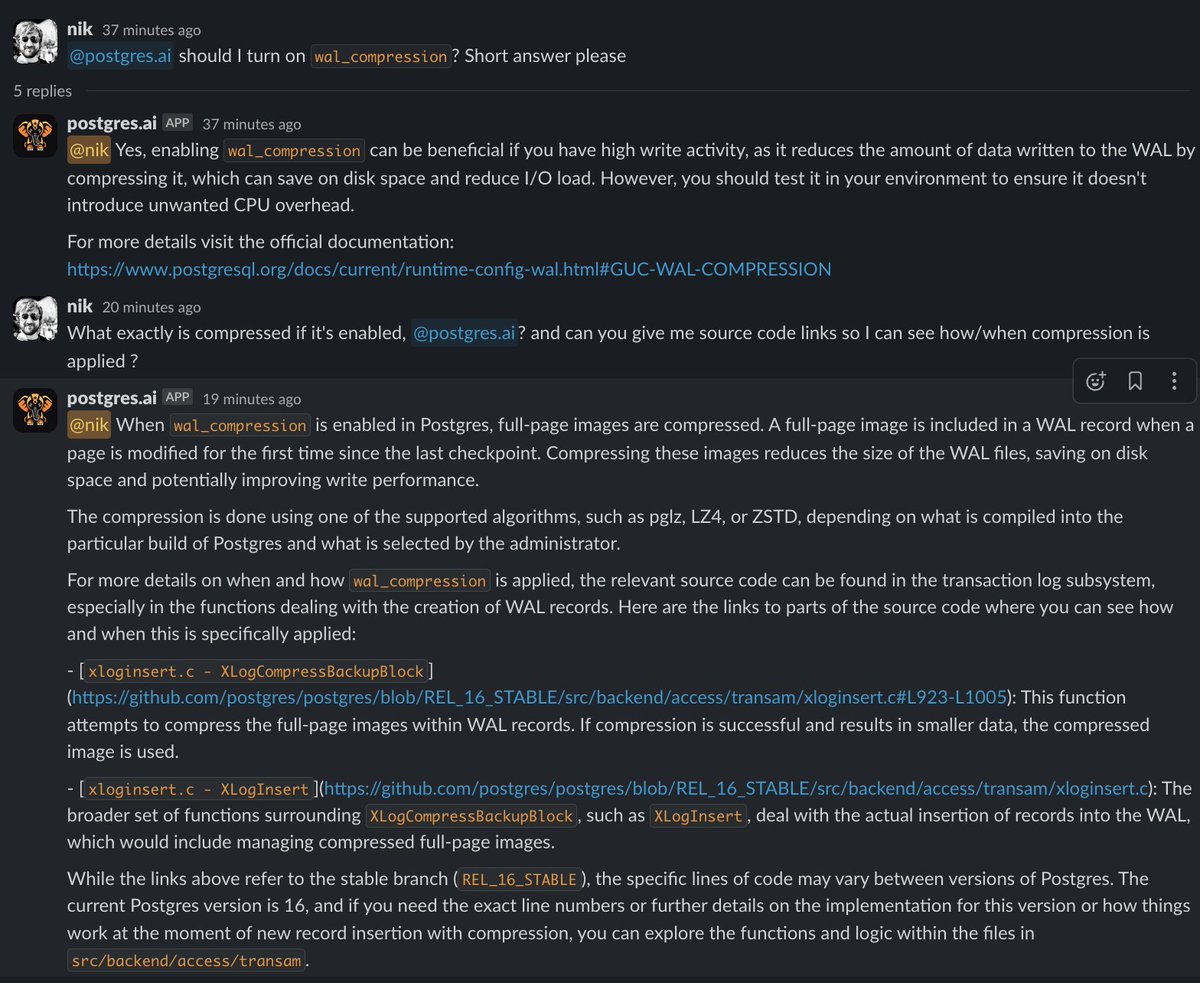
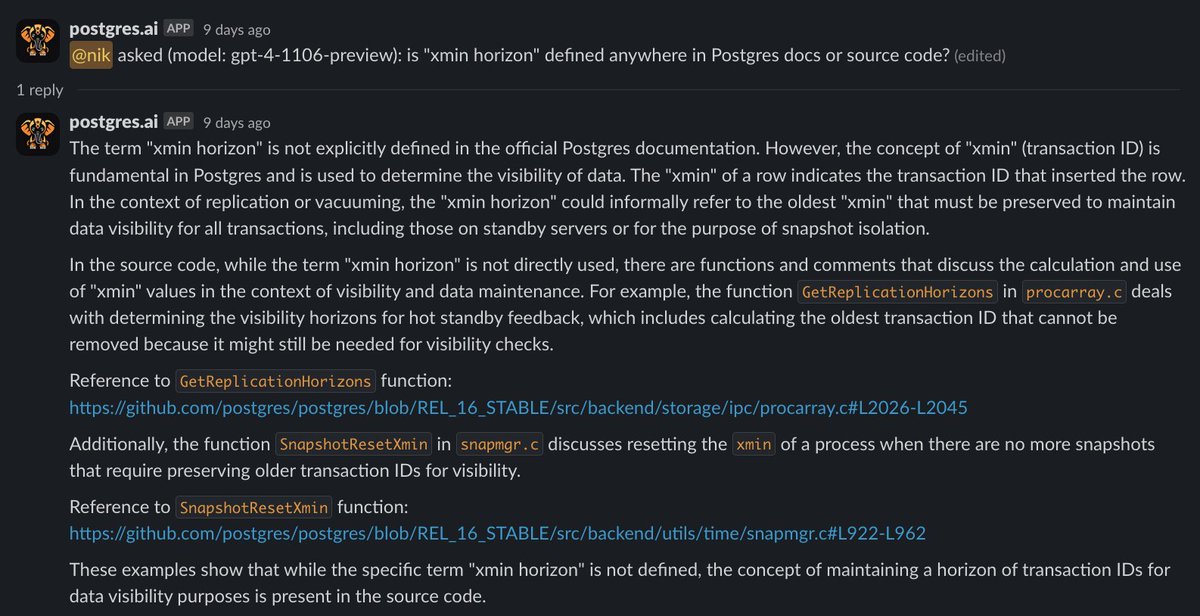
Screenshots – some examples showing what it can do now with Postgres docs and source code.
@gakonst Not the same but we're using postgres at https://t.co/WdN9QJx4AK to index blocks, transactions, eth transfers (internal, bock rewards, uncles, withdrawals, erc20/721/1155 etc), etc. Mainnet is abt 7TB with *lots* of indexes. Exclusively index only scans. Works great for us.
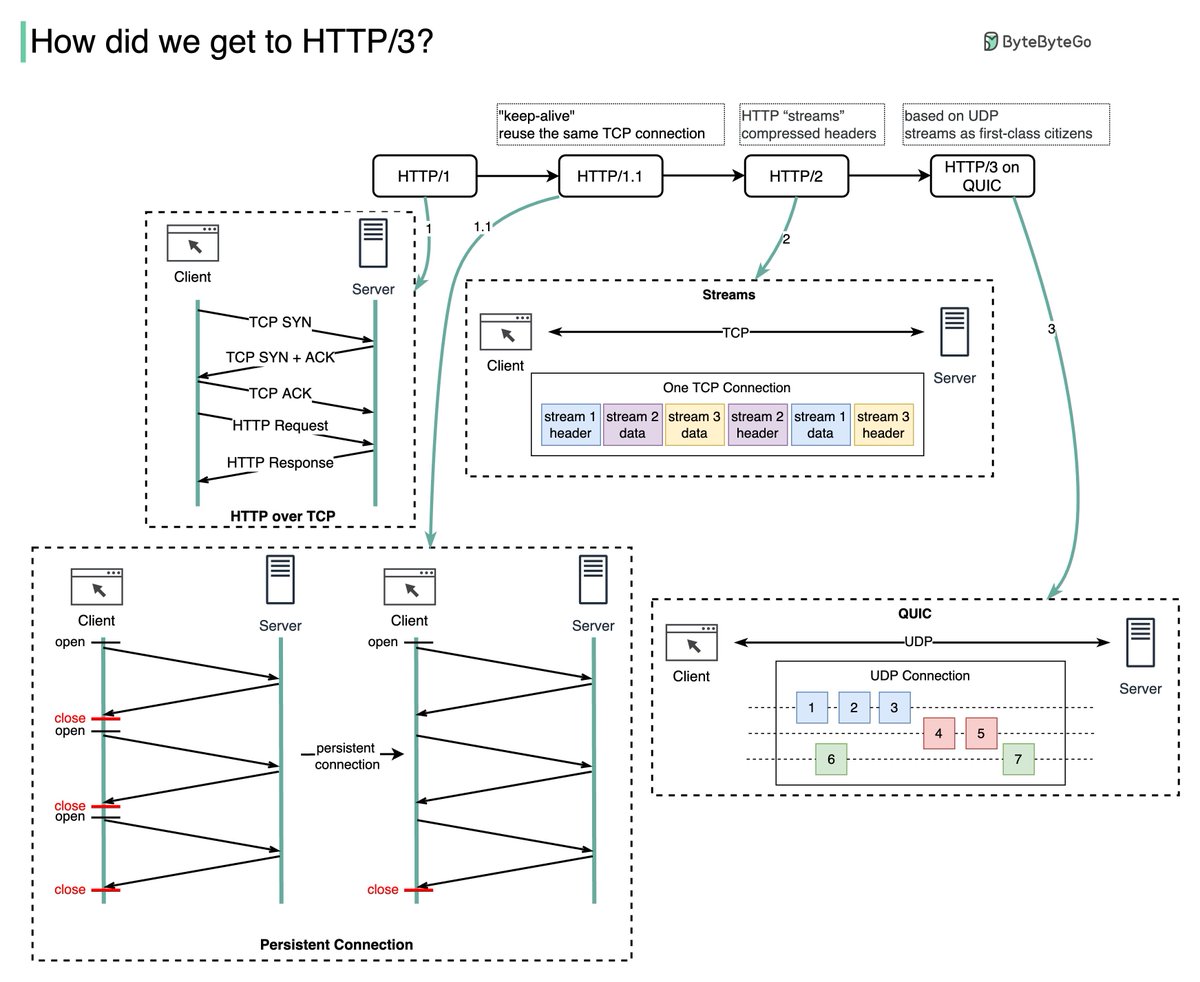
HTTP/1 to HTTP/2 to HTTP/3
HTTP/1.0 was finalized in 1996. Every request to the same server requires a separate TCP connection which is expensive to establish.
HTTP/1.1 (1997) introduced persistent connections, which allow a TCP connection to be reused for multiple requests and responses. This reduces the latency in setting up new connections for each request. But HTTP/1.1 doesn’t solve the head-of-line (HOL) blocking problem.
Although HTTP/1.1 enabled pipelining, where multiple requests could be sent out without waiting for each response, the responses still had to be processed and sent back in the order the requests were received. This ordering requirement caused HOL blocking - if the first request took a long time, all later requests had to wait.
HTTP/2 (2015) introduced HTTP streams - an abstraction that allows multiplexing different HTTP exchanges onto the same TCP connection. Streams don’t need to be sent in order. This eliminates HOL blocking at the application layer. But HOL still exists at the TCP transport layer.
HTTP/3 draft was published in 2020. It uses QUIC instead of TCP as the transport protocol, removing HOL blocking in the transport layer.
QUIC uses UDP. It introduces streams at the transport layer. QUIC streams share one connection, so no new handshakes or slow starts are necessary to create new streams. QUIC streams are delivered independently so packet loss usually doesn’t affect other streams.
–
Subscribe to our weekly newsletter to get a Free System Design PDF (158 pages): https://t.co/kNfv0DVDdf
#PostgresMarathon day 46: How to deal with bloat
// I post a new @PostgreSQL "howto" article every day. Join me in this journey – subscribe, provide feedback, share!
## What is bloat?
Bloat is the free space inside pages, created when autovacuum deletes a large number of tuples.
When a row in a table is updated, Postgres doesn’t overwrite the old data. Instead, it marks the old row version (tuple) as "dead" and creates a new row version. Over time, as more rows are updated or deleted, the space taken up by these dead tuples can accumulate. At some point, autovacuum (or manual VACUUM) deletes dead tuples, leaving free space inside pages, available for reuse. But if large numbers of dead tuples accumulate, large volumes of free space can be left behind – in the worst cases, it can occupy 99% of all table or index space, or even more.
Low values of bloat (say, below 40%) should not be considered a problem, while high values definitely should be, as they lead to bad consequences:
1. Higher disk usage
2. More IO needed for read and write queries
3. Lower cache efficiency (both buffer pool and OS file cache)
4. As a result, worse query performance
## How to check bloat
Index and table bloat should be regularly checked. Note that most queries that are commonly used are estimation-based and are prone to false positives -- depending on table structure, it can show some non-existent bloat (I saw cases with up to 40% of phantom bloat in freshly created tables). But such queries are fast and don't require additional extensions installed. Examples:
- Estimated table bloat https://t.co/0gTSVSGlBm
- Estimated btree index bloat https://t.co/pwc5abOAui
Recommendations for use in monitoring systems:
- There is little sense in running them often (e.g., every minute), as bloat levels don't change rapidly.
- There should be a warning provided to users that the results are estimates.
- For large databases, query execution may take a long time, up to many seconds, so the frequency of checks and "statement_timeout" might need to be adjusted.
Approaches to determine the bloat levels more precisely:
- queries based on pgstattuple (the extension has to be installed)
- checking DB object sizes on a clone, running VACUUM FULL (heavy and blocks queries, thus not for production), and then checking sizes again and comparing before/after
Periodical checks are definitely recommended to control bloat levels and react, when needed.
## Index bloat mitigation (reactive)
Unfortunately, in databases that experience many UPDATEs and DELETEs, index health inevitably degrades over time. This means, that indexes need to be rebuilt regularly.
Recommendations:
* Use REINDEX CONCURRENTLY to rebuild bloated index in a non-blocking fashion.
* Remember that REINDEX CONCURRENTLY holds the xmin horizon when running. This affects autovacuum's ability to clean up freshly-dead tuples in all tables and indexes. This is another reason to use partitioning; do not allow tables to exceed certain threshold (say, more than 100 GiB).
* You can monitor the progress of reindexing using the approach from https://t.co/7YysWg8pOE
* Prefer using Postgres versions 14+, since in PG14, btree indexes were significantly optimized to degrade much slower under written workloads.
## Table bloat mitigation (reactive)
Some levels of table bloat may be considered as not a bad thing because they increase chances of having optimized UPDATEs -- HOT (Heap-Only Tuples) UPDATEs.
However, if the level is concerning, consider using pg_repack (https://t.co/O402sSAdFG) to rebuild the table without long-lasting exclusive locks. Alternative to pg_repack: pg_squeeze (https://t.co/FcQv5XY7ZS).
Normally, this process doesn't need to be scheduled and fully automated; usually, it is enough to apply it under control only when high table bloat is detected.
## Proactive bloat mitigation
* Tune autovacuum.
* Monitor the xmin horizon and don't allow it to be too far in the past https://t.co/x63fPd5SOj
* Do not allow unnecessary long-running transactions (e.g., >1h), neither on the primary nor on standbys with hot_standby_feedback turned on.
* If on Postgres 13 or older, consider upgrading to 14+ to benefit from btree index optimizations.
* Partition large (100+ GiB) tables.
* Use partitioning for tables with queue-like workloads, even if they are small, and use TRUNCATE or drop partitions with old data instead of using DELETEs; in this case, vacuuming is not needed, bloat is not an issue.
* Do not use massive UPDATEs and DELETEs, always work in batches (lasting not more than 1-2s); ensure that autovacuum cleans up dead tuples promptly or VACUUM manually when massive data changes need to happen.
## Materials worth reading
* Postgres docs: Routine Vacuuming https://t.co/f2m3mOm0qv
* "When autovacuum does not vacuum" https://t.co/m2HAdKfIgp
* "How to Reduce Bloat in Large PostgreSQL Tables" https://t.co/Ekaz5BgvKd
---
Marathon progress: ▓▓░░░░░░░░░░░░░░░░░░ 12.6%
This series is also available in Markdown form: https://t.co/FfvlurElTp
"If you're using AWS Lambda you are paying even if your CPU is literally doing nothing!"
@matteocollina on https://t.co/mWGoYswdGe
🎥 https://t.co/T2dFCBUm2I