Men,
As you talk to yourself,
Visualize your purpose and clarify your goals in life.
Talk silently, confidently with affirmation.
Talking to yourself connects you to your masculine spirit.
So, when you meet a man talking to himself, don't interfere.
#MasculinitySaturday
The laptop was supposed to be asleep.
But at 3:07 AM, it was still making outbound connections to the internet every five minutes.
The user had already gone to bed, so there was no reason for the machine to be doing anything serious at that time.
At first, I thought it could just be Windows doing normal background activity.
Windows Update, OneDrive, Defender, plenty of legitimate services can make network connections when nobody is using the system.
But the timing was too consistent.
Every five minutes.
So I checked which process owned the connection.
That was when I found:
OneDriveSyncHelper.exe
Again, the name looked normal.
The problem was the location:
C:\Users\marcus\AppData\Roaming\Microsoft\Sync\OneDriveSyncHelper.exe
That was not the normal location for Microsoft OneDrive.
I checked the digital signature.
The file was not signed.
Now it was getting interesting.
The process had an active HTTPS connection to an external IP address, so I checked how it was starting.
Inside Task Scheduler, I found a task called:
OneDrive Sync Maintenance
The task was configured to launch the same unsigned executable from the user’s AppData folder.
And the repetition interval?
Every five minutes.
That explained the network traffic.
The attacker had deliberately used Microsoft-looking names so that anyone checking the system quickly might assume everything was legitimate.
OneDriveSyncHelper.exe
OneDrive Sync Maintenance
Even the folder was called:
Microsoft\Sync
Everything was made to look normal.
When we spoke to the user, he remembered downloading a document converter the previous afternoon because somebody had sent him a file he could not open.
The installer appeared to work, so he never thought anything was wrong.
But shortly after it ran, the scheduled task was created.
From that point, the suspicious binary kept starting quietly in the background and calling out every five minutes.
We isolated the laptop, collected the executable and scheduled-task configuration for analysis, revoked the user’s active sessions, reset the affected credentials and rebuilt the endpoint.
What exposed the compromise was not ransomware.
It was not a strange message on the screen.
It was one laptop communicating when nobody was supposed to be using it.
In incident response, sometimes the smallest behaviour is the thing that tells you the whole story.
The employee changed his Microsoft 365 password twice.
The attacker still logged back in.
That was the moment we knew we were not dealing with a normal stolen-password incident.
The first alert came from an impossible-travel sign-in. The employee had authenticated from Maryland, then the same account appeared from another country less than an hour later.
We reset the password.
Twenty minutes later, another suspicious session appeared.
So we reset it again and forced MFA re-registration.
The attacker came back.
At that point, I stopped looking at the account and started looking at the employee’s laptop.
Inside the Downloads folder was a file called:
Invoice_Viewer.exe
The employee remembered downloading it from a website that claimed he needed a special viewer to open an invoice.
Windows logs showed the file running at 9:14 AM.
Seconds later, it launched PowerShell in the background.
Then we found something else.
A scheduled task called MicrosoftEdgeUpdateCheck had been created on the machine.
The name looked legitimate enough to ignore if you were moving quickly, but it was not one of Microsoft Edge’s normal update tasks.
We also found an outbound HTTPS connection from the compromised host to an external IP address.
The file hash was submitted for malware analysis.
It came back as an information stealer.
That explained why changing the password had not solved the problem.
The malware had stolen browser data, including authentication cookies and active session information.
The attacker was not repeatedly discovering the employee’s new password.
They were reusing a session that had already been authenticated.
We revoked every active Microsoft 365 session, isolated the laptop from the network, removed the persistence, reset the credentials again, and rebuilt the endpoint.
The suspicious logins finally stopped.
A compromised account does not always mean the attacker still knows your password.
Sometimes you already changed the password.
The attacker is still inside because they stole the session.
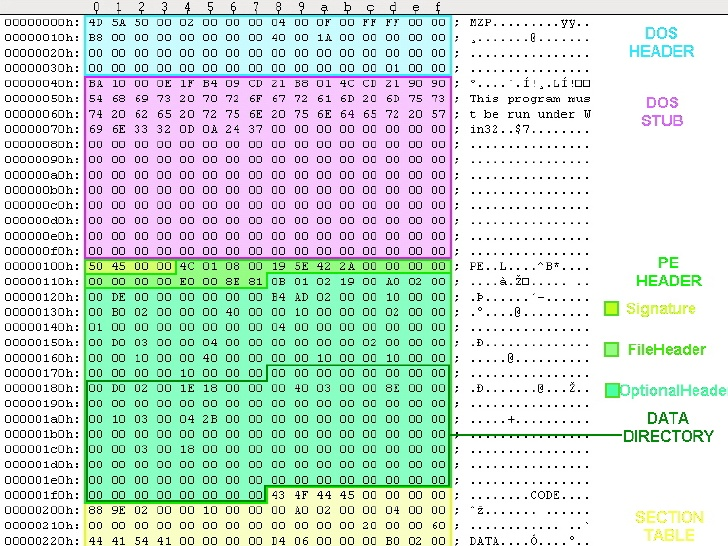
Introduction to Windows shellcode development series
Part 1:- https://t.co/EMdEvLUaud
Part 2:- https://t.co/UwLvzr9NUl
Part 3:- https://t.co/Oyj2AkRSZA
#redteam#exploit#shellcode
Malware Reverse Engineering for Beginners
Part 1 ( Basics, CPU Architecture ):- https://t.co/5LAVfAPoeP
Part 2 ( Analyzing Packers, Dynamic detection & Automation ):- https://t.co/jUm3olmcvb
Agentic AI can generate 100x more tokens per task than a standard chat exchange, changing the economics of AI and requiring infrastructure built for the full inference loop.
Learn how @CrusoeAI uses our full AI stack—from NVIDIA DSX-powered AI factories and Dynamo to open Nemotron models—to deliver more work per watt at a lower cost per token ⤵️
We cut DeepSeek-V4 Pro startup from 8 minutes to under 2 minutes by moving weights over the fastest path to GPU memory with GPU-to-GPU RDMA.
This was achieved using NVIDIA ModelExpress (MX), the weight distribution and cache management service in NVIDIA Dynamo, and this same approach speeds up both inference and RL post-training too. MX reuses kernel caches, while inference workers fetch updated weights directly from other GPUs over NIXL—avoiding centralized broadcasts and keeping weight movement off the critical path.
AMD Ryzen AI platforms help developers, enterprises, and creators run powerful AI locally with more secure, responsive, and cost-effective client systems.
As shared at #AdvancingAI 2026:
• Build, test, and iterate on AI models with AMD Ryzen AI Halo, supporting models up to 200 billion parameters
• Expanded partnership with @huggingface to bring optimized open models, libraries, and toolkits to Ryzen AI Halo
• New collaboration with @Cisco to help enterprises scale hybrid and local agentic AI
• AMD Ryzen AI Max PRO 400 Series processors with 192GB of unified memory and support for models up to 300 billion parameters
Learn more: https://t.co/FH6yqF5Rle
For my first post, I’m sharing a letter @NVIDIA signed on why open models matter.
AI will transform every industry, power every company, and be built by every country.
Open models strengthen safety and cybersecurity, accelerate innovation and diffusion, and enable sovereignty.
The world needs both frontier closed models and frontier open models.
https://t.co/AUKzoQ5Ikb
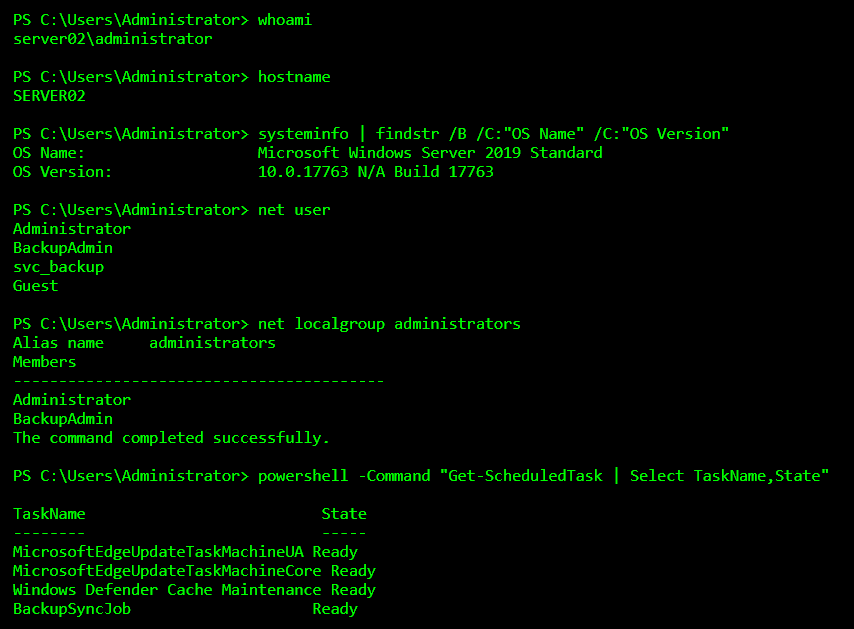
How Attackers Hide in Plain Sight Using Built-In Windows Tools
After attackers gain access to a Windows system, their biggest challenge is not getting more tools but staying unnoticed. Installing custom malware increases the risk of detection, so experienced attackers often avoid it entirely. Instead, they rely on tools that already exist on the system. These are trusted Windows utilities that administrators use daily, which makes malicious activity blend in with normal operations.
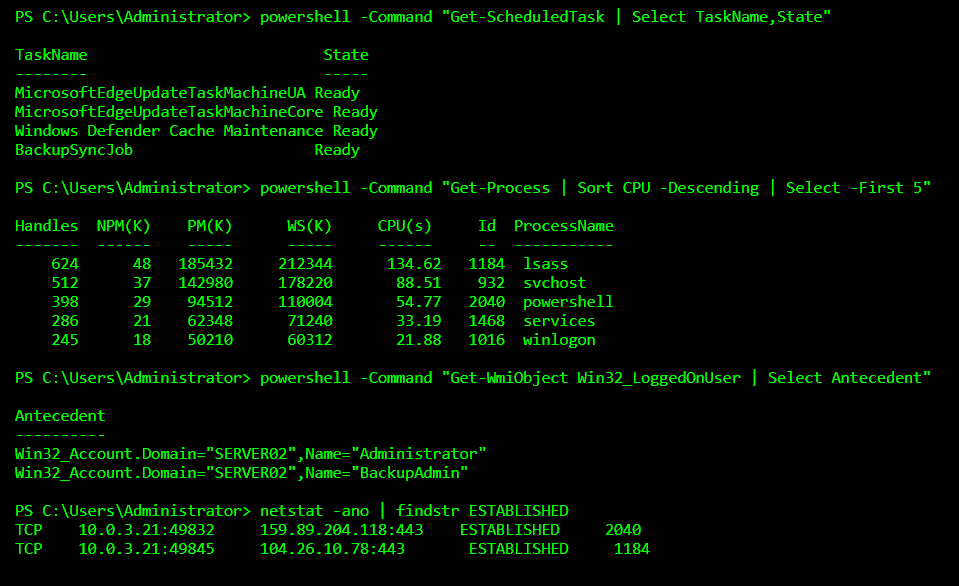
In the terminal session shown below, every command used is legitimate and commonly seen on Windows servers. The attacker first confirms their identity and system context using commands like whoami, hostname, and systeminfo. This helps them understand the level of access they have and the type of system they are dealing with. Listing local users and administrator group members allows them to see which accounts are valuable and which ones may be targeted later for persistence or privilege abuse.
The attacker then inspects scheduled tasks and running processes using PowerShell. This is a quiet way to understand what jobs already exist on the system and whether malicious activity can be hidden among them. By checking logged-in users and active network connections, the attacker confirms who else is present and whether the machine is communicating externally. At no point is malware dropped, exploits launched, or suspicious binaries executed. Everything looks like routine system administration.
This technique is known as “living off the land.” The attacker survives using only native tools provided by the operating system. PowerShell, WMI, task scheduling, and built-in networking commands are powerful enough to perform reconnaissance, persistence, lateral movement, and data access. Because these tools are signed, trusted, and heavily used in real environments, security controls often allow them by default.
One reason this approach is so effective is that it reduces obvious indicators of compromise. Antivirus tools are designed to look for malicious files; not legitimate commands being misused. Logs may show PowerShell activity, but without proper monitoring and context, nothing immediately appears wrong. To an untrained eye, the activity looks like a system administrator doing routine checks.
This is why many breaches go undetected for weeks or months. The attacker does not break anything, slow down the system, or trigger alerts. They simply operate quietly, gathering information and positioning themselves deeper inside the network. By the time suspicious behavior is noticed, the attacker may already have achieved their objective.
Modern cybersecurity defense must account for this reality. Blocking malware alone is no longer enough. Organizations need visibility into how legitimate tools are used and the ability to recognize abnormal behavior patterns. When trusted tools are abused, behavior becomes the most important signal.
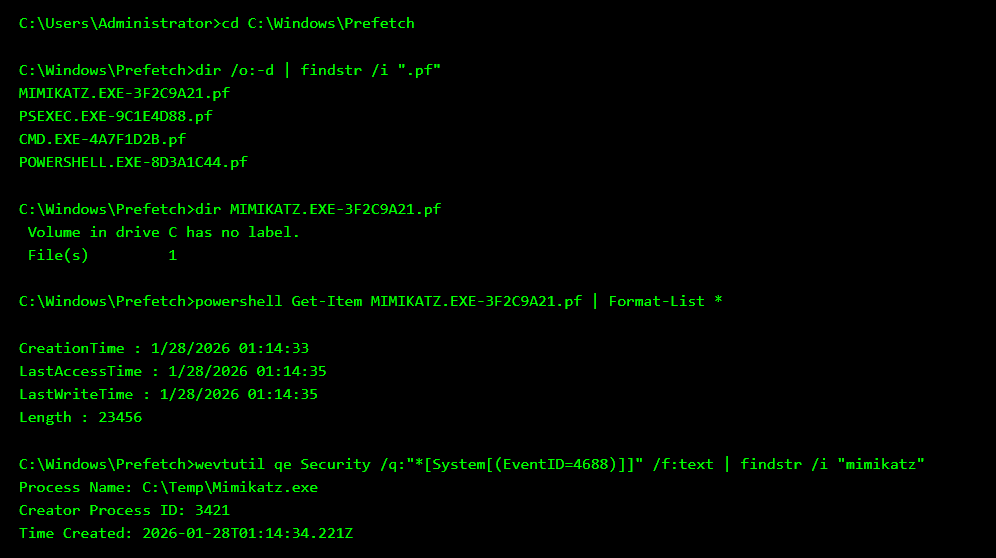
Windows doesn’t just run programs it remembers them. One of the least understood artifacts in Windows forensics is Prefetch, a feature designed to speed up application loading. Every time a program is executed, Windows creates a .pf file that records the program name, execution count, and last run times. Even if the executable is deleted immediately after use, the Prefetch file often remains.
Attackers frequently make the mistake of deleting their tools and assuming the system is clean. But Prefetch tells a different story. Files like MIMIKATZ.EXE-*.pf or PSEXEC.EXE-*.pf reveal not just that a tool existed, but that it was executed and roughly when. Combined with Windows event logs, forensic analysts can reconstruct attacker activity even when binaries are long gone.
In the terminal above, the investigator(me) navigates to the Prefetch directory and sorts files by recent activity. Suspicious Prefetch entries immediately stand out. File metadata shows exact execution timestamps, and Windows Security logs confirm process creation events tied to those tools. The attacker removed the executable, but Windows already wrote the evidence. This is how defenders prove execution not by finding malware, but by finding memory of it.
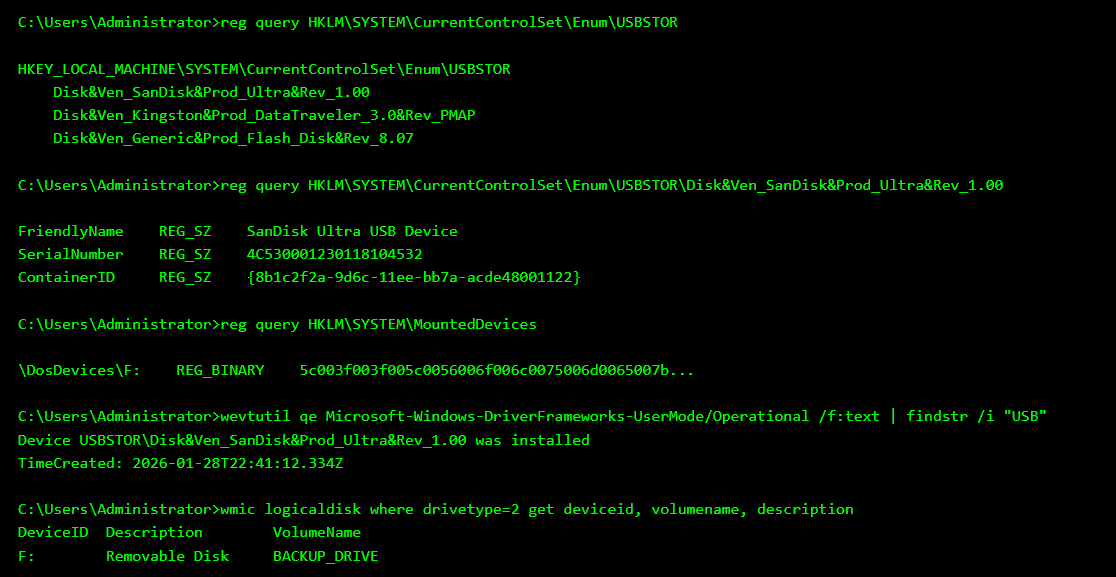
Many people believe plugging in a USB drive leaves no trace once it’s removed. In reality, Windows treats removable devices like permanent guests. Every USB storage device ever connected is recorded in the registry, along with its manufacturer, product name, serial number, and the last time it was seen. This makes USB activity one of the easiest insider threats to investigate during forensic analysis.
Even if files are deleted and the USB drive is long gone, the system still remembers it. Windows logs the device under USBSTOR, assigns it a drive letter, and records installation events in system logs. Investigators can correlate these artifacts to prove that a specific USB device was connected to a specific machine and often determine whether it was used for data transfer.
In the terminal below, the investigator(me) queries the registry to list all USB storage devices that have ever been connected. A SanDisk USB device stands out, complete with a unique serial number. Mounted device records reveal it was assigned drive letter F:. Event logs confirm exactly when the USB driver was installed, and disk queries show how the device appeared to the system. Even without the USB present, the evidence remains. This is how forensic analysts catch data theft that insiders assume is invisible.
1. Algebra is good for problem-solving.
2. Geometry is good for visual thinking.
3. Calculus is good for understanding change.
4. Statistics is good for decision-making.
5. Number theory is good for logical discipline.
6. Linear algebra is good for modern science and engineering.
7. Discrete math is good for computer science.
8. Differential equations are good for modeling the real world.
9. Optimization is good for smart planning.
10. Graph theory is good for network thinking.
11. Set theory is good for structured reasoning.
12. Practice is good for mathematical fluency.
13. Curiosity is good for lifelong learning in math.
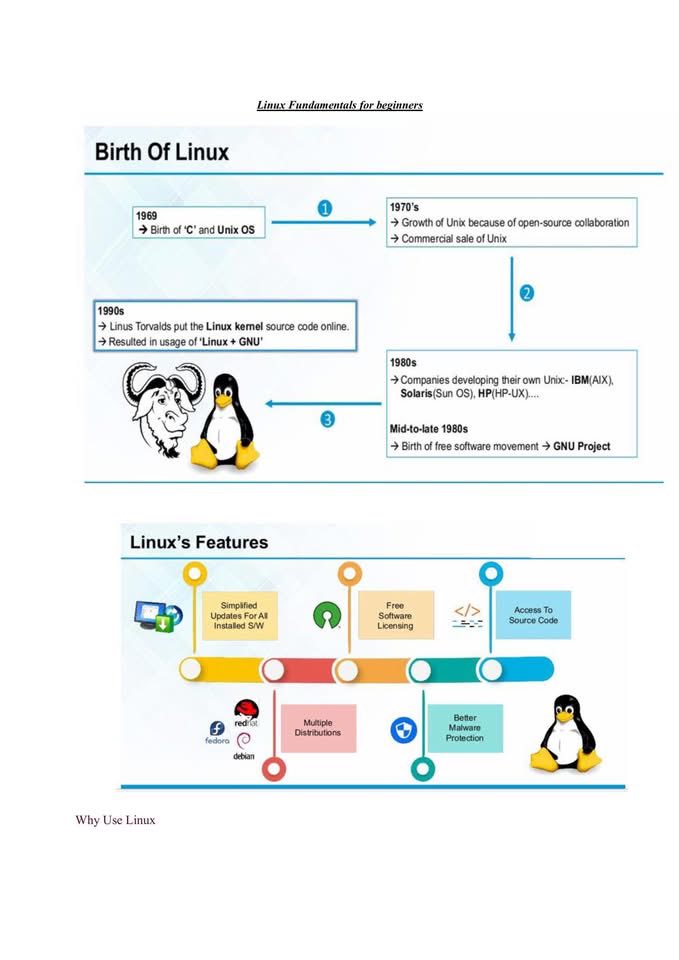
🐧 LINUX FUNDAMENTALS – The Complete Beginner’s Guide (Free PDF) ⚙️💡
If you’re stepping into Cybersecurity, DevOps Cloud or System Administration one skill you must get comfortable with is Linux. It’s the backbone of servers tools and almost everything you’ll work with in tech
A Standard Media Group journalist watches the procession carrying the body of former Prime Minister Raila Odinga from the Standard Group PLC HQ office
Video by Flavier Momanyi