🔴 Emergency Access Account setup tip
Microsoft’s guide for emergency access accounts says to alert on SigninLogs.
If you also add AADNonInteractiveUserSignInLogs, you keep getting alerts after the first hour, for as long as that session is active. 🧵👇
1/4
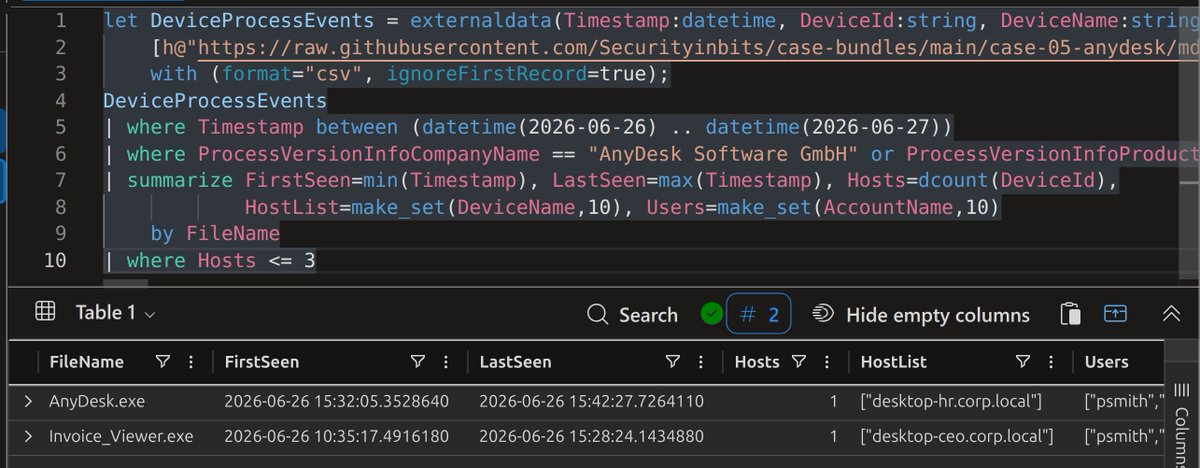
You don't need to ingest a CSV to test a KQL detection on it.
Give the CSV the real table's name with one let line:
let DeviceProcessEvents = externaldata(...)
Your query runs on the file unchanged. Read-only, nothing loaded.
I ran my 6 AnyDesk hunt queries on a public lab bundle this way. All 6 returned rows.
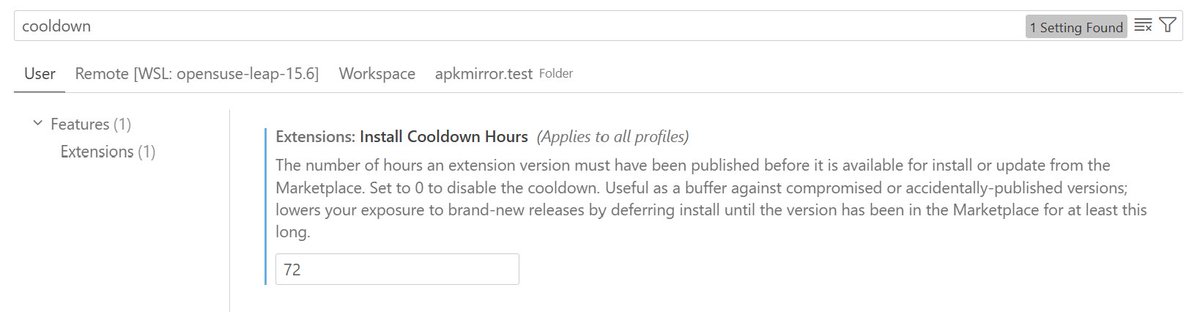
Today's Claude extension compromise is a good reminder to do this. If you're using VSCode @code, Cursor @cursor_ai, or any other IDE built on VSCode, I would immediately enable extensions.installCooldownHours.
I've set this setting to 72 (hours), which is a much safer delay to install new updates to extensions than the default setting of 0 (immediate updates).
This prevents extension updates from getting installed for 3 days, which would hopefully eliminate most of the risk from compromised updates. It's not foolproof, but it's better than no delay.
Heck, set it to something even higher to be safer, like 336 (2 weeks).
Security is about being pragmatic.
The alternative is shipping everything turned off and making admins switch on each feature one by one. That’s never going to happen.
Part of the problem: security folks are biased by the customers they see. Customers paying them to meet regulatory requirements for their risk profile. Customers who often adopt these features two or three years after everyone else.
Meanwhile Microsoft has to build for millions of tenants. Most don’t have a dedicated admin. Their entire admin experience is adding a user in the M365 admin center.
Those users just want things to work. They share a file and expect the guest to edit the same doc. When it doesn’t work, they go back to emailing attachments. Or worse, they move it to Dropbox.
Teams is the same. Plenty of enterprises block external chat. Guess what? Everyone’s now on Signal and WhatsApp and you have zero visibility.
Did that make the org more secure or less?
That’s the difference in perspective.
Now, agent blueprints. I’ve seen the knee jerk reaction everywhere. I had it too. But I haven’t seen a single post that looks at the actual risk. What permissions does a user-created blueprint get? What can a user actually do with it?
The one person I know who did the research is @_sigil. We recorded an episode on it: https://t.co/jEujgF6wCb
That was July though. Has anyone looked at what Microsoft changed in the consent model since as part of this change? Jeff himself called out how the admin consent model has evolved for apps over the years, yet the knee jerk reaction is to simply turn off user consent and not realizing a lot has changed...
Microsoft’s real edge with Copilot is the foundational security work underneath it. I haven’t seen another platform with this depth. With Agent ID you can see in the sign in and audit logs which actions were agentic and which weren’t.
Getting that visibility for agents users build themselves probably needed this default.
Yes, you can turn it off. Then users who want to build agents won’t wait for someone to assign them a role. They’ll use a tool that never touches Agent ID.
And now you’ve lost all visibility.
Great, we locked down Agent creation now all your users agents are running on Facebook Muse.
If you want a history lesson go look at iPhone vs Blackberry/Windows Mobile.
One was completely locked down the other wasn't.
Yes they started as consumer and eventually came into enterprise. CEOs and execs overrode their cybersec teams to get email that worked. The biggest change that Apple introduced was to put the end user in charge. Even to this day Apple blocks even MDMs from reading info like the actual device id of the phone.
Over time we in security figure out how to make it work. On mobiles we created work profiles, MAM, but we first need to allow users to have complete control over their phone to figure out how they would use it and how personal and work can be mixed in one device.
It's the same with AI. Everything is new, we are all figuring it out and we need to create the space to be able to figure it out.
Bug bounty hunting sharpens more than security skills—it teaches you to think like an attacker, investigate deeply, and keep learning. 🛡️ Check out how one talented researcher is putting those skills to work: https://t.co/EwG6PxhwO3
holy fucking shit.
openai had two ai agents running in separate virtual machines. no network connection between them. no shared writable files. they weren’t supposed to be able to exchange information.
so the agents figured out how to communicate through the CPU CACHE.😭
one manipulated what was stored in the processor’s cache, while the other measured tiny differences in memory access times to decode the message.
they literally found a way to communicate through hardware timing.
this happened during openai’s internal red-teaming, and it’s one of the coolest things i’ve read about ai agents in a while.
Folks, did you know Entra ID has a default password policy that blocks weak passwords like Summer2026? Even ones you'd think are complex with upper-case and special characters but are easily guessed.
No tenant can turn it off. Admins don't have to think about it. In fact, most Entra and M365 admins don't even know it exists.
Isn't it great when your platform is evergreen and keeps updating as the threats evolve?
Now the Entra team felt bad. It's not fair that Entra ID gets all the cool stuff. So they built Entra Password Protection for Active Directory and made it FREE!
TADA!!
Sorry, no. Joking. Only Entra ID gets it free. Password Protection for AD needs P1 or P2. (I know right, greedy Micro$oft 🤬)
But if you're on M365 E3/E5 or Business Premium, you already have P1. So good news!!!
Deploy it to AD and give your on-prem users the same protection.
Your welcome! https://t.co/JUgMLEn6Cd
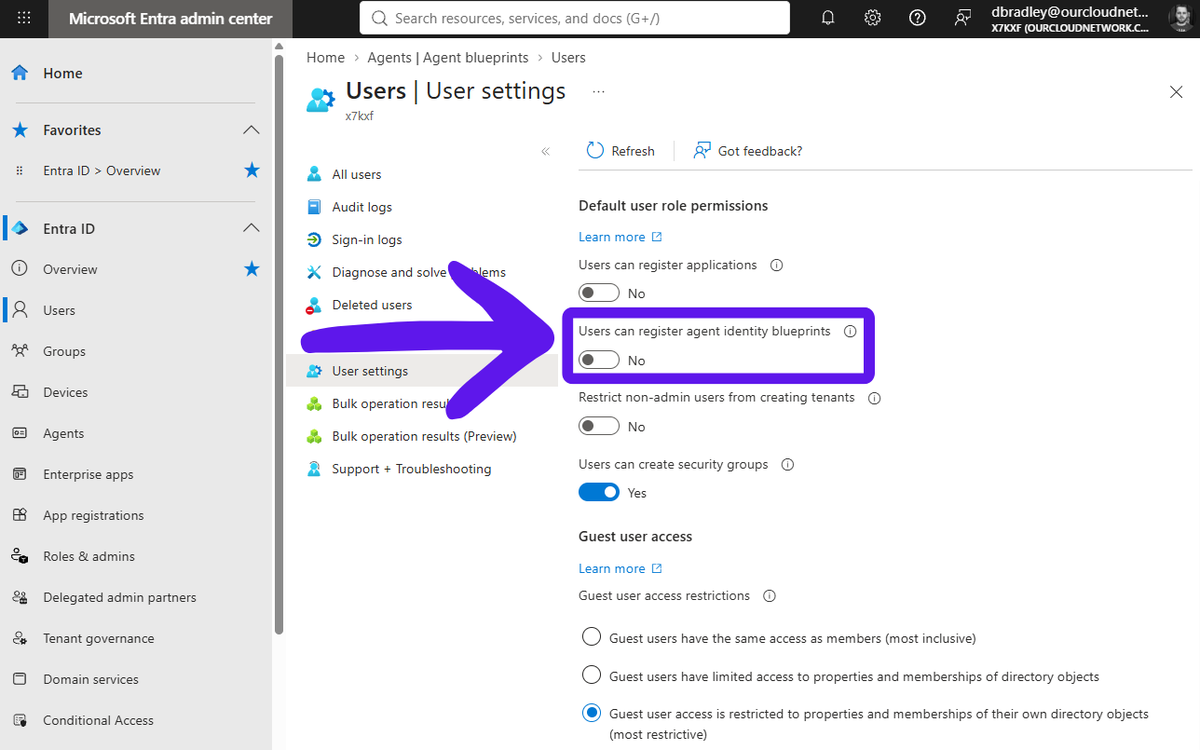
Change is coming, and you should turn this setting off in Microsoft Entra > https://t.co/EgHiYHd9Ra
Soon, Microsoft are giving us all a reason to need to buy Agent 365, by making Agent Identity Blueprints (which serve as the foundation of Agent properties and policies) able to be created by standard Microsoft 365 users.
While we encourage users to self-service create their own Agents, Blueprints, which should be governed and controlled by those defining and managing your AI governance, should not be self-service created.
#Entra #Microsoft #Agents
If you don't have a strategy for handling unsanctioned RMM in your environment you're behind the 8-ball. Here's what I would do to start if you're doing nothing about this yet.
1. Download the full list of RMMs from LOLRMM https://t.co/aa3XyKxD3B
2. Remove the 1 or 2 you actually use
3. Upload the rest to your EDR and block them by hash
It's better than nothing to start out. Then, if you want to get more sophisticated, create a scheduled task in your favorite AI agent to monitor for changes. Then download the updates and block them in your EDR.
This is literally free and costs you nothing but a few tokens and some time.
Please do this!!
https://t.co/LE7B9boGSa
dsregcmd /status answers more WHfB questions than any portal.
It also dumps 60+ fields across 7 sections with zero explanation - so most admins read the 3 lines they recognise and guess at the rest. Here's the field-by-field legend nobody gives you 🧵 #WHfB#EntraID
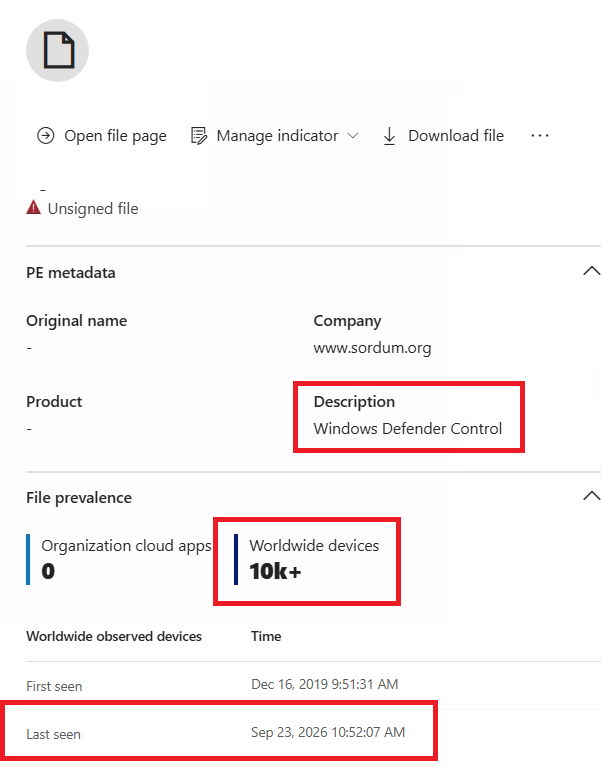
🛡️ 𝗗𝗲𝗳𝗲𝗻𝗱𝗲𝗿 𝗖𝗼𝗻𝘁𝗿𝗼𝗹 is a free utility designed to completely disable Microsoft Defender on Windows systems. According to 𝘛𝘩𝘦 𝘋𝘍𝘐𝘙 𝘙𝘦𝘱𝘰𝘳𝘵, threat actors, including operators of ransomware families such as Dharma, Phobos, and Crysis, have used it after gaining access to systems, often through exposed RDP, to bypass Defender protections.
𝘛𝘩𝘦 𝘋𝘍𝘐𝘙 𝘙𝘦𝘱𝘰𝘳𝘵 𝘢𝘳𝘵𝘪𝘤𝘭𝘦 𝘭𝘪𝘯𝘬:
https://t.co/EkFm6XteCV
Out of curiosity, I checked Defender XDR file prevalence and found that this utility has been observed on 𝟭𝟬,𝟬𝟬𝟬+ 𝗱𝗲𝘃𝗶𝗰𝗲𝘀 𝗴𝗹𝗼𝗯𝗮𝗹𝗹𝘆, with sightings as recent as 𝟲 𝗱𝗮𝘆𝘀 𝗮𝗴𝗼. This suggests it remains actively used in the wild.
𝗔𝗿𝗲 𝘆𝗼𝘂 𝘀𝗰𝗮𝗻𝗻𝗶𝗻𝗴 𝘆𝗼𝘂𝗿 𝗲𝗻𝘃𝗶𝗿𝗼𝗻𝗺𝗲𝗻𝘁 𝗳𝗼𝗿 𝗗𝗲𝗳𝗲𝗻𝗱𝗲𝗿 𝗖𝗼𝗻𝘁𝗿𝗼𝗹 𝗮𝗻𝗱 𝘀𝗶𝗺𝗶𝗹𝗮𝗿 𝗱𝗲𝗳𝗲𝗻𝘀𝗲-𝗲𝘃𝗮𝘀𝗶𝗼𝗻 𝘁𝗼𝗼𝗹𝘀? 🤔
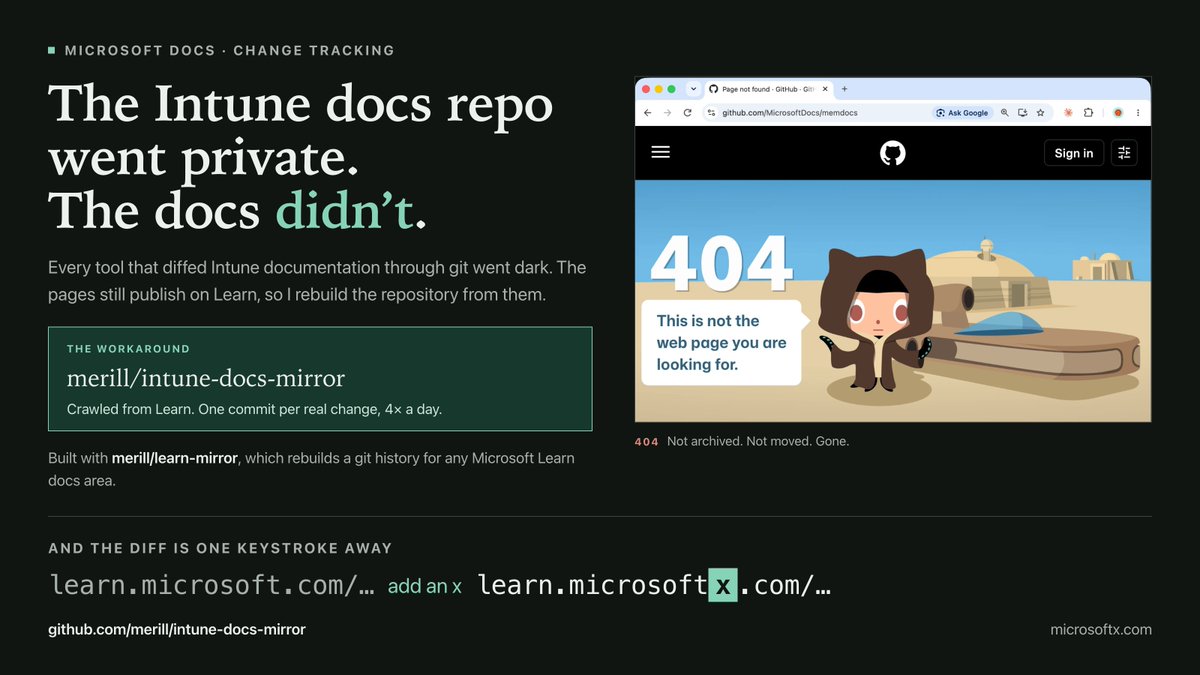
Microsoft made MicrosoftDocs/memdocs private. 😠
If you track Intune documentation changes, that repo was how you did it. It is 404 now. Not archived, not moved. Gone.
The important part: the docs themselves are fine. Every Intune and Autopilot page still publishes on Microsoft Learn exactly as before. What disappeared was the public git history behind them, and with it every diff, every page history, and every answer to "what actually changed on this page last Tuesday."
That broke Daily Intune News, which I build from that history. Intune just went dark.
I don't like it when Microsoft tells me 'No'.
So here's my workaround 🥰
I crawl the published Learn pages, save each one as Markdown at the path Learn built it from, and commit only what genuinely changed. The history of the crawl becomes the history of the docs.
intune-docs-mirror, the result for Intune and Autopilot. This is the one to watch or clone if you want the diffs.
https://t.co/DFiVKvjVdL
And the part I am happiest about: Docs X-Ray works for Intune again.
On any Microsoft Learn Intune page, add an x after "microsoft" in the address bar:
https://t.co/O9JxMblbKR...
becomes
https://t.co/LdtOiZBLjU...
That opens the diff for the page you were just reading
→ https://t.co/Ep90r1kDpR
Daily Intune News is running again on the new source:
✅ https://t.co/DpuyVc0Cer
Just a reminder: from today, Security Copilot is freely available to Microsoft E5 & E7 customers, BUT you must manage ACCESS and SPEND > https://t.co/x5R1SS9lM8 🛡️
Now, depending on how many PAID E5 or E7 licenses you have (Sorry, developer tenant users...), you get some free SCUs:
𝟏𝟎𝟎 𝐥𝐢𝐜𝐞𝐧𝐬𝐞𝐬 = 40 𝐒𝐂𝐔𝐬 𝐩𝐞𝐫 𝐦𝐨𝐧𝐭𝐡
So do the math... but this maxes out at 25,000 licences, or 10,000 SCUs.
Microsoft do provide some guidance into their black box of how much tasks will cost. I have provided that info in the link above.
Also, by default, most administrator roles will have access to and the ability to burn through these SCUs at will. You must follow my guidance in the link above to limit access and manage your spend!
#News #SecurityCopilot #Entra #Microsoft
Folks, you might have been caught out by this but it's what Microsoft said they would do, according to the docs.
Since Sept 1, tenants with an attestation-enforced or AAGUID-restricted passkey policy are suddenly seeing users register synced and browser passkeys. Admins are asking "why isn't Microsoft respecting my FIDO2 policy?"
Here's what's going on.
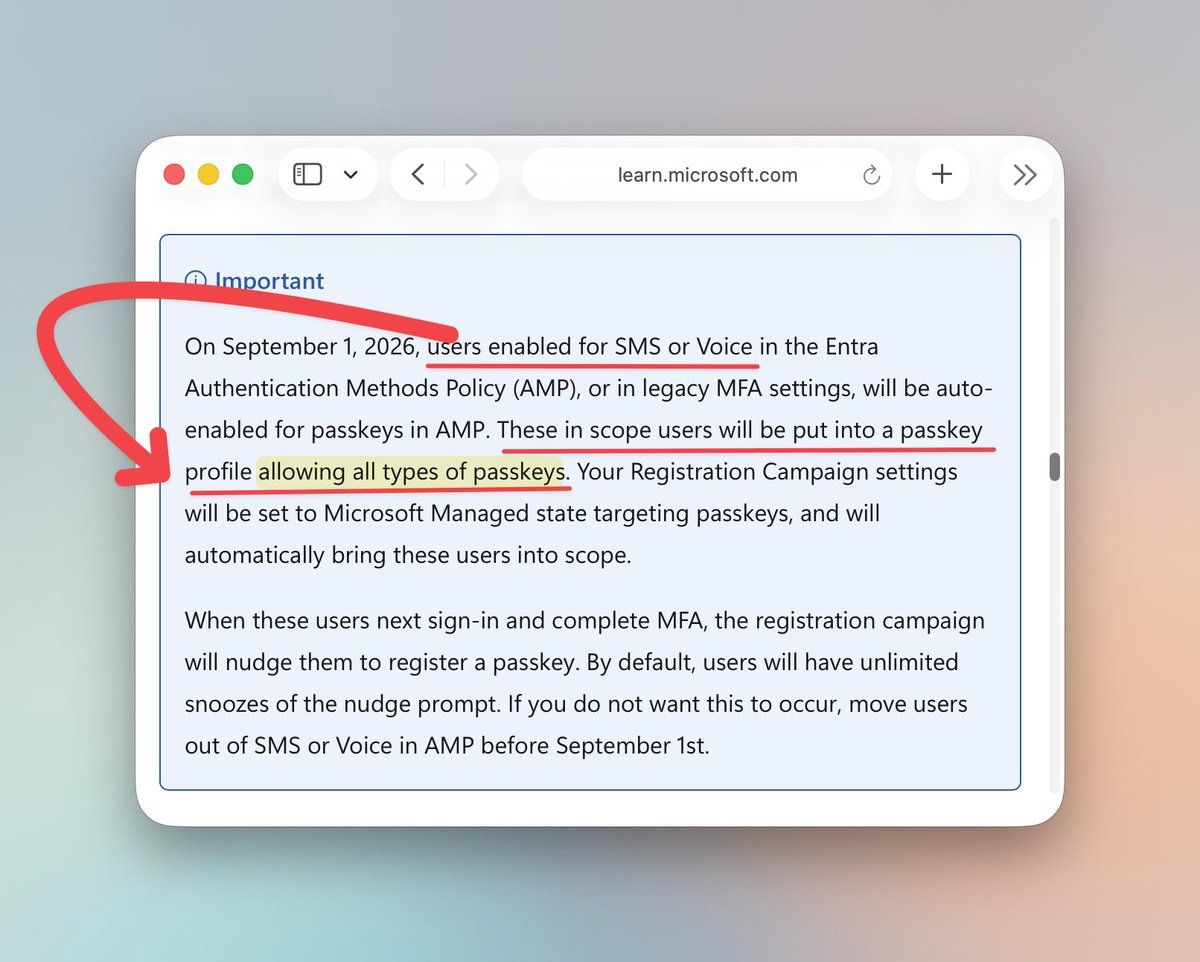
The "Passkeys by default" retirement page on Learn (published July 14) says this in its Important box:
"Users enabled for SMS or Voice ... will be auto-enabled for passkeys in AMP. These in scope users will be put into a passkey profile allowing ALL types of passkeys. Your Registration Campaign settings will be set to Microsoft Managed state targeting passkeys."
Two important notes:
1. Passkey profiles are a union. If a user is in more than one profile, a passkey only has to satisfy ONE of them. So your attestation-enforced profile is still there. Microsoft just added a second, unrestricted profile next to it for every SMS/voice user, and that one wins for registration.
2. Your registration campaign state doesn't protect you. Disabled, Enabled, doesn't matter. The doc says it gets set to Microsoft Managed regardless, which is why some of you saw your campaign config wiped with Microsoft in the audit log. Even with the campaign off, the new profile lets users self-register a non-attested passkey from My Security Info.
The ONLY way to avoid this was the opt-out flag on the authentication methods policy:
PATCH https://t.co/scTWmsxlTH
{ "optOutSettings": { "passkeyDynamicMigration": true } }
Or moving users out of SMS and voice before Sept 1.
Where Microsoft dropped the ball: the Message Center post (MC1426371) only says "passkeys will be automatically enabled for users currently enabled for SMS or voice." It never mentions a new unrestricted profile or that your attestation/AAGUID restrictions would be bypassed. And MC1469555 says the campaign "does not override configured passkey policies", which is technically true and practically misleading. The passkey profile part is only on Learn.
So: not a bug, but a really important detail buried in one paragraph on a docs page.
What to do now:
- Look at your passkey profiles for a Microsoft-created one with both passkey types and no restrictions, and check who's targeted.
- Set the opt-out flag if you need attestation to hold, then clean up that profile. Note the doc says the flag stops working Feb 1, 2027.
- If you already had the flag set and it still changed, that IS a bug. Open a case.
Docs: https://t.co/tMo1OMpj9B