One pattern I find useful for working with LLMs is a nice long ramble session. Sometimes the LLM needs more bits to understand what you're trying to achieve, but you're too lazy to type them. In these cases I like to lean back, switch to /voice and just ramble for like 10 minutes, total mess, anything goes, full stream of consciousness. Sometimes I declare it up top, something like "switching to speech recognition sorry for any typos...". Sometimes I turn it into a small interview of a few turns. But I find that the LLMs are somehow very good at reconstructing long incoherent rambles and often their echo of your own tangle of thoughts comes out quite a bit cleaner than what you started with. The result is that you improve the mind meld and have to correct things less from that point on.
LLM Knowledge Bases
Something I'm finding very useful recently: using LLMs to build personal knowledge bases for various topics of research interest. In this way, a large fraction of my recent token throughput is going less into manipulating code, and more into manipulating knowledge (stored as markdown and images). The latest LLMs are quite good at it. So:
Data ingest:
I index source documents (articles, papers, repos, datasets, images, etc.) into a raw/ directory, then I use an LLM to incrementally "compile" a wiki, which is just a collection of .md files in a directory structure. The wiki includes summaries of all the data in raw/, backlinks, and then it categorizes data into concepts, writes articles for them, and links them all. To convert web articles into .md files I like to use the Obsidian Web Clipper extension, and then I also use a hotkey to download all the related images to local so that my LLM can easily reference them.
IDE:
I use Obsidian as the IDE "frontend" where I can view the raw data, the the compiled wiki, and the derived visualizations. Important to note that the LLM writes and maintains all of the data of the wiki, I rarely touch it directly. I've played with a few Obsidian plugins to render and view data in other ways (e.g. Marp for slides).
Q&A:
Where things get interesting is that once your wiki is big enough (e.g. mine on some recent research is ~100 articles and ~400K words), you can ask your LLM agent all kinds of complex questions against the wiki, and it will go off, research the answers, etc. I thought I had to reach for fancy RAG, but the LLM has been pretty good about auto-maintaining index files and brief summaries of all the documents and it reads all the important related data fairly easily at this ~small scale.
Output:
Instead of getting answers in text/terminal, I like to have it render markdown files for me, or slide shows (Marp format), or matplotlib images, all of which I then view again in Obsidian. You can imagine many other visual output formats depending on the query. Often, I end up "filing" the outputs back into the wiki to enhance it for further queries. So my own explorations and queries always "add up" in the knowledge base.
Linting:
I've run some LLM "health checks" over the wiki to e.g. find inconsistent data, impute missing data (with web searchers), find interesting connections for new article candidates, etc., to incrementally clean up the wiki and enhance its overall data integrity. The LLMs are quite good at suggesting further questions to ask and look into.
Extra tools:
I find myself developing additional tools to process the data, e.g. I vibe coded a small and naive search engine over the wiki, which I both use directly (in a web ui), but more often I want to hand it off to an LLM via CLI as a tool for larger queries.
Further explorations:
As the repo grows, the natural desire is to also think about synthetic data generation + finetuning to have your LLM "know" the data in its weights instead of just context windows.
TLDR: raw data from a given number of sources is collected, then compiled by an LLM into a .md wiki, then operated on by various CLIs by the LLM to do Q&A and to incrementally enhance the wiki, and all of it viewable in Obsidian. You rarely ever write or edit the wiki manually, it's the domain of the LLM. I think there is room here for an incredible new product instead of a hacky collection of scripts.
The @ilyasut episode
0:00:00 – Explaining model jaggedness
0:09:39 - Emotions and value functions
0:18:49 – What are we scaling?
0:25:13 – Why humans generalize better than models
0:35:45 – Straight-shotting superintelligence
0:46:47 – SSI’s model will learn from deployment
0:55:07 – Alignment
1:18:13 – “We are squarely an age of research company”
1:29:23 – Self-play and multi-agent
1:32:42 – Research taste
Look up Dwarkesh Podcast on YouTube, Apple Podcasts, or Spotify. Enjoy!
I finally read the Kosmos "AI Scientist" paper from FutureHouse. Here is a bit about what they did and what I think about it.
> The general idea behind this paper, and others like it, is that science follows a series of steps and that much of these steps can be automated. Those steps are:
- Search the literature. Read stuff.
- Use your reading to come up with new hypotheses. Try to draw connections between things.
- Analyze data to draw conclusions. Write up your results.
- Repeat.
Kosmos uses two separate agents — one for data analysis and another for literature searches — to go out and do these tasks while sharing information with each other. The agents can see what the other agents have learned, in other words, which is super useful. They exist within a single "world model." A single run of Kosmos can execute up to 42,000 lines of code across 166 different data analysis agents, and also read 1,500 scientific papers using 36 literature review agents. Each run takes up to 12 hours.
So that’s the gist. You spin this thing up, give it a huge prompt, and then let it cook. In this preprint, they report seven discoveries that they say were made by Kosmos; “three discoveries made by Kosmos reproduce findings from preprinted or unpublished manuscripts,” which are not in its training dataset, “while the remaining four make novel contributions to the scientific literature.”
FutureHouse handed Kosmos to researchers around the world, working in myriad fields (electronics, neurology, materials, etc.), and let them test it out. Here are some of the “discoveries” they reported:
1. By feeding Kosmos some mouse brain metabolomics data, it suggested that cooling the brain’s temperature might activate nucleotide-salvage pathways, which basically preserves neurons during hypothermia. This had been shown in an unpublished paper and was later re-confirmed.
2. Using environmental sensor data from a recent arXiv paper, it identified a linear relationship between the solvent vapor on a solar cell and that cell’s current. In other words, humidity matters a lot? Not sure if this is surprising or not, as I have no background in this field. But again, it was a sort of “re-discovery” to see if Kosmos could find results that humans had already identified (but had not yet published.)
3. Higher levels of an enzyme, called superoxide dismutase 2, in the blood may reduce myocardial fibrosis. Published papers had previously identified a correlation between SOD2 and myocardial fibrosis, but Kosmos re-pointed at it and humans followed up to show it’s causal.
Here are my quick thoughts:
1. Many other AI scientists (both at nonprofits and for-profits, which have not yet been released) are trying to do the same thing. We clearly need better benchmarks to know what is real and what is fake. It seems like Kosmos is real, but how does this compare to Google etc?
2. I’m not wholly convinced that the idea of extremely long runs will be palatable to most biology researchers. My take is that researchers are looking for more of a real-time collaborator, where you’re constantly prompting and getting immediate feedback, rather than just delegating huge, open-ended tasks to agents. If a “general user” tests out Kosmos, pays the large price tag, and is disappointed by the results, will they keep using it? The wait time is a huge barrier, as is the price (even though academics get generous access.) Also difficult to prompt engineer?
3. This paper tries to quantify “the time it would take for a human scientist to complete the work that Kosmos performs in an individual run,” but I find it a bit hand-wavy. They say it takes a typical researcher 15 minutes to read a paper and 2 hours to write a Jupyter notebook for data analysis and, since Kosmos can read 1,500 papers per run, it offers a huge time savings.
But human scientists don’t need to read hundreds of papers to make a discovery! The best scientists have an innate ability to “triangulate to innovation;” to find the right combo of papers and discussions that enable them to make conceptual advances. This seems difficult to replicate.
I'd like to have more discussions about AI Scientists, if any of you are interested.
The human in the loop is the real problem!
Today AI still needs a human in the loop to frame questions correctly, understand technical concepts and the limitations of AI
The humans in the loop are now causing more than 50% of all failures
Over time, machines won’t have to depend on humans so much and things will get way better
We plan a free course about LLM and AI engineering to cover:
🔸 LLMs and RAG
🔸 Vector databases
🔸 Orchestration
🔸 Monitoring
We will launch the course if there's enough interest.
Fill in this form if you're interested: https://t.co/MCACUtQyGH
𝗛𝗼𝘄 𝘁𝗼 𝗯𝗲 𝗮 𝗽𝗿𝗼𝗱𝘂𝗰𝘁𝗶𝘃𝗶𝘁𝘆 𝗺𝗮𝘀𝘁𝗲𝗿?
Use a few simple techniques:
1. Focus on ONE thing. Block your time in the calendar for everything and try to focus on the current task only.
2. Use 3:3:3 Plan. 3h to work on your most important projects. 3h for shorter tasks. 3h for maintenance activities.
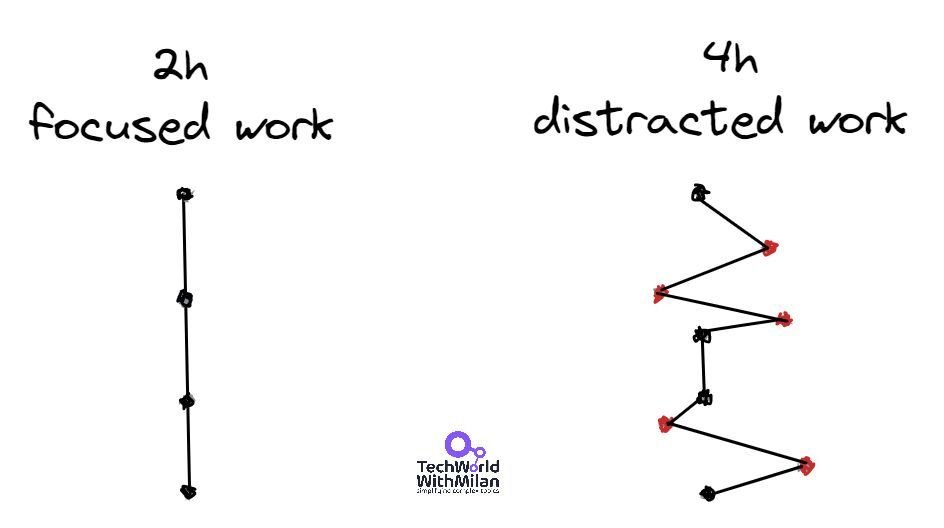
3. Use a deep work practice, for at least 4h per day, with no distractions (use airplane mode on your phone).
4. When learning something new, apply the Feynman Technique. Pick a subject, attempt to explain it to a 5-year-old, then do more research to fill in any knowledge gaps.
5. Organize your duties according to an Eisenhower Matrix. The aim is to spend more time on vital tasks that advance your long-term values, missions, goals, and principles.
6. Processing messages and emails in bulk during one to three condensed times during the day.
7. If you want to improve in something, do it for 20mins per day. After a year, you will be better than 90% of people.
8. Use the Getting Things Done methodology to track everything you do efficiently.
9. Use Zero Inbox Policy. Get rid of unnecessary emails immediately. If the email requires someone else's attention, forward it. If an email takes less than a few minutes to reply, do it directly; otherwise, schedule a time to deal with it.
10. Beat procrastination with Pomodoro. Choose a task, set a timer for 25min and work on it without distractions, take a short break, and do it again. After 4 sessions, take a more extended break.
11. Create yearly, monthly, weekly, and daily goals and plans. With the goal, you will probably get nowhere.
12. Do daily and weekly reviews. Ask yourself: "What did I do today that was aligned with my goals?" "Can I improve something?"
13. Learn to say NO to many things! One no is yes to many other things.
14. Walk 30mins every evening. Even better, do a walking meditation during this time.
15. Automate everything you can. Try to use different tools to automate everything you can, especially repetitive tasks.
To learn more about it, check out my newsletter in the comments.
#technology #softwareengineering #techworldwithmilan #productivity #gettingthigsdone