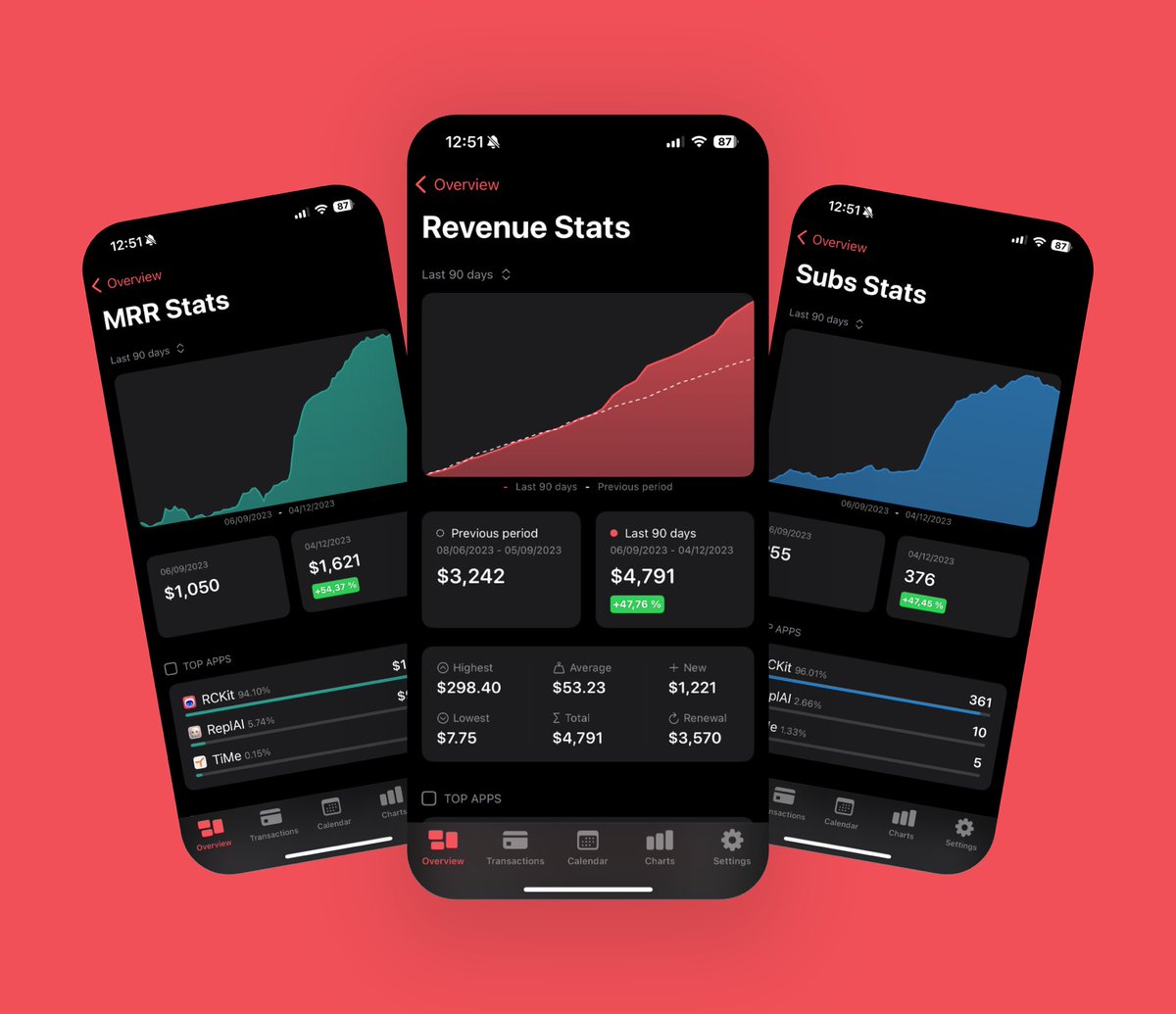
🚀 RCKit's latest update is now live! Packed with some exciting new features to make your experience with @RevenueCat data even better.
Here's what's new 🧵
Update 6.1.7 just arrived with the ability to open your Installs Stats, the option to show the country flag on notifications and the integration of @MyWishKit.
Click on the feature request button in Settings and start asking for more features you’d like to see in future updates!
Thanks to the partnership with @Superwall the free tier limit is now increased from 100$ MTR to 500$ and most of the pro features that required an RCKit plan are also included in the free plan
New update coming soon 🚀
Revenue Stats has been moved inside the revenue card and now you can also check your MRR, Subs and Trials stats and compare them to previous periods
Five Tools I (Almost) Use Everyday As An Indie Hacker
Here are five tools that I use regularly while trying to build my app business:
Shots @shotsapphq
I’ve always been on the hunt for tools that can make my day-to-day tasks a bit easier. Recently, I came across a web app named Shots, and I’ve found myself using it quite a bit. Before this, I tried out a few screenshot apps on my Mac like Xnapper and Cleanshot, but they didn’t quite hit the mark for me.
Shots is pretty straightforward and has become my go-to for taking screenshots. It’s a web app, so there’s nothing to install. I just copy my screenshot, paste it into Shots, and bam - I can add a cool background before sharing it on social media. The best part? It’s free and there's no need to sign up or anything.
One feature I really appreciate is how Shots can automatically pick out a gradient or solid color background that matches the screenshot. It’s a small thing, but it really makes the screenshots pop and look professional without any extra effort on my part. So, if you’re looking to make your screenshots or social media posts a bit more eye-catching, Shots is worth a try.
For those who are into mobile app development, there’s a neat feature where you can put your screenshots into a device case image right within the app. It’s been useful for showing off my app, @HabitKit, in a more professional light.
NotePlan @NotePlanApp
NotePlan is a wonderful native app for iOS and Mac. I've been searching for the notes app that perfectly matches my needs for a long time and when I found NotePlan earlier this year, it finally happened.
I use NotePlan for three areas: As a calendar, to-do list and note-taking app. It provides a great combination of markdown-based note-taking, task management and scheduling. It even comes with a great starting architecture for your notes based on the PARA method so they don't float around in a flat hierarchy.
I usually start my Sunday by scrolling back in the 7-day view and reviewing everything I've done or didn't manage to do. Then I hop over to the "Weekly" tab (where I defined my goals for the week) and think about my goals for the next week. This workflow helps me tremendously with keeping accountable and always having the next steps on my mind.
Make sure to follow NotePlans' creator @metzgereduard. He always posts cool stuff about the development of the app!
RCKit @RCKit_App
The next one is an app that I also use every day: RCKit is my go-to app for checking the recent numbers of my app business. When it comes to keeping track of MRR, subscriber counts and cool-looking charts, this app is even better than the original RevenueCat dashboard.
I know that it's kind of a bad habit to check these numbers too often, but it's definitely not the app's fault and I can highly recommend it to every aspiring or established app developer who uses RevenueCat as a payment provider in its' apps.
BlackMagic @blackmagic_so
Next up is a social-media-focused tool: I discovered BlackMagic Sidebar on Twitter through the tweets of its' creator @tdinh_me. It's a browser extension that brings your X/Twitter experience to another level. You can schedule tweets, write drafts and get a huge load of statistics regarding your growth, followers, impressions and interactions.
I have the feeling that after Tony sold the product to Hypefury speed of development slowed down a lot, but it's still a great tool and I can highly recommend it. I also heard good things about @typefully which I will check out at the end of the year.
HabitKit @HabitKit
This is THE habit tracking app that holds me accountable day in and day out. I developed it one year ago and there hasn't been one single day where I didn't use it. I usually track 5 core habits and add various small habits when I try something new.
My current core habits:
🏋️♀️ Sport: Weightlifting, running or something similar at least 3 days a week
🐦 Tweet: Writing a post on X every day
🚶 Daily Walk: Nothing better to clear my mind than a nice walk in nature with my partner
🥗 Healthy Eating: Healthy food, no junk, don't overeat
📱 App Business: Work on my app (side) business at least 5 times a week
My current additional habits:
🇳🇴 Learn Norwegian: Complete at least 3 lessons in Duolingo per day
📺 Limit YouTube: Try to watch only one video per day
🍅 Pomodoro: Focus up for at least 2 hours per day
Tracking these habits and trying to fill the grid tiles with color feels super satisfying and I wouldn't miss the app in my life anymore.
@alpennec@JordanMorgan10@RCKit_App@LualdiDylan It is indeed, best @RevenueCat app by far, created by an indie who cares and always receptive to feedback, and it makes the service even better with insights I couldn’t get from the website itself.
Don’t RC without it. (new slogan? :)
🚀 RCKit's latest update is now live! Packed with some exciting new features to make your experience with @RevenueCat data even better.
Here's what's new 🧵
Enhanced widget capabilities! Single overview widgets can now show charts. 'Today's Revenue' is interactive—toggle between today & yesterday. Plus, choose to open the app or refresh data directly from all widgets.