We're excited to announce that the RITREK app is now available on Google Play.
Create, upload, monitor, and initiate Bitcoin Timelock-Recovery plans from your Android device. Your seed phrase remains secure on your hardware wallet.
Here's how to create a Timelock-Recovery plan with the RITREK app:
Step 1: Get the app
https://t.co/DeS13FDqux
Step 2: Generate a Bitcoin address on a second, easily accessible wallet.
This is the destination wallet your Bitcoin will move to during a recovery event. For example, if you use a passphrase on your hardware wallet (also known as "the 25th word" of your 24-word seed), your second wallet could be the same hardware wallet but without the passphrase. Another option is a wallet held by a friend or family member.
Step 3: Connect your Trezor or Ledger wallet.
Trezor users should download Trezor Suite Lite first: https://t.co/88qm2Ar9a8
Advanced users with hardware wallets other than Trezor or Ledger can use Electrum's built-in Timelock-Recovery plugin. Cable connection only - the app does not support Bluetooth yet.
Step 4: Sign the two Timelock-Recovery transactions.
Enter the timelock that you wish (default: 90 days) and a reasonable fee rate* - then sign the two timelock-recovery transactions from your main wallet to the second-wallet address. As always, verify the destination address on your hardware wallet screen!
Step 5: Your Recovery-Plan is ready.
Lost access to your main wallet? Swipe the button to initiate the transaction that will move your Bitcoin from your main wallet to the second wallet within the timelock period.
You can also download the pre-signed transactions as a JSON file and send it to friends and family - no one can change the destination or timelock of these transactions.
Your relatives could then initiate the recovery by going to https://t.co/smFajtcV6J
If your data leaks and the pre-signed transactions are broadcast against your will, you'll receive a push notification and have the full timelock period (i.e. 90 days) to move your Bitcoin elsewhere.
Limitations
RITREK is suitable as a recovery solution for wallets that are not used frequently.
Spending any amount of Bitcoin from your main wallet will invalidate the recovery plan (the pre-signed transactions) that was created before - and you will have to start over.
Additionally, new funds received after the recovery plan is created will not be covered by the existing plan.
If you want to keep using the same hardware wallet with the same seed phrase, we recommend using a different account for any new funds you may receive: https://t.co/t8seoCVPHK
RITREK only works with modern Native SegWit wallets (your addresses should start with "bc1q...").
* Fee rate recommendation: it is hard to predict the fee rate that will be needed far in the future for your Bitcoin transaction to be mined in a reasonable timeframe.
Your transactions can always be accelerated via CPFP techniques or by using accelerator services (https://t.co/7ikcIBvuVQ), but this requires some technical skill.
At the moment, fee rates are very low (1-2 sat/vB), but to be safe for the future, we recommend using a higher fee rate of 50 sats/vB, which would amount to ~$4-$40 for typical transactions - a negligible amount in recovery situations.
Try the free plan now with up to 0.05 BTC of recovery-plan coverage!
@SpecterDIY's latest version now displays something no other hardware wallet (AFAIK) currently shows in Bitcoin transactions: Relative Locktimes.
Locktimes may not matter much for day-to-day spending, but they become important when working with pre-signed transactions intended to be broadcast in the future - for example in a Timelock Recovery plan, where you should verify the cancellation period between the initiation and final transfer of funds.
In this video, we will:
1. Create a Timelock Recovery plan using @SpecterWallet (Specter Desktop - available on @umbrel) together with the @SpecterDIY hardware wallet.
2. Export the pre-signed transactions in #BIP128 JSON format.
3. Import the file into the RITREK Android app for monitoring.
4. Learn how to execute the recovery-plan both with the RITREK app and without it.
5. Lean how to cancel the recovery-plan within the cancellation period, after it was initiated.
If you're hodling BTC for the far future behind a complicated multisig/SLIP39/passphrase setup, and you're worried your future self, or your inheritors, may struggle to recover it safely - this video is for you!
Download the app from here:
https://t.co/kLnjZuTsyJ
Free for testing amounts up to 0.05 BTC.
No need to switch to a script-supporting hardware wallet - standard pre-signed transactions can include timelocks, even without miniscript.
@SpecterDIY's latest version now displays something no other hardware wallet (AFAIK) currently shows in Bitcoin transactions: Relative Locktimes.
Locktimes may not matter much for day-to-day spending, but they become important when working with pre-signed transactions intended to be broadcast in the future - for example in a Timelock Recovery plan, where you should verify the cancellation period between the initiation and final transfer of funds.
In this video, we will:
1. Create a Timelock Recovery plan using @SpecterWallet (Specter Desktop - available on @umbrel) together with the @SpecterDIY hardware wallet.
2. Export the pre-signed transactions in #BIP128 JSON format.
3. Import the file into the RITREK Android app for monitoring.
4. Learn how to execute the recovery-plan both with the RITREK app and without it.
5. Lean how to cancel the recovery-plan within the cancellation period, after it was initiated.
If you're hodling BTC for the far future behind a complicated multisig/SLIP39/passphrase setup, and you're worried your future self, or your inheritors, may struggle to recover it safely - this video is for you!
YOU 👏 MIGHT 👏 FORGET 👏 YOUR 👏 PASSPHRASE 👏 OVER 👏 THE 👏 NEXT 👏 20 👏 YEARS!
If you're hodling a significant amount of Bitcoin in a passphrase-protected wallet, don't assume you'll always remember it.
Follow this tutorial to learn how to create a Timelock-Recovery plan, ensuring you always have pre-signed transactions ready to move your Bitcoin from your passphrase-protected wallet to a standard wallet (after a timelock period of your choice): https://t.co/KeRk2qejs6
Two days ago somebody uploaded a Javascript file to the https://t.co/smFajtdsWh page. While checking the logs to see why the error happened, I've noticed that the file contained a 12-words seed inside that file - which contains a small amount (around 9k sats).
The /send page is for uploading and executing Timelock-Recovery JSON files as defined in BIP-128: https://t.co/zG41QwAV0D - I'm not sure why you tried to upload a Javascript file.
Anyways, I haven't touched the funds and I recommend moving that small amount elsewhere.
I took this photo a few days ago, after an Iranian cluster munition hit ~1km from my home.
Thankfully no one was hurt and the damage is probably repairable - but in worse cases, buildings can be declared unsafe, with owners not even allowed to enter.
Putting the politics of this war aside: storing your Bitcoin seed phrase in a single geographic location is a real risk - especially in regions affected by war or natural disasters.
One approach is redundancy: Shamir Secret Sharing, multisig setups, or splitting your seed (e.g. a 2-of-3 scheme where each part contains 18 of the 24 words).
But these come with tradeoffs - complexity for less tech-savvy inheritors, risk of misconfiguration, and multiple locations to secure against an immediate break. In practice, more Bitcoin has been lost due to overly complex setups than stolen.
Another approach: pre-signed timelocked transactions.
They allow you to move funds from a "local" wallet to a "remote" one after a delay (e.g. 90 days), without splitting or duplicating your keys.
With solutions like RITREK (Android) or @ElectrumWallet's Timelock Recovery plugin:
* Transactions are pre-signed and immutable - destinations can't be altered, so backups can safely be stored in multiple locations (even online) and shared with 3rd parties.
* No need to change hardware wallets or switch from a standard 24-word seed to multisig/shamir.
* Easy for inheritors: Your "local" wallet can be very complex (with a memorized passphrase, seed split and mixed, etc.) - but the emergency "remote" wallet could be a simple 12 words wallet anyone can operate.
* You retain a cancellation window if something is triggered unexpectedly - a time period (i.e. 90 days) has to pass from the broadcast of the pre-signed transactions until the funds actually move to the "remote" wallet.
Learn more about Timelock Recovery at https://t.co/c5TJge7S9C, or try the https://t.co/Zwe2zP1zQU app on Android (free up to 0.05 BTC).
Don’t wait for a disaster.
Secure your self-custody Bitcoin today.
@BitvaultApp and other multisig & miniscript wallets are great for advanced users who use Bitcoin frequently.
But if you're a simple "hodler" sitting on a significant amount of Bitcoin with no plan to touch it for years, splitting your 24 seed words or memorizing a passphrase might backfire - your less-technical loved ones won't know how to interpret your clues and riddles!
Make sure you also leave them pre-signed transactions that can move the Bitcoin from your complex wallet to a simple one. No need to send the Bitcoin to a new wallet - the RITREK Android app lets you pre-sign transaction directly on your existing Ledger or Trezor wallet.
https://t.co/DeS13FDqux
Self-custody is a pain - but it's what #Bitcoin is all about.
Too many seed backups → your Bitcoin could be stolen.
Too few → an accident could lock your Bitcoin away forever.
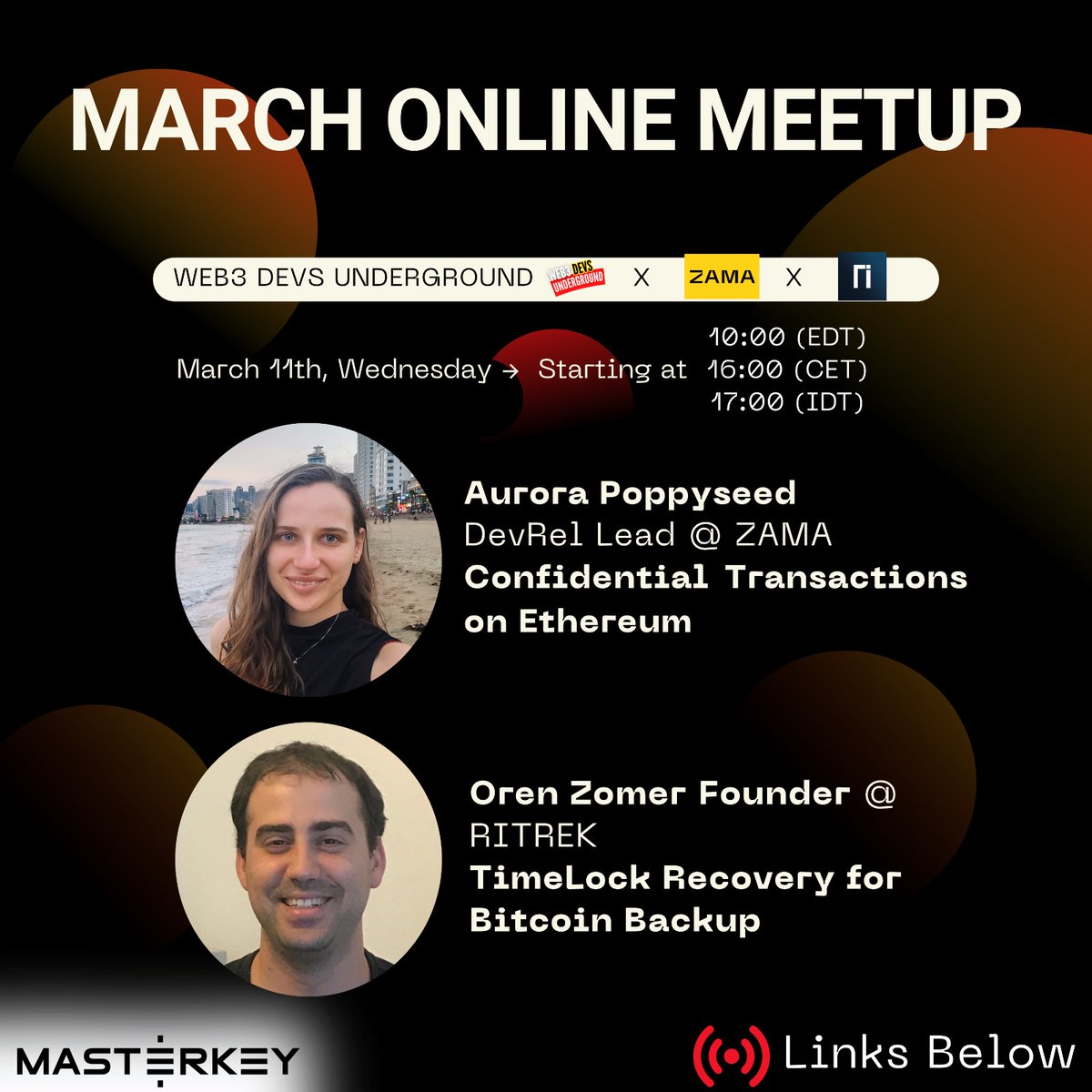
Join me tomorrow for a talk about how relative & absolute timelocks enable safer recovery mechanisms - and how the new RITREK Android app is different from previous solutions.
We are excited to invite you to join us for another Web3 Devs Underground event!
🔐₿ Two sessions. Two frontiers. One event.
@Web3_Devs × @zama x @RitrekRecovery
powered by @MasterkeyVC
📅 March 11th | 17:00 Israel Time | 16:00 CET | 10:00 EDT
📍 Live on X, YouTube & LinkedIn
Register Here: https://t.co/qvmo65BRXP
Session 1 - FHE & Confidential Smart Contracts
@poppyseedDev (Aurora Poppyseed), DevRel at @zama, breaks down how Fully Homomorphic Encryption (FHE) is bringing real confidentiality to the EVM - running computations on encrypted data without ever decrypting it.
From private transfers to blind auctions, this is what on-chain privacy actually looks like.
Session 2 - TimeLock Recovery for Bitcoin Backup
@oren_z0 (Oren Zomer), Founder at @RitrekRecovery, walks through structured wallet recovery using Bitcoin Script - primary to secondary wallet, and what BIP-128 makes possible.
Self-sovereign custody, done right.
Two of the most technically dense topics in crypto infrastructure - in one session.
Whether you're building on EVM or working with Bitcoin Script, this one's for you.
🔗 See full calendar: https://t.co/hO9DkfdknL
@MasterkeyVC@SHAP0W@Amit_Masterkey@Web3_Devs@ELuttenberg789@AlonKivity@al23xyz #Web3 #Bitcoin #FHE #Zama #ZeroKnowledge #BitcoinScript #Cryptography #Web3Dev #Blockchain #DeFi #SmartContracts #MasterkeyVC
@yrn_jo Reaching 1 BTC is the easy milestone.
Making sure access survives hardware decay and forgotten backups is the hard one.
Curious how you plan for long-term continuity.