The Netherlands will likely be insufficiently prepared in case of a very cold winter as it misses the natural gas refill targets 🇳🇱
Have we learned nothing from the previous gas crisis? Solar and wind won't get us through the winter, we need reliable baseload
We need nuclear ⚛️
URANIUM DOES NOT GO STRAIGHT FROM THE GROUND INTO A REACTOR.
Most people think nuclear fuel = mining.
Reality: it is a 4-stage supply chain, each with its own chokepoints.
• Stage 1 - Mining & Milling
Uranium ore → U3O8 (yellowcake)
Kazakhstan, Canada, Namibia dominate supply
• Stage 2 - Conversion
Yellowcake → UF6 gas (required for enrichment)
Only a handful of facilities outside Russia/China (U.S., Canada, France)
• Stage 3 - Enrichment
Natural uranium = 0.7% U-235
Reactors need 3–5% (LEU)
Russia controls ~40% of global capacity
• Stage 4 - Fuel Fabrication
LEU → uranium dioxide pellets → fuel rods → assemblies
This is the finished reactor fuel
The risk is real:
Russia still supplied ~25% of U.S. enrichment services in 2024
The Prohibiting Russian Uranium Imports Act bans that by 2028
But new centrifuge capacity takes 7–10 years to build
The clock is running.
$CCJ $LEU $UEC $UUUU
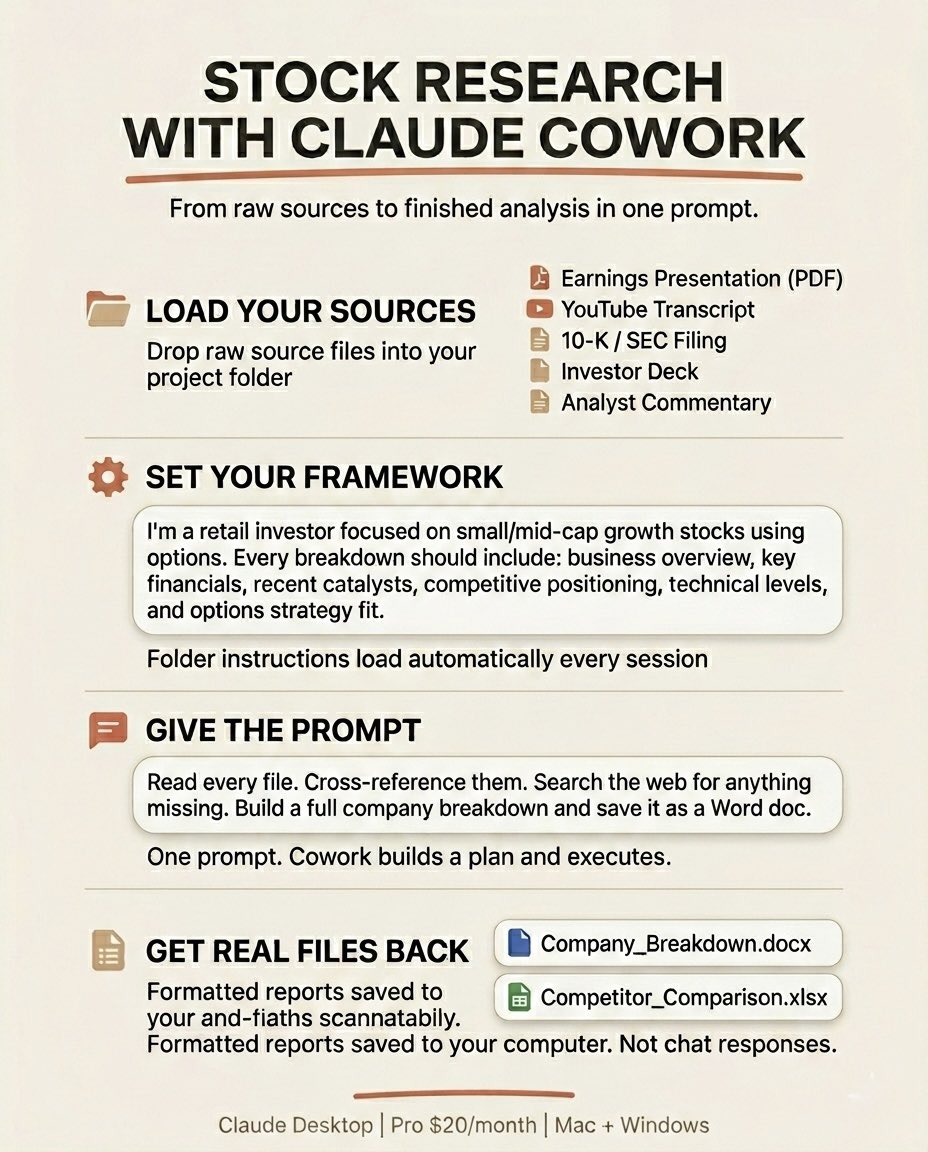
Claude Cowork is f*cking ridiculous for stock research
One prompt + a folder of source material = a finished company breakdown saved as a real document on your computer.
Not a chat response. A file.
If you're spending 2-3 hours every week bouncing between 12 browser tabs, reading earnings transcripts, watching YouTube bull cases, skimming SEC filings, and copying random numbers into Apple Notes just to forget half of it...
Claude Cowork eliminates the entire loop:
-> Drop your raw sources into a folder (earnings decks, YouTube transcripts, 10-Ks, investor presentations, PDFs)
-> Point Cowork at the folder and tell it what you need
-> It reads every file, cross-references them, and searches the web for what you're missing
-> It builds a full company breakdown and saves it as a real .docx or .xlsx on your machine
-> It connects to tools like Notion so you can pull in context you already have
No more 12-tab research sessions.
No copy-pasting between sources.
No starting from scratch every time.
What you get:
-> Business overview, financials, catalysts, competitive positioning, and risk factors synthesized from YOUR sources
-> A formatted report saved on your computer you can reference before every trade
-> Web research layered on top filling gaps your files didn't cover
-> A reusable framework that loads automatically every session through folder instructions
Mine tells Cowork: "I'm a retail investor focused on small/mid-cap growth stocks using options. Every breakdown should cover business overview, key financials, recent catalysts, competitive positioning, technical levels, and which options strategy fits the current IV environment."
Set it once. Every research session already has context.
Available inside Claude Desktop on Pro ($20/month). Mac and Windows. Still a research preview with some rough edges. Pro users may hit usage limits on heavy sessions.
$20/month for what used to be a 3-hour manual process.
If there's interest I'll do a full walkthrough with my exact folder setup, instructions, and prompts.
Great list. Here's how to actually start each one today:
Claude Code
□ Install: npm install -g @ anthropic-ai/claude-code
□ Run claude in any project folder
□ First task: "Explain this codebase"
Perplexity Computer
□ Download Perplexity desktop app
□ Enable Computer mode in settings
□ First task: "Research [competitor] and summarize their pricing"
Claude Cowork
□ Open claude. ai → Install Productivity plugin
□ Add one context file about your business
□ First task: "/productivity:start"
OpenClaw (Clawdbot)
□ Install: npm install -g clawdbot
□ Run clawdbot init to set up your workspace
□ Connect to Discord/Telegram/WhatsApp
□ First task: Create your first skill in the skills/ folder
□ Add your AGENTS. md to define how your agent behaves
AI Second Brain
□ Create a Notion database OR folder
□ Save every useful AI output there
□ Tag by use case (research, writing, code)
Automation
□ Pick ONE: Zapier (easiest) or Make (more power)
□ Build one zap: "New email → Slack notification"
□ Graduate to MCP when ready
Prompt Engineering
□ Learn one framework: CO-STAR or RISEN
□ Save your best prompts in a swipe file
□ Iterate: good prompt → test → improve
Once you master the above you'll never have to worry about money again.
Best Cowork setup guide I've seen.
How to fully implement in under 15 minutes:
Setup (do once)
□ Download Claude Desktop → claude. com/download
□ Sign in → Click "Cowork" tab at top
□ Create folder: ~/Claude-Workspace/
□ Inside it, create: /context, /projects, /outputs
Context files (this is the leverage)
□ Create context/about-me.md
→ Your role, what you do, what success looks like
□ Create context/brand-voice.md
→ Paste 2-3 examples of YOUR writing
→ List phrases you hate ("leverage", "I hope this finds you well")
□ Create context/working-preferences.md
→ "Ask questions before starting"
→ "Show plan before executing"
→ "Never delete without confirmation"
Plugins
□ Click Customize → Browse plugins
□ Install: Productivity (everyone needs this)
□ Install: One for your role (Sales, Marketing, Finance, etc.)
□ Type "/" to see available commands
Connectors
□ Settings → Connectors
□ Connect your top tool: Slack, Google Drive, or Notion
First task
□ Paste this to verify setup works:
"Read all files in context/. Tell me what you know about me and how I prefer to work."
Then try:
□ "Organize this folder by type and date"
□ "Create a report from these scattered notes"
□ "Draft a doc based on this template"
The compounding trick: After every session where output missed the mark, update your context files.
Hope this helps!
JUNE 2028.
The S&P is down 38% from its highs. Unemployment just printed 10.2%. Private credit is unraveling. Prime mortgages are cracking. AI didn’t disappoint. It exceeded every expectation.
What happened?
https://t.co/JzzwCrbJgS