Direct Send: How Attackers Weaponize Your Infrastructure Against You
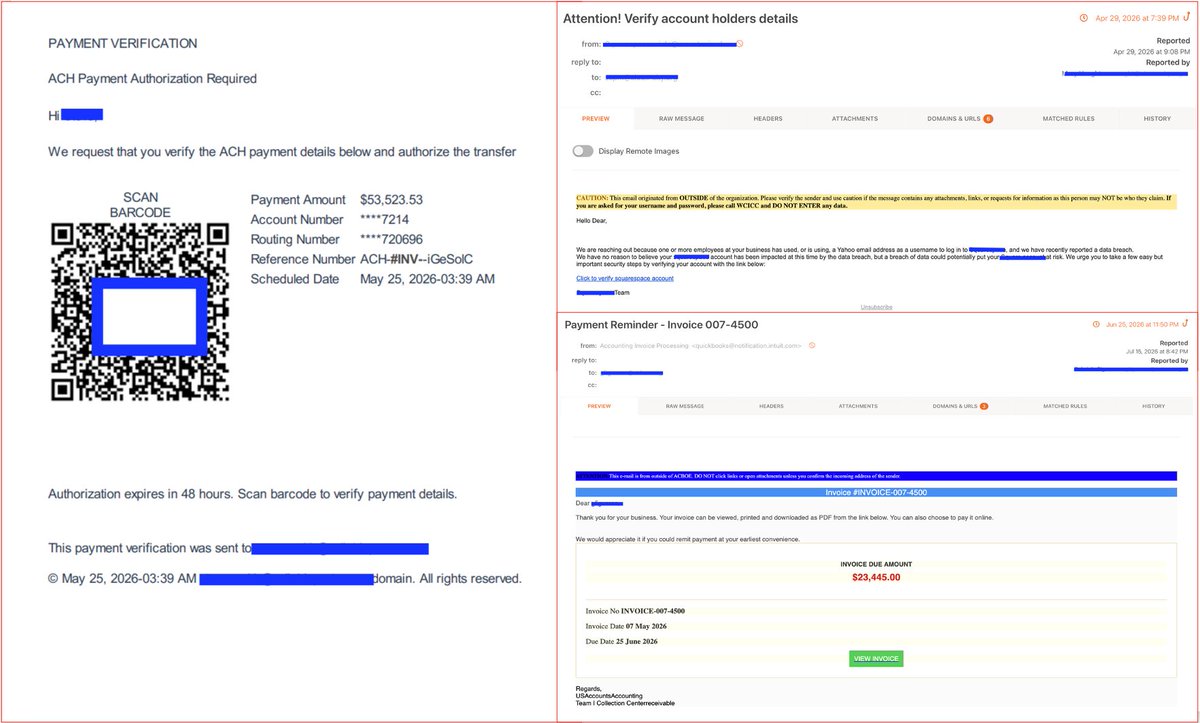
KnowBe4 ThreatLab is tracking a surge in Direct Send abuse campaigns impersonating internal senders across Microsoft 365 tenants. Lures include RFQ document requests, internal voicemail alerts, BEC invoice chains, and OneDrive-staged .url shortcut files silently redirecting to attacker-controlled infrastructure.
What is Direct Send & Why Are Attackers Exploiting It?
Direct Send is a built-in M365 feature designed so on-premises applications and multi-function printers can relay emails through a tenant's MX endpoint without authentication.
Attackers exploit this unauthenticated SMTP path by:
Performing reconnaissance to identify valid internal target emails and organizational domains.
Connecting directly to M365’s SMTP endpoint.
Injecting spoofed messages that appear to originate from trusted internal departments (e.g., IT alerts, HR updates, executive requests).
Because messages route through M335's trusted infrastructure, bypassing standard security checks and tricking both filter controls and end-users into trusting the sender.
Defensive Actions & Remediation
Enable “Reject Direct Send” Setting If your organization does not need Direct Send
Enable Strict DMARC or SPF Records: Transition your DMARC policy from p=none to p=quarantine or p=reject, and ensure strict SPF enforcement.
IoCs — block/hunt:
powerepq[.]com/uEv5wQa/yc3ASrf/index[.]html
wkssa8wo7nzoxmb[.]libertyirow[.]com[.]de/135unfashionably/
acdh4mwy[.]mvconstruoeincorporaslholtda[.]vu/jFtMxE
microcontrol-gucpbrefazgue6ad[.]z02[.]azurefd[.]net/
bverster[.]store
cwhe[.]qualitypresence[.]de
sharedocufill[.]exceltecbusinessbwpsolutions[.]vu/XRAQdm
tdto[.]prodesignscommunicate[.]de
mcbspvtlsamtd[.]vu
3347silver[.]shoplyo[.]com[.]de
folders-them9782-safe-empty-files-9w478262[.]b-cdn[.]net/folders/index
rfq1ox88[.]wisnetcomlrfnlc[.]vu/CkN3Wn
#KnowBe4ThreatLabs #DirectSend #ExchangeOnline #BEC #Phishing #ThreatIntel #M365 #Phishing
PHISH ALERT: DocuSign Lure, Dual Threat: How One Phishing Kit Targets Windows & macOS
KnowBe4 ThreatLabs is tracking a cross-platform RMM deployment campaign impersonating DocuSign’s “Electronic Signature Service” delivering ScreenConnect RMM silently to both Windows and macOS endpoints from a single delivery kit running multiple concurrent lures.
Here is how the threat actors are dropping ConnectWise ScreenConnect RMM on both Windows and macOS:
Initial Access: DocuSign lure redirects victims through short URLs to an OS-fingerprinting CAPTCHA gate.
Real-time Tracking: The landing page pings a Telegram bot to notify the attacker of incoming victims instantly.
OS Fingerprinting & BitB Overlay: JavaScript detects the visitor's platform. On Windows, it serves a Browser-in-the-Browser (BitB) "Adobe Reader Update" overlay to trick users into launching malicious .bat installers. macOS users receive a direct .pkg installer.
Execution: Silent installation scripts leverage hidden PowerShell calls on Windows or direct .pkg execution on Mac to deploy RMM agents, giving attackers remote endpoint access.
Reusable Infrastructure: Open directories reveal sibling folders with various Adobe and DocuSign lures running concurrently—confirming a highly flexible, reusable delivery kit.
IoCs — block/hunt:
captcha-loading[.]com - Landing Domain
pub-159b5913fbeb442e86754b3a836356bf[.]r2[.]dev - Payload Hosting
pub-9ee8bb8867504e9bb658a187ab29224c[.]r2[.]dev - Payload Hosting
api[.]telegram[.]org/bot8650258937:AAEAHdFRuXkvcEEeRhezk1UulL_kgGMVfzk/sendMessage - Telegram Exfil Endpoint
#KnowBe4ThreatLabs #RMM #ScreenConnect #DocuSign #BitB #Phishing #infosec #cybersecurity
Just when you think you know what to look for, threat actors find a new workaround. 🧠⚠️
New research from KnowBe4 Threat Lab breaks down how attackers use "blind redirectors" on compromised websites to hide malicious destinations from standard email scanners.
It’s a great reminder of why staying vigilant - even with emails coming from familiar or trusted platforms - is so important. https://t.co/ZPuwjOsUrT
From a Direct Link to a Staged Chain: How RMM Delivery Has Evolved
KnowBe4 ThreatLabs is tracking an RMM delivery campaign that disguises a preconfigured remote access installer as a silent Windows Defender update dropped through a staged VBS-to-PowerShell chain triggered by a Social Security Administration impersonation lure.
The email impersonates the SSA and directs the recipient to download what appears to be an electronic statement. The download delivers an archive containing eStmt_2026-08-10021254.vbs, an obfuscated script that reaches out to landoflawns[.]com/.July to pull the next stage.
Attack Chain:
The campaign opens with a phishing email impersonating the Social Security Administration. The body directs the recipient to download what appears to be an electronic statement.
Initial Access: An SSA-impersonating phishing email tricks recipients into downloading a malicious electronic statement.
Delivery: An archive containing an obfuscated script named as eStmt_2026-08-10021254.vbs is downloaded to fetch the next attack stage.
Execution and Evasion: The VBS script downloads BrowserCore.mp3, a PowerShell script disguised as media to evade detection. The encoded Final payload URL is decoded and concatenated in memory to bypass static scans and decrypt code at runtime.
Payload Drop: The payload is written to disk, bypassing User Account Control for elevated privileges.
Outcome: The installer executes silently using /quiet /norestart flags, granting the attacker covert, persistent remote access.
IoCs — block/hunt:
peacelovers[.]es/August - Domain hosting VBS payload
landoflawns[.]com/.July - Domain hosting Powershell payload
eStmt_2026-08-10021254.vbs - e84ec80f900a629e61a8af8323106dba506b0f40b6b3f295e4637251f842d7af
BrowserCore.mp3 - 77458f4302ce2ac6ed426659f4a57191b03312a90cdeebd21ad75ac1327cd0d0
#KnowBe4ThreatLabs #RMM #PhishingKit #ThreatIntel #Phishing #CyberSecurity #IOC
---
The Page Is Real. The Session Is Not: DOM-Streaming Turns Your Browser Into the Attacker's Terminal
KnowBe4 ThreatLabs is tracking an active phishing campaign targeting Google Workspace users with a technique that abandons the cloned login page entirely. The attacker streams the live DOM of the genuine Google Sign-In directly into the victim's browser. The victim sees the real page, completes a real login, and hands over a live session token without ever visiting a fake site.
The operational logic is absolute: when the visual interface is authentic because it is natively rendered, traditional detection mechanisms find no artifact to trigger an alert.
The Lure:
The attacker utilizes phishing lures disguised as "Lien Waiver" or similar documentation requests to initiate the compromise.
The Technique: DOM-Streaming AiTM:
A minimal HTML shell without login forms or cloned assets opens a persistent connection to the attacker's server. The server streams the genuine Google Sign-In page, rebuilding it inside the phishing page. Every keystroke, clicks, and inputs relayed to the attacker's session, authenticating against real Google servers and delivering the session token to the attacker.
MFA Bypass:
MFA is not intercepted. It is completed. The victim solves every challenge themselves, including reCAPTCHA, which the client bridges by rendering server-sent JPEG frames of the widget onto canvas overlays. The attacker's session is what gets authorized.
Bot Gate:
The delivery chain passes through a Cloudflare human verification challenge at the redirector domain before the victim reaches the phishing infrastructure. Automated scanners and reputation crawlers do not pass.
Clean Exit:
On completion, the victim is silently redirected to mail[.]google[.]com. Their inbox loads normally. There is no error, no suspicious page, and no moment that triggers suspicion.
#CyberSecurity
#InfoSec
#Phishing
#AiTM
#ThreatIntelligence
#IOC
Trust Is the Exploit: How the Safest-Looking Links in Your Inbox Became the Trap
KnowBe4 ThreatLabs is tracking ongoing phishing campaigns that have turned legitimate Google and Microsoft URLs into the attack surface itself.
Three variants. One principle: if the link resolves to a trusted domain, it clears the filter.
Variant 1 — Google Dynamic Subdomain Redirect: The email delivers a real google[.]com URL. A JavaScript module extracts the victim's domain on the fly and generates a familiar-looking subdomain redirect. Every target gets a unique IoC. Reputation scanners see Google. The victim lands on a harvesting page.
Variant 2 — Microsoft OAuth client_id Abuse: The link goes to login[.]microsoftonline[.]com — real endpoint, legitimate OAuth flow. The malicious parameter is the client_id. An attacker-registered OAuth app sits at the redirect URI. The authorization code arrives clean to the attacker. No suspicious domain touched.
Variant 3 — Google delivers, Microsoft closes the trap: A real google[.]com/share[.]google URL redirects straight into a Microsoft AiTM flow at login[.]microsoft[.]com's FIDO/passkey bridge endpoint. The victim clicks Google, completes what looks like a normal Microsoft sign-in, and hands over a live session token. Both hops are legitimate. Neither gets flagged.
Observed URL patterns:
google[.]com/share[.]google?q=<Random_ID>
login[.]microsoftonline[.]com/common/oauth2/v2[.]0/authorize?scope=openid&prompt=none&client_id=<malicious_clientID>&state=<userEmail>
login[.]microsoft[.]com/{id}/bridge/fido?fluent=2&cancelUrl=login[.]live[.]com/oauth20_authorize[.]srf?lc=1033&client_id=<malicious_clientID>
URL reputation is no longer a reliable signal when the URL IS Google or Microsoft. Hunt on client_id values in OAuth logs and alert on redirect chains that terminate at the FIDO bridge endpoint from non-interactive sessions.
#Phishing #AiTM #OAuthAbuse #M365 #ThreatIntel #IOC
Attackers Turning .vu Domains into a Phishing Paradise
KnowBe4 ThreatLabs has been tracking a major surge in phishing campaigns leveraging infrastructure hosted on Vanuatu’s .vu top-level domain (TLD).
The .vu registry operates with minimal administrative friction requiring no strict ID verification while offering bulk pricing and default WHOIS privacy. This creates a low-enforcement operational base for threat actors. Intelligence across flagged domains shows that only 1% faced serverhold intervention. Rather than attempting to maintain compromised domains, attackers utilize rapid rotation, with an average domain operational lifespan less than a month from registration to detection.
Activity was minimal through Feb–March, spiked hard in May, and held a sustained volume band through June–July. This isn't a test run. it's an established operation.
Technical fingerprints across the infrastructure point to #Sneaky2FA, an AiTM phishing kit. Standardized CAPTCHA gates, concentrated registrar usage, and uniform nameserver patterns are consistent with Phishing-as-a-Service scaling.
Individual domain blocks won't cut it here. Detection requires TLD-level behavioral signals: registration velocity on .vu, WHOIS privacy concentration and nameserver uniformity across newly-registered domains.
#Cybersecurity #ThreatIntel #Phishing #KnowBe4 #ThreatLabs
Weaponizing Trust: How Phishing Campaigns Pivot Through Google’s Redirect Ecosystem
KnowBe4 ThreatLabs is tracking an active phishing campaign that expands on previously documented Google redirect abuse by exploiting a wider range of Google services. Utilizing trusted themes such as Social Security lures, DocuSign requests and Microsoft voicemail alerts. The threat actors are actively targeting organizations within the manufacturing, government, finance, and non-profit sectors.
Open Redirect Exploitation (Google Infrastructure)
Google Image redirects -- images[.]google[.]com[.]bd, images[.]google[.]dj via ?q= parameter
Tag Manager redirect -- googletagmanager[.]com/debug/clearcookies?url=
Analytics endpoint -- analytics[.]google[.]com/ with lure domain in dl= parameter
Dual Execution Paths:
Once the victim clicks through the Google redirect layer, the attack splits into two separate tracks
Track A: Credential & Device Code Harvesting: Directs the victim to Adversary-in-the-Middle (AiTM) landing pages to steal Microsoft 365 credentials or device codes phishing.
Track B : (RMM Deployment): Prompts the user with fake verification popups (e.g., "Identity Verification Required") to drop a script that silently installs a ScreenConnect remote access tool.
#ThreatIntel #Phishing #Cybersecurity #KnowBe4ThreatLabs #GoogleAbuse #InfoSec #M365 #OAuth #devicecode #humanrisk
One Lure Two Traps: Inside a Dual M365 Credential & Device Code Campaign
KnowBe4 ThreatLabs is tracking a phishing campaign running two simultaneous attack paths M365 credential harvesting and device code phishing out of a single purpose-built email campaign management platform.
The lure is a spoofed Microsoft Azure "Messages Held for Review" notification. Convincing enough. But the infrastructure behind it is the story.
The platform is a web-based phishing management tool with security-themed branding, multi-campaign deployment, city-level visitor telemetry, and per-campaign traffic segmentation think operator dashboard, not a solo kit. A "contact your admin" login prompt points to a shared-access service model built for multiple operators running campaigns concurrently.
Two paths off the same lure email:
→ Path 1 — M365 Credential Harvest: pixel-perfect M365 clone, two-step username/password flow, randomized long-path URLs for detection evasion. 574 visitors across 100+ cities in 3 days.
→ Path 2 — Device Code Phish: link drops on a Cloudflare Workers page impersonating a SharePoint document shared with a pre-seeded device verification code. The victim is prompted to enter it at login[.]microsoft[.]com/device — completing the attacker's OAuth flow directly. No password captured. Session granted. 130 visitors across 40 cities in 2 days.
IoCs — block/hunt:
• excelsfest[.]com
• zone-cape-406a[.]pt-l9t4azki[.]workers[.]dev
• miryuwcjkm[.]mudeagoramesmo[.]com
Campaign management platforms commoditise multi-vector phishing operations. One operator, one dashboard, two attack paths, 700 victims in under a week.
#KnowBe4ThreatLabs #Phishing #ThreatIntel #DeviceCodePhishing #M365 #AzureAD #CredentialHarvesting #CloudflareWorkers #OAuth #MicrosoftAbuse
Clear Skies, Dark Emails: Inside the Callback Phishing Campaign Targeting Renewable Energy
KnowBe4 ThreatLabs is tracking an active callback phishing campaign targeting the renewable energy sector solar and bioenergy organisations across the US and Europe. The goal is to establish a trusted communication path to facilitate payload delivery, credential harvesting
Who Is at Risk:
Organisations whose operations involve solar power management, bioenergy processing, or renewable energy products. Targeting is deliberate and sector-specific.
Impersonation & Email Mechanics:
Threat actors register lookalike domains mimicking legitimate solar and bioenergy providers. By splitting the From and Reply-To fields, they guarantee that replies are directed to an attacker-controlled domain instead of the spoofed sender.
Evasion via Hidden Threads:
To deceive security systems, each email appends a hijacked conversation thread to the end of its body, rendering it invisible to the human eye. Inside this hidden block is a WHMCS (Web Host Manager Complete Solution) account notification from a legitimate hosting provider, featuring an active billing portal link. This deliberate anchoring to a live, reputable domain aims to bypass reputation-based security scanners.
#KnowBe4ThreatLabs #CallbackPhishing #RenewableEnergy #ThreatIntel #Phishing #BEC
PHISHING ALERT: Dream job or credential trap?
How attackers are weaponizing legitimate cloud chains for perfect BitB phishing
KnowBe4 ThreatLabs is tracking a credential harvesting campaign that strings together AWS WorkMail, Salesforce Marketing Cloud, and Render to run BitB phishing against job seekers.
The lure: personalized recruiter outreach impersonating Deloitte, American Airlines, and Lamborghini.
The CTA : "Schedule Introductory Call" routes through a legitimate Salesforce ExactTarget click-tracker, cleanly bypassing URL reputation filters.
Victims land on a brand-specific fake careers portal styled as a Calendly scheduler convincing recruiter profile on the left, Browser-in-the-Browser (BitB) fake Google OAuth popup on the right. The DOM overlay is pixel-perfect. Credentials are silently POSTed to a dedicated Render backend the moment the victim hits "Sign in."
Three brands. Three phishing portals. Three exfil endpoints. Same kit, swappable brand skins.
IoCs — Block/Hunt:
Sender Domains:
no-reply@<org[.]name>-jobs[.]awsapps[.]com
Click-Tracker:
cl[.]s12[.]exct[.]net
Phishing Landing Pages:
deloitte-careers[.]com
aa-careers[.]com
lamborghini-jobs[.]com
Credential Exfiltration Backends:
deloitteback2026[.]onrender[.]com
backw2026v3v3[.]onrender[.]com
lamboback2026[.]onrender[.]com
Chaining trusted infrastructure through legitimate services to hide malicious redirects is now table stakes. If a job email is pushing you to Google-authenticate into a scheduler — stop.
#KnowBe4ThreatLabs #Phishing #BitB #CredentialHarvesting #AWSWorkMail #SalesforceAbuse #FakeJobs #ThreatIntel
PHISH ALERT: Mandatory security training? Think again. Attackers are literally using your compliance program as a weapon against your own employees.
KnowBe4 Threat Labs is tracking a new clever phishing campaign where threat actors impersonate the internal compliance process itself. By mimicking official notifications, they trick people into completing a fake "mandatory training" requirement, entirely bypassing standard email defenses by leveraging trusted SaaS platforms.
Here is how the attack chain plays out:
1️⃣ The Bait: A phishing email lands in the inbox claiming there's an outstanding "Mandatory Employee Training" module that requires immediate action.
2️⃣ The Fake Quiz: Clicking the link sends the victim to a highly realistic, interactive compliance quiz hosted on Formstack.
3️⃣ The Harvest: Once the quiz is done, they are sent to an AI-generated landing page built on Softr. To "submit" their results, they're prompted to authenticate via a dual-path credential harvester targeting either Microsoft SSO or standard email login.
4️⃣ The Distraction: To keep things looking legit and avoid immediate suspicion, the victim is finally redirected to a real-looking Employee Handbook signing page on JotForm.
By using reputable, trusted domains like Formstack, Softr, and JotForm to host their infrastructure, the attackers completely side-step basic domain reputation filters. Meanwhile, the stolen data is exfiltrated back to an attacker-controlled C2C.
Abused platforms to monitor in this campaign: formstack[.]com, softr[.]io, jotform[.]com
When security awareness training is weaponized, standard user instinct can backfire. Make sure your teams know exactly how legitimate internal compliance training is assigned, and never blindly trust an external SaaS form asking for enterprise credentials.
#Cybersecurity #Phishing #ThreatIntel #SocialEngineering #InfoSec #IOC
When Anti-Bot Tools Go Bad: Phishers are now using ZeroBot to block security defenders.
Knowbe4 Threat Labs is tracking a highly sophisticated phishing campaign that demonstrates just how far threat actors will go to bypass automated security scanners and sandbox environments. In this campaign, attackers move beyond basic credential harvesting by integrating ZeroBot, a legitimate anti-bot service. This dual-use tool functions as a real-time defense mechanism, allowing phishers to shield their backend infrastructure from security analysis.
Here is how the attack chain breaks down:
The Lure: Victims get a spoofed email (often mimicking Microsoft/Skype voicemail notifications) with a malicious HTML attachment.
The Bait: Opening the attachment renders a fake Skype audio player. Clicking "play" redirects the victim to a multi-lure Microsoft credential harvesting page (spoofing Outlook, Teams, Excel, etc. using wildcard subdomains).
The Twist (ZeroBot): Before the phishing page fully loads, ZeroBot analyzes the connection. If it detects a security bot, a sandbox, or a researcher’s IP, it shuts the door. If it's a real human victim, it lets them through to steal their credentials.
Behind the scenes, the attackers' backend logs show they are harvesting everything in cleartext—IPs, UserAgents, emails, and passwords.
By using ZeroBot as a real-time defense mechanism for their own infrastructure, these actors are keeping their campaigns alive much longer.
#Phishing #ThreatIntel #ZeroBot #M365 #CredentialHarvesting #KnowBe4 #CyberSecurity #Microsoft365
PHISH ALERT: From a Simple Phishing Email to a Full Attack Arsenal: The Evolution of "ClickFix"
KnowBe4 Threat Labs is tracking a sophisticated phishing campaign that flips the script on traditional email security. What looks like a routine, urgency-driven OneDrive lure is actually a gateway to an entire multi-purpose hosting setup packed with credential harvesters, droppers, and spyware.
Here is exactly how the threat actors are evolving the notorious ClickFix technique to bypass modern endpoint security:
The Attack Flow Breakdown
The Lure: Targets receive an email with the subject or body claiming an urgent past-due document needs tracking: "We have an urgent past due, please review secure OneDrive attachment and let's rectify today." The email carries a malicious attachment named Review Past Due Doc. zip.
The Trigger: Inside the ZIP is a .lnk shortcut. Clicking it doesn't download a file instead, it redirects the victim to a landing page that silently injects a malicious PowerShell command directly into their clipboard.
The Social Engineering (ClickFix): A fake verification prompt tricks the user into manually pressing Win + R, pasting the command, and hitting enter. Because the victim manually interacts with the terminal, traditional attachment scanning and URL filters see nothing out of the ordinary.
DNS TXT Staging: The injected clipboard stager fetches its payload instructions using DNS TXT records. The actual payload instructions never touch HTTP requests or email headers they only exist in the DNS response at execution time.
The Attacker's Infrastructure & Payload Arsenal
Pivoting to the operator's parent domain revealed a massive hosting setup designed for large-scale operations
ZIP Archives: Obfuscated .js and .vbs scripts acting as initial droppers.
MSI Files: Masquerading as legitimate software installers (some even abusing names like ConnectWise) to drop password stealers and Remote Monitoring and Management (RMM) tools.
ISO Images: Bundled spyware that leverages background processes to maintain persistent access.
This campaign proves that threat actors are moving far beyond simple credential theft. They are playing the long game using victim-assisted execution and network-level evasion to establish full, post-compromise control over environments.
Indicators of Compromise (IOCs)
Domains:
document-auth[.]icu
italy-news[.]info
lootrioya[.]info
Key Hashes:
7b7981c99d59595fe15377df84695bb72ce0b85560a3935f930657b2d162e5ef (Review Past Due Doc. zip)
adcd15f3d6b87f84d106ea426fa824fd20c9d64f6d199ce92580884290785f30 (RMM / MSI Installer)
d7d2f0ee187549f3f4a114d716be12521fbf62d6d26e2ac23d2a32d521d08fd8 (Password Stealer)
#ThreatIntel #Phishing #Cybersecurity #ClickFix #InfoSec #KnowBe4 #M365 #OAuth
PHISH ALERT: Impostor League — Fraudulent FIFA World Cup 2026 Recruitment Campaigns Spoof Booking & Calendar/Survey Flows
As anticipation builds for the 2026 World Cup, threat actors are shifting their sights from ticket buyers to hopeful job seekers. We are tracking a highly polished recruiting and survey scam that impersonates official FIFA HR and Talent Acquisition teams, weaponizing calendar-booking and fake survey workflows to harvest credentials and steal PII.
Because candidates are in application mode they expect to share resume data and book interviews making them incredibly vulnerable.
Here is how the threat actors are running this operational matrix:
The Outreach: Targets receive highly customized emails spoofing legitimate recruitment communications. The senders abuse AWS application services and third-party desk platforms (e.g., worldcup2026fifa[.]awsapps[.]com and fifa-jobs[.]us2[.]desk365[.]com) to slip past standard domain SPF/DKIM filters.
The Booking Bait: The email bypasses standard attachments and instead presents a "low-friction" call to action, urging the victim to click "View Calendar Availability" or "Select a time here" to set up a preliminary interview.
Redirection & Fingerprinting: Clicking the button redirects the victim through transactional tracking links (like cl[.]s13[.]exct[.]net) onto highly convincing, branded landing pages like fifahiring[.]com or fifa-careerhub[.]com.
The SSO Phish: To finalise the "interview slot" on the fake scheduling portal, the victim is prompted to authenticate via Google or Microsoft Single Sign-On ("Continue with Google"). The moment they attempt to sign in, their corporate or personal login credentials are harvested.
Card Harvesting: On the survey track, the landing page displays fake Facebook-style comment sections featuring dynamic "satisfied winner" testimonials to build instant trust. Once the survey is completed, the kit redirects victims to a payment gateway (otakusignalflow[.]com) to cover a nominal "shipping fee" of €2.35 capturing raw credit card numbers, CVVs, and expiration dates in real time.
IOCs TO MONITOR AND BLOCK
worldcup2026fifa[.]awsapps[.]com
fifa-jobs[.]us2[.]desk365[.]com
fifa-careerhub[.]com
fifahiring[.]com
nowsearchnet[.]com
Canadiansoccerleague[.]org
hxxp://theresultsearch.com/
Cl[.]s13[.]exct[.]net
fifaworldcup-jobs[.]com
manidharipharma[.]online
Visionspace[.]cfd
grupotrabajopn[.]info
#ThreatIntel #Phishing #FifaWorldCup #RecruitingScams #IOC #CyberSecurity #FIFA #scam


![Kb4Threatlabs's tweet photo. Direct Send: How Attackers Weaponize Your Infrastructure Against You
KnowBe4 ThreatLab is tracking a surge in Direct Send abuse campaigns impersonating internal senders across Microsoft 365 tenants. Lures include RFQ document requests, internal voicemail alerts, BEC invoice chains, and OneDrive-staged .url shortcut files silently redirecting to attacker-controlled infrastructure.
What is Direct Send & Why Are Attackers Exploiting It?
Direct Send is a built-in M365 feature designed so on-premises applications and multi-function printers can relay emails through a tenant's MX endpoint without authentication.
Attackers exploit this unauthenticated SMTP path by:
Performing reconnaissance to identify valid internal target emails and organizational domains.
Connecting directly to M365’s SMTP endpoint.
Injecting spoofed messages that appear to originate from trusted internal departments (e.g., IT alerts, HR updates, executive requests).
Because messages route through M335's trusted infrastructure, bypassing standard security checks and tricking both filter controls and end-users into trusting the sender.
Defensive Actions & Remediation
Enable “Reject Direct Send” Setting If your organization does not need Direct Send
Enable Strict DMARC or SPF Records: Transition your DMARC policy from p=none to p=quarantine or p=reject, and ensure strict SPF enforcement.
IoCs — block/hunt:
powerepq[.]com/uEv5wQa/yc3ASrf/index[.]html
wkssa8wo7nzoxmb[.]libertyirow[.]com[.]de/135unfashionably/
acdh4mwy[.]mvconstruoeincorporaslholtda[.]vu/jFtMxE
microcontrol-gucpbrefazgue6ad[.]z02[.]azurefd[.]net/
bverster[.]store
cwhe[.]qualitypresence[.]de
sharedocufill[.]exceltecbusinessbwpsolutions[.]vu/XRAQdm
tdto[.]prodesignscommunicate[.]de
mcbspvtlsamtd[.]vu
3347silver[.]shoplyo[.]com[.]de
folders-them9782-safe-empty-files-9w478262[.]b-cdn[.]net/folders/index
rfq1ox88[.]wisnetcomlrfnlc[.]vu/CkN3Wn
#KnowBe4ThreatLabs #DirectSend #ExchangeOnline #BEC #Phishing #ThreatIntel #M365 #Phishing](https://pbs.twimg.com/media/HQD5KnXbQAEN7ua.jpg)
![Kb4Threatlabs's tweet photo. Direct Send: How Attackers Weaponize Your Infrastructure Against You
KnowBe4 ThreatLab is tracking a surge in Direct Send abuse campaigns impersonating internal senders across Microsoft 365 tenants. Lures include RFQ document requests, internal voicemail alerts, BEC invoice chains, and OneDrive-staged .url shortcut files silently redirecting to attacker-controlled infrastructure.
What is Direct Send & Why Are Attackers Exploiting It?
Direct Send is a built-in M365 feature designed so on-premises applications and multi-function printers can relay emails through a tenant's MX endpoint without authentication.
Attackers exploit this unauthenticated SMTP path by:
Performing reconnaissance to identify valid internal target emails and organizational domains.
Connecting directly to M365’s SMTP endpoint.
Injecting spoofed messages that appear to originate from trusted internal departments (e.g., IT alerts, HR updates, executive requests).
Because messages route through M335's trusted infrastructure, bypassing standard security checks and tricking both filter controls and end-users into trusting the sender.
Defensive Actions & Remediation
Enable “Reject Direct Send” Setting If your organization does not need Direct Send
Enable Strict DMARC or SPF Records: Transition your DMARC policy from p=none to p=quarantine or p=reject, and ensure strict SPF enforcement.
IoCs — block/hunt:
powerepq[.]com/uEv5wQa/yc3ASrf/index[.]html
wkssa8wo7nzoxmb[.]libertyirow[.]com[.]de/135unfashionably/
acdh4mwy[.]mvconstruoeincorporaslholtda[.]vu/jFtMxE
microcontrol-gucpbrefazgue6ad[.]z02[.]azurefd[.]net/
bverster[.]store
cwhe[.]qualitypresence[.]de
sharedocufill[.]exceltecbusinessbwpsolutions[.]vu/XRAQdm
tdto[.]prodesignscommunicate[.]de
mcbspvtlsamtd[.]vu
3347silver[.]shoplyo[.]com[.]de
folders-them9782-safe-empty-files-9w478262[.]b-cdn[.]net/folders/index
rfq1ox88[.]wisnetcomlrfnlc[.]vu/CkN3Wn
#KnowBe4ThreatLabs #DirectSend #ExchangeOnline #BEC #Phishing #ThreatIntel #M365 #Phishing](https://pbs.twimg.com/media/HQD5IAQbQAAwoPv.jpg)
![Kb4Threatlabs's tweet photo. PHISH ALERT: DocuSign Lure, Dual Threat: How One Phishing Kit Targets Windows & macOS
KnowBe4 ThreatLabs is tracking a cross-platform RMM deployment campaign impersonating DocuSign’s “Electronic Signature Service” delivering ScreenConnect RMM silently to both Windows and macOS endpoints from a single delivery kit running multiple concurrent lures.
Here is how the threat actors are dropping ConnectWise ScreenConnect RMM on both Windows and macOS:
Initial Access: DocuSign lure redirects victims through short URLs to an OS-fingerprinting CAPTCHA gate.
Real-time Tracking: The landing page pings a Telegram bot to notify the attacker of incoming victims instantly.
OS Fingerprinting & BitB Overlay: JavaScript detects the visitor's platform. On Windows, it serves a Browser-in-the-Browser (BitB) "Adobe Reader Update" overlay to trick users into launching malicious .bat installers. macOS users receive a direct .pkg installer.
Execution: Silent installation scripts leverage hidden PowerShell calls on Windows or direct .pkg execution on Mac to deploy RMM agents, giving attackers remote endpoint access.
Reusable Infrastructure: Open directories reveal sibling folders with various Adobe and DocuSign lures running concurrently—confirming a highly flexible, reusable delivery kit.
IoCs — block/hunt:
captcha-loading[.]com - Landing Domain
pub-159b5913fbeb442e86754b3a836356bf[.]r2[.]dev - Payload Hosting
pub-9ee8bb8867504e9bb658a187ab29224c[.]r2[.]dev - Payload Hosting
api[.]telegram[.]org/bot8650258937:AAEAHdFRuXkvcEEeRhezk1UulL_kgGMVfzk/sendMessage - Telegram Exfil Endpoint
#KnowBe4ThreatLabs #RMM #ScreenConnect #DocuSign #BitB #Phishing #infosec #cybersecurity](https://pbs.twimg.com/media/HPsYjuWbwAAaZM1.jpg)
![Kb4Threatlabs's tweet photo. PHISH ALERT: DocuSign Lure, Dual Threat: How One Phishing Kit Targets Windows & macOS
KnowBe4 ThreatLabs is tracking a cross-platform RMM deployment campaign impersonating DocuSign’s “Electronic Signature Service” delivering ScreenConnect RMM silently to both Windows and macOS endpoints from a single delivery kit running multiple concurrent lures.
Here is how the threat actors are dropping ConnectWise ScreenConnect RMM on both Windows and macOS:
Initial Access: DocuSign lure redirects victims through short URLs to an OS-fingerprinting CAPTCHA gate.
Real-time Tracking: The landing page pings a Telegram bot to notify the attacker of incoming victims instantly.
OS Fingerprinting & BitB Overlay: JavaScript detects the visitor's platform. On Windows, it serves a Browser-in-the-Browser (BitB) "Adobe Reader Update" overlay to trick users into launching malicious .bat installers. macOS users receive a direct .pkg installer.
Execution: Silent installation scripts leverage hidden PowerShell calls on Windows or direct .pkg execution on Mac to deploy RMM agents, giving attackers remote endpoint access.
Reusable Infrastructure: Open directories reveal sibling folders with various Adobe and DocuSign lures running concurrently—confirming a highly flexible, reusable delivery kit.
IoCs — block/hunt:
captcha-loading[.]com - Landing Domain
pub-159b5913fbeb442e86754b3a836356bf[.]r2[.]dev - Payload Hosting
pub-9ee8bb8867504e9bb658a187ab29224c[.]r2[.]dev - Payload Hosting
api[.]telegram[.]org/bot8650258937:AAEAHdFRuXkvcEEeRhezk1UulL_kgGMVfzk/sendMessage - Telegram Exfil Endpoint
#KnowBe4ThreatLabs #RMM #ScreenConnect #DocuSign #BitB #Phishing #infosec #cybersecurity](https://pbs.twimg.com/media/HPsYihAaAAAzIWH.jpg)
![Kb4Threatlabs's tweet photo. PHISH ALERT: DocuSign Lure, Dual Threat: How One Phishing Kit Targets Windows & macOS
KnowBe4 ThreatLabs is tracking a cross-platform RMM deployment campaign impersonating DocuSign’s “Electronic Signature Service” delivering ScreenConnect RMM silently to both Windows and macOS endpoints from a single delivery kit running multiple concurrent lures.
Here is how the threat actors are dropping ConnectWise ScreenConnect RMM on both Windows and macOS:
Initial Access: DocuSign lure redirects victims through short URLs to an OS-fingerprinting CAPTCHA gate.
Real-time Tracking: The landing page pings a Telegram bot to notify the attacker of incoming victims instantly.
OS Fingerprinting & BitB Overlay: JavaScript detects the visitor's platform. On Windows, it serves a Browser-in-the-Browser (BitB) "Adobe Reader Update" overlay to trick users into launching malicious .bat installers. macOS users receive a direct .pkg installer.
Execution: Silent installation scripts leverage hidden PowerShell calls on Windows or direct .pkg execution on Mac to deploy RMM agents, giving attackers remote endpoint access.
Reusable Infrastructure: Open directories reveal sibling folders with various Adobe and DocuSign lures running concurrently—confirming a highly flexible, reusable delivery kit.
IoCs — block/hunt:
captcha-loading[.]com - Landing Domain
pub-159b5913fbeb442e86754b3a836356bf[.]r2[.]dev - Payload Hosting
pub-9ee8bb8867504e9bb658a187ab29224c[.]r2[.]dev - Payload Hosting
api[.]telegram[.]org/bot8650258937:AAEAHdFRuXkvcEEeRhezk1UulL_kgGMVfzk/sendMessage - Telegram Exfil Endpoint
#KnowBe4ThreatLabs #RMM #ScreenConnect #DocuSign #BitB #Phishing #infosec #cybersecurity](https://pbs.twimg.com/media/HPsYgw9b0AAPZ2H.jpg)


![Kb4Threatlabs's tweet photo. From a Direct Link to a Staged Chain: How RMM Delivery Has Evolved
KnowBe4 ThreatLabs is tracking an RMM delivery campaign that disguises a preconfigured remote access installer as a silent Windows Defender update dropped through a staged VBS-to-PowerShell chain triggered by a Social Security Administration impersonation lure.
The email impersonates the SSA and directs the recipient to download what appears to be an electronic statement. The download delivers an archive containing eStmt_2026-08-10021254.vbs, an obfuscated script that reaches out to landoflawns[.]com/.July to pull the next stage.
Attack Chain:
The campaign opens with a phishing email impersonating the Social Security Administration. The body directs the recipient to download what appears to be an electronic statement.
Initial Access: An SSA-impersonating phishing email tricks recipients into downloading a malicious electronic statement.
Delivery: An archive containing an obfuscated script named as eStmt_2026-08-10021254.vbs is downloaded to fetch the next attack stage.
Execution and Evasion: The VBS script downloads BrowserCore.mp3, a PowerShell script disguised as media to evade detection. The encoded Final payload URL is decoded and concatenated in memory to bypass static scans and decrypt code at runtime.
Payload Drop: The payload is written to disk, bypassing User Account Control for elevated privileges.
Outcome: The installer executes silently using /quiet /norestart flags, granting the attacker covert, persistent remote access.
IoCs — block/hunt:
peacelovers[.]es/August - Domain hosting VBS payload
landoflawns[.]com/.July - Domain hosting Powershell payload
eStmt_2026-08-10021254.vbs - e84ec80f900a629e61a8af8323106dba506b0f40b6b3f295e4637251f842d7af
BrowserCore.mp3 - 77458f4302ce2ac6ed426659f4a57191b03312a90cdeebd21ad75ac1327cd0d0
#KnowBe4ThreatLabs #RMM #PhishingKit #ThreatIntel #Phishing #CyberSecurity #IOC
---](https://pbs.twimg.com/media/HPXNz4xb0AEMfDb.png)
![Kb4Threatlabs's tweet photo. From a Direct Link to a Staged Chain: How RMM Delivery Has Evolved
KnowBe4 ThreatLabs is tracking an RMM delivery campaign that disguises a preconfigured remote access installer as a silent Windows Defender update dropped through a staged VBS-to-PowerShell chain triggered by a Social Security Administration impersonation lure.
The email impersonates the SSA and directs the recipient to download what appears to be an electronic statement. The download delivers an archive containing eStmt_2026-08-10021254.vbs, an obfuscated script that reaches out to landoflawns[.]com/.July to pull the next stage.
Attack Chain:
The campaign opens with a phishing email impersonating the Social Security Administration. The body directs the recipient to download what appears to be an electronic statement.
Initial Access: An SSA-impersonating phishing email tricks recipients into downloading a malicious electronic statement.
Delivery: An archive containing an obfuscated script named as eStmt_2026-08-10021254.vbs is downloaded to fetch the next attack stage.
Execution and Evasion: The VBS script downloads BrowserCore.mp3, a PowerShell script disguised as media to evade detection. The encoded Final payload URL is decoded and concatenated in memory to bypass static scans and decrypt code at runtime.
Payload Drop: The payload is written to disk, bypassing User Account Control for elevated privileges.
Outcome: The installer executes silently using /quiet /norestart flags, granting the attacker covert, persistent remote access.
IoCs — block/hunt:
peacelovers[.]es/August - Domain hosting VBS payload
landoflawns[.]com/.July - Domain hosting Powershell payload
eStmt_2026-08-10021254.vbs - e84ec80f900a629e61a8af8323106dba506b0f40b6b3f295e4637251f842d7af
BrowserCore.mp3 - 77458f4302ce2ac6ed426659f4a57191b03312a90cdeebd21ad75ac1327cd0d0
#KnowBe4ThreatLabs #RMM #PhishingKit #ThreatIntel #Phishing #CyberSecurity #IOC
---](https://pbs.twimg.com/media/HPXNyY2bcAAfxaK.jpg)
![Kb4Threatlabs's tweet photo. From a Direct Link to a Staged Chain: How RMM Delivery Has Evolved
KnowBe4 ThreatLabs is tracking an RMM delivery campaign that disguises a preconfigured remote access installer as a silent Windows Defender update dropped through a staged VBS-to-PowerShell chain triggered by a Social Security Administration impersonation lure.
The email impersonates the SSA and directs the recipient to download what appears to be an electronic statement. The download delivers an archive containing eStmt_2026-08-10021254.vbs, an obfuscated script that reaches out to landoflawns[.]com/.July to pull the next stage.
Attack Chain:
The campaign opens with a phishing email impersonating the Social Security Administration. The body directs the recipient to download what appears to be an electronic statement.
Initial Access: An SSA-impersonating phishing email tricks recipients into downloading a malicious electronic statement.
Delivery: An archive containing an obfuscated script named as eStmt_2026-08-10021254.vbs is downloaded to fetch the next attack stage.
Execution and Evasion: The VBS script downloads BrowserCore.mp3, a PowerShell script disguised as media to evade detection. The encoded Final payload URL is decoded and concatenated in memory to bypass static scans and decrypt code at runtime.
Payload Drop: The payload is written to disk, bypassing User Account Control for elevated privileges.
Outcome: The installer executes silently using /quiet /norestart flags, granting the attacker covert, persistent remote access.
IoCs — block/hunt:
peacelovers[.]es/August - Domain hosting VBS payload
landoflawns[.]com/.July - Domain hosting Powershell payload
eStmt_2026-08-10021254.vbs - e84ec80f900a629e61a8af8323106dba506b0f40b6b3f295e4637251f842d7af
BrowserCore.mp3 - 77458f4302ce2ac6ed426659f4a57191b03312a90cdeebd21ad75ac1327cd0d0
#KnowBe4ThreatLabs #RMM #PhishingKit #ThreatIntel #Phishing #CyberSecurity #IOC
---](https://pbs.twimg.com/media/HPXNwlwbcAAs0HQ.jpg)
![Kb4Threatlabs's tweet photo. The Page Is Real. The Session Is Not: DOM-Streaming Turns Your Browser Into the Attacker's Terminal
KnowBe4 ThreatLabs is tracking an active phishing campaign targeting Google Workspace users with a technique that abandons the cloned login page entirely. The attacker streams the live DOM of the genuine Google Sign-In directly into the victim's browser. The victim sees the real page, completes a real login, and hands over a live session token without ever visiting a fake site.
The operational logic is absolute: when the visual interface is authentic because it is natively rendered, traditional detection mechanisms find no artifact to trigger an alert.
The Lure:
The attacker utilizes phishing lures disguised as "Lien Waiver" or similar documentation requests to initiate the compromise.
The Technique: DOM-Streaming AiTM:
A minimal HTML shell without login forms or cloned assets opens a persistent connection to the attacker's server. The server streams the genuine Google Sign-In page, rebuilding it inside the phishing page. Every keystroke, clicks, and inputs relayed to the attacker's session, authenticating against real Google servers and delivering the session token to the attacker.
MFA Bypass:
MFA is not intercepted. It is completed. The victim solves every challenge themselves, including reCAPTCHA, which the client bridges by rendering server-sent JPEG frames of the widget onto canvas overlays. The attacker's session is what gets authorized.
Bot Gate:
The delivery chain passes through a Cloudflare human verification challenge at the redirector domain before the victim reaches the phishing infrastructure. Automated scanners and reputation crawlers do not pass.
Clean Exit:
On completion, the victim is silently redirected to mail[.]google[.]com. Their inbox loads normally. There is no error, no suspicious page, and no moment that triggers suspicion.
#CyberSecurity
#InfoSec
#Phishing
#AiTM
#ThreatIntelligence
#IOC](https://pbs.twimg.com/media/HPHtHerasAAGiM_.jpg)
![Kb4Threatlabs's tweet photo. The Page Is Real. The Session Is Not: DOM-Streaming Turns Your Browser Into the Attacker's Terminal
KnowBe4 ThreatLabs is tracking an active phishing campaign targeting Google Workspace users with a technique that abandons the cloned login page entirely. The attacker streams the live DOM of the genuine Google Sign-In directly into the victim's browser. The victim sees the real page, completes a real login, and hands over a live session token without ever visiting a fake site.
The operational logic is absolute: when the visual interface is authentic because it is natively rendered, traditional detection mechanisms find no artifact to trigger an alert.
The Lure:
The attacker utilizes phishing lures disguised as "Lien Waiver" or similar documentation requests to initiate the compromise.
The Technique: DOM-Streaming AiTM:
A minimal HTML shell without login forms or cloned assets opens a persistent connection to the attacker's server. The server streams the genuine Google Sign-In page, rebuilding it inside the phishing page. Every keystroke, clicks, and inputs relayed to the attacker's session, authenticating against real Google servers and delivering the session token to the attacker.
MFA Bypass:
MFA is not intercepted. It is completed. The victim solves every challenge themselves, including reCAPTCHA, which the client bridges by rendering server-sent JPEG frames of the widget onto canvas overlays. The attacker's session is what gets authorized.
Bot Gate:
The delivery chain passes through a Cloudflare human verification challenge at the redirector domain before the victim reaches the phishing infrastructure. Automated scanners and reputation crawlers do not pass.
Clean Exit:
On completion, the victim is silently redirected to mail[.]google[.]com. Their inbox loads normally. There is no error, no suspicious page, and no moment that triggers suspicion.
#CyberSecurity
#InfoSec
#Phishing
#AiTM
#ThreatIntelligence
#IOC](https://pbs.twimg.com/media/HPHtGN5bEAEiEWG.jpg)
![Kb4Threatlabs's tweet photo. The Page Is Real. The Session Is Not: DOM-Streaming Turns Your Browser Into the Attacker's Terminal
KnowBe4 ThreatLabs is tracking an active phishing campaign targeting Google Workspace users with a technique that abandons the cloned login page entirely. The attacker streams the live DOM of the genuine Google Sign-In directly into the victim's browser. The victim sees the real page, completes a real login, and hands over a live session token without ever visiting a fake site.
The operational logic is absolute: when the visual interface is authentic because it is natively rendered, traditional detection mechanisms find no artifact to trigger an alert.
The Lure:
The attacker utilizes phishing lures disguised as "Lien Waiver" or similar documentation requests to initiate the compromise.
The Technique: DOM-Streaming AiTM:
A minimal HTML shell without login forms or cloned assets opens a persistent connection to the attacker's server. The server streams the genuine Google Sign-In page, rebuilding it inside the phishing page. Every keystroke, clicks, and inputs relayed to the attacker's session, authenticating against real Google servers and delivering the session token to the attacker.
MFA Bypass:
MFA is not intercepted. It is completed. The victim solves every challenge themselves, including reCAPTCHA, which the client bridges by rendering server-sent JPEG frames of the widget onto canvas overlays. The attacker's session is what gets authorized.
Bot Gate:
The delivery chain passes through a Cloudflare human verification challenge at the redirector domain before the victim reaches the phishing infrastructure. Automated scanners and reputation crawlers do not pass.
Clean Exit:
On completion, the victim is silently redirected to mail[.]google[.]com. Their inbox loads normally. There is no error, no suspicious page, and no moment that triggers suspicion.
#CyberSecurity
#InfoSec
#Phishing
#AiTM
#ThreatIntelligence
#IOC](https://pbs.twimg.com/media/HPHtEfgbwAADc1K.jpg)
![Kb4Threatlabs's tweet photo. Trust Is the Exploit: How the Safest-Looking Links in Your Inbox Became the Trap
KnowBe4 ThreatLabs is tracking ongoing phishing campaigns that have turned legitimate Google and Microsoft URLs into the attack surface itself.
Three variants. One principle: if the link resolves to a trusted domain, it clears the filter.
Variant 1 — Google Dynamic Subdomain Redirect: The email delivers a real google[.]com URL. A JavaScript module extracts the victim's domain on the fly and generates a familiar-looking subdomain redirect. Every target gets a unique IoC. Reputation scanners see Google. The victim lands on a harvesting page.
Variant 2 — Microsoft OAuth client_id Abuse: The link goes to login[.]microsoftonline[.]com — real endpoint, legitimate OAuth flow. The malicious parameter is the client_id. An attacker-registered OAuth app sits at the redirect URI. The authorization code arrives clean to the attacker. No suspicious domain touched.
Variant 3 — Google delivers, Microsoft closes the trap: A real google[.]com/share[.]google URL redirects straight into a Microsoft AiTM flow at login[.]microsoft[.]com's FIDO/passkey bridge endpoint. The victim clicks Google, completes what looks like a normal Microsoft sign-in, and hands over a live session token. Both hops are legitimate. Neither gets flagged.
Observed URL patterns:
google[.]com/share[.]google?q=<Random_ID>
login[.]microsoftonline[.]com/common/oauth2/v2[.]0/authorize?scope=openid&prompt=none&client_id=<malicious_clientID>&state=<userEmail>
login[.]microsoft[.]com/{id}/bridge/fido?fluent=2&cancelUrl=login[.]live[.]com/oauth20_authorize[.]srf?lc=1033&client_id=<malicious_clientID>
URL reputation is no longer a reliable signal when the URL IS Google or Microsoft. Hunt on client_id values in OAuth logs and alert on redirect chains that terminate at the FIDO bridge endpoint from non-interactive sessions.
#Phishing #AiTM #OAuthAbuse #M365 #ThreatIntel #IOC](https://pbs.twimg.com/media/HOj5PhgbMAAyj79.jpg)
![Kb4Threatlabs's tweet photo. Trust Is the Exploit: How the Safest-Looking Links in Your Inbox Became the Trap
KnowBe4 ThreatLabs is tracking ongoing phishing campaigns that have turned legitimate Google and Microsoft URLs into the attack surface itself.
Three variants. One principle: if the link resolves to a trusted domain, it clears the filter.
Variant 1 — Google Dynamic Subdomain Redirect: The email delivers a real google[.]com URL. A JavaScript module extracts the victim's domain on the fly and generates a familiar-looking subdomain redirect. Every target gets a unique IoC. Reputation scanners see Google. The victim lands on a harvesting page.
Variant 2 — Microsoft OAuth client_id Abuse: The link goes to login[.]microsoftonline[.]com — real endpoint, legitimate OAuth flow. The malicious parameter is the client_id. An attacker-registered OAuth app sits at the redirect URI. The authorization code arrives clean to the attacker. No suspicious domain touched.
Variant 3 — Google delivers, Microsoft closes the trap: A real google[.]com/share[.]google URL redirects straight into a Microsoft AiTM flow at login[.]microsoft[.]com's FIDO/passkey bridge endpoint. The victim clicks Google, completes what looks like a normal Microsoft sign-in, and hands over a live session token. Both hops are legitimate. Neither gets flagged.
Observed URL patterns:
google[.]com/share[.]google?q=<Random_ID>
login[.]microsoftonline[.]com/common/oauth2/v2[.]0/authorize?scope=openid&prompt=none&client_id=<malicious_clientID>&state=<userEmail>
login[.]microsoft[.]com/{id}/bridge/fido?fluent=2&cancelUrl=login[.]live[.]com/oauth20_authorize[.]srf?lc=1033&client_id=<malicious_clientID>
URL reputation is no longer a reliable signal when the URL IS Google or Microsoft. Hunt on client_id values in OAuth logs and alert on redirect chains that terminate at the FIDO bridge endpoint from non-interactive sessions.
#Phishing #AiTM #OAuthAbuse #M365 #ThreatIntel #IOC](https://pbs.twimg.com/media/HOj5OnkaAAAuMcU.jpg)


![Kb4Threatlabs's tweet photo. Weaponizing Trust: How Phishing Campaigns Pivot Through Google’s Redirect Ecosystem
KnowBe4 ThreatLabs is tracking an active phishing campaign that expands on previously documented Google redirect abuse by exploiting a wider range of Google services. Utilizing trusted themes such as Social Security lures, DocuSign requests and Microsoft voicemail alerts. The threat actors are actively targeting organizations within the manufacturing, government, finance, and non-profit sectors.
Open Redirect Exploitation (Google Infrastructure)
Google Image redirects -- images[.]google[.]com[.]bd, images[.]google[.]dj via ?q= parameter
Tag Manager redirect -- googletagmanager[.]com/debug/clearcookies?url=
Analytics endpoint -- analytics[.]google[.]com/ with lure domain in dl= parameter
Dual Execution Paths:
Once the victim clicks through the Google redirect layer, the attack splits into two separate tracks
Track A: Credential & Device Code Harvesting: Directs the victim to Adversary-in-the-Middle (AiTM) landing pages to steal Microsoft 365 credentials or device codes phishing.
Track B : (RMM Deployment): Prompts the user with fake verification popups (e.g., "Identity Verification Required") to drop a script that silently installs a ScreenConnect remote access tool.
#ThreatIntel #Phishing #Cybersecurity #KnowBe4ThreatLabs #GoogleAbuse #InfoSec #M365 #OAuth #devicecode #humanrisk](https://pbs.twimg.com/media/HNwjZ9gawAAvIXg.jpg)
![Kb4Threatlabs's tweet photo. Weaponizing Trust: How Phishing Campaigns Pivot Through Google’s Redirect Ecosystem
KnowBe4 ThreatLabs is tracking an active phishing campaign that expands on previously documented Google redirect abuse by exploiting a wider range of Google services. Utilizing trusted themes such as Social Security lures, DocuSign requests and Microsoft voicemail alerts. The threat actors are actively targeting organizations within the manufacturing, government, finance, and non-profit sectors.
Open Redirect Exploitation (Google Infrastructure)
Google Image redirects -- images[.]google[.]com[.]bd, images[.]google[.]dj via ?q= parameter
Tag Manager redirect -- googletagmanager[.]com/debug/clearcookies?url=
Analytics endpoint -- analytics[.]google[.]com/ with lure domain in dl= parameter
Dual Execution Paths:
Once the victim clicks through the Google redirect layer, the attack splits into two separate tracks
Track A: Credential & Device Code Harvesting: Directs the victim to Adversary-in-the-Middle (AiTM) landing pages to steal Microsoft 365 credentials or device codes phishing.
Track B : (RMM Deployment): Prompts the user with fake verification popups (e.g., "Identity Verification Required") to drop a script that silently installs a ScreenConnect remote access tool.
#ThreatIntel #Phishing #Cybersecurity #KnowBe4ThreatLabs #GoogleAbuse #InfoSec #M365 #OAuth #devicecode #humanrisk](https://pbs.twimg.com/media/HNwjY2gaUAEW2vU.jpg)
![Kb4Threatlabs's tweet photo. Weaponizing Trust: How Phishing Campaigns Pivot Through Google’s Redirect Ecosystem
KnowBe4 ThreatLabs is tracking an active phishing campaign that expands on previously documented Google redirect abuse by exploiting a wider range of Google services. Utilizing trusted themes such as Social Security lures, DocuSign requests and Microsoft voicemail alerts. The threat actors are actively targeting organizations within the manufacturing, government, finance, and non-profit sectors.
Open Redirect Exploitation (Google Infrastructure)
Google Image redirects -- images[.]google[.]com[.]bd, images[.]google[.]dj via ?q= parameter
Tag Manager redirect -- googletagmanager[.]com/debug/clearcookies?url=
Analytics endpoint -- analytics[.]google[.]com/ with lure domain in dl= parameter
Dual Execution Paths:
Once the victim clicks through the Google redirect layer, the attack splits into two separate tracks
Track A: Credential & Device Code Harvesting: Directs the victim to Adversary-in-the-Middle (AiTM) landing pages to steal Microsoft 365 credentials or device codes phishing.
Track B : (RMM Deployment): Prompts the user with fake verification popups (e.g., "Identity Verification Required") to drop a script that silently installs a ScreenConnect remote access tool.
#ThreatIntel #Phishing #Cybersecurity #KnowBe4ThreatLabs #GoogleAbuse #InfoSec #M365 #OAuth #devicecode #humanrisk](https://pbs.twimg.com/media/HNwjWrza4AEU56P.jpg)
![Kb4Threatlabs's tweet photo. One Lure Two Traps: Inside a Dual M365 Credential & Device Code Campaign
KnowBe4 ThreatLabs is tracking a phishing campaign running two simultaneous attack paths M365 credential harvesting and device code phishing out of a single purpose-built email campaign management platform.
The lure is a spoofed Microsoft Azure "Messages Held for Review" notification. Convincing enough. But the infrastructure behind it is the story.
The platform is a web-based phishing management tool with security-themed branding, multi-campaign deployment, city-level visitor telemetry, and per-campaign traffic segmentation think operator dashboard, not a solo kit. A "contact your admin" login prompt points to a shared-access service model built for multiple operators running campaigns concurrently.
Two paths off the same lure email:
→ Path 1 — M365 Credential Harvest: pixel-perfect M365 clone, two-step username/password flow, randomized long-path URLs for detection evasion. 574 visitors across 100+ cities in 3 days.
→ Path 2 — Device Code Phish: link drops on a Cloudflare Workers page impersonating a SharePoint document shared with a pre-seeded device verification code. The victim is prompted to enter it at login[.]microsoft[.]com/device — completing the attacker's OAuth flow directly. No password captured. Session granted. 130 visitors across 40 cities in 2 days.
IoCs — block/hunt:
• excelsfest[.]com
• zone-cape-406a[.]pt-l9t4azki[.]workers[.]dev
• miryuwcjkm[.]mudeagoramesmo[.]com
Campaign management platforms commoditise multi-vector phishing operations. One operator, one dashboard, two attack paths, 700 victims in under a week.
#KnowBe4ThreatLabs #Phishing #ThreatIntel #DeviceCodePhishing #M365 #AzureAD #CredentialHarvesting #CloudflareWorkers #OAuth #MicrosoftAbuse](https://pbs.twimg.com/media/HNWm_jla0AEh27_.jpg)
![Kb4Threatlabs's tweet photo. One Lure Two Traps: Inside a Dual M365 Credential & Device Code Campaign
KnowBe4 ThreatLabs is tracking a phishing campaign running two simultaneous attack paths M365 credential harvesting and device code phishing out of a single purpose-built email campaign management platform.
The lure is a spoofed Microsoft Azure "Messages Held for Review" notification. Convincing enough. But the infrastructure behind it is the story.
The platform is a web-based phishing management tool with security-themed branding, multi-campaign deployment, city-level visitor telemetry, and per-campaign traffic segmentation think operator dashboard, not a solo kit. A "contact your admin" login prompt points to a shared-access service model built for multiple operators running campaigns concurrently.
Two paths off the same lure email:
→ Path 1 — M365 Credential Harvest: pixel-perfect M365 clone, two-step username/password flow, randomized long-path URLs for detection evasion. 574 visitors across 100+ cities in 3 days.
→ Path 2 — Device Code Phish: link drops on a Cloudflare Workers page impersonating a SharePoint document shared with a pre-seeded device verification code. The victim is prompted to enter it at login[.]microsoft[.]com/device — completing the attacker's OAuth flow directly. No password captured. Session granted. 130 visitors across 40 cities in 2 days.
IoCs — block/hunt:
• excelsfest[.]com
• zone-cape-406a[.]pt-l9t4azki[.]workers[.]dev
• miryuwcjkm[.]mudeagoramesmo[.]com
Campaign management platforms commoditise multi-vector phishing operations. One operator, one dashboard, two attack paths, 700 victims in under a week.
#KnowBe4ThreatLabs #Phishing #ThreatIntel #DeviceCodePhishing #M365 #AzureAD #CredentialHarvesting #CloudflareWorkers #OAuth #MicrosoftAbuse](https://pbs.twimg.com/media/HNWm-CaaQAAoyZG.jpg)
![Kb4Threatlabs's tweet photo. One Lure Two Traps: Inside a Dual M365 Credential & Device Code Campaign
KnowBe4 ThreatLabs is tracking a phishing campaign running two simultaneous attack paths M365 credential harvesting and device code phishing out of a single purpose-built email campaign management platform.
The lure is a spoofed Microsoft Azure "Messages Held for Review" notification. Convincing enough. But the infrastructure behind it is the story.
The platform is a web-based phishing management tool with security-themed branding, multi-campaign deployment, city-level visitor telemetry, and per-campaign traffic segmentation think operator dashboard, not a solo kit. A "contact your admin" login prompt points to a shared-access service model built for multiple operators running campaigns concurrently.
Two paths off the same lure email:
→ Path 1 — M365 Credential Harvest: pixel-perfect M365 clone, two-step username/password flow, randomized long-path URLs for detection evasion. 574 visitors across 100+ cities in 3 days.
→ Path 2 — Device Code Phish: link drops on a Cloudflare Workers page impersonating a SharePoint document shared with a pre-seeded device verification code. The victim is prompted to enter it at login[.]microsoft[.]com/device — completing the attacker's OAuth flow directly. No password captured. Session granted. 130 visitors across 40 cities in 2 days.
IoCs — block/hunt:
• excelsfest[.]com
• zone-cape-406a[.]pt-l9t4azki[.]workers[.]dev
• miryuwcjkm[.]mudeagoramesmo[.]com
Campaign management platforms commoditise multi-vector phishing operations. One operator, one dashboard, two attack paths, 700 victims in under a week.
#KnowBe4ThreatLabs #Phishing #ThreatIntel #DeviceCodePhishing #M365 #AzureAD #CredentialHarvesting #CloudflareWorkers #OAuth #MicrosoftAbuse](https://pbs.twimg.com/media/HNWm5vgaQAAZfKJ.jpg)


![Kb4Threatlabs's tweet photo. PHISHING ALERT: Dream job or credential trap?
How attackers are weaponizing legitimate cloud chains for perfect BitB phishing
KnowBe4 ThreatLabs is tracking a credential harvesting campaign that strings together AWS WorkMail, Salesforce Marketing Cloud, and Render to run BitB phishing against job seekers.
The lure: personalized recruiter outreach impersonating Deloitte, American Airlines, and Lamborghini.
The CTA : "Schedule Introductory Call" routes through a legitimate Salesforce ExactTarget click-tracker, cleanly bypassing URL reputation filters.
Victims land on a brand-specific fake careers portal styled as a Calendly scheduler convincing recruiter profile on the left, Browser-in-the-Browser (BitB) fake Google OAuth popup on the right. The DOM overlay is pixel-perfect. Credentials are silently POSTed to a dedicated Render backend the moment the victim hits "Sign in."
Three brands. Three phishing portals. Three exfil endpoints. Same kit, swappable brand skins.
IoCs — Block/Hunt:
Sender Domains:
no-reply@<org[.]name>-jobs[.]awsapps[.]com
Click-Tracker:
cl[.]s12[.]exct[.]net
Phishing Landing Pages:
deloitte-careers[.]com
aa-careers[.]com
lamborghini-jobs[.]com
Credential Exfiltration Backends:
deloitteback2026[.]onrender[.]com
backw2026v3v3[.]onrender[.]com
lamboback2026[.]onrender[.]com
Chaining trusted infrastructure through legitimate services to hide malicious redirects is now table stakes. If a job email is pushing you to Google-authenticate into a scheduler — stop.
#KnowBe4ThreatLabs #Phishing #BitB #CredentialHarvesting #AWSWorkMail #SalesforceAbuse #FakeJobs #ThreatIntel](https://pbs.twimg.com/media/HMn1_nvaQAA3XdY.jpg)
![Kb4Threatlabs's tweet photo. PHISHING ALERT: Dream job or credential trap?
How attackers are weaponizing legitimate cloud chains for perfect BitB phishing
KnowBe4 ThreatLabs is tracking a credential harvesting campaign that strings together AWS WorkMail, Salesforce Marketing Cloud, and Render to run BitB phishing against job seekers.
The lure: personalized recruiter outreach impersonating Deloitte, American Airlines, and Lamborghini.
The CTA : "Schedule Introductory Call" routes through a legitimate Salesforce ExactTarget click-tracker, cleanly bypassing URL reputation filters.
Victims land on a brand-specific fake careers portal styled as a Calendly scheduler convincing recruiter profile on the left, Browser-in-the-Browser (BitB) fake Google OAuth popup on the right. The DOM overlay is pixel-perfect. Credentials are silently POSTed to a dedicated Render backend the moment the victim hits "Sign in."
Three brands. Three phishing portals. Three exfil endpoints. Same kit, swappable brand skins.
IoCs — Block/Hunt:
Sender Domains:
no-reply@<org[.]name>-jobs[.]awsapps[.]com
Click-Tracker:
cl[.]s12[.]exct[.]net
Phishing Landing Pages:
deloitte-careers[.]com
aa-careers[.]com
lamborghini-jobs[.]com
Credential Exfiltration Backends:
deloitteback2026[.]onrender[.]com
backw2026v3v3[.]onrender[.]com
lamboback2026[.]onrender[.]com
Chaining trusted infrastructure through legitimate services to hide malicious redirects is now table stakes. If a job email is pushing you to Google-authenticate into a scheduler — stop.
#KnowBe4ThreatLabs #Phishing #BitB #CredentialHarvesting #AWSWorkMail #SalesforceAbuse #FakeJobs #ThreatIntel](https://pbs.twimg.com/media/HMn1-etacAAVCCx.jpg)
![Kb4Threatlabs's tweet photo. PHISHING ALERT: Dream job or credential trap?
How attackers are weaponizing legitimate cloud chains for perfect BitB phishing
KnowBe4 ThreatLabs is tracking a credential harvesting campaign that strings together AWS WorkMail, Salesforce Marketing Cloud, and Render to run BitB phishing against job seekers.
The lure: personalized recruiter outreach impersonating Deloitte, American Airlines, and Lamborghini.
The CTA : "Schedule Introductory Call" routes through a legitimate Salesforce ExactTarget click-tracker, cleanly bypassing URL reputation filters.
Victims land on a brand-specific fake careers portal styled as a Calendly scheduler convincing recruiter profile on the left, Browser-in-the-Browser (BitB) fake Google OAuth popup on the right. The DOM overlay is pixel-perfect. Credentials are silently POSTed to a dedicated Render backend the moment the victim hits "Sign in."
Three brands. Three phishing portals. Three exfil endpoints. Same kit, swappable brand skins.
IoCs — Block/Hunt:
Sender Domains:
no-reply@<org[.]name>-jobs[.]awsapps[.]com
Click-Tracker:
cl[.]s12[.]exct[.]net
Phishing Landing Pages:
deloitte-careers[.]com
aa-careers[.]com
lamborghini-jobs[.]com
Credential Exfiltration Backends:
deloitteback2026[.]onrender[.]com
backw2026v3v3[.]onrender[.]com
lamboback2026[.]onrender[.]com
Chaining trusted infrastructure through legitimate services to hide malicious redirects is now table stakes. If a job email is pushing you to Google-authenticate into a scheduler — stop.
#KnowBe4ThreatLabs #Phishing #BitB #CredentialHarvesting #AWSWorkMail #SalesforceAbuse #FakeJobs #ThreatIntel](https://pbs.twimg.com/media/HMn18q_aMAAsQaf.jpg)
![Kb4Threatlabs's tweet photo. PHISH ALERT: Mandatory security training? Think again. Attackers are literally using your compliance program as a weapon against your own employees.
KnowBe4 Threat Labs is tracking a new clever phishing campaign where threat actors impersonate the internal compliance process itself. By mimicking official notifications, they trick people into completing a fake "mandatory training" requirement, entirely bypassing standard email defenses by leveraging trusted SaaS platforms.
Here is how the attack chain plays out:
1️⃣ The Bait: A phishing email lands in the inbox claiming there's an outstanding "Mandatory Employee Training" module that requires immediate action.
2️⃣ The Fake Quiz: Clicking the link sends the victim to a highly realistic, interactive compliance quiz hosted on Formstack.
3️⃣ The Harvest: Once the quiz is done, they are sent to an AI-generated landing page built on Softr. To "submit" their results, they're prompted to authenticate via a dual-path credential harvester targeting either Microsoft SSO or standard email login.
4️⃣ The Distraction: To keep things looking legit and avoid immediate suspicion, the victim is finally redirected to a real-looking Employee Handbook signing page on JotForm.
By using reputable, trusted domains like Formstack, Softr, and JotForm to host their infrastructure, the attackers completely side-step basic domain reputation filters. Meanwhile, the stolen data is exfiltrated back to an attacker-controlled C2C.
Abused platforms to monitor in this campaign: formstack[.]com, softr[.]io, jotform[.]com
When security awareness training is weaponized, standard user instinct can backfire. Make sure your teams know exactly how legitimate internal compliance training is assigned, and never blindly trust an external SaaS form asking for enterprise credentials.
#Cybersecurity #Phishing #ThreatIntel #SocialEngineering #InfoSec #IOC](https://pbs.twimg.com/media/HLqUAl6aYAE8rKE.jpg)
![Kb4Threatlabs's tweet photo. PHISH ALERT: Mandatory security training? Think again. Attackers are literally using your compliance program as a weapon against your own employees.
KnowBe4 Threat Labs is tracking a new clever phishing campaign where threat actors impersonate the internal compliance process itself. By mimicking official notifications, they trick people into completing a fake "mandatory training" requirement, entirely bypassing standard email defenses by leveraging trusted SaaS platforms.
Here is how the attack chain plays out:
1️⃣ The Bait: A phishing email lands in the inbox claiming there's an outstanding "Mandatory Employee Training" module that requires immediate action.
2️⃣ The Fake Quiz: Clicking the link sends the victim to a highly realistic, interactive compliance quiz hosted on Formstack.
3️⃣ The Harvest: Once the quiz is done, they are sent to an AI-generated landing page built on Softr. To "submit" their results, they're prompted to authenticate via a dual-path credential harvester targeting either Microsoft SSO or standard email login.
4️⃣ The Distraction: To keep things looking legit and avoid immediate suspicion, the victim is finally redirected to a real-looking Employee Handbook signing page on JotForm.
By using reputable, trusted domains like Formstack, Softr, and JotForm to host their infrastructure, the attackers completely side-step basic domain reputation filters. Meanwhile, the stolen data is exfiltrated back to an attacker-controlled C2C.
Abused platforms to monitor in this campaign: formstack[.]com, softr[.]io, jotform[.]com
When security awareness training is weaponized, standard user instinct can backfire. Make sure your teams know exactly how legitimate internal compliance training is assigned, and never blindly trust an external SaaS form asking for enterprise credentials.
#Cybersecurity #Phishing #ThreatIntel #SocialEngineering #InfoSec #IOC](https://pbs.twimg.com/media/HLqT_PqagAAEypO.jpg)
![Kb4Threatlabs's tweet photo. PHISH ALERT: Mandatory security training? Think again. Attackers are literally using your compliance program as a weapon against your own employees.
KnowBe4 Threat Labs is tracking a new clever phishing campaign where threat actors impersonate the internal compliance process itself. By mimicking official notifications, they trick people into completing a fake "mandatory training" requirement, entirely bypassing standard email defenses by leveraging trusted SaaS platforms.
Here is how the attack chain plays out:
1️⃣ The Bait: A phishing email lands in the inbox claiming there's an outstanding "Mandatory Employee Training" module that requires immediate action.
2️⃣ The Fake Quiz: Clicking the link sends the victim to a highly realistic, interactive compliance quiz hosted on Formstack.
3️⃣ The Harvest: Once the quiz is done, they are sent to an AI-generated landing page built on Softr. To "submit" their results, they're prompted to authenticate via a dual-path credential harvester targeting either Microsoft SSO or standard email login.
4️⃣ The Distraction: To keep things looking legit and avoid immediate suspicion, the victim is finally redirected to a real-looking Employee Handbook signing page on JotForm.
By using reputable, trusted domains like Formstack, Softr, and JotForm to host their infrastructure, the attackers completely side-step basic domain reputation filters. Meanwhile, the stolen data is exfiltrated back to an attacker-controlled C2C.
Abused platforms to monitor in this campaign: formstack[.]com, softr[.]io, jotform[.]com
When security awareness training is weaponized, standard user instinct can backfire. Make sure your teams know exactly how legitimate internal compliance training is assigned, and never blindly trust an external SaaS form asking for enterprise credentials.
#Cybersecurity #Phishing #ThreatIntel #SocialEngineering #InfoSec #IOC](https://pbs.twimg.com/media/HLqT8sNaIAAdv74.jpg)


![Kb4Threatlabs's tweet photo. PHISH ALERT: From a Simple Phishing Email to a Full Attack Arsenal: The Evolution of "ClickFix"
KnowBe4 Threat Labs is tracking a sophisticated phishing campaign that flips the script on traditional email security. What looks like a routine, urgency-driven OneDrive lure is actually a gateway to an entire multi-purpose hosting setup packed with credential harvesters, droppers, and spyware.
Here is exactly how the threat actors are evolving the notorious ClickFix technique to bypass modern endpoint security:
The Attack Flow Breakdown
The Lure: Targets receive an email with the subject or body claiming an urgent past-due document needs tracking: "We have an urgent past due, please review secure OneDrive attachment and let's rectify today." The email carries a malicious attachment named Review Past Due Doc. zip.
The Trigger: Inside the ZIP is a .lnk shortcut. Clicking it doesn't download a file instead, it redirects the victim to a landing page that silently injects a malicious PowerShell command directly into their clipboard.
The Social Engineering (ClickFix): A fake verification prompt tricks the user into manually pressing Win + R, pasting the command, and hitting enter. Because the victim manually interacts with the terminal, traditional attachment scanning and URL filters see nothing out of the ordinary.
DNS TXT Staging: The injected clipboard stager fetches its payload instructions using DNS TXT records. The actual payload instructions never touch HTTP requests or email headers they only exist in the DNS response at execution time.
The Attacker's Infrastructure & Payload Arsenal
Pivoting to the operator's parent domain revealed a massive hosting setup designed for large-scale operations
ZIP Archives: Obfuscated .js and .vbs scripts acting as initial droppers.
MSI Files: Masquerading as legitimate software installers (some even abusing names like ConnectWise) to drop password stealers and Remote Monitoring and Management (RMM) tools.
ISO Images: Bundled spyware that leverages background processes to maintain persistent access.
This campaign proves that threat actors are moving far beyond simple credential theft. They are playing the long game using victim-assisted execution and network-level evasion to establish full, post-compromise control over environments.
Indicators of Compromise (IOCs)
Domains:
document-auth[.]icu
italy-news[.]info
lootrioya[.]info
Key Hashes:
7b7981c99d59595fe15377df84695bb72ce0b85560a3935f930657b2d162e5ef (Review Past Due Doc. zip)
adcd15f3d6b87f84d106ea426fa824fd20c9d64f6d199ce92580884290785f30 (RMM / MSI Installer)
d7d2f0ee187549f3f4a114d716be12521fbf62d6d26e2ac23d2a32d521d08fd8 (Password Stealer)
#ThreatIntel #Phishing #Cybersecurity #ClickFix #InfoSec #KnowBe4 #M365 #OAuth](https://pbs.twimg.com/media/HLbEXtMaUAEdAml.jpg)
![Kb4Threatlabs's tweet photo. PHISH ALERT: From a Simple Phishing Email to a Full Attack Arsenal: The Evolution of "ClickFix"
KnowBe4 Threat Labs is tracking a sophisticated phishing campaign that flips the script on traditional email security. What looks like a routine, urgency-driven OneDrive lure is actually a gateway to an entire multi-purpose hosting setup packed with credential harvesters, droppers, and spyware.
Here is exactly how the threat actors are evolving the notorious ClickFix technique to bypass modern endpoint security:
The Attack Flow Breakdown
The Lure: Targets receive an email with the subject or body claiming an urgent past-due document needs tracking: "We have an urgent past due, please review secure OneDrive attachment and let's rectify today." The email carries a malicious attachment named Review Past Due Doc. zip.
The Trigger: Inside the ZIP is a .lnk shortcut. Clicking it doesn't download a file instead, it redirects the victim to a landing page that silently injects a malicious PowerShell command directly into their clipboard.
The Social Engineering (ClickFix): A fake verification prompt tricks the user into manually pressing Win + R, pasting the command, and hitting enter. Because the victim manually interacts with the terminal, traditional attachment scanning and URL filters see nothing out of the ordinary.
DNS TXT Staging: The injected clipboard stager fetches its payload instructions using DNS TXT records. The actual payload instructions never touch HTTP requests or email headers they only exist in the DNS response at execution time.
The Attacker's Infrastructure & Payload Arsenal
Pivoting to the operator's parent domain revealed a massive hosting setup designed for large-scale operations
ZIP Archives: Obfuscated .js and .vbs scripts acting as initial droppers.
MSI Files: Masquerading as legitimate software installers (some even abusing names like ConnectWise) to drop password stealers and Remote Monitoring and Management (RMM) tools.
ISO Images: Bundled spyware that leverages background processes to maintain persistent access.
This campaign proves that threat actors are moving far beyond simple credential theft. They are playing the long game using victim-assisted execution and network-level evasion to establish full, post-compromise control over environments.
Indicators of Compromise (IOCs)
Domains:
document-auth[.]icu
italy-news[.]info
lootrioya[.]info
Key Hashes:
7b7981c99d59595fe15377df84695bb72ce0b85560a3935f930657b2d162e5ef (Review Past Due Doc. zip)
adcd15f3d6b87f84d106ea426fa824fd20c9d64f6d199ce92580884290785f30 (RMM / MSI Installer)
d7d2f0ee187549f3f4a114d716be12521fbf62d6d26e2ac23d2a32d521d08fd8 (Password Stealer)
#ThreatIntel #Phishing #Cybersecurity #ClickFix #InfoSec #KnowBe4 #M365 #OAuth](https://pbs.twimg.com/media/HLbEWoEb0AAExWP.jpg)
![Kb4Threatlabs's tweet photo. PHISH ALERT: From a Simple Phishing Email to a Full Attack Arsenal: The Evolution of "ClickFix"
KnowBe4 Threat Labs is tracking a sophisticated phishing campaign that flips the script on traditional email security. What looks like a routine, urgency-driven OneDrive lure is actually a gateway to an entire multi-purpose hosting setup packed with credential harvesters, droppers, and spyware.
Here is exactly how the threat actors are evolving the notorious ClickFix technique to bypass modern endpoint security:
The Attack Flow Breakdown
The Lure: Targets receive an email with the subject or body claiming an urgent past-due document needs tracking: "We have an urgent past due, please review secure OneDrive attachment and let's rectify today." The email carries a malicious attachment named Review Past Due Doc. zip.
The Trigger: Inside the ZIP is a .lnk shortcut. Clicking it doesn't download a file instead, it redirects the victim to a landing page that silently injects a malicious PowerShell command directly into their clipboard.
The Social Engineering (ClickFix): A fake verification prompt tricks the user into manually pressing Win + R, pasting the command, and hitting enter. Because the victim manually interacts with the terminal, traditional attachment scanning and URL filters see nothing out of the ordinary.
DNS TXT Staging: The injected clipboard stager fetches its payload instructions using DNS TXT records. The actual payload instructions never touch HTTP requests or email headers they only exist in the DNS response at execution time.
The Attacker's Infrastructure & Payload Arsenal
Pivoting to the operator's parent domain revealed a massive hosting setup designed for large-scale operations
ZIP Archives: Obfuscated .js and .vbs scripts acting as initial droppers.
MSI Files: Masquerading as legitimate software installers (some even abusing names like ConnectWise) to drop password stealers and Remote Monitoring and Management (RMM) tools.
ISO Images: Bundled spyware that leverages background processes to maintain persistent access.
This campaign proves that threat actors are moving far beyond simple credential theft. They are playing the long game using victim-assisted execution and network-level evasion to establish full, post-compromise control over environments.
Indicators of Compromise (IOCs)
Domains:
document-auth[.]icu
italy-news[.]info
lootrioya[.]info
Key Hashes:
7b7981c99d59595fe15377df84695bb72ce0b85560a3935f930657b2d162e5ef (Review Past Due Doc. zip)
adcd15f3d6b87f84d106ea426fa824fd20c9d64f6d199ce92580884290785f30 (RMM / MSI Installer)
d7d2f0ee187549f3f4a114d716be12521fbf62d6d26e2ac23d2a32d521d08fd8 (Password Stealer)
#ThreatIntel #Phishing #Cybersecurity #ClickFix #InfoSec #KnowBe4 #M365 #OAuth](https://pbs.twimg.com/media/HLbEVgraAAECMuH.png)
![Kb4Threatlabs's tweet photo. PHISH ALERT: Impostor League — Fraudulent FIFA World Cup 2026 Recruitment Campaigns Spoof Booking & Calendar/Survey Flows
As anticipation builds for the 2026 World Cup, threat actors are shifting their sights from ticket buyers to hopeful job seekers. We are tracking a highly polished recruiting and survey scam that impersonates official FIFA HR and Talent Acquisition teams, weaponizing calendar-booking and fake survey workflows to harvest credentials and steal PII.
Because candidates are in application mode they expect to share resume data and book interviews making them incredibly vulnerable.
Here is how the threat actors are running this operational matrix:
The Outreach: Targets receive highly customized emails spoofing legitimate recruitment communications. The senders abuse AWS application services and third-party desk platforms (e.g., worldcup2026fifa[.]awsapps[.]com and fifa-jobs[.]us2[.]desk365[.]com) to slip past standard domain SPF/DKIM filters.
The Booking Bait: The email bypasses standard attachments and instead presents a "low-friction" call to action, urging the victim to click "View Calendar Availability" or "Select a time here" to set up a preliminary interview.
Redirection & Fingerprinting: Clicking the button redirects the victim through transactional tracking links (like cl[.]s13[.]exct[.]net) onto highly convincing, branded landing pages like fifahiring[.]com or fifa-careerhub[.]com.
The SSO Phish: To finalise the "interview slot" on the fake scheduling portal, the victim is prompted to authenticate via Google or Microsoft Single Sign-On ("Continue with Google"). The moment they attempt to sign in, their corporate or personal login credentials are harvested.
Card Harvesting: On the survey track, the landing page displays fake Facebook-style comment sections featuring dynamic "satisfied winner" testimonials to build instant trust. Once the survey is completed, the kit redirects victims to a payment gateway (otakusignalflow[.]com) to cover a nominal "shipping fee" of €2.35 capturing raw credit card numbers, CVVs, and expiration dates in real time.
IOCs TO MONITOR AND BLOCK
worldcup2026fifa[.]awsapps[.]com
fifa-jobs[.]us2[.]desk365[.]com
fifa-careerhub[.]com
fifahiring[.]com
nowsearchnet[.]com
Canadiansoccerleague[.]org
hxxp://theresultsearch.com/
Cl[.]s13[.]exct[.]net
fifaworldcup-jobs[.]com
manidharipharma[.]online
Visionspace[.]cfd
grupotrabajopn[.]info
#ThreatIntel #Phishing #FifaWorldCup #RecruitingScams #IOC #CyberSecurity #FIFA #scam](https://pbs.twimg.com/media/HLB3MTma0AAKdHn.jpg)
![Kb4Threatlabs's tweet photo. PHISH ALERT: Impostor League — Fraudulent FIFA World Cup 2026 Recruitment Campaigns Spoof Booking & Calendar/Survey Flows
As anticipation builds for the 2026 World Cup, threat actors are shifting their sights from ticket buyers to hopeful job seekers. We are tracking a highly polished recruiting and survey scam that impersonates official FIFA HR and Talent Acquisition teams, weaponizing calendar-booking and fake survey workflows to harvest credentials and steal PII.
Because candidates are in application mode they expect to share resume data and book interviews making them incredibly vulnerable.
Here is how the threat actors are running this operational matrix:
The Outreach: Targets receive highly customized emails spoofing legitimate recruitment communications. The senders abuse AWS application services and third-party desk platforms (e.g., worldcup2026fifa[.]awsapps[.]com and fifa-jobs[.]us2[.]desk365[.]com) to slip past standard domain SPF/DKIM filters.
The Booking Bait: The email bypasses standard attachments and instead presents a "low-friction" call to action, urging the victim to click "View Calendar Availability" or "Select a time here" to set up a preliminary interview.
Redirection & Fingerprinting: Clicking the button redirects the victim through transactional tracking links (like cl[.]s13[.]exct[.]net) onto highly convincing, branded landing pages like fifahiring[.]com or fifa-careerhub[.]com.
The SSO Phish: To finalise the "interview slot" on the fake scheduling portal, the victim is prompted to authenticate via Google or Microsoft Single Sign-On ("Continue with Google"). The moment they attempt to sign in, their corporate or personal login credentials are harvested.
Card Harvesting: On the survey track, the landing page displays fake Facebook-style comment sections featuring dynamic "satisfied winner" testimonials to build instant trust. Once the survey is completed, the kit redirects victims to a payment gateway (otakusignalflow[.]com) to cover a nominal "shipping fee" of €2.35 capturing raw credit card numbers, CVVs, and expiration dates in real time.
IOCs TO MONITOR AND BLOCK
worldcup2026fifa[.]awsapps[.]com
fifa-jobs[.]us2[.]desk365[.]com
fifa-careerhub[.]com
fifahiring[.]com
nowsearchnet[.]com
Canadiansoccerleague[.]org
hxxp://theresultsearch.com/
Cl[.]s13[.]exct[.]net
fifaworldcup-jobs[.]com
manidharipharma[.]online
Visionspace[.]cfd
grupotrabajopn[.]info
#ThreatIntel #Phishing #FifaWorldCup #RecruitingScams #IOC #CyberSecurity #FIFA #scam](https://pbs.twimg.com/media/HLB3LICaQAApb9L.jpg)


![Kb4Threatlabs's tweet photo. Direct Send: How Attackers Weaponize Your Infrastructure Against You
KnowBe4 ThreatLab is tracking a surge in Direct Send abuse campaigns impersonating internal senders across Microsoft 365 tenants. Lures include RFQ document requests, internal voicemail alerts, BEC invoice chains, and OneDrive-staged .url shortcut files silently redirecting to attacker-controlled infrastructure.
What is Direct Send & Why Are Attackers Exploiting It?
Direct Send is a built-in M365 feature designed so on-premises applications and multi-function printers can relay emails through a tenant's MX endpoint without authentication.
Attackers exploit this unauthenticated SMTP path by:
Performing reconnaissance to identify valid internal target emails and organizational domains.
Connecting directly to M365’s SMTP endpoint.
Injecting spoofed messages that appear to originate from trusted internal departments (e.g., IT alerts, HR updates, executive requests).
Because messages route through M335's trusted infrastructure, bypassing standard security checks and tricking both filter controls and end-users into trusting the sender.
Defensive Actions & Remediation
Enable “Reject Direct Send” Setting If your organization does not need Direct Send
Enable Strict DMARC or SPF Records: Transition your DMARC policy from p=none to p=quarantine or p=reject, and ensure strict SPF enforcement.
IoCs — block/hunt:
powerepq[.]com/uEv5wQa/yc3ASrf/index[.]html
wkssa8wo7nzoxmb[.]libertyirow[.]com[.]de/135unfashionably/
acdh4mwy[.]mvconstruoeincorporaslholtda[.]vu/jFtMxE
microcontrol-gucpbrefazgue6ad[.]z02[.]azurefd[.]net/
bverster[.]store
cwhe[.]qualitypresence[.]de
sharedocufill[.]exceltecbusinessbwpsolutions[.]vu/XRAQdm
tdto[.]prodesignscommunicate[.]de
mcbspvtlsamtd[.]vu
3347silver[.]shoplyo[.]com[.]de
folders-them9782-safe-empty-files-9w478262[.]b-cdn[.]net/folders/index
rfq1ox88[.]wisnetcomlrfnlc[.]vu/CkN3Wn
#KnowBe4ThreatLabs #DirectSend #ExchangeOnline #BEC #Phishing #ThreatIntel #M365 #Phishing](https://pbs.twimg.com/media/HQD5NoTaMAEOSQe.jpg)
![Kb4Threatlabs's tweet photo. PHISH ALERT: DocuSign Lure, Dual Threat: How One Phishing Kit Targets Windows & macOS
KnowBe4 ThreatLabs is tracking a cross-platform RMM deployment campaign impersonating DocuSign’s “Electronic Signature Service” delivering ScreenConnect RMM silently to both Windows and macOS endpoints from a single delivery kit running multiple concurrent lures.
Here is how the threat actors are dropping ConnectWise ScreenConnect RMM on both Windows and macOS:
Initial Access: DocuSign lure redirects victims through short URLs to an OS-fingerprinting CAPTCHA gate.
Real-time Tracking: The landing page pings a Telegram bot to notify the attacker of incoming victims instantly.
OS Fingerprinting & BitB Overlay: JavaScript detects the visitor's platform. On Windows, it serves a Browser-in-the-Browser (BitB) "Adobe Reader Update" overlay to trick users into launching malicious .bat installers. macOS users receive a direct .pkg installer.
Execution: Silent installation scripts leverage hidden PowerShell calls on Windows or direct .pkg execution on Mac to deploy RMM agents, giving attackers remote endpoint access.
Reusable Infrastructure: Open directories reveal sibling folders with various Adobe and DocuSign lures running concurrently—confirming a highly flexible, reusable delivery kit.
IoCs — block/hunt:
captcha-loading[.]com - Landing Domain
pub-159b5913fbeb442e86754b3a836356bf[.]r2[.]dev - Payload Hosting
pub-9ee8bb8867504e9bb658a187ab29224c[.]r2[.]dev - Payload Hosting
api[.]telegram[.]org/bot8650258937:AAEAHdFRuXkvcEEeRhezk1UulL_kgGMVfzk/sendMessage - Telegram Exfil Endpoint
#KnowBe4ThreatLabs #RMM #ScreenConnect #DocuSign #BitB #Phishing #infosec #cybersecurity](https://pbs.twimg.com/media/HPsYk5FaMAA6mDH.jpg)

![Kb4Threatlabs's tweet photo. From a Direct Link to a Staged Chain: How RMM Delivery Has Evolved
KnowBe4 ThreatLabs is tracking an RMM delivery campaign that disguises a preconfigured remote access installer as a silent Windows Defender update dropped through a staged VBS-to-PowerShell chain triggered by a Social Security Administration impersonation lure.
The email impersonates the SSA and directs the recipient to download what appears to be an electronic statement. The download delivers an archive containing eStmt_2026-08-10021254.vbs, an obfuscated script that reaches out to landoflawns[.]com/.July to pull the next stage.
Attack Chain:
The campaign opens with a phishing email impersonating the Social Security Administration. The body directs the recipient to download what appears to be an electronic statement.
Initial Access: An SSA-impersonating phishing email tricks recipients into downloading a malicious electronic statement.
Delivery: An archive containing an obfuscated script named as eStmt_2026-08-10021254.vbs is downloaded to fetch the next attack stage.
Execution and Evasion: The VBS script downloads BrowserCore.mp3, a PowerShell script disguised as media to evade detection. The encoded Final payload URL is decoded and concatenated in memory to bypass static scans and decrypt code at runtime.
Payload Drop: The payload is written to disk, bypassing User Account Control for elevated privileges.
Outcome: The installer executes silently using /quiet /norestart flags, granting the attacker covert, persistent remote access.
IoCs — block/hunt:
peacelovers[.]es/August - Domain hosting VBS payload
landoflawns[.]com/.July - Domain hosting Powershell payload
eStmt_2026-08-10021254.vbs - e84ec80f900a629e61a8af8323106dba506b0f40b6b3f295e4637251f842d7af
BrowserCore.mp3 - 77458f4302ce2ac6ed426659f4a57191b03312a90cdeebd21ad75ac1327cd0d0
#KnowBe4ThreatLabs #RMM #PhishingKit #ThreatIntel #Phishing #CyberSecurity #IOC
---](https://pbs.twimg.com/media/HPXN09wbkAA0cFn.jpg)
![Kb4Threatlabs's tweet photo. The Page Is Real. The Session Is Not: DOM-Streaming Turns Your Browser Into the Attacker's Terminal
KnowBe4 ThreatLabs is tracking an active phishing campaign targeting Google Workspace users with a technique that abandons the cloned login page entirely. The attacker streams the live DOM of the genuine Google Sign-In directly into the victim's browser. The victim sees the real page, completes a real login, and hands over a live session token without ever visiting a fake site.
The operational logic is absolute: when the visual interface is authentic because it is natively rendered, traditional detection mechanisms find no artifact to trigger an alert.
The Lure:
The attacker utilizes phishing lures disguised as "Lien Waiver" or similar documentation requests to initiate the compromise.
The Technique: DOM-Streaming AiTM:
A minimal HTML shell without login forms or cloned assets opens a persistent connection to the attacker's server. The server streams the genuine Google Sign-In page, rebuilding it inside the phishing page. Every keystroke, clicks, and inputs relayed to the attacker's session, authenticating against real Google servers and delivering the session token to the attacker.
MFA Bypass:
MFA is not intercepted. It is completed. The victim solves every challenge themselves, including reCAPTCHA, which the client bridges by rendering server-sent JPEG frames of the widget onto canvas overlays. The attacker's session is what gets authorized.
Bot Gate:
The delivery chain passes through a Cloudflare human verification challenge at the redirector domain before the victim reaches the phishing infrastructure. Automated scanners and reputation crawlers do not pass.
Clean Exit:
On completion, the victim is silently redirected to mail[.]google[.]com. Their inbox loads normally. There is no error, no suspicious page, and no moment that triggers suspicion.
#CyberSecurity
#InfoSec
#Phishing
#AiTM
#ThreatIntelligence
#IOC](https://pbs.twimg.com/media/HPHtKaIb0AAtpeC.jpg)
![Kb4Threatlabs's tweet photo. Trust Is the Exploit: How the Safest-Looking Links in Your Inbox Became the Trap
KnowBe4 ThreatLabs is tracking ongoing phishing campaigns that have turned legitimate Google and Microsoft URLs into the attack surface itself.
Three variants. One principle: if the link resolves to a trusted domain, it clears the filter.
Variant 1 — Google Dynamic Subdomain Redirect: The email delivers a real google[.]com URL. A JavaScript module extracts the victim's domain on the fly and generates a familiar-looking subdomain redirect. Every target gets a unique IoC. Reputation scanners see Google. The victim lands on a harvesting page.
Variant 2 — Microsoft OAuth client_id Abuse: The link goes to login[.]microsoftonline[.]com — real endpoint, legitimate OAuth flow. The malicious parameter is the client_id. An attacker-registered OAuth app sits at the redirect URI. The authorization code arrives clean to the attacker. No suspicious domain touched.
Variant 3 — Google delivers, Microsoft closes the trap: A real google[.]com/share[.]google URL redirects straight into a Microsoft AiTM flow at login[.]microsoft[.]com's FIDO/passkey bridge endpoint. The victim clicks Google, completes what looks like a normal Microsoft sign-in, and hands over a live session token. Both hops are legitimate. Neither gets flagged.
Observed URL patterns:
google[.]com/share[.]google?q=<Random_ID>
login[.]microsoftonline[.]com/common/oauth2/v2[.]0/authorize?scope=openid&prompt=none&client_id=<malicious_clientID>&state=<userEmail>
login[.]microsoft[.]com/{id}/bridge/fido?fluent=2&cancelUrl=login[.]live[.]com/oauth20_authorize[.]srf?lc=1033&client_id=<malicious_clientID>
URL reputation is no longer a reliable signal when the URL IS Google or Microsoft. Hunt on client_id values in OAuth logs and alert on redirect chains that terminate at the FIDO bridge endpoint from non-interactive sessions.
#Phishing #AiTM #OAuthAbuse #M365 #ThreatIntel #IOC](https://pbs.twimg.com/media/HOj5QjNbAAA5rI_.jpg)

![Kb4Threatlabs's tweet photo. Weaponizing Trust: How Phishing Campaigns Pivot Through Google’s Redirect Ecosystem
KnowBe4 ThreatLabs is tracking an active phishing campaign that expands on previously documented Google redirect abuse by exploiting a wider range of Google services. Utilizing trusted themes such as Social Security lures, DocuSign requests and Microsoft voicemail alerts. The threat actors are actively targeting organizations within the manufacturing, government, finance, and non-profit sectors.
Open Redirect Exploitation (Google Infrastructure)
Google Image redirects -- images[.]google[.]com[.]bd, images[.]google[.]dj via ?q= parameter
Tag Manager redirect -- googletagmanager[.]com/debug/clearcookies?url=
Analytics endpoint -- analytics[.]google[.]com/ with lure domain in dl= parameter
Dual Execution Paths:
Once the victim clicks through the Google redirect layer, the attack splits into two separate tracks
Track A: Credential & Device Code Harvesting: Directs the victim to Adversary-in-the-Middle (AiTM) landing pages to steal Microsoft 365 credentials or device codes phishing.
Track B : (RMM Deployment): Prompts the user with fake verification popups (e.g., "Identity Verification Required") to drop a script that silently installs a ScreenConnect remote access tool.
#ThreatIntel #Phishing #Cybersecurity #KnowBe4ThreatLabs #GoogleAbuse #InfoSec #M365 #OAuth #devicecode #humanrisk](https://pbs.twimg.com/media/HNwjazlbMAAymiF.jpg)
![Kb4Threatlabs's tweet photo. One Lure Two Traps: Inside a Dual M365 Credential & Device Code Campaign
KnowBe4 ThreatLabs is tracking a phishing campaign running two simultaneous attack paths M365 credential harvesting and device code phishing out of a single purpose-built email campaign management platform.
The lure is a spoofed Microsoft Azure "Messages Held for Review" notification. Convincing enough. But the infrastructure behind it is the story.
The platform is a web-based phishing management tool with security-themed branding, multi-campaign deployment, city-level visitor telemetry, and per-campaign traffic segmentation think operator dashboard, not a solo kit. A "contact your admin" login prompt points to a shared-access service model built for multiple operators running campaigns concurrently.
Two paths off the same lure email:
→ Path 1 — M365 Credential Harvest: pixel-perfect M365 clone, two-step username/password flow, randomized long-path URLs for detection evasion. 574 visitors across 100+ cities in 3 days.
→ Path 2 — Device Code Phish: link drops on a Cloudflare Workers page impersonating a SharePoint document shared with a pre-seeded device verification code. The victim is prompted to enter it at login[.]microsoft[.]com/device — completing the attacker's OAuth flow directly. No password captured. Session granted. 130 visitors across 40 cities in 2 days.
IoCs — block/hunt:
• excelsfest[.]com
• zone-cape-406a[.]pt-l9t4azki[.]workers[.]dev
• miryuwcjkm[.]mudeagoramesmo[.]com
Campaign management platforms commoditise multi-vector phishing operations. One operator, one dashboard, two attack paths, 700 victims in under a week.
#KnowBe4ThreatLabs #Phishing #ThreatIntel #DeviceCodePhishing #M365 #AzureAD #CredentialHarvesting #CloudflareWorkers #OAuth #MicrosoftAbuse](https://pbs.twimg.com/media/HNWnArsaYAAxlfn.jpg)

![Kb4Threatlabs's tweet photo. PHISHING ALERT: Dream job or credential trap?
How attackers are weaponizing legitimate cloud chains for perfect BitB phishing
KnowBe4 ThreatLabs is tracking a credential harvesting campaign that strings together AWS WorkMail, Salesforce Marketing Cloud, and Render to run BitB phishing against job seekers.
The lure: personalized recruiter outreach impersonating Deloitte, American Airlines, and Lamborghini.
The CTA : "Schedule Introductory Call" routes through a legitimate Salesforce ExactTarget click-tracker, cleanly bypassing URL reputation filters.
Victims land on a brand-specific fake careers portal styled as a Calendly scheduler convincing recruiter profile on the left, Browser-in-the-Browser (BitB) fake Google OAuth popup on the right. The DOM overlay is pixel-perfect. Credentials are silently POSTed to a dedicated Render backend the moment the victim hits "Sign in."
Three brands. Three phishing portals. Three exfil endpoints. Same kit, swappable brand skins.
IoCs — Block/Hunt:
Sender Domains:
no-reply@<org[.]name>-jobs[.]awsapps[.]com
Click-Tracker:
cl[.]s12[.]exct[.]net
Phishing Landing Pages:
deloitte-careers[.]com
aa-careers[.]com
lamborghini-jobs[.]com
Credential Exfiltration Backends:
deloitteback2026[.]onrender[.]com
backw2026v3v3[.]onrender[.]com
lamboback2026[.]onrender[.]com
Chaining trusted infrastructure through legitimate services to hide malicious redirects is now table stakes. If a job email is pushing you to Google-authenticate into a scheduler — stop.
#KnowBe4ThreatLabs #Phishing #BitB #CredentialHarvesting #AWSWorkMail #SalesforceAbuse #FakeJobs #ThreatIntel](https://pbs.twimg.com/media/HMn2Aj9b0AIjFVQ.jpg)
![Kb4Threatlabs's tweet photo. PHISH ALERT: Mandatory security training? Think again. Attackers are literally using your compliance program as a weapon against your own employees.
KnowBe4 Threat Labs is tracking a new clever phishing campaign where threat actors impersonate the internal compliance process itself. By mimicking official notifications, they trick people into completing a fake "mandatory training" requirement, entirely bypassing standard email defenses by leveraging trusted SaaS platforms.
Here is how the attack chain plays out:
1️⃣ The Bait: A phishing email lands in the inbox claiming there's an outstanding "Mandatory Employee Training" module that requires immediate action.
2️⃣ The Fake Quiz: Clicking the link sends the victim to a highly realistic, interactive compliance quiz hosted on Formstack.
3️⃣ The Harvest: Once the quiz is done, they are sent to an AI-generated landing page built on Softr. To "submit" their results, they're prompted to authenticate via a dual-path credential harvester targeting either Microsoft SSO or standard email login.
4️⃣ The Distraction: To keep things looking legit and avoid immediate suspicion, the victim is finally redirected to a real-looking Employee Handbook signing page on JotForm.
By using reputable, trusted domains like Formstack, Softr, and JotForm to host their infrastructure, the attackers completely side-step basic domain reputation filters. Meanwhile, the stolen data is exfiltrated back to an attacker-controlled C2C.
Abused platforms to monitor in this campaign: formstack[.]com, softr[.]io, jotform[.]com
When security awareness training is weaponized, standard user instinct can backfire. Make sure your teams know exactly how legitimate internal compliance training is assigned, and never blindly trust an external SaaS form asking for enterprise credentials.
#Cybersecurity #Phishing #ThreatIntel #SocialEngineering #InfoSec #IOC](https://pbs.twimg.com/media/HLqUB3HasAA5gVD.jpg)

![Kb4Threatlabs's tweet photo. PHISH ALERT: From a Simple Phishing Email to a Full Attack Arsenal: The Evolution of "ClickFix"
KnowBe4 Threat Labs is tracking a sophisticated phishing campaign that flips the script on traditional email security. What looks like a routine, urgency-driven OneDrive lure is actually a gateway to an entire multi-purpose hosting setup packed with credential harvesters, droppers, and spyware.
Here is exactly how the threat actors are evolving the notorious ClickFix technique to bypass modern endpoint security:
The Attack Flow Breakdown
The Lure: Targets receive an email with the subject or body claiming an urgent past-due document needs tracking: "We have an urgent past due, please review secure OneDrive attachment and let's rectify today." The email carries a malicious attachment named Review Past Due Doc. zip.
The Trigger: Inside the ZIP is a .lnk shortcut. Clicking it doesn't download a file instead, it redirects the victim to a landing page that silently injects a malicious PowerShell command directly into their clipboard.
The Social Engineering (ClickFix): A fake verification prompt tricks the user into manually pressing Win + R, pasting the command, and hitting enter. Because the victim manually interacts with the terminal, traditional attachment scanning and URL filters see nothing out of the ordinary.
DNS TXT Staging: The injected clipboard stager fetches its payload instructions using DNS TXT records. The actual payload instructions never touch HTTP requests or email headers they only exist in the DNS response at execution time.
The Attacker's Infrastructure & Payload Arsenal
Pivoting to the operator's parent domain revealed a massive hosting setup designed for large-scale operations
ZIP Archives: Obfuscated .js and .vbs scripts acting as initial droppers.
MSI Files: Masquerading as legitimate software installers (some even abusing names like ConnectWise) to drop password stealers and Remote Monitoring and Management (RMM) tools.
ISO Images: Bundled spyware that leverages background processes to maintain persistent access.
This campaign proves that threat actors are moving far beyond simple credential theft. They are playing the long game using victim-assisted execution and network-level evasion to establish full, post-compromise control over environments.
Indicators of Compromise (IOCs)
Domains:
document-auth[.]icu
italy-news[.]info
lootrioya[.]info
Key Hashes:
7b7981c99d59595fe15377df84695bb72ce0b85560a3935f930657b2d162e5ef (Review Past Due Doc. zip)
adcd15f3d6b87f84d106ea426fa824fd20c9d64f6d199ce92580884290785f30 (RMM / MSI Installer)
d7d2f0ee187549f3f4a114d716be12521fbf62d6d26e2ac23d2a32d521d08fd8 (Password Stealer)
#ThreatIntel #Phishing #Cybersecurity #ClickFix #InfoSec #KnowBe4 #M365 #OAuth](https://pbs.twimg.com/media/HLbEYmWbkAA2Y6f.jpg)
![Kb4Threatlabs's tweet photo. PHISH ALERT: Impostor League — Fraudulent FIFA World Cup 2026 Recruitment Campaigns Spoof Booking & Calendar/Survey Flows
As anticipation builds for the 2026 World Cup, threat actors are shifting their sights from ticket buyers to hopeful job seekers. We are tracking a highly polished recruiting and survey scam that impersonates official FIFA HR and Talent Acquisition teams, weaponizing calendar-booking and fake survey workflows to harvest credentials and steal PII.
Because candidates are in application mode they expect to share resume data and book interviews making them incredibly vulnerable.
Here is how the threat actors are running this operational matrix:
The Outreach: Targets receive highly customized emails spoofing legitimate recruitment communications. The senders abuse AWS application services and third-party desk platforms (e.g., worldcup2026fifa[.]awsapps[.]com and fifa-jobs[.]us2[.]desk365[.]com) to slip past standard domain SPF/DKIM filters.
The Booking Bait: The email bypasses standard attachments and instead presents a "low-friction" call to action, urging the victim to click "View Calendar Availability" or "Select a time here" to set up a preliminary interview.
Redirection & Fingerprinting: Clicking the button redirects the victim through transactional tracking links (like cl[.]s13[.]exct[.]net) onto highly convincing, branded landing pages like fifahiring[.]com or fifa-careerhub[.]com.
The SSO Phish: To finalise the "interview slot" on the fake scheduling portal, the victim is prompted to authenticate via Google or Microsoft Single Sign-On ("Continue with Google"). The moment they attempt to sign in, their corporate or personal login credentials are harvested.
Card Harvesting: On the survey track, the landing page displays fake Facebook-style comment sections featuring dynamic "satisfied winner" testimonials to build instant trust. Once the survey is completed, the kit redirects victims to a payment gateway (otakusignalflow[.]com) to cover a nominal "shipping fee" of €2.35 capturing raw credit card numbers, CVVs, and expiration dates in real time.
IOCs TO MONITOR AND BLOCK
worldcup2026fifa[.]awsapps[.]com
fifa-jobs[.]us2[.]desk365[.]com
fifa-careerhub[.]com
fifahiring[.]com
nowsearchnet[.]com
Canadiansoccerleague[.]org
hxxp://theresultsearch.com/
Cl[.]s13[.]exct[.]net
fifaworldcup-jobs[.]com
manidharipharma[.]online
Visionspace[.]cfd
grupotrabajopn[.]info
#ThreatIntel #Phishing #FifaWorldCup #RecruitingScams #IOC #CyberSecurity #FIFA #scam](https://pbs.twimg.com/media/HLB3N5WakAAXd_v.jpg)


