@jfsrev Banger Jeff Sir!
Have been incorporating the VARS indicator myself and am really seeing the difference between that and the traditional RS indicator 👍
@AlfieSelvaggi@Tfury1322@DSzymborski But that is only relevant to a liner to 3rd which is not very likely. He didn't need hindsight to know that muncy was twice as far from the bag as he was. (Coaches to blame). The point is he could have been 2 feet further off with almost no additional risk.
@Tfury1322@DSzymborski So if he takes 2 more feet off third he will get picked off on a liner to 2b? That's insane, man. He only needed 2 more feet to make the play at the plate not close.
@evans4fintech@jfsrev@i_manage_risk Has anyone with thinkorswim figured out a simple way to have the 3 stops plus an automatic taking of profits at 2r?
@jfsrev@i_manage_risk Staggered stops make my trades more resilient and keep risk in check. This sheet is practical for sizing and disciplined execution.
@TCMLLC Randomly, I was having trouble logging in in the first place and I changed the ipv4 on the DNS settings to the Google server settings and it was all magically fixed. So try that. The DNS settings are 8.8.8.8 and 8.8.4.4 for ipv4.
TOS Users : I spent 1hr 52min talking to one of the technical support staff, shared the pc, replicated the behavior went through many different iterations. We could see the error code in the program files, but to them it isn't an error. However, it is a big error and my brother being a tech genius knew exactly what was happening when I showed him the error code because he hates IPV6.
He knew immediately what to do, because this is what he loves to do. Solve problems. First thing he said : "Why is your router set to IPV6?!?... turn that off!
I didn't go into the router but into my desktop.
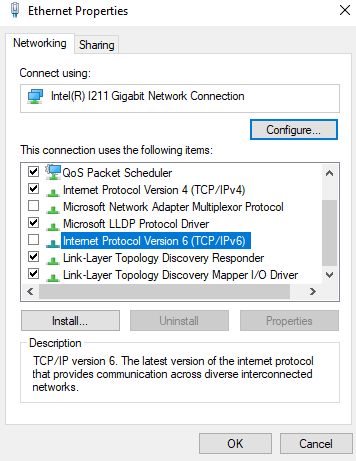
Open Control Panel > Network and Sharing > Change Adapter Settings > Right Click on Ethernet and select Properties > Uncheck Internet Protocol Version 6 ( TCP /IPv6)
Then restarted my pc so the new setting locked in.
Then I logged back into TOS and as my layout loaded NO DATA would load, so right then and there he knew it was an issue with the IPv6 Handler at TOS. So I closed TOS since it was still operating on the IPv6 logic. Re-installed TOS with an overwrite of what I already had. Since I was doing that after having changed the network card it locked it in.
Logged back into TOS and voila! Everything loaded up.
The real test was to flip through my watchlist and see if it was different behavior by not freezing up in 12sec chunks every few charts I went through. No freezing straight through the entire list. The real test though was to test some trades. Filled on AMZN in EXT and no freezing. Around this time /GC was down about -76% ATR LOD. I wanted to test it but didn't want things freezing up if we hadn't fixed it so dropped down to /MGC and scalped a trade around -89% ATR LOD with a market order in and out real quick. No freeze... then it dropped to -96% ATR LOD and I bought again... no freeze.
Will see under full data flow tomorrow if everything is back the way it should be, but now we know what the issue was. And to @CharlesSchwab they saw that error code as not a real error that would cause the issues, but they didn't know to do what my brother did. He new it was a packet routing issue.
The very important thing here is THIS SHOULD NEVER HAVE TO BE THE CHANGE TO FIX THE ISSUE. Their internal network handler should not be having a preference of one over the other. And if IPv6 is this broken why wouldn't it fall back to the other IPv4 protocol?
To find what your error code is when you have an issue do this.
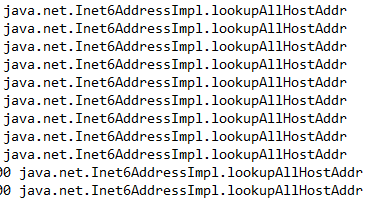
Right click on the TOS icon and Left click on Properties > Click on Open File Location > Click on Error_Report_Zip > scroll down and find Performance Log and if you see the attached pic on the far right of that text file then my issue may indeed be your issue.
About to find out if this works under full data load in a few minutes.
@lVlichaelB@CespedesBBQ And it was the 8th inning! Did I cry when the Royals won the 2015 world series? Like a baby. But not until Wade Davis finished it off. This guy was just being weird.