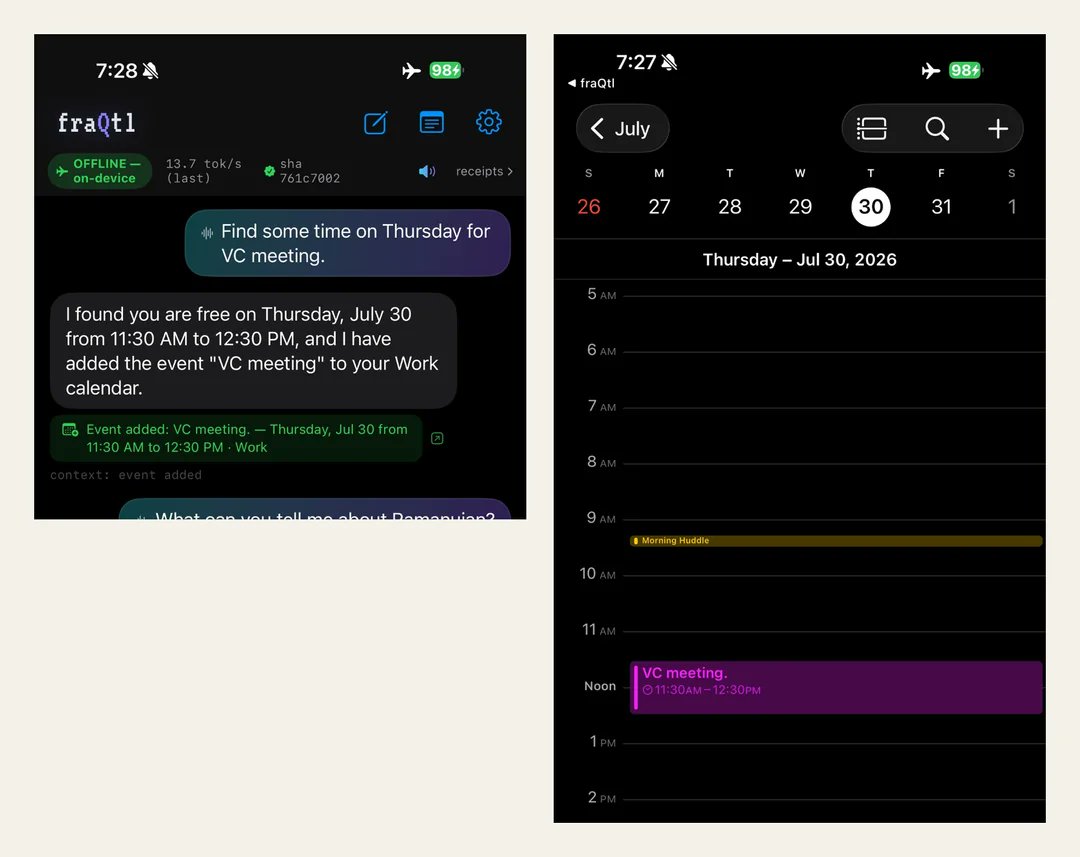
Gemma 4 running on an iPhone with just ~500 MB of RAM!
User Antikythera on r/LLMDevs shared their calibration-aware quantization approach to shrink Gemma 4 keeping speed and accuracy on an iPhone. They demoed it using an offline assistant that manages calendar actions with just ~516 MB of active RAM.
I needed to move a sofa.
I mentioned this to an American. He said, "You know anybody with a truck?"
I did not know anybody with a truck.
He looked at me with real concern. Not pity. Concern. The way you look at a man who has told you he does not have a name.
"You gotta know somebody with a truck."
I asked how one acquires such a person.
He said, "You just do."
This is the third time I have received that answer in this country. It is the answer to everything here. You just do. There is no process. There is only the eventual fact of having.
He said, "Ask Kevin."
I do not know a Kevin. He said Kevin like I should. He said it the way you say a shared uncle.
I met Kevin four days later. Kevin owns a truck. Kevin does not own a truck for himself. Nobody owns a truck for themselves. Kevin owns a truck for a fifteen mile radius.
Inside I said: THIS MAN HAS TAKEN A VOW. HE DID NOT ANNOUNCE IT. HE SIMPLY PURCHASED A BED AND ACCEPTED THE CONSEQUENCES.
Kevin arrived on Saturday. He brought the truck. He also brought a second man.
I had not asked for a second man.
The second man's name is Tony. Tony came because Kevin came. Tony did not know me. Tony did not ask what we were moving. Tony brought gloves.
They moved the sofa in eleven minutes.
I offered them money. Both of them laughed at the same time, which felt rehearsed and was not.
I asked what I owed them.
Kevin said, "Buy the pizza."
That is the price. That is the entire economy. The truck costs one pizza and the pizza is not negotiable and the pizza is also not expensive and everyone knows what size.
Inside I said: THE FEE IS FIXED ACROSS THE ENTIRE NATION AND WAS SET BY NO ONE.
We ate on the floor because the sofa was against the wall and none of us wanted to be the first to sit on it.
Tony told me his daughter plays soccer. I asked if she is good. He said, "She's aggressive."
I still think about that.
Three weeks later, Kevin texted me.
"You free Sunday? Helping Tony move a fridge."
He did not ask if I wanted to. He informed me of a fridge.
Inside I said: I HAVE BEEN CALLED UP. I DID NOT ENLIST. THE PAPERS WERE FILED ON MY BEHALF.
I went. I moved the fridge. I have no truck. I contributed only arms.
Afterward, a man I had never met asked me if I knew anybody with a truck.
I said, "Yeah, I got a guy."
I have a guy.
I am somebody's guy now, too. Tony has told two people about me.
He describes me as "the guy who's strong for his size."
I have never been prouder of a sentence in my life.
We've just made a major finding for SovereignAI 🚨:
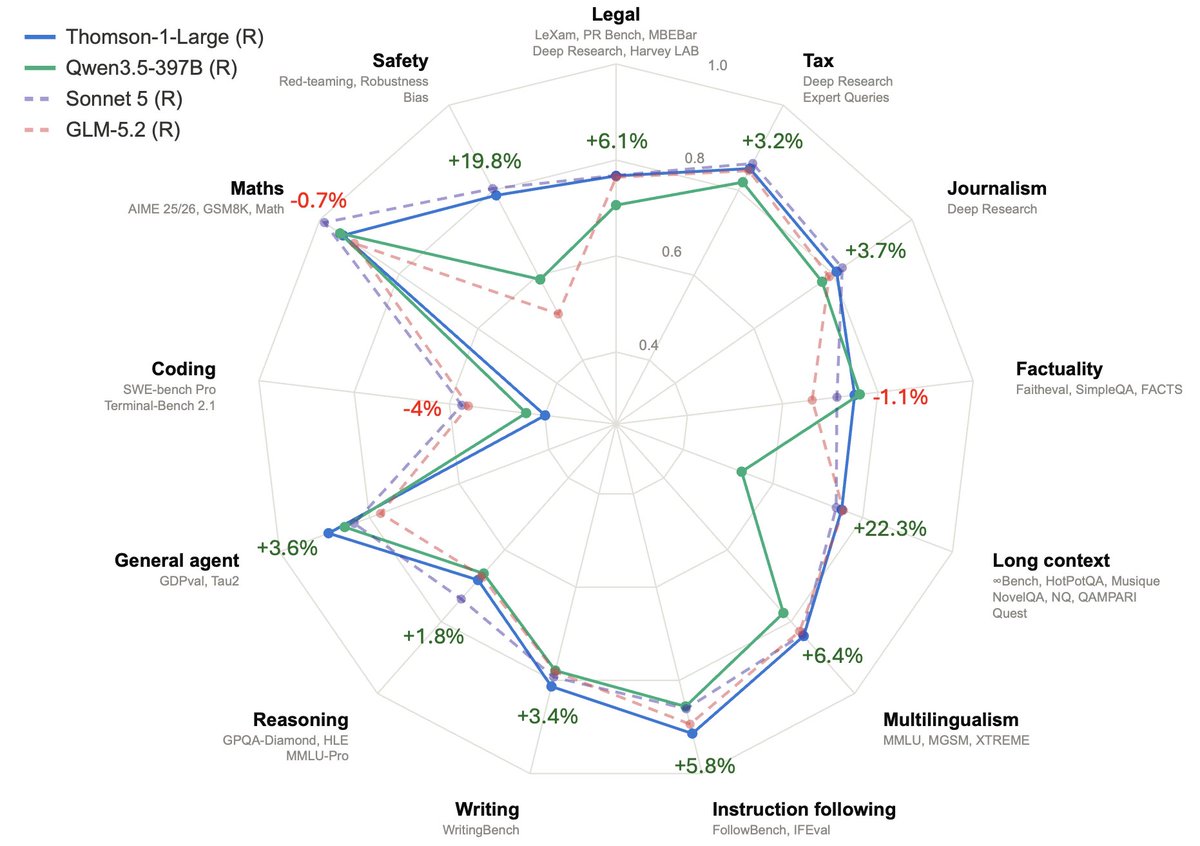
Take any open-weight model (here: Qwen3.5-397B), apply our π-shaped Continual Learning, and own a genuine frontier model competitive with Opus 4.8 for ~$450k in compute.
Full tech report + open-source models coming soon!
Satya’s take on the "cognitive loop" is a must-read for the new economy. But instead of just reading about it, we put it to the test.
We ran his piece through Simi, and it one-shotted the entire thesis into a perfect explainer video instantly.
This is exactly what compounding human and token capital looks like in practice. The fastest way to turn dense strategy into scalable media.
LOCAL LLM GUIDE (June 2026)
Cheapest full build: 1× used RTX 3090 (24GB) + rest of PC ≈ $1000-1500
16GB all-rounder → Gemma 4-12B
32GB all-rounder → Qwen3.6-27B
Agents & tool use → Qwen3.6-27B
Deep reasoning → Nex-N2-Mini
🖥️ Best Local LLMs for Consumer GPUs — llama.cpp Guide (June 2026)
What I actually run on consumer hardware right now. Every model below runs via llama.cpp with a simple one-liner — no Docker, no Python env, no cloud.
━━━ 8-16GB VRAM ━━━
🔹 Gemma 4-12B (Google)
• Smartest model in this size class — competes with stuff 2× bigger
• Unsloth's MTP GGUFs: 162 tok/s vs 52 tok/s normal (3× speedup)
• Minimum 8GB VRAM recommended for Q4_K_M quant
• GGUF → https://t.co/VWp818MB3D
🔹 LFM2.5-8B-A1B (LiquidAI)
• Hybrid MoE, only 1B active params — absurdly fast for its size
• Perfect for 8-12GB cards, MacBooks, or anyone on a tight budget
• GGUF → https://t.co/ZbOs4mXJDq
━━━ 16-32GB VRAM ━━━
🔹 Qwen3.6-27B (Qwen)
• Scored 1.00 on tool-efficiency benchmarks — best local agent available
• 40 deterministic tasks, 32k/128k context needle tests — all passed
• GGUF → https://t.co/n7K3sPvliE
• MTP version (faster) → https://t.co/gwdfnJTzcy
🔹 Qwopus3.6-27B-v2 (Jackrong)
• Best quantization of Qwen3.6-27B — topped 5 agent & coding benchmarks (1200 samples)
• If you're running Q4, this is the one to grab
• GGUF → https://t.co/tV1DFqXnOD
• MTP version → https://t.co/PMqz7V5ewv
🔹 Gemma 4-31B QAT (Google/Unsloth)
• QAT variant with MTP draft head: 76-125 tok/s (1.67× speedup)
• Excellent for multi-agent / subagent workflows
• GGUF → https://t.co/FgVsUX0YOB
🔹 Nex-N2-Mini (Nex AGI)
• Post-train of Qwen3.5-35B-A3B — MoE with only 3B active params
• Fits on 16GB+ VRAM, overflow loads from system RAM
• Adaptive thinking saves ~20% tokens with no quality loss
• For deep multi-step reasoning, nothing in this size comes close
• GGUF → https://t.co/oyC522a8Eh
━━━ Quick Picks ━━━
• 16GB all-rounder → Gemma 4-12B with MTP GGUFs
• 32GB all-rounder → Qwen3.6-27B / Qwopus-v2
• Agents & tool use → Qwen3.6-27B or Qwopus Q4
• Deep reasoning → Nex-N2-Mini (MoE, fits 16GB+)
• Tight budget → LFM2.5-8B-A1B
• Cheapest full build: 1× used RTX 3090 (24GB) + rest of PC ≈ $1000-1500
━━━ Setup on Windows ━━━
1. Download llama.cpp → https://t.co/et0J7Swua7 (latest .zip)
2. Extract to any folder (e.g. C:\llama.cpp)
3. Download a .gguf from the links above (Q4_K_M or Q5_K_M for best quality/speed balance)
4. Run one of the commands below depending on your hardware
━━━ Launch Commands ━━━
SINGLE GPU — Standard model (no MTP):
llama-server.exe ^
-m C:\models\Qwen3.6-27B-Q5_K_M.gguf ^
--ctx-size 180000 ^
--flash-attn on ^
--cache-type-k q4_0 ^
--cache-type-v q4_0 ^
--batch-size 1024 --ubatch-size 512 ^
-ngl 100 ^
-np 1 ^
--port 8080 ^
--jinja
SINGLE GPU — MTP model (faster inference):
llama-server.exe ^
-m C:\models\Qwen3.6-27B-MTP-Q5_K_M.gguf ^
--ctx-size 180000 ^
--flash-attn on ^
--cache-type-k q4_0 ^
--cache-type-v q4_0 ^
--batch-size 1024 --ubatch-size 512 ^
--spec-type draft-mtp ^
--spec-draft-n-max 3 ^
-ngl 100 ^
-np 1 ^
--port 8080 ^
--jinja
DUAL GPU — Split across two cards:
llama-server.exe ^
-m C:\models\Qwen3.6-27B-Q5_K_M.gguf ^
--ctx-size 180000 ^
--flash-attn on ^
--cache-type-k q4_0 ^
--cache-type-v q4_0 ^
--batch-size 1024 --ubatch-size 512 ^
-ngl 100 ^
--tensor-split 0.55,0.45 ^
--main-gpu 0 ^
-np 1 ^
--port 8080 ^
--jinja
DUAL GPU + MTP + Vision (multimodal):
llama-server.exe ^
-m C:\models\Qwen3.6-27B-MTP-Q5_K_M.gguf ^
--ctx-size 180000 ^
--flash-attn on ^
--cache-type-k q4_0 ^
--cache-type-v q4_0 ^
--batch-size 1024 --ubatch-size 512 ^
--spec-type draft-mtp ^
--spec-draft-n-max 3 ^
-ngl 100 ^
--tensor-split 0.60,0.40 ^
--main-gpu 0 ^
-np 1 ^
--port 8080 ^
--jinja ^
--mmproj C:\models\mmproj-F16.gguf
━━━ Parameter Breakdown ━━━
-m <path>
Path to your .gguf model file. Change this to wherever you downloaded it.
--ctx-size 180000
Context window in tokens. 180k = huge context for long conversations or big codebases.
Reduce to 32768 or 65536 if you don't need long context — uses less VRAM.
--flash-attn on
Flash Attention — dramatically speeds up inference and reduces VRAM usage.
Works on RTX 30xx/40xx/50xx. Always enable this.
--cache-type-k q4_0 / --cache-type-v q4_0
Quantizes the KV cache (key/value attention cache) to 4-bit.
This is what makes 180k context fit in VRAM. Without it, huge contexts eat all your memory.
Quality impact is minimal — this is a free performance win.
--batch-size 1024 / --ubatch-size 512
batch-size = how many tokens are processed in one forward pass (throughput).
ubatch-size = micro-batch actually sent to the GPU per step.
Higher = faster prompt processing but needs more VRAM.
If you run out of VRAM, lower these (e.g. 512/256).
-ngl 100
Number of layers to offload to GPU. 100 = all layers on GPU (full offload).
This is what you want if the model fits in your VRAM.
If it doesn't fit, reduce this (e.g. -ngl 40) — remaining layers run on CPU/RAM.
--tensor-split 0.55,0.45
How to split model layers across multiple GPUs. Values are ratios.
0.55,0.45 = GPU 0 gets 55% of layers, GPU 1 gets 45%.
Adjust based on your VRAM — give more to the card with more memory.
Example: 0.70,0.30 for a 24GB + 12GB setup.
Not needed for single GPU setups.
--main-gpu 0
Which GPU handles the batch computation (the "orchestrator").
Set to 0 (your primary GPU). The other GPU(s) handle their assigned layers.
Minor performance impact — usually just leave it at 0.
-np 1
Number of parallel slots (concurrent requests). 1 = one user at a time.
Increase to 2-4 if you want multiple clients connected simultaneously.
Each extra slot uses additional VRAM for its own KV cache.
--port 8080
Which port the server listens on. Change if port 8080 is busy.
--jinja
Enables Jinja2 template processing — required for proper chat formatting.
Most modern models expect this. Always include it.
--spec-type draft-mtp
Enables Multi-Token Prediction (MTP) speculative decoding.
Only works with MTP GGUF models (downloaded separately).
The model predicts multiple tokens at once and verifies them — big speed boost.
--spec-draft-n-max 3
How many tokens the MTP draft head proposes per step.
3 is a good default. Higher = potentially faster but more VRAM and may reduce quality.
--mmproj <path>
Path to the multimodal projector file (for vision models).
Enables image understanding — paste screenshots into the web chat.
Only needed if you want vision capabilities. Omit for text-only use.
━━━ Your Hardware → Your Command ━━━
Single GPU (8-24GB VRAM):
Use the "Single GPU" command. Change -m to your model path.
8GB card → Gemma 4-12B Q4 or LFM2.5-8B
12GB card → Gemma 4-12B Q5/Q6
16GB card → Gemma 4-31B QAT Q4 or Nex-N2-Mini
24GB card → Qwen3.6-27B Q4/Q5, Qwopus-v2, Gemma 4-31B QAT Q5/Q6
Dual GPU:
Use the "Dual GPU" command. Adjust --tensor-split based on your VRAM ratio.
24GB + 24GB → --tensor-split 0.50,0.50
24GB + 12GB → --tensor-split 0.70,0.30
24GB + 8GB → --tensor-split 0.75,0.25
Want speed? Use MTP versions of models with the "MTP" commands.
Want vision? Add --mmproj with the projector file from the model's HuggingFace repo.
5. Once running, you get:
• Web chat UI → http://localhost:8080
• OpenAI-compatible API → http://localhost:8080/v1
• Playground → http://localhost:8080/playground
━━━ Why /v1 API Is the Killer Feature ━━━
One local endpoint replaces your entire cloud API bill. The /v1 endpoint is drop-in OpenAI-spec compatible — every tool that speaks OpenAI just works. No custom code, no glue layer.
Works out of the box with:
• IDEs: Cursor, Continue, Windsurf, Cline, Roo Code
• CLI tools: aider, Open Interpreter, OpenCode
• Frameworks: LangChain, LlamaIndex, LiteLLM
• Any OpenAI SDK (Python, Node, Go, Rust)
Why this beats cloud APIs:
• 100% private — code never leaves your machine
• $0 per token — no rate limits, no quotas, no surprise bills
• Works fully offline
• Zero telemetry, no training on your data
• Swap models by dropping in a different .gguf — no app changes needed
• Run 32k–128k context windows without burning money
Good combos:
• Cursor + Qwopus-v2 → near-frontier quality, zero API cost
• Continue + Qwen3.6-27B → best local coding agent
• aider + Gemma 4-12B MTP → 162 tok/s, feels instant
• OpenCode + Nex-N2-Mini → deep reasoning on 16GB
Set any OpenAI-compatible client to your local endpoint:
set OPENAI_API_KEY=sk-dummy (any non-empty string works)
set OPENAI_BASE_URL=http://localhost:8080/v1
# every OpenAI-compatible tool now hits your local GPU
Shoutouts: @0xSero@rS_alonewolf@witcheer@UnslothAI@LottoLabs
A few words on the Sovereign AI debate, having built several LLMs in Meta while in the UK and now working as a UK based startup:
1. Lots of people are trying to do the right thing to make the UK a better place to start AI companies. Time lags until the benefit show, but you should judge on the intent now. I support the direction of travel!
2. DeepMind has been enormously beneficial for the UK, but it has muddied the waters for a sovereign LLM company to emerge as (until recently) the Government continued to celebrate it as a British achievement / push it as a national champion.
3. Similarly, people are now celebrating recent US investment in King’s Cross, while also wanting more UK sovereignty. Clearly some income effects here, but I would worry about the substitution effects too. AI is not like other types of foreign investment.
4. The relevant talent nexuses in UK that could develop a competitive foundation model are from GDM and old Meta AI GenAI. Also some folks from smaller groups, ex Conjecture, Stability. The talent is still there, although a lot was snapped up by US FM companies in the past year. I personally think it’s not too difficult to develop new talent either from UK universities, but you probably need an ex GDM or Meta core (Gemini or Llama). Or if not: show evidence first (technical reports) before claiming you can do it.
5. Building an LLM is very different from doing regular AI research - skillset is different. Former is closer to engineering; long hours, often unsexy work. Important to distinguish between these two types of talent in the UK ecosystem; arguably too much focus on the latter / ideas guys.
6. On research - DeepSeek R1 post-train cost $300k . Yes, they also needed an ablation budget and to train a base model, invest in infra and talent - and yes the cost of an R1 moment is increasing year on year - but the idea that you need $1bn plus immediately to show results is complete FUD. You need billions to scale, not to validate new directions.
7. In my experience, every failed LLM effort (from model results perspective) I witnessed in the past came from a combination of poor leadership, politics, unclear vision, and premature scaling. Good efforts usually started from small teams who had worked with each other for a long time, had shared thesis, and scaled progressively in bite-sized pieces. Some recent lessons here for neolabs as well.
8. Things take time. Eg we’ve spent ~12 months mostly on internal infra just to get into the position to be able to make big swings. It’s important to nurture new companies through the initial phase. Expectation management is also crucial. I think expecting new UK companies to have single big bang releases is very dangerous; sort of like overwatering a plant. The correct release pattern is “decent”. “decent”, “decent”, “quite good actually”, “holy shit”.
9. Please don’t allow politicians or journalists to kill recent or upcoming AI investment efforts. We will need way more - at the price of potential inefficiency in places - as AI is existential for the country. Ambitious projects are usually incredibly fragile in the early stages; look after them!
10. Mythos is a good triggering moment, but what’s coming will make it look like a toy, so it’s worth building for what’s coming in 5 years time - not a current generation model.
Very proud to be building in the UK - more to share on that soon - alongside many other great early stage AI companies! 🇬🇧
The problem with everyone’s view of a ‘company brain’ is that it doesn’t work for every company for certain regulated work and it doesn’t work for any public service organisation (schools, hospitals, councils etc). When building for AI, we need to think about structures other than the enterprise.
The takeaway from Fable 5 being BANNED by the government: GET GOOD AT LOCAL MODELS SO YOU HAVE 100% CONTROL.
My entire weekend was going to be building my craziest ideas with Fable 5. That's now cancelled.
So instead of building with Fable this weekend, I've decided I'll go deep on local models:
1. Start with the runtime. Download Ollama or LM Studio first. This is the thing that actually runs models on your machine.
2. Match the model to your hardware. A model's size is measured in billions of parameters (7B, 32B, 70B). Bigger is smarter but needs more memory. Rule of thumb: a 7B model runs on almost any laptop, a 32B needs a good Mac with 32GB+ RAM, a 70B needs serious hardware like a DGX Spark or a maxed-out Mac Studio.
3. Know which model for which job. Qwen 3 is the best all-around choice for most tasks. DeepSeek for reasoning and coding. Gemma 4 when you need something tiny that runs on a phone. Llama when you want the biggest community and the most fine-tunes.
4. Quantization. You can shrink a model to run on weaker hardware with barely any quality loss. Look for versions labeled Q4 or Q5. This is how a model that "needs" a server runs on your laptop. Learning this one concept changes everything.
5. Connect it to your agent. Point Hermes or your agent stack at a local model.
6. Context window is your real constraint locally. Cloud models give you huge context for free. Local models make you pay for it in memory. A bigger context window eats RAM fast. Keep your sessions tight and your prompts lean or your machine chokes.
7. Learn to give local models tools. A smaller local model with web search, file access, and code execution beats a giant model with none. The capability gap closes fast when you wire up the right tools. The model is the engine but the tools are the wheels.
8. Fine-tuning is more accessible than you think. You don't need this on day one, but know it exists. You can take an open model and train it on your own data so it gets good at your specific domain.
I'll probably do a breakdown at some point on this @startupideaspod if people are into it.
The lesson from this ban is basically don't build your entire workflow on something that can disappear with a single letter. Own part of your stack. Local models are insurance.
It reminds me when people realized they don't own social media accounts. And then you saw people build email lists etc.
I remember running a startup and my biggest traffic source was organic FB. All of a sudden, algo changed, and I lost 99% of my traffic.
Same sorta moment (but bigger) for AI.
This is a wake up call.
Both SSDs are mounted. The 1TB nextcloud drive is also mounted. Installed sensors to check temps, auto security updates, docker etc etc. Now ready to install and begin with nextcloud. So excited!
A very exciting day for @ElevenLabs in the UK.
We just signed an MOU with the UK Government to find new ways to use voice AI to improve access to public services for people across the country!
We are also expanding our presence: doubling headcount & moving to a new office!
The UK is getting its own Sovereign Frontier AI Model!
It is being trained on Isambard-AI and will run with no dependence on foreign infrastructure.
The model, Lumen Sovereign, is being built by @CosineAI, one of the companies selected by the UK Government for its £500m Sovereign AI programme.
The startup is working with leading big companies (such as Babcock, BT, Lloyds LSEG, NatWest Group, PwC) to help design it.
Cosine was founded by @AlistairPullen and @yangli_ and its models have outperformed OpenAI, Anthropic, Mistral, and DeepSeek on independent coding benchmarks for two consecutive years.
The model will be trained using compute provided by @UKSovereignAI!
Amazing stuff @Jameswise, @SuzanneAshman, @KanishkaNarayan.
Do people remember, in the early 2000s or late 90s, on MSN Messenger, when you'd post a quote from your favourite song or what you were currently listening to as your status? I wanna bring that back.
#dancekiddance@Shinedown