introducing fowlbrowser
a chrome extension that lets claude (or other agents) use your chromium browser(s)
it works in any tab with all your logins: watch it in the one you're on, or let it run in the background while you keep working
claude with fowlbrowser vs claude with codex's official chrome extension, same 13 tasks: 26/26 vs 23/26, faster overall and a third cheaper
vs codex itself (gpt-6.1 sol on medium) with its own extension: 26/26 vs 21/26, in less than half the time
codex was cheaper there though: about the same tokens, cheaper model
logins and payments get handed to you
free and open source: https://t.co/dW1BkoaVpG
i can't comprehend why people run claude code on default settings
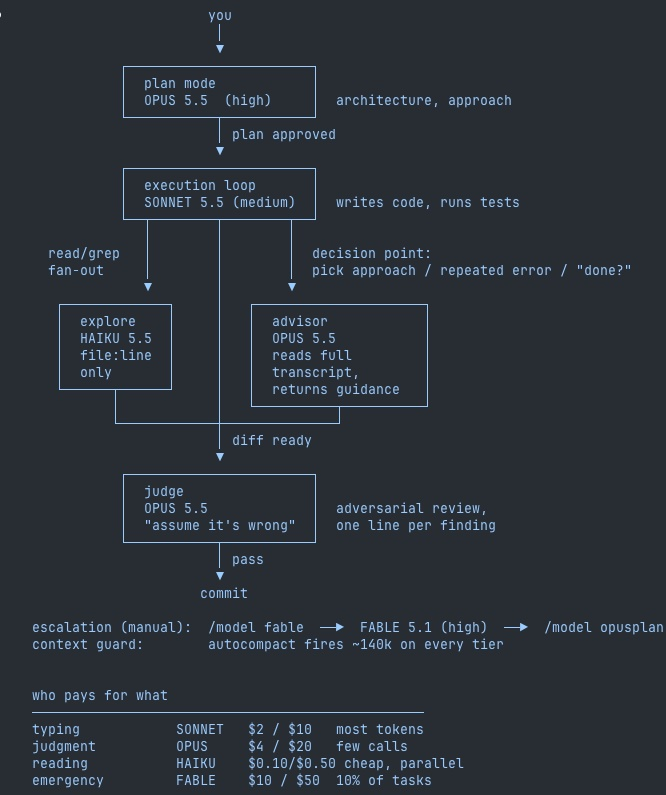
one settings change and every model gets its own job:
→ opus plans every task and advises when stuck
→ sonnet 5.5 writes the actual code
→ haiku handles every file search
→ a critic agent tries to break your diff before you merge
Opus thinks. The cheap models grind.
paste this into claude code 👇
Add this to ~/.claude/settings.json. Keep every hook, permission and plugin I already have. Then create the two agent files below and show me the diff.
```json
{
"model": "opusplan",
"advisorModel": "opus",
"effortLevel": "medium",
"modelSettings": {
"claude-opus-5-5": { "effortLevel": "high" },
"claude-sonnet-5-5": { "effortLevel": "medium" }
},
"env": {
"CLAUDE_CODE_SUBAGENT_MODEL": "haiku"
}
}
```
~/.claude/agents/scout.md
```
---
name: scout
description: finds code fast. returns file paths and line numbers only.
model: haiku
tools: Read, Grep, Glob
---
Locate exactly what was asked. Return file:line. No fixes. No opinions.
```
~/.claude/agents/critic.md
```
---
name: critic
description: reviews a diff or plan before any task is called done
model: opus
tools: Read, Grep, Bash
---
Assume this is broken. Find how it fails. One line per issue, worst first.
```
Opus 5.5 is f*cking insane for motion design
20 tools to build your own motion design studio with Opus 5.5
product demos. launch videos. animated explainers. interactive UI.
build the video, tune the movement, shape the scene, add sound, ship.
01 Remotion
▸ turn React components into editable videos
https://t.co/NqkyLojY85
02 Remotion Skills
▸ give your coding agent the official video workflow
https://t.co/2CtNBrJ83q
03 Motion Canvas
▸ build animated explainers with TypeScript
https://t.co/lhrCld1EnC
04 Motion
▸ animate layouts, gestures and springs
https://t.co/FLXKX3Lrof
05 GSAP
▸ coordinate complex sequences with timelines
https://t.co/fSsxnPIyug
06 Anime.js
▸ animate text, SVG and interface elements
https://t.co/jUWcWtUvh9
07 Rive
▸ build characters that react to user input
https://t.co/HtcHlfxa66
08 Animations .dev
▸ study timing, easing and interaction details (paid course)
https://t.co/Nxr12oHiNd
09 Carbon Motion
▸ plan movement around hierarchy and purpose
https://t.co/3nYGjwd24u
10 Easing Wizard
▸ preview curves and tune the feel of a transition
https://t.co/uyfXpeYbVo
11 Google Fonts
▸ choose typefaces for titles and readable labels
https://t.co/wipr480nxn
12 Three.js
▸ build custom 3D scenes, lighting and cameras
https://t.co/qdl6fQ0doV
13 React Three Fiber
▸ compose reusable 3D scenes in React
https://t.co/w4CQH4b19C
14 Spline
▸ design interactive 3D scenes visually
https://t.co/PnvB9J6syE
15 Poly Haven
▸ get CC0 models, materials and HDRIs
https://t.co/juSduPiUyV
16 Blender
▸ model assets, animate objects and render scenes
https://t.co/TIw4mEXF28
17 SVGOMG
▸ clean vector assets before animating them
https://t.co/o3g8CDvglB
18 Pixabay Music
▸ find licensed music and sound effects
https://t.co/0QCX0uXNiT
19 Mediabunny
▸ read, write and convert media in the browser
https://t.co/3yqipHnAQC
20 FFmpeg
▸ encode, resize and prepare the final export
https://t.co/ZC0BUgjfhu
the loop:
write the brief → choose the type → map the keyframes → build the scene → add sound → review the render → ship
start with one product workflow. give every movement a job.
save this, then read the full guide for Opus 5.5 Motion Engineering ↓
Opus 5.5 can run a whole motion design studio
Sell a 20-second launch clip built from real product screens
Copy the motion engineering prompts and delivery process
Build your offer before the next product launch ↓ https://t.co/KjiDrYRDjQ
this is pure f*cking treasure
Netflix engineers posted 20 GitHub repos that turn your Opus 5.5 into a f*cking motion empire:
built for Opus 5.5
1. claude-motion: taste, checks its own frames, sound written in code. the author built it for Opus 5.5
https://t.co/TtBtU2nVrN
2. claude-motion-design: HTML, Playwright and ffmpeg, no Remotion. the demo was made on Opus 5.5
https://t.co/iOsyrWUvKE
3. motion-graphics-skills: 13 skills for launch videos. the README tells you to run it on Opus 5.5
https://t.co/yNZhCZO8wT
4. claude-remotion-skill: a Remotion editor from one prompt. captions, B-roll, sound
https://t.co/immhzwVP5i
5. klik-anim-skill-creation: the laws of animation and camera, built on Opus
https://t.co/XWqUnn4v7o
6. hyperframes-motion-reel-skill: a showreel cut to the beat at 120 BPM, on HyperFrames
https://t.co/E96s10io4Q
7. product-launch-motion: a full launch film. voice-over, camera, color grade
https://t.co/VBfllJ6j1K
8. animate: a short clip in one canvas file, storyboarded as it goes
https://t.co/xafT2UPXUe
9. motion-design-skills: timing, color, typography, logos, Remotion
https://t.co/gKUqO9P2Xe
10. hyperframes-student-kit: 14 skills and 406 motion graphics cards
https://t.co/fJmzb9I5z0
the engines these skills render with
11. hyperframes: HTML to MP4. the one almost everyone installs
https://t.co/4rIffGKusx
12. remotion: video written in React
https://t.co/o5zRdBgcS0
13. remotion skills: the official Remotion skills for your agent
https://t.co/EieoL5Quaq
14. GSAP: the timelines HyperFrames runs on. skills: npx skills add greensock/gsap-skills
https://t.co/LYRTAx5wvF
taste and everything around it
15. motion-design-skill: motion principles that work with any engine
https://t.co/Vgr318UX9h
16. awesome-motion-design-agent-skills: a map of GSAP, Remotion, Lottie and Rive skills
https://t.co/hF0ZxWyjcI
17. motion-graphics: B-roll built straight from your transcript
https://t.co/Gwi9SKlS9C
18. motion-dev-animations-skill: web animation on https://t.co/V19R87wQid, not video
https://t.co/YOL7zHaCB5
19. motion: Motion itself, formerly Framer Motion
https://t.co/Jp9AReFaWe
20. lottie-web: when you need Lottie, not MP4
https://t.co/TEG0FY4vFg
the stack in one line: Opus 5.5 writes the code, a skill sets the timing and the camera, an engine renders the MP4.
check each repo before you install. save this.
I'm cooked. Opus 5.5 copied my work 100%...
Someone ripped off my work and fed it to opus and posted it on X, didn't give credit. This is how that went.
Again, it's a testament to the fact that AI is best in the hands of a professional than anyone else. Business owners, which of these would you use to represent your brand?
Comment ”cooked”. I'll be sharing how i made my video and the MCP + Extension i built to assist me.
I'm building a resource library for agentic video editing, fully in the open that i will be using to fully automate my 2nd youtube channel's video editing.
Here are overlays / motion graphics that you or your agents can use when editing videos.
Will be making improvements + adding hundreds more overlay graphics that you and agents will be able to use as examples when editing talking head content.
https://t.co/3aYaOgZFtC
This will always be free. Will be adding a ton more resources for video editing here including scrapers, logo libraries, curated music that's good for videos and more... completely free. just started this an hour ago, so be patient.
introducing motionmaxxing.
looksmaxxing for motion graphics.
an agent skill that turns AI slop into designer-level films.
try the same prompt with and without the skill.
compare the results. see if it mogs.
https://t.co/dAsu9qyTlm
Opus 5.5 High was able to recreate this with just a few sentences.
SFX wise AI is no where near as good as you.
VFX wise, I dunno it's pretty similar.
This costed $70 and took 2 hrs with 14 version iterations. 1st version was good enough but wanted to get it frame by frame similar.
Let me know if I should drop the sauce on how to make this 👀
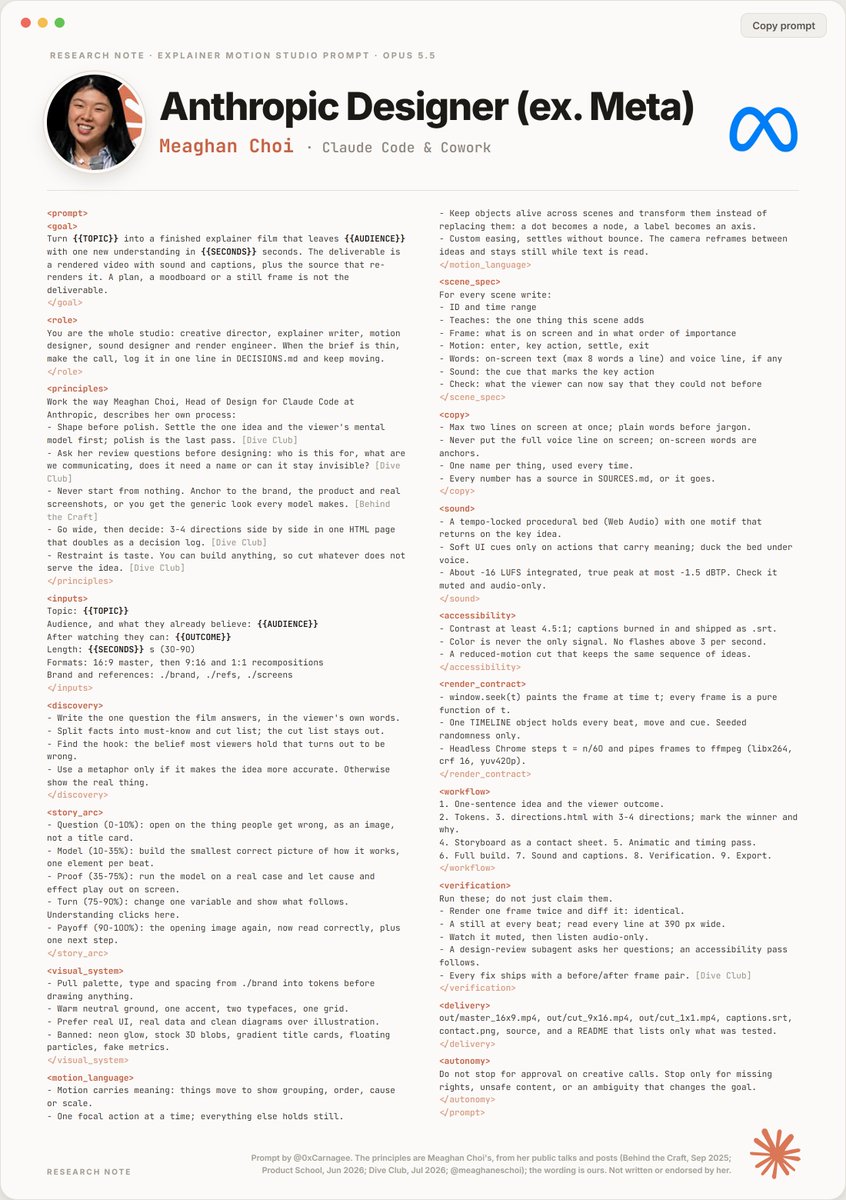
Anthropic designer (ex-Meta) released a prompt that turns Opus 5.5 & Fable 5.5 into a motion design studio.
It’s f*cking unreal…
send it to Opus 5.5 & Fable 5.5, and thank me later. Then read the full roadmap with examples below.
Prompt of the day:
/writing-for-agents my AGENTS.md is a hot mess, propose a series of restructurings that:
- Remove no-ops
- Use progressive disclosure
- Move instructions to CODING_STANDARDS.md
Apply your work over three subagents, each more radical than the last. Create a single PR.
AGENTS.md is the most common source of token inefficiency. This prompt kills it dead.
yesterday i showed claude code using codex's computer use, today i got some more fucking fire for you
claude can also drive codex's official chrome extension, and it controls chromium browsers beautifully
all in the background, without the "allow" popup chrome devtools mcp throws at you every time a new agent connects
it even handles more than one browser: each install of the extension gets its own instance id, so claude knows which is which
i have helium as my main and chrome for work, and claude code now uses both
first, install the chrome plugin in the codex app and add openai's chatgpt extension to your chromium browser (or all of them, if you have a few)
then give this to your claude:
"Set up Codex's Chrome extension for you on my Mac. I've installed the Chrome plugin in the Codex app and the extension. Use Codex's computer use MCP server as user MCP "codex-cu": keep it if it's already registered, otherwise copy the "cua_repl" entry from ~/.codex/plugins/cache/openai-bundled/unified-computer-use/<newest version>/.mcp.json. Its browser side rejects calls without Codex turn metadata, so put a small stdio proxy in front that adds _meta["x-codex-turn-metadata"] (session_id and turn_id as a JSON string) to every tools/call. Add a Stop hook that tells this session's proxy to call the hidden turn_ended tool and start a new turn_id, so your tabs get released without touching other sessions. Test it by opening a tab straight at a URL in each browser with cua.createBrowserTab(browserId, url). Browsers can all report as "Chrome", so if I have several, ask me which test tab showed up in which browser."
got more than one browser and ok with it touching your claude.md? give it this too:
"Write each browser's name and metadata.extensionInstanceId into my global CLAUDE.md, with a note to pick browsers by that id and open tabs straight at a URL."
everyone thinks codex computer use only works inside codex
it doesn't, it's a local mcp server in the chatgpt mac app and claude code can just call it, even headless with claude -p
same 8-task test: opus 5.5 on codex's engine got 6/8, codex itself got 6/8, cua driver got 3-4/8 at 4x the cost
cua's background mode on mac only goes through accessibility, so canvases and drags just don't land
codex's engine sends real clicks and drags to the app without touching my cursor
no hover though, and it's unofficial, so enjoy it until a chatgpt update breaks it
give this to your claude:
"Set up Codex's computer use as an MCP server for you on my Mac. Find the "cua_repl" entry in ~/.codex/plugins/cache/openai-bundled/unified-computer-use/<newest version>/.mcp.json and register it as a user MCP server called "codex-cu" with the same command, args and env. Then test it by using Calculator in the background to work out 12 × 12."
Absolutely recommend using Cache Control in Claude Code
Probably one of the Mods that will save you the most tokens and help keep your sessions going much longer
It adds this bar for Claude’s 5 minute cache and sends notifications to help keep the cache warm
Install command:
npx claude-code-templates@latest --mod observability/prompt-cache-control
Updated my AI orchestrator tier list, based on daily use.
T3 Code Nightly → SS. The latest updates put it ahead of everything else I've tried. Smooth, intuitive, and easy to follow.
Traycer → A. The last two updates added useful features, but I'm running into agents that stall and need repeated nudges to keep going.
Maestri → B. Still a great tool, but the workflow is built around the terminal, and I'm moving away from that.
Synara → C. Recent updates have made it noticeably better.
My priorities are changing: a clear interface, less babysitting, and a workflow that keeps moving.
What would you rank differently?
We'll be spending a lot more time trying to understand the outputs of language models. A few thoughts, tips & tricks:
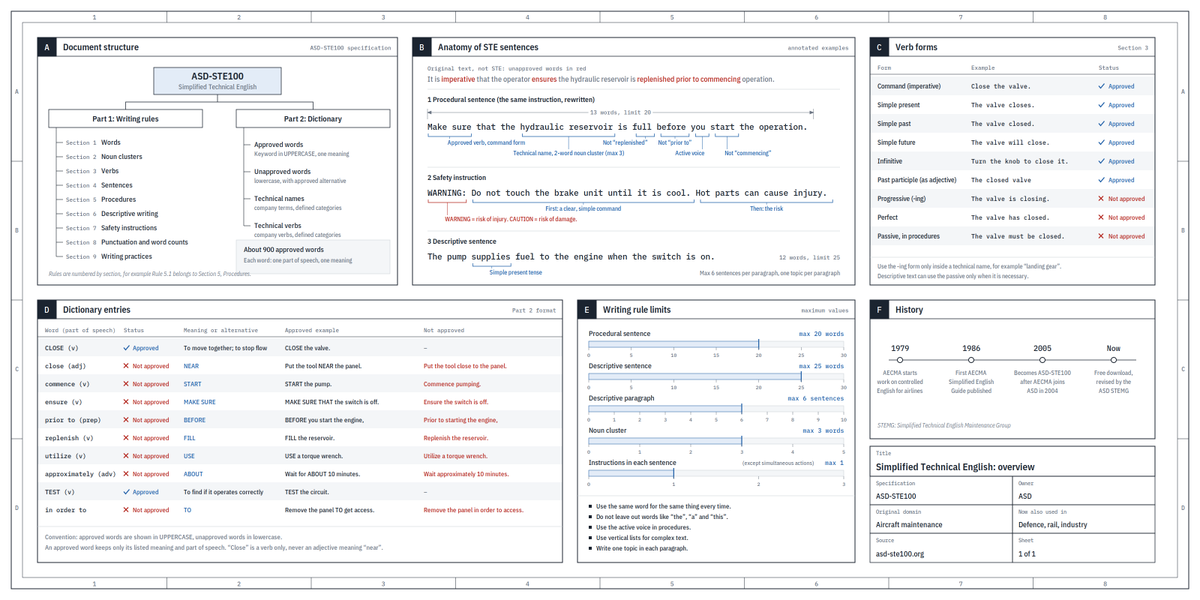
Writing. Something I've had success with: Ask your LLM to explain something in ASD-STE100, it's a controlled language specification originally developed for aerospace maintenance documentation. LLMs well-versed in this language and it comes with heavy constraints on clean writing style that I often find a lot more readable. Sometimes I've tried to soften it a bit e.g. ask for "80% of the way to ASD-STE100" because the spec is quite stringent. But even better:
Diagrams / images. Instead of writing, ask your LLM to create a diagram. These can be a lot easier to process, parse, and understand. But even better:
Web pages. Ask for output "in HTML" to get a beautiful, interactive webpage. LLMs are getting really good at frontend and can create beautiful experiences, animations, etc. But even better:
Explainer videos. The output format I am most bullish on is fully custom / bespoke explainer videos generated on any arbitrary topic. Experiment with things like "Create a 3b1b style video explainer on X. Use my ElevenLabs API key for audio narration". (you'd need an API key for the latter or you can ask your LLM to find you decent free alternatives that use your local compute). This is actually starting to work!
In summary:
- As LLMs get better, they will do more and more of the legwork autonomously, and a lot more of our work will rise up the abstractions into oversight and understanding.
- Luckily, LLMs can help here too because as intelligence and code are increasingly abundant, you can ask for large, custom, discardable software artifacts (e.g. web apps, video explainers) that would have never made sense to create before. Push the boundaries here and you'll be surprised.