Hi!
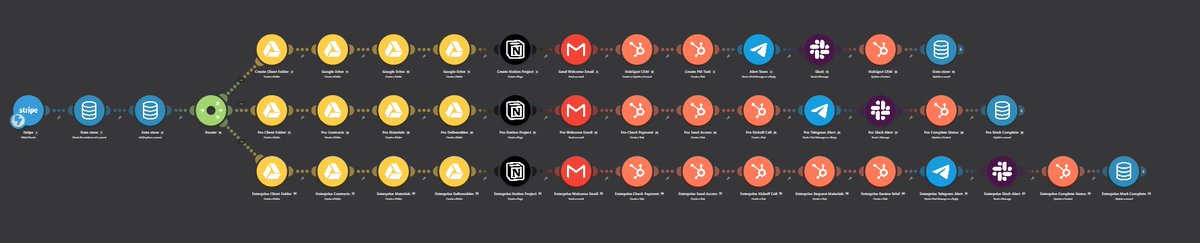
I decided to build a full-scale B2B Onboarding Engine. Obviously, the system can be tailored to match a client's specific workflow, but I built this production-ready base version to show how clean the process can look:
*Triggered by Payment: Catches a Stripe webhook with customer details, payment amount, and product tier.
*Deduplication (Idempotency): Verifies the "event_id" via Data Store. Duplicate Stripe webhooks are instantly dropped-zero duplicated folders or emails
*Tiered Routing: Routes execution paths (Basic, Pro, Enterprise) based on Stripe metadata or line items
*Workspace Setup: Auto-generates structured Google Drive folders (01 - Contracts, 02 - Materials) and a custom Notion client portal
*CRM & Tasks: Creates or updates contacts in HubSpot and assigns tier-specific onboarding tasks to project managers
*Comms & Alerts: Sends a personalized welcome email via Gmail and alerts the internal team in Slack and Telegram
*Error Handling: Updates state to "Completed". If an API drops mid-way, it logs "Failed" and alerts the team for a clean retry from the point of failure
Need a similar custom automation built for your workflow? Shoot me a DM and let's chat. #automation #buildinpublic #leadgeneration #leadqualification #BusinessAutomation #business #founders #b2b
@buildwcrispim@X I think, it's definitely approvals and handoffs. Data intake is usually pretty straightforward once you set up the webhooks/forms, but handling edge cases in client approvals and syncing data into their existing stack is really hard i think. What’s been your experience with that?
Hi @X!
Question for devs, builders, automation builders and indie founders:
How did you land your very first client or customer?
Did you hit cold DMs, leverage personal networks, publish build in public posts, or find them on freelance platforms?
I build production-grade B2B automations (onboarding, lead routing, error handling - examples in my profile) and I’m exploring the best client acquisition channels right now.
Drop your stories below (or hit my DMs if you're open to sharing tips)!
#automation #buildinpublic #founders #b2b
Hi!
I decided to build a full-scale B2B Onboarding Engine. Obviously, the system can be tailored to match a client's specific workflow, but I built this production-ready base version to show how clean the process can look:
*Triggered by Payment: Catches a Stripe webhook with customer details, payment amount, and product tier.
*Deduplication (Idempotency): Verifies the "event_id" via Data Store. Duplicate Stripe webhooks are instantly dropped-zero duplicated folders or emails
*Tiered Routing: Routes execution paths (Basic, Pro, Enterprise) based on Stripe metadata or line items
*Workspace Setup: Auto-generates structured Google Drive folders (01 - Contracts, 02 - Materials) and a custom Notion client portal
*CRM & Tasks: Creates or updates contacts in HubSpot and assigns tier-specific onboarding tasks to project managers
*Comms & Alerts: Sends a personalized welcome email via Gmail and alerts the internal team in Slack and Telegram
*Error Handling: Updates state to "Completed". If an API drops mid-way, it logs "Failed" and alerts the team for a clean retry from the point of failure
Need a similar custom automation built for your workflow? Shoot me a DM and let's chat. #automation #buildinpublic #leadgeneration #leadqualification #BusinessAutomation #business #founders #b2b
@KarlG119 Yeah! Exactly. Validating the payment state directly via Stripe API instead of blindly trusting the incoming webhook payload is essential for avoiding race conditions during replays. Appreciate the insight. It's a really good point!
Hi!
I decided to build a full-scale B2B Onboarding Engine. Obviously, the system can be tailored to match a client's specific workflow, but I built this production-ready base version to show how clean the process can look:
*Triggered by Payment: Catches a Stripe webhook with customer details, payment amount, and product tier.
*Deduplication (Idempotency): Verifies the "event_id" via Data Store. Duplicate Stripe webhooks are instantly dropped-zero duplicated folders or emails
*Tiered Routing: Routes execution paths (Basic, Pro, Enterprise) based on Stripe metadata or line items
*Workspace Setup: Auto-generates structured Google Drive folders (01 - Contracts, 02 - Materials) and a custom Notion client portal
*CRM & Tasks: Creates or updates contacts in HubSpot and assigns tier-specific onboarding tasks to project managers
*Comms & Alerts: Sends a personalized welcome email via Gmail and alerts the internal team in Slack and Telegram
*Error Handling: Updates state to "Completed". If an API drops mid-way, it logs "Failed" and alerts the team for a clean retry from the point of failure
Need a similar custom automation built for your workflow? Shoot me a DM and let's chat. #automation #buildinpublic #leadgeneration #leadqualification #BusinessAutomation #business #founders #b2b
@RenXHQ Hi! Great point! To handle partial execution timeouts, I store "folder_id" and notion "page_id" in the Data Store right after creation. On retry, the flow checks for existing asset IDs before making API calls. Also thanks for the feedback and the great question
To be honest, I’m just getting started on the commercial side - haven't sold my automations yet, but I'm actively building out my portfolio and open to my first client projects right now. But from my perspective, the hardest part seems to be showing non-technical founders the clear ROI instead of just the tech stack. What was your experience when closing your first deals? It's really interesting and important for me!
@liorpesoa Hi!
Mostly B2B automation - lead qualification, enrichment, and lead gen pipelines. But overall, I can build pretty much any custom workflow depending on what a business needs.
obviously you can check my projects in my profile if you want
Hi Guys!
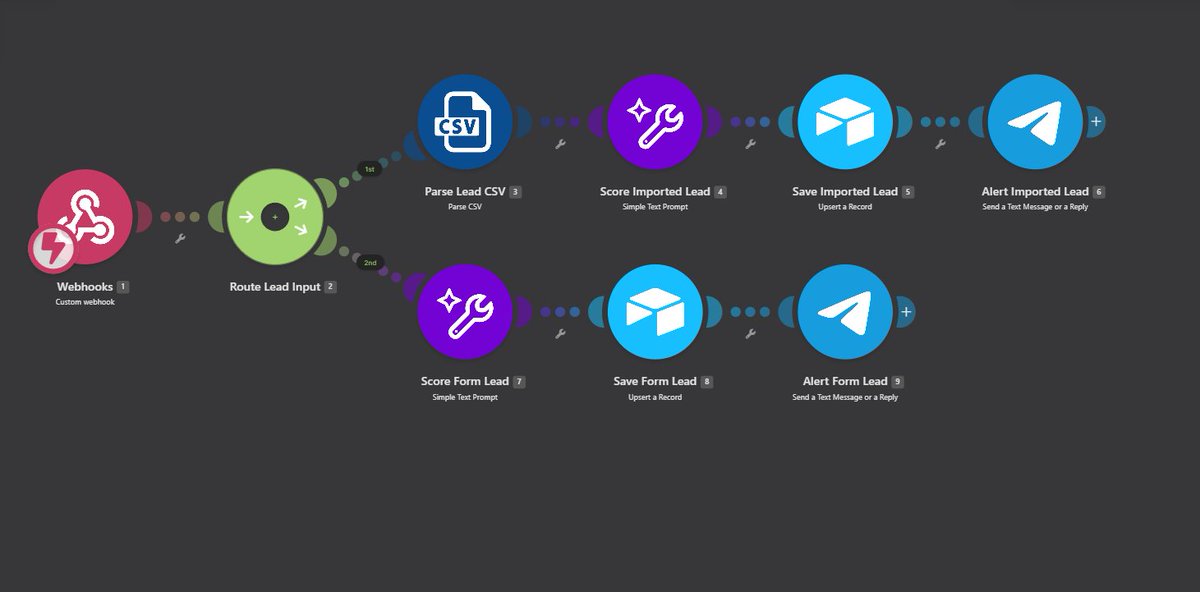
Upgraded my previous Lead Qualification scenario in Make
Version 1 (First photo) was a basic pipeline: inbound lead, AI scoring, Airtable, and a Telegram alert.
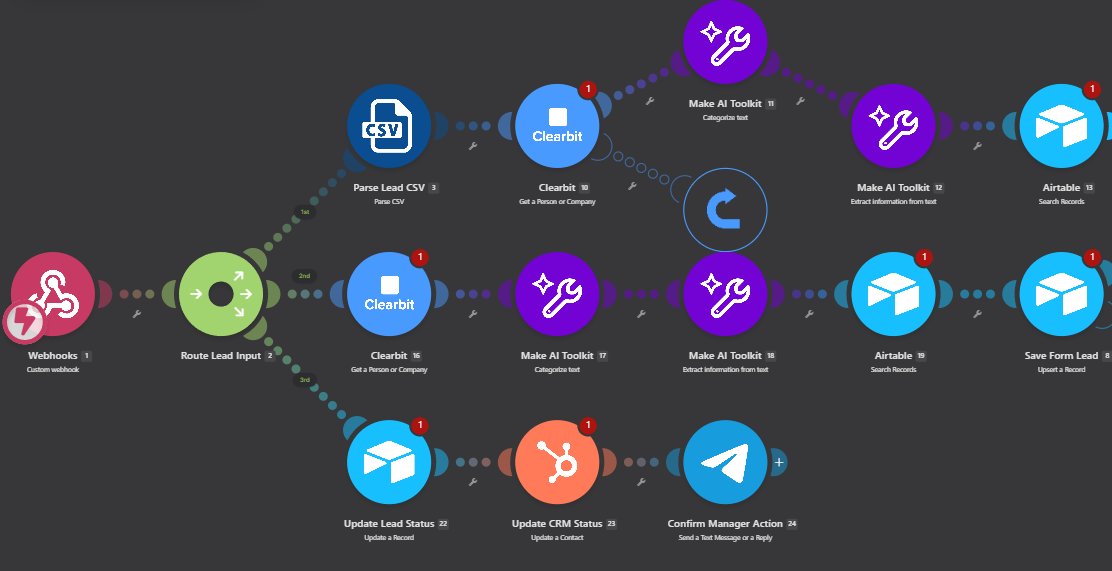
Version 2 (Next 2 photos) turned into let's say a proper B2B Lead Engine. Here’s what changed and how it runs now
* Clearbit Enrichment: Pulls firmographics (company size, role, domain) before running the scoring model.
* AI Processing: Uses two AI steps to categorize the lead and extract key data for scoring.
* Airtable Deduplication: Checks existing records first so the base stays clean.
* HubSpot Sync: Automatically creates or updates the contact and assigns a task to a sales rep.
* Fallback & Retry: Added a Data Store error-handling flow so no lead gets lost if the CRM API drops.
* Interactive Alerts: Telegram notifications now include action buttons for the team.
Obviously, I have a few more ideas on how to simplify the architecture without losing efficiency, and overall, there's plenty of room to improve it even further. Also think it's not a final version and probably i'll do the same in n8n in near future.
Need a similar custom automation built for your workflow? Shoot me a DM and let's chat. #automation #buildinpublic #leadgeneration #leadqualification #BusinessAutomation #business #founders #b2b
@andymewborn Just getting started here and keeping it simple. Right now I'm looking for founders to build a few practical automation projects and set up solid case studies. Obviously always happy to stay in touch! How are things scaling with Distribute?
Founders!
What’s the most boring task/routine you’re still doing manually in your business?
(Lead routing, CRM updates, scraping, social posting, etc.)
Describe it and drop it below.
Let's connect and help each other!
#BusinessAutomation#automation#business#buildinpublic