Listening in on the JISC meeting for Joint Building Digital Capability and Digital Experience Insights Community of Practice🎧
#digitalstudent#digitalcapability#JISC
Haven't self-nominated to join the MIE Expert or Showcase School communities yet? 👀
The window to join these programmes for 2022-23 is open until 7 July. Learn more here: https://t.co/HjHDrxR8MF
@MicrosoftEDU#MicrosoftEDU#MIEExpert#ShowcaseSchool
The Microsoft Educator Centre on @MicrosoftLearn is chock-full of handy resources for educators, students & IT staff! 😍
Among them are the product guides for your favourite @MicrosoftEDU apps! You can explore them here: https://t.co/3mE5OSPiSR
#MicrosoftEDU#MIEExpert#EdTech
🎁We're so excited about our visit to #Bett2022 that we're giving you the chance to win an EDU PRO plan😍
Just retweet this, and we'll pick a winner! Valid until March 28th. #Genially#giveaway
Oh, hi @Bett_show 👋!! To say we are happy to be back is an understatement! Swing by stand NH52 to chat all things Planet eStream! #edtech#ukedchat#bett2022
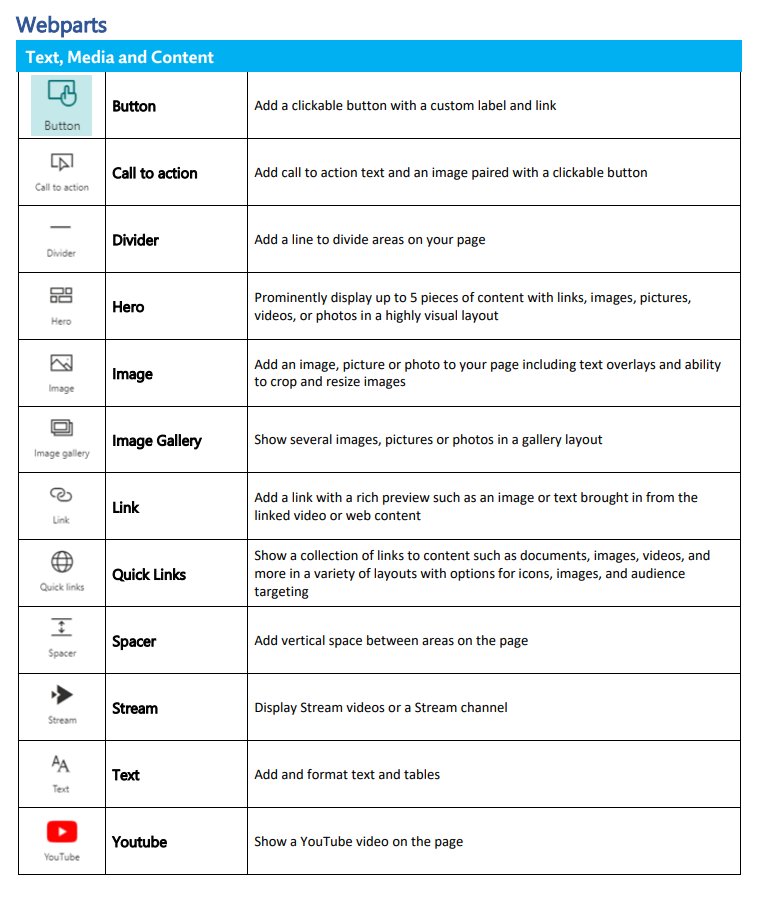
Wasn't able to find a quick resource that explains all the SharePoint webparts we had - so slapped together a quick Word doc of it all. If anyone knows where to find all the webpart icons, that'd be real snazzy to know.
#MIEExpert#MicrosoftEDU#MIEE
@kyteijas@wakelet Oh - I knew that and use it Wakelet tabs in Teams. Apologies, my comment was specifically for the columns layout. I was eager to put it to use & was disappointed to find out it wasn't working as a tab as intended yet.
Had long infographic image that would go blurry, as if it were a lower resolution, when trying to post in SharePoint... ...Wakelet to the rescue! Can now keep as tab in Teams w/out losing quality 🎉
#wakelet#wakeletwave#MIEE#MIEExpert#MicrosoftTeams
Lesson learned - I must have missed the documentation somewhere, but two things to note when recording a Teams meeting using PPT Live:
• Slide animations are not recorded
• Embedded / inserted videos that are played are not recorded
#MIEExpert#MicrosoftEDU#MicrosoftTeams