I just shipped /uk 🇬🇧 A UK copy of your email or web page, on the canvas or in code.
- UK wording & spelling
- Real exchange rates, not a £ swap
- UK delivery rules
- Original untouched
- Flags what it can't guess
Built for @figma. Works with any agent.
https://t.co/pLW63ntJGI
Give Claude your browser's dev tools so that it can reach into the DOM, the CSS and the console of your running app and debug your components where they actually render. Learn more about this and the rest of my AI design system stack:
https://t.co/FIAAiiWIRr
#designsystems#mcp
Tools will change again in 6 months. What survives: MCPs and skills, because they're protocols you can port to whatever tool wins. Learn the workflow, not the tool. Check out the full workshop:👇
https://t.co/FIAAiiWIRr
#mcp#claudecode#aitools#designsystems#vibecoding
How to make your design system something a coding agent can actually read: I teach the exact prompts live. Link in the comments 👇
Check out the full workshop:
https://t.co/FIAAiiWIRr
#designsystems#vibecoding#claudecode#figma#uxdesign
@shaderdotmd If you’re working in Figma Make, it pulls from the plan that you made there. If you’re working in Figma Design, it pulls from the chat thread. Plan mode isn’t currently available in agent, so the work around is to say “Propose a plan first. Don’t change anything until I approve.”
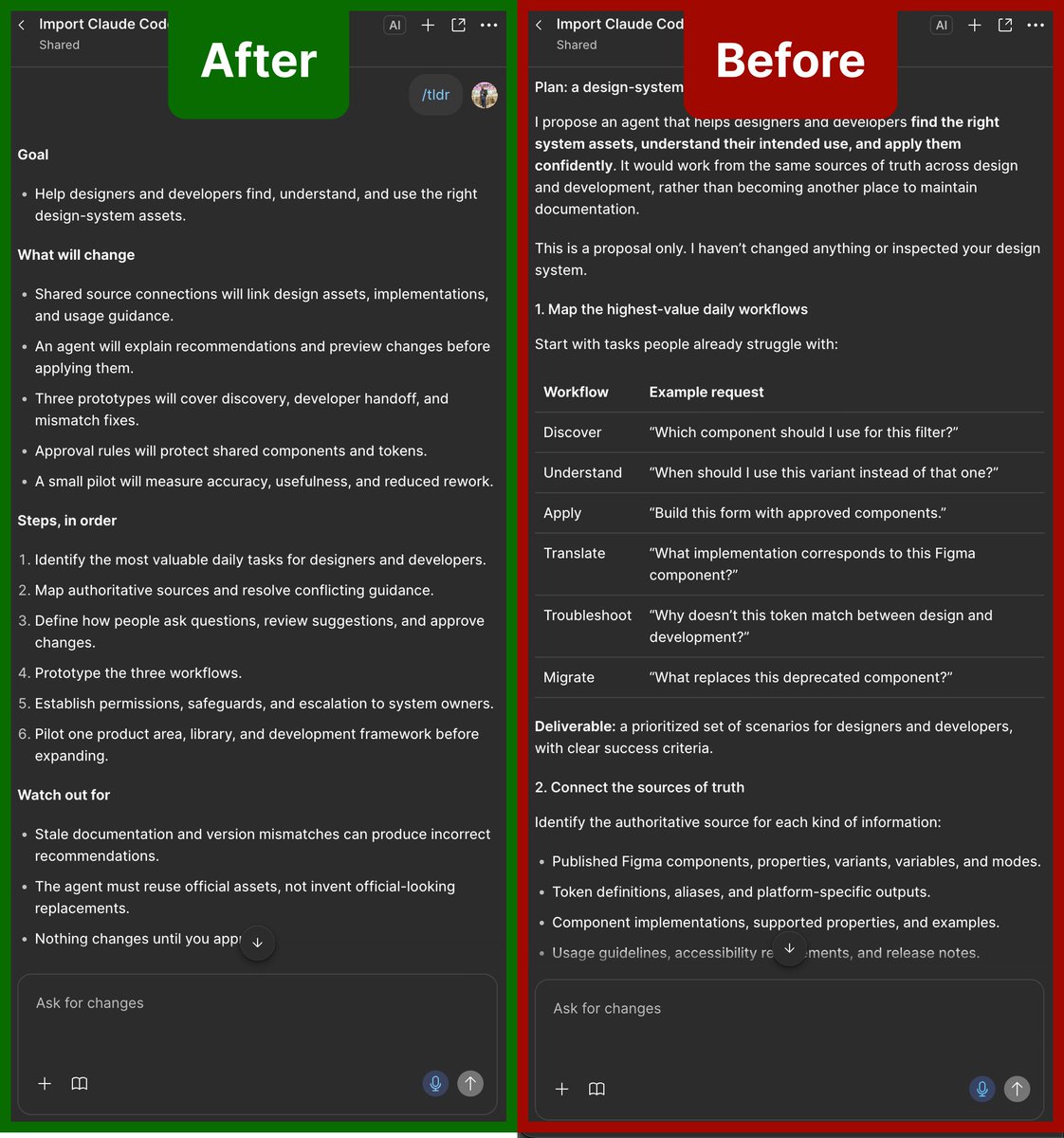
I modified my Claude Code /tldr skill for Figma, so it can be used inside Figma Make and the Figma agent. 🚀
Try it here: https://t.co/kTmUoCHMXy
It turns a long plan into a concise, easy to understand bulleted list.
When your vibe coding tool shows you a plan, do you actually read it, or do you just say “yolo” and hit “approve and auto”? 😅
I got tired of asking Claude to explain its plans, so I built /tldr: one command, plain-English bullets, never edits anything.
https://t.co/UVk22I7oYR
GPT-6 and Intelligent UI, now rolling out in ChatGPT for everyone.
Intelligent UI in ChatGPT delivers fast, interactive answers that make everyday questions more visual, complex topics easier to grasp, and interactive tools for your task available on the spot.
Figma finally fixed the double sidebar. 👀
You can now minimize the left navigation to give yourself more room on the canvas. Need it back? Just hover over the collapsed nav.
A small update, but one I’ve been waiting for.
#Figma#FigmaTips#UIDesign#ProductDesign#DesignTips
Design is getting closer to code. 👀
Figma’s latest Auto Layout updates feel a lot like CSS justify-content, making the mental model between designing and coding feel more connected.
The gap between design and code keeps getting smaller. 🔥
#Figma#DesignToCode#UIDesign
If you’re using AI to generate user experiences, you’re likely creating anti-patterns without even knowing it.
My new course, UX Crash Course for PMs, teaches product managers and engineers without a design background how to judge good design: https://t.co/Mn6iF0JgCL
If you're vibe coding, your AI is probably drifting from your established design patterns, and introducing bugs and other unwanted consequences. Learn the best way to implement Design System with AI in my new Designlab workshop: https://t.co/FIAAiiXgGZ
8 AI tips for Figma you need to know 🤖
1. Generate images
2. Remove background images
3. Generate design variations
4. Edit images
5. Generate designs for multiple screen sizes
6. Update images in your designs
7. Change the text in your designs
8. Generate dark mode
#aihacks
Here are two ways of generating a Figma Slides deck with AI. The agent in Figma Slides and the Figma MCP with Claude Code. Which one do you think did a better job? #AITips#Claude#ClaudeCode#MCP#HowToUseAI