Some new features in VS Code's integrated web browser:
- ⏳ History
- ⭐️ Favorites
- 🔍 Web search
- 📱 Device emulation (and Copilot can control it too! ask it to test your website's responsiveness)
- 📸 Add screenshot to chat
To try them out in VS Code, select View > Browser
🚀 VS Code has never been more powerful! In this video, we highlight the latest features including integrated browser improvements, device emulation, Mermaid diagrams, better issue reporting, and a sneak peek of our new VS Code Learn content. Check it out: ▶️ https://t.co/fwIrO1gCn9
The Integrated Browser in @Code just got more useful. 🌐
⭐ Favorites
📸 Full-page screenshots
✂️ Partial screenshots
Small additions, but they make it much easier to research, test, document, and stay in flow without leaving VS Code.
Many roughly know how a transformer works
To REALLY understand modern neural LMs—MoEs, GPU tiling, kernels, RLHF, data—you need CS336
By @tatsu_hashimoto, @percyliang
The 2026 edition appears on yt with ~2 weeks delay
https://t.co/iEWTqEivvB
Materials
https://t.co/E1pzUSC6Tr
I wrote Deep Learning with Python to be the definitive guide to how deep learning works and how to best make use of it. Tens of thousands of people got their career start via this book. 120,000 copies sold, and downloaded by millions more.
And now it's free to read online: https://t.co/3CbcQ7hmjp
@shanselman Whoa I didn’t know you spoke Spanish!
nit corrections to this post: “Copilot e IA en español presentado por mí”
- “y” becomes “e” before an “i” sound to avoid cacophony
- language names aren’t capitalized in Spanish
Interested in learning about differential geometry and its connection to geometric computing?
All material from the @CarnegieMellon course on #DiscreteDifferentialGeometry has been collected in a new webpage (videos, code, exercises, etc.). Check it out!
https://t.co/JYFX4O4LML
Cleaning up your data frame is a snap with Data Wrangler. Drop missing values, see a diff of what will be changed and even get the generated code for the drop.
Get Data Wrangler here (yes, it's free): https://t.co/ypg4SlO3n9
We believe every educator should have access to cutting-edge AI.
So, thanks to a partnership with @Microsoft, we’re covering the costs of our AI-powered teaching assistant.
Educators in the U.S. can now sign up for Khanmigo for Teachers for free: https://t.co/N44pp9UjAM
You asked, we delivered. Graph Semantics for Kusto are now GA! 🚀Explore your data as graphs and use KQL to query and analyze them.
Learn more: https://t.co/zqolA0dCwa
Play the Kusto Detective Agency game: https://t.co/GSUqGhO1t5
#KustoGraph#KQL#RealTimeIntelligence
🪄 Live from #GoogleIO, we’re announcing Illuminate → https://t.co/yr8s7B80mE
Learn your way! Illuminate uses AI to reimagine learning by transforming complex research papers into engaging audio conversations.
@wongmjane They probably use language detection followed by text-to-speech. I guess the language detection decided it’s Mandarin and the text-to-speech proceeded to use that as the phonetics. Which version of GPT is it?
this will prove to be in retrospect by far the most underrated openai event ever
openai casually dropping text to 3d rendering in gpt4o and not even mentioning it
(more 👇🏼)
Our VS Code extension is now Generally Available!
Faster, sleeker, and better integrated with Jupyter Notebook variable explorer & debugger. i18n in 14 languages.
⬇️ Install the Extension: https://t.co/twwso8A2v3
📰 Read the blog post: https://t.co/6cjJiOlH7H
📢 We’re excited to announce the general availability of Data Wrangler for VS @Code. Our new, code-centric, AI-powered data cleaning/prep tool is available to everyone today! 🔥
Learn more at https://t.co/A55MTKxCU9
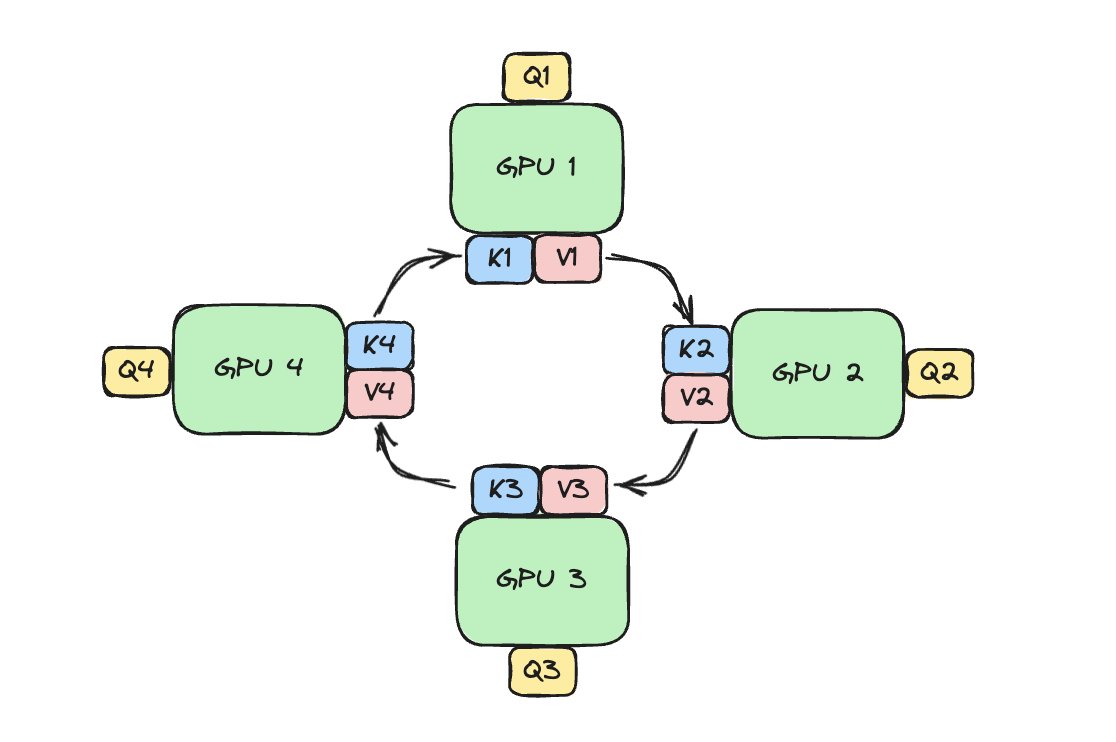
How do LLMs scale to million token context window? Ring Attention is a nice trick to parallelize long sequence across devices and rotate them in a ring with zero overhead scaling.
In our new blog, we cover the tricks behind this magic. It looks like this (1/5🧵)
# on technical accessibility
One interesting observation I think back to often:
- when I first published the micrograd repo, it got some traction on GitHub but then somewhat stagnated and it didn't seem that people cared much.
- then I made the video building it from scratch, and the repo immediately went through hockey stick growth and became a verty often cited reference for people learning backpropagation.
This was interesting because the micrograd code itself didn't change at all and it was up on GitHub for many months before, stagnating. The code made sense to me (because I wrote it), it was only ~200 lines of code, it was extensively commented in the .py files and in the Readme, so I thought surely it was clear and/or self-explanatory. I was very happy with myself about how minimal the code was for explaining backprop - it strips away a ton of complexity and just gets to the very heart of an autograd engine on one page of code. But others didn't seem to think so, so I just kind of brushed it off and moved on.
Except it turned out that what stood in its way was "just" a matter of accessibility. When I made the video that built it and walked through it, it suddenly almost 100X'd the overall interest and engagement with that exact same piece of code. Not only from beginners in the field who needed the full intro and explanation, but even from more technical/expert friends, who I think could have understood it if they looked at it long enough, but were deterred by a barrier to entry.
I think as technical people we have a strong bias to put up code or papers or the final thing and feel like things are mostly self-explanatory. It's there, and also it's commented, there is a Readme, so all is well, and if people don't engage then it's just because the thing is not good enough. But the reality is that there is still a large barrier to engage with your thing (even for other experts who might not feel like spending time/effort!), and you might be leaving somewhere 10-100X of the potential of that exact same piece of work on the table just because you haven't made it sufficiently accessible.
TLDR: Step 1 build the thing. Step 2 build the ramp. 📈
Some voice in your head will tell you that this is not necessary, but it is wrong.
Karpathy announced he was leaving OpenAI 4 days ago.
Today, he released an implementation of the Byte Pair Encoding algorithm behind GPT and most LLMs.
Byte Pair Encoding: "Minimal, clean, educational code for the Byte Pair Encoding (BPE) algorithm commonly used in LLM tokenization."
The best part? It's written in 70 lines of pure python.
You may have missed a *big* development in the ML weather forecasting revolution over the holidays: GenCast, @GoogleDeepMind's new generative weather model https://t.co/GK4STlSq9K
Thread of some of my personal highlights from the paper. 👇