Hey .NET Fans! It’s that time of year again!
.NET Conf is back November 10-12, 2026.
Spend three days learning from the people who build and use .NET, catching up with the community, and launching .NET 11.
Learn more and save the date: https://t.co/idt9xscU8h
#dotNETConf
Cómo fixear esto hasta que haya un standard:
1. Crea una carpeta `.ai`.
2. Dentro de esa carpeta, crea una llamada `skills` y pon tus skills allí dentro.
3. Ejecuta `ln -s ../.ai/skills .claude/skills` (sustituye .claude por el editor que uses).
Most developers misunderstand DRY
They think it's about removing duplicate code.
It's not.
DRY is about duplicated knowledge, not the code.
Duplicate code is only a symptom.
The real problem is duplicated business rules hiding across the system.
When the same rule lives in five places, change becomes dangerous.
You fix one place and forget the other four.
Here is where most teams get it wrong:
❌ They extract shared helpers too early.
❌ They create generic utilities that are hard to maintain
❌ They couple unrelated features just to reduce duplication.
This actually makes the code worse.
Sometimes duplication is fine.
If two pieces of code change for different reasons, keep them separate.
This follows Single Responsibility better than forced reuse.
DRY is violated only when the same reason to change exists in multiple places.
Examples of real DRY violations:
→ Validation rules copied across controllers
→ Pricing logic repeated in services and background jobs
→ Authorization checks duplicated across different layers
Examples that are usually fine:
→ Similar loops doing different jobs
→ Repeated mappings near their usage
→ Small duplicated database query logic
Treating DRY in the wrong way leads to "enteprisy" code:
- Too complex code to understand, too many abstractions
If you have the same EF Core query (in 2 lines of code) present in 2 different classes, it's fine; you don't need a repository for this.
Here is how I apply DRY:
If I need to duplicate some logic in a third place, it's a sign that I should extract it elsewhere. Before that - no premature refactorings.
Next time you see duplication, ask one question first:
"Is this the same knowledge, or just similar code?"
That question changes how you design software.
What is one place where DRY caused more harm than good in your project?
——
♻️ Repost to help others understand DRY Principle
➕ Follow me ( @AntonMartyniuk ) to improve your .NET and Architecture Skills
The worst kind of bug is the one that explodes 3 days after deployment.
This is the hidden danger of the standard Options Pattern in .NET.
You might bind your appsettings.json to a class, inject it, and everything looks fine. The app starts up perfectly.
But if a required API Key is missing? You won't know until a user triggers that specific feature, and the app crashes.
This is why "Fail Fast" is crucial for configuration.
If your config is invalid, your application should refuse to start. Period.
You can achieve this by extending the Options Pattern with IValidateOptions.
Instead of just binding data, you attach validation logic:
1. Define rules (e.g., "ApiKey cannot be null", "RetryCount must be > 0").
2. Register the validator.
3. If the config breaks the rules, the DI container throws an exception immediately at startup.
I took this a step further and integrated FluentValidation to make the rules cleaner and more expressive.
Here is the complete implementation code: https://t.co/tv1ob0lu1Q
---
Sign up for the .NET Weekly with 75K+ other engineers, and get a free Clean Architecture template: https://t.co/j3tOgFhDZ7
𝟭𝟮 𝗘𝗙 𝗖𝗼𝗿𝗲 𝗔𝗻𝘁𝗶-𝗣𝗮𝘁𝘁𝗲𝗿𝗻𝘀 𝗞𝗶𝗹𝗹𝗶𝗻𝗴 𝗬𝗼𝘂𝗿 𝗔𝗦𝗣.𝗡𝗘𝗧 𝗖𝗼𝗿𝗲 𝗔𝗽𝗽𝘀
I've optimized over 20 enterprise .NET applications and seen the same mistakes in EF Core repeatedly.
Many teams blame EF Core when performance drops.
But most problems come from how EF Core is used, not from EF Core itself.
👉 Here are 12 EF Core anti-patterns killing your .NET apps in production.
❌ 1. Not Disposing DbContext
→ DbContext is not thread-safe and keeps tracked entities forever.
→ This causes memory leaks, race conditions, and stale data bugs.
Fix: Register DbContext as Scoped or dispose manually.
❌ 2. Ignoring AsNoTracking() for read-only queries
→ Tracking every entity increases memory usage and CPU cost.
Fix: Use AsNoTracking() for read-only queries
❌ 3. Using Lazy Loading
→ Lazy loading often creates N+1 queries without you noticing.
→ At scale, this quietly destroys database performance.
Fix: avoid lazy loading
❌ 4. Overusing Include() everywhere
→ Include() loads entire object graphs even when unnecessary.
→ Most endpoints only need a small subset of related data.
Fix: Load only required relationships or use projections instead.
❌ 5. Calling SaveChanges() inside loops
→ Each call creates a separate database roundtrip.
→ This kills throughput and increases transaction overhead.
Fix: Batch changes and call SaveChanges() once per unit of work.
❌ 6. Missing indexes and blaming EF Core
→ Slow queries are often missing indexes, not ORM problems.
→ Always inspect execution plans before blaming EF Core.
Fix: Analyze query plans and add proper database indexes.
❌ 7. Not using projections
→ Returning full entities forces EF Core to materialize everything.
→ Select only the fields you actually need.
Fix: Use Select() to project only needed fields into DTOs.
❌ 8. Overfetching too many rows
→ Extra rows waste memory, CPU, and network bandwidth.
→ This hurts every single request under load.
Fix: Fetch minimal data required for each use case.
❌ 9. Ignoring concurrency handling
→ Without concurrency tokens, updates overwrite each other silently.
→ This leads to data loss and hard-to-debug production issues.
Fix: Use concurrency tokens like RowVersion or timestamps.
❌ 10. Not using migrations
→ Manual schema changes drift over time and break deployments.
→ Migrations keep database evolution predictable and safe.
Fix: Use EF Core migrations to version and evolve schemas safely.
❌ 11. Skipping async APIs
→ Blocking threads limits scalability under traffic spikes.
→ Async database calls are mandatory for modern .NET apps.
Fix: Use async EF Core APIs end to end.
❌ 12. Using EF Core for bulk updates blindly
→ EF Core is not optimized for large bulk operations.
Fix: use Entity Framework Core Extensions library
👉 Get .NET interview questions for free here:
↳ https://t.co/W1jLMI7Wvl
——
♻️ Repost to help others avoid common EF Core mistakes
➕ Follow me ( @anton-martyniuk ) to improve your .NET and Architecture Skills
Este Web Component es una maravilla.
Muestra un calendario en tu Web o App fácil.
✓ Multi-idioma
✓ Sólo pesa 9 KB
✓ Personalizable con CSS
✓ ¡Funciona en cualquier framework!
Instalación → npm install cally
Discover how to bring your own AI models to Android devices.
From defining use cases to deployment, we'll guide you through the process of creating innovative on-device AI experiences.
Learn more → https://t.co/s7HNiUOOKv
#AndroidAI
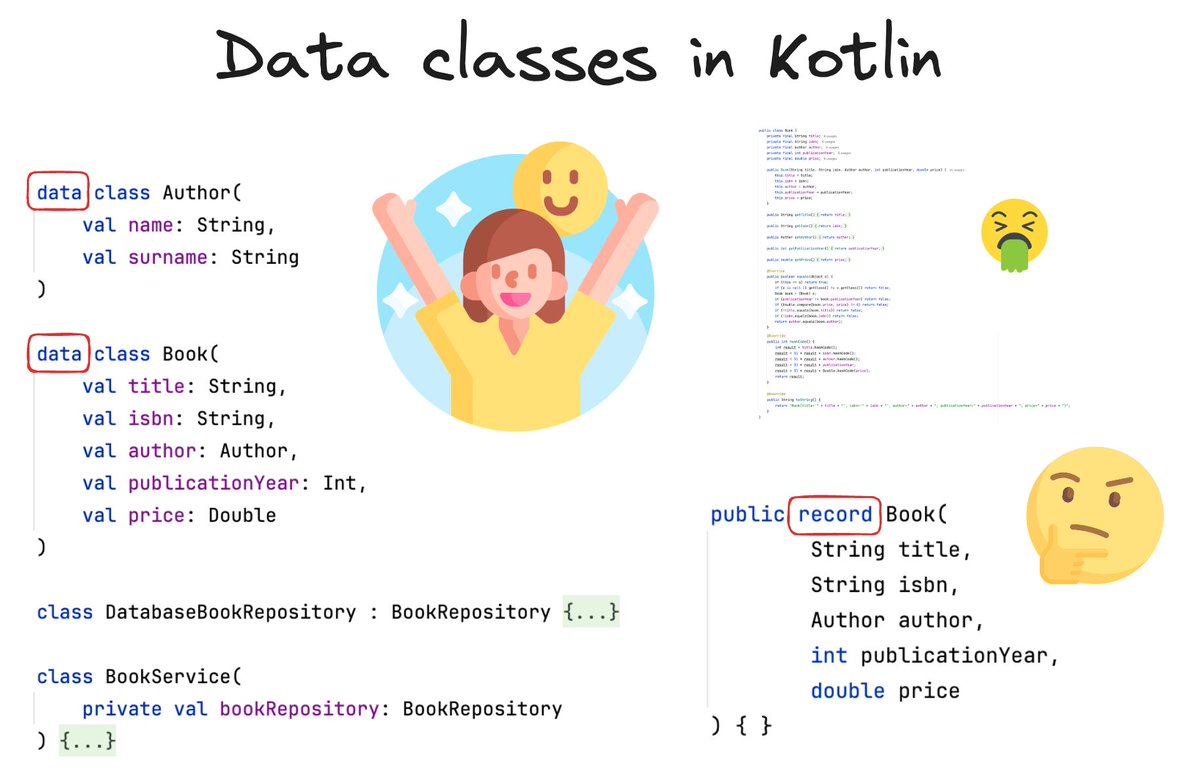
Data classes are not just syntactic sugar; they have completely changed how we treat classes and objects, and by that they extremely simplified development. Let me explain 🧵👇
🎉 Cheers to the @reactjs team and contributors on achieving a perfect 100% on Custom Elements Everywhere with React 19 beta! The Lit team can't wait to see the amazing things everyone will create!
https://t.co/zlQuIIP1ER
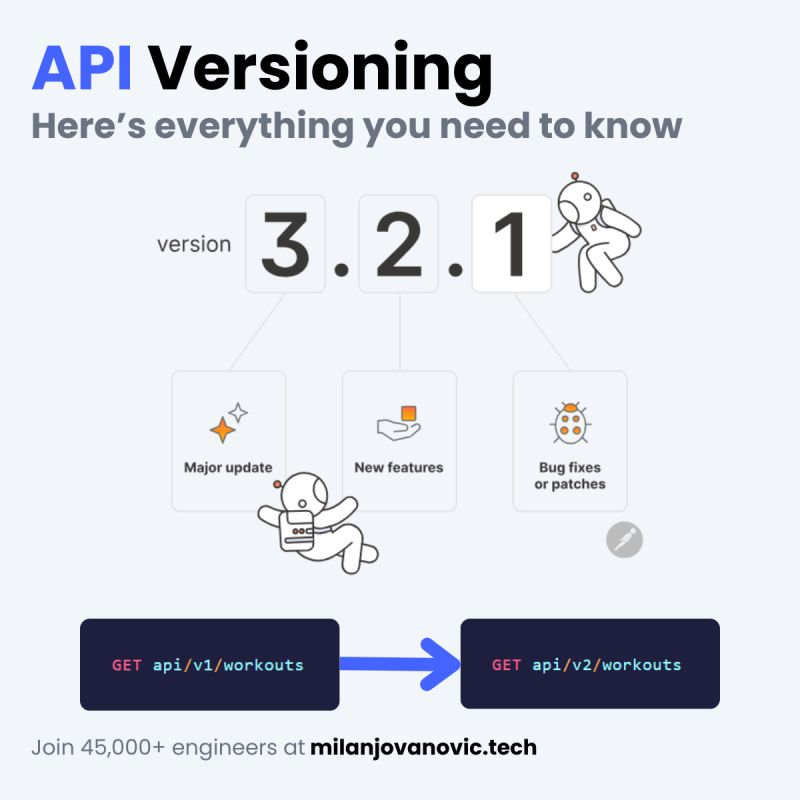
Can you have two instances of the same API endpoint?
Yes, with API Versioning. Here's why it's important. 👇
API versioning allows your API to evolve independently from the clients using it.
Introducing breaking changes to your API is a bad user experience. API versioning gives you a mechanism to avoid exposing breaking changes to clients.
Instead of making a breaking change, you introduce a new API version.
What's the definition of a breaking change?
This isn't an exhaustive list, but a few examples are:
- Removing or renaming APIs or API parameters
- Changing the behavior of existing APIs
- Changing the API response contract
- Changing the API error codes
You can decide what a breaking change means for your API.
For example, adding a new field to the response doesn't have to be a breaking change.
But how do you actually version your API?
Here's a simple 5-step process: https://t.co/uiB8jNhG6z
---
P.S. If you're ready to improve your .NET and software architecture skills, you will love the .NET Weekly.
Join 47,000+ engineers: https://t.co/mUw91jm5Rv
En 14 años habrá un nuevo "fin del mundo" informático.
¿Te acuerdas del "Efecto 2000" o Y2K? Eso no fue nada.
Te explico por qué nos deberíamos preparar YA...
O afectará al mundo de forma grave y disruptiva.
🎉We are excited to announce the open-source repo of Build Server for Gradle project on VS @code Java - a collaboration between Microsoft and Gradle. 🛠️This project aims to improve the Gradle experience on VS Code for Java developers. Learn more: https://t.co/sqnSe0Z6uE
Did you hear about screaming architecture?
Your architecture should communicate what problems it solves.
Moreover, it should focus on the use cases.
Here's an example from Uncle Bob.
When you look at the folder structure and source files, do they scream:
- Health Care System or Apartment Booking System?
- Or do they scream ASP .NET Core?
The symptoms of the last approach are folder names like this:
❌ Technical
📂 Controllers
📂 Entities
📂 Exceptions
📂 Services
The problem is they're based on technical concerns.
Here's a better example:
✅ Use case driven
📂 Apartments
📂 Bookings
📂 Payments
📂 Disputes
This is an example of screaming architecture.
The folder structure expresses the intent of your system.
The benefits of grouping around use cases are:
- Easier navigation
- Improved cohesion
- Simplified maintenance
- High coupling for a single feature
- Low coupling between unrelated features
If you liked this, consider joining The .NET Weekly - my newsletter with 32,000+ engineers.
Subscribe here: https://t.co/xip45XpWuB
What do you think about screaming architecture?