☸️ Most Kubernetes learning content
teaches theory first.
But real DevOps work is mostly:
• Debugging issues
• Checking logs
• Restarting workloads
• Scaling applications
• Troubleshooting production problems
These are some kubectl commands
engineers actually use daily 👨💻
Save this for your Kubernetes journey 🚀
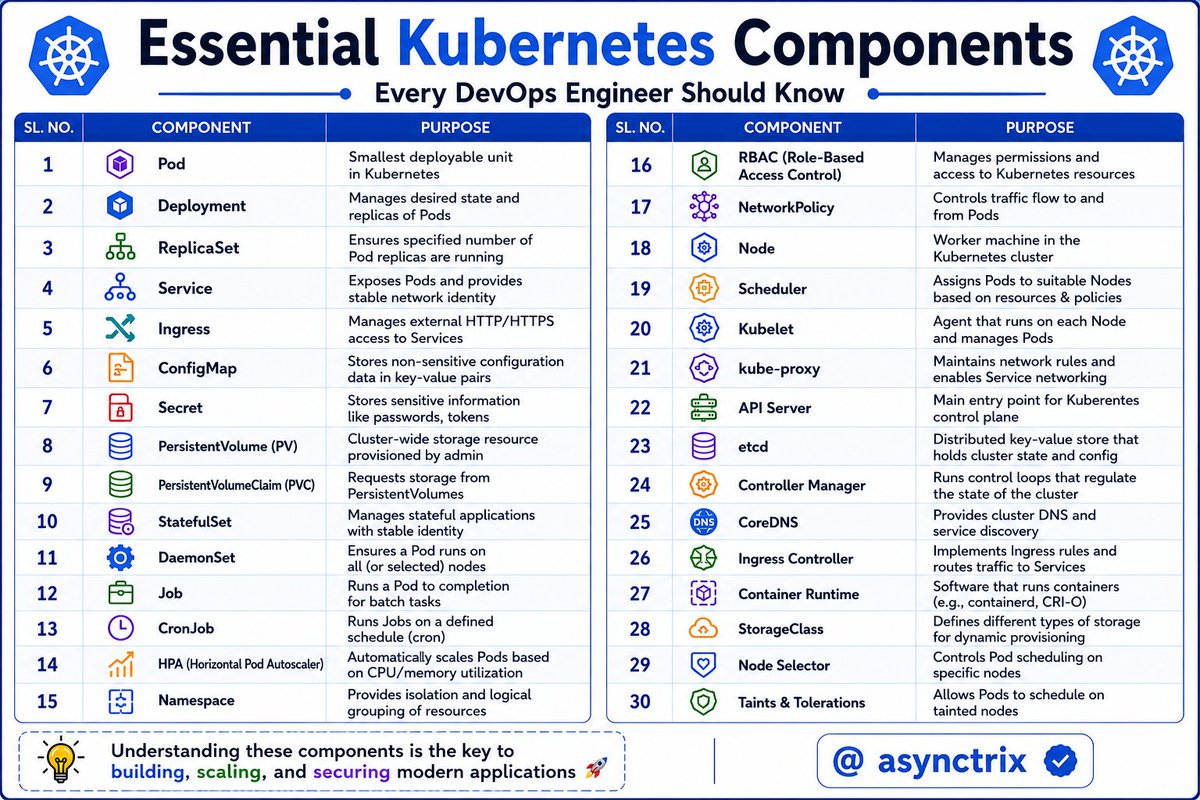
☸️ Kubernetes Looks Complex🔥
Until you understand
what each component actually does 👨💻
From Pods → API Server → CoreDNS,
these components work together
to run modern cloud applications at scale 🚀
If you're learning Kubernetes,
master these components first.
Everything else becomes easier after that 🔥
Kubernetes is just Linux for distributed systems
𝗦𝘁𝗮𝗿𝘁 𝘄𝗶𝘁𝗵 𝗮 𝘀𝗶𝗺𝗽𝗹𝗲 𝗽𝗿𝗼𝗰𝗲𝘀𝘀.
> On a Linux box, you start a process. It runs in its own memory space, gets a PID, and writes logs to stdout.
> In Kubernetes, you start a pod. It runs in its own namespace, gets a name, and writes logs to stdout.
Same thing. Different scope.
𝗡𝗼𝘄 𝘁𝗵𝗶𝗻𝗸 𝗮𝗯𝗼𝘂𝘁 𝘄𝗵𝗼 𝗸𝗲𝗲𝗽𝘀 𝘁𝗵𝗮𝘁 𝗽𝗿𝗼𝗰𝗲𝘀𝘀 𝗮𝗹𝗶𝘃𝗲.
> On Linux, systemd watches your service.
- If it dies, systemd restarts it.
- You declare what you want in a unit file. systemd reconciles reality to match.
> In Kubernetes, the kubelet watches your pod.
- If it dies, the kubelet restarts it.
- You declare what you want in a YAML file.
- The control plane reconciles reality to match.
Same loop. Bigger radius.
𝗥𝗲𝘀𝗼𝘂𝗿𝗰𝗲 𝗹𝗶𝗺𝗶𝘁𝘀.
> On Linux, cgroups cap how much CPU and memory a process can use. You set them in the unit file or with systemd-run.
> In Kubernetes, you set requests and limits on a container. Under the hood, the kubelet is just writing those values into cgroups on the node.
It is literally the same kernel feature. You are just one abstraction higher.
𝗡𝗼𝘄 𝘁𝗵𝗶𝗻𝗸 𝗮𝗯𝗼𝘂𝘁 𝗡𝗲𝘁𝘄𝗼𝗿𝗸𝗶𝗻𝗴.
> On Linux, iptables rules decide which packets reach which port on which interface.
> In Kubernetes, kube-proxy programs iptables rules on every node to decide which packets reach which pod on which service.
Same iptables. More rules.
𝗡𝗮𝗺𝗲 𝗿𝗲𝘀𝗼𝗹𝘂𝘁𝗶𝗼𝗻.
> On Linux, /etc/hosts and /etc/resolv.conf tell your process how to find other hosts.
> In Kubernetes, CoreDNS does the same thing for pods. service-name.namespace.svc.cluster.local is just a fancy hostname.
Same DNS. Dynamic backend.
𝗦𝘁𝗼𝗿𝗮𝗴𝗲.
> On Linux, you mount a disk at a path. The process reads and writes files there. If the disk fails, the data is gone.
> In Kubernetes, you mount a PersistentVolume at a path inside a pod. Same model. The disk just lives somewhere else and follows the pod around.
You will find the same patterns everywhere.
Every concept you find confusing in Kubernetes has a Linux ancestor sitting on a server you have already touched.
If you know Linux, you are not starting from zero.
Learn advanced Kubernetes on AWS with DevSecOps & AIops by building real projects with production-level implementation in my upcoming bootcamp starting 23rd May.
https://t.co/WKC5CRhITj
72 Topics to Master DevOps ♾️
→ Learn Linux, networking, and shell scripting
→ Understand Git workflows and collaboration
→ Build CI/CD pipelines with Jenkins and GitHub Actions
→ Master Infrastructure as Code with Terraform and Ansible
→ Learn Docker, Kubernetes, and Helm fundamentals
→ Understand monitoring with Prometheus, Grafana, and ELK
→ Practice DevSecOps and infrastructure security
→ Get comfortable with AWS, Azure, or Google Cloud
→ Learn deployment and rollback strategies
→ Focus on automation, reliability, and scalability.
Most people trying to break into DevOps do this first 👇
They jump straight into tools.
CI/CD. Terraform. Kubernetes. Docker.
And they skip the basics.
Here is why that is a problem:
Without solid networking knowledge, you are just clicking buttons without knowing what is really happening underneath.
It is also why so many people struggle in DevOps interviews despite knowing a bunch of tools.
If you are just getting started, dont ignore these fundamentals:
- 𝗜𝗣 𝗔𝗱𝗱𝗿𝗲𝘀𝘀𝗶𝗻𝗴 & 𝗖𝗜𝗗𝗥 – Understand IPv4, IPv6, public vs private IPs, and subnetting.
- 𝗗𝗡𝗦 – How names map to IPs, including internal DNS in Kubernetes.
- 𝗢𝗦𝗜/𝗧𝗖𝗣 𝗟𝗮𝘆𝗲𝗿𝘀 – L2 (switching), L3 (routing), L4 (TCP/UDP), L7 (HTTP/HTTPS).
- 𝗧𝗖𝗣 𝘃𝘀 𝗨𝗗𝗣 – Reliability vs speed, and where each is used.
- 𝗦𝗦𝗟/𝗧𝗟𝗦 & 𝗖𝗲𝗿𝘁𝗶𝗳𝗶𝗰𝗮𝘁𝗲𝘀 – Encryption, HTTPS, and mutual TLS.
- 𝗙𝗶𝗿𝗲𝘄𝗮𝗹𝗹𝘀 & 𝗧𝗿𝗮𝗳𝗳𝗶𝗰 𝗖𝗼𝗻𝘁𝗿𝗼𝗹 – IPTables, IPVS, NFTables, and cloud security groups.
- 𝗟𝗼𝗮𝗱 𝗕𝗮𝗹𝗮𝗻𝗰𝗶𝗻𝗴 & 𝗣𝗿𝗼𝘅𝗶𝗲𝘀 – L4 vs L7, reverse proxies, Kubernetes Services & Ingress.
- 𝗖𝗹𝗼𝘂𝗱 𝗡𝗲𝘁𝘄𝗼𝗿𝗸𝗶𝗻𝗴 𝗕𝗮𝘀𝗶𝗰𝘀 – VPCs, subnets, NAT, gateways, peering.
- 𝗧𝗿𝗼𝘂𝗯𝗹𝗲𝘀𝗵𝗼𝗼𝘁𝗶𝗻𝗴 𝗧𝗼𝗼𝗹𝘀 – ping, curl, dig, traceroute, tcpdump, eBPF tools.
These basics always apply.
19,500+ professionals read our DevOps newsletter
→ 𝗝𝗼𝗶𝗻 𝗛𝗲𝗿𝗲 (𝟭𝟬𝟬% 𝗳𝗿𝗲𝗲): https://t.co/Sftwp9Vb4N
We share deep dives on Kubernetes, DevOps, Cloud, MLOps and GitOps
#devops #networking
Stop burning money on AWS EKS. 💸
I’ve compiled the 8 battle-tested strategies to slash your bill without breaking production. 👇
1⃣ Use Spot Instances (Save ~90%):
The biggest cost lever. Perfect for stateless apps, CI/CD runners, and dev clusters. Use 3+ instance families to avoid interruptions.
2⃣ Swap Cluster Autoscaler for Karpenter:
Standard scaling takes 2-5 mins. Karpenter takes ~30s. It uses real-time bin-packing and automatic spot diversification to eliminate node waste.
3⃣ Scale to Zero with KEDA:
Standard HPA can't hit zero. KEDA scales based on SQS, Kafka, or Cron. No traffic = Zero pods = Zero cost.
4⃣ Commit to a Baseline:
Use AWS Savings Plans for 24/7 workloads. Commit to 70-80% of your 3-month minimum usage for up to 72% off.
5⃣ Kill Hidden Networking Fees:
NAT Gateway egress ($0.045/GB) is a silent killer. Use VPC Endpoints for S3, ECR, and CloudWatch to keep traffic internal and free.
6⃣ Right-Size Your Workloads:
Most pods request more CPU/RAM than they ever use. Use Kubecost or OpenCost to find the "gap" and trim your resource requests.
7⃣ Automated Shutdowns:
Don't pay for Dev/Staging on weekends. Use kube-downscaler to scale deployments to zero on a schedule.
8⃣ Tagging & Visibility:
You can’t optimize what you can’t see. Tag by Team/Project/Env. If a namespace is costing $2k/mo and you don't know why, you've already lost.
The Stack: Karpenter + KEDA + Spot + Savings Plans.
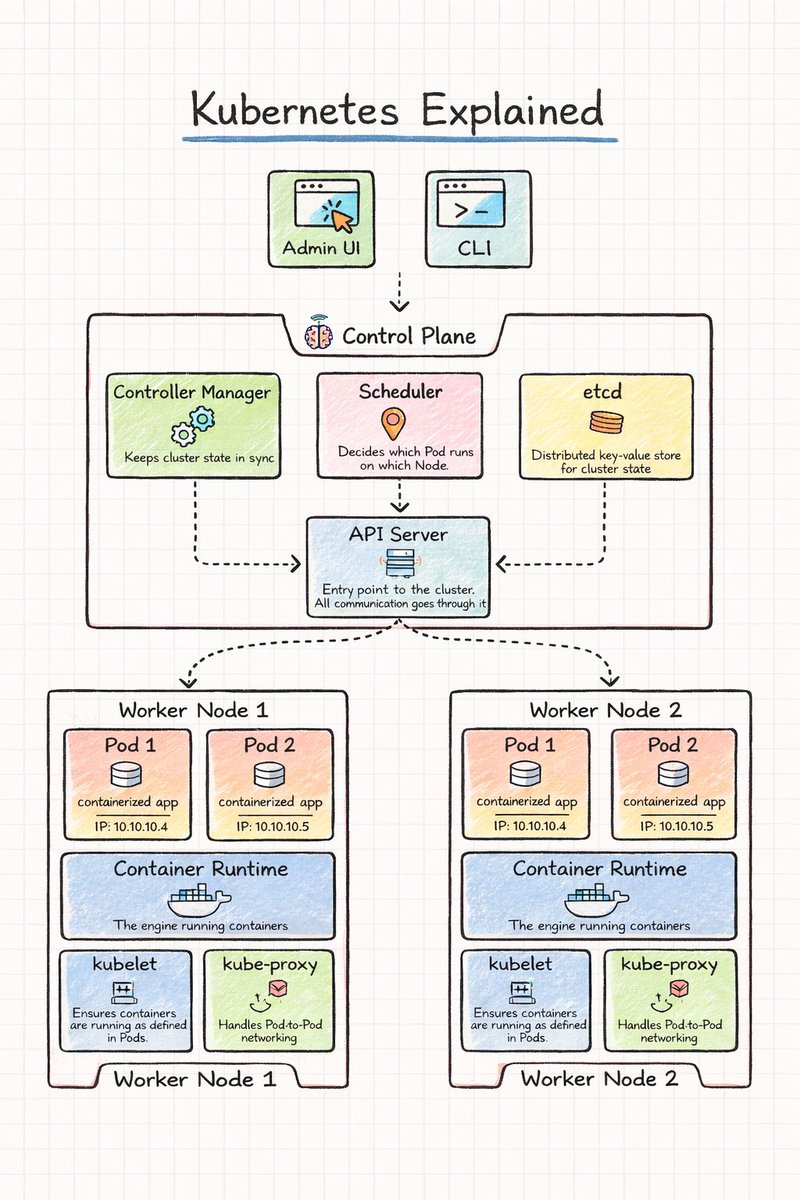
Kubernetes Simplified..! ☸️
A Kubernetes cluster has two main parts:
🧠 Control Plane
• API Server
• Scheduler
• Controller Manager
• etcd
🖥 Worker Nodes
• Pods
• Container Runtime
• kubelet
• kube-proxy
InShort Simplified 👇
🧠 Control Plane
API Server
• Entry point of the Kubernetes cluster
• All commands and requests go through it
• Communicates with all components
Scheduler
• Watches for new Pods
• Chooses the best worker node
• Assigns Pods to nodes
Controller Manager
• Keeps cluster in the desired state
• Detects failures
• Recreates Pods if needed
etcd
• Distributed key-value database
• Stores cluster configuration
• Stores cluster state
🖥 Worker Nodes
Pods
• Smallest deployable unit
• Runs one or more containers
• Each Pod gets its own IP
Container Runtime
• Runs containers on the node
• Pulls container images
• Manages container lifecycle
kubelet
• Agent running on each node
• Communicates with the API Server
• Ensures containers run as expected
kube-proxy
• Handles network routing
• Enables Pod-to-Pod communication
• Manages service traffic
Many Kubernetes Engineers don’t fully understand Kubernetes autoscaling and how HPA vs VPA vs KEDA work.
Here, I’ve made this to help you better understand.
55K+ read my DevOps and Cloud newsletter: https://t.co/wwkI6UOSo4
Sign up to get 'The Practical Linux Guide for DevOps Engineers'
What do we cover:
DevOps, Cloud, Kubernetes, IaC, GitOps, MLOps
🔁 Consider a Repost if this is helpful
Esta herramienta me encantó.
Learn Claude Code Interactively es un mini curso dónde vas a aprender a usar CC con ejercicios prácticos
Lo mejor es que al tocar muchos conceptos standard, puedes usar estos temas en otras AIs!
Y si, es GRATIS
Everything is code:
• 6 Terraform modules (VPC, EKS, RDS, ECR, Secrets Manager, OpenSearch)
• Helm charts for all services
• Kong Ingress + NLB + ACM cert for HTTPS
• GitHub Actions CI/CD with OIDC (zero static credentials)
• External Secrets Operator syncing AWS Secrets Manager → K8s
Created and destroyed the infra multiple times during dev. Only possible because it's all in Terraform.
Kubernetes Rules I Never Break 🔥
These Kubernetes rules became non-negotiable 👇
• Never use ":latest" image tags
→ Always pin versions (prevents surprise breakage)
• Always define resource requests
→ Add limits where appropriate
• Avoid cluster-admin in prod
→ Use scoped Roles + RoleBindings only
• Use readiness & liveness probes
→ Don’t send traffic to broken pods
• Drain nodes before maintenance
→ "kubectl cordon + drain" is mandatory
• Use namespaces per environment
→ dev ≠ staging ≠ prod
• Run containers as non-root
→ Basic security, often ignored
• Use ServiceAccounts per workload
→ Never rely on default SA
• Restrict inter-pod communication
→ NetworkPolicies should default to deny
• Use PodDisruptionBudgets for critical workloads
→ Prevent downtime during upgrades
If you follow just these,
you’ll avoid most production issues.
ÚLTIMA HORA: Claude ahora puede crear un sistema de finanzas personales mejor que muchos consultores de $1.500.
Aquí tienes 8 prompts para salir del caos financiero y lograr control total en menos de 30 días:
Excited to be 🚂heading🚂 to #KubeConEurope where I’ll be speaking with Roland Huß on “Make GenAI Production-Ready With Kubernetes Patterns.”
For me, this feels like a culmination of Kubernetes Patterns with Roland Huß & Daniele Zonca's new book.
Looking forward to the conversations in Amsterdam about Kubernetes, GenAI, and building reliable agentic systems. 🚀 🚀 🚀 Come and 👋 at the Diagrid booth!
https://t.co/fitLlnaWl2
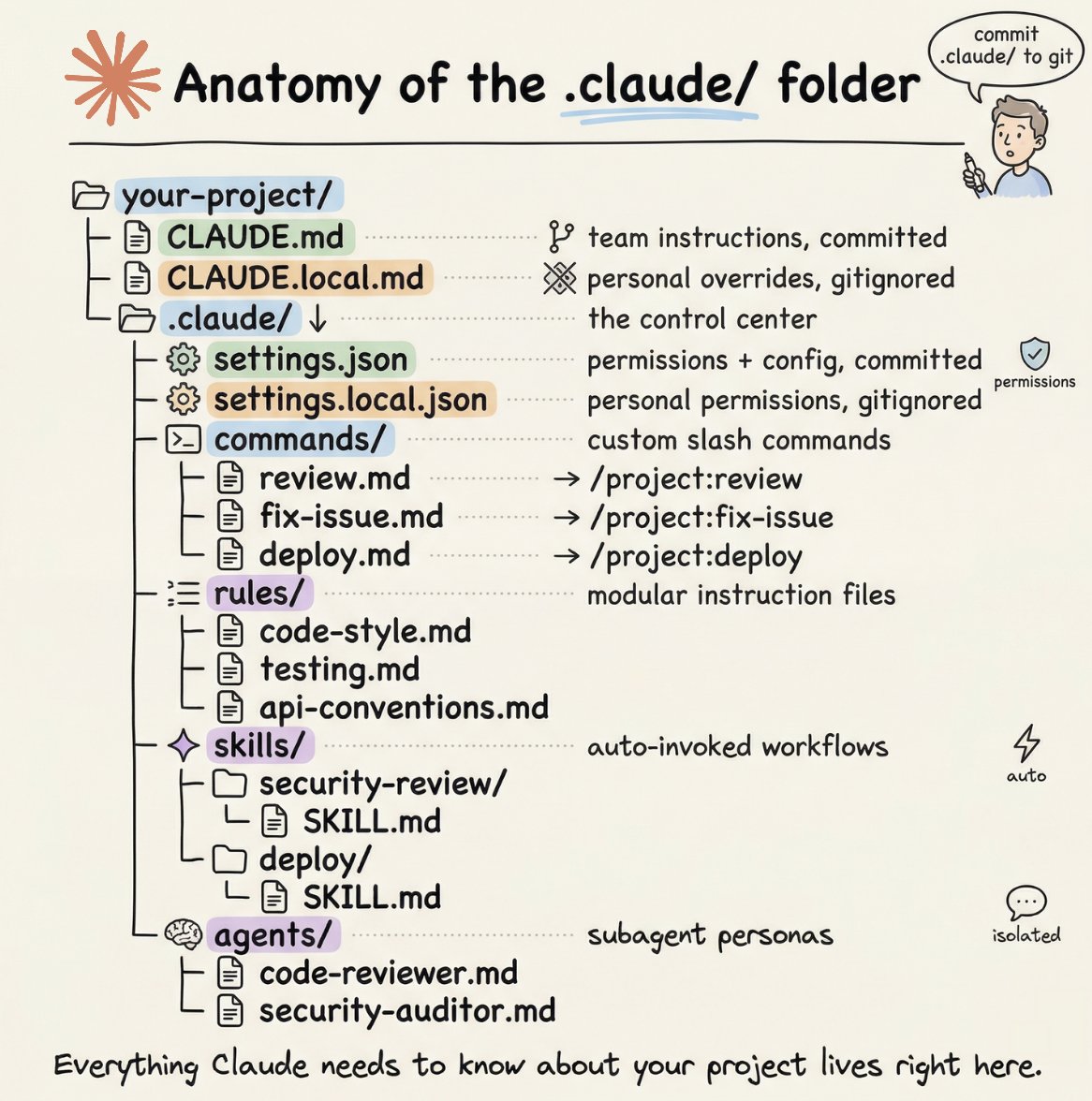
How to setup your Claude code project?
TL;DR
Most developers skip the setup and just start prompting. That's the mistake.
A proper Claude Code project lives inside a .𝗰𝗹𝗮𝘂𝗱𝗲/ folder. Start with 𝗖𝗟𝗔𝗨𝗗𝗘.𝗺𝗱 as Claude's instruction manual. Split it into a 𝗿𝘂𝗹𝗲𝘀/ folder as it grows. Add 𝗰𝗼𝗺𝗺𝗮𝗻𝗱𝘀/ for repeatable workflows, 𝘀𝗸𝗶𝗹𝗹𝘀/ for context-triggered automation, and 𝗮𝗴𝗲𝗻𝘁𝘀/ for isolated subagents. Lock down permissions in 𝘀𝗲𝘁𝘁𝗶𝗻𝗴𝘀.𝗷𝘀𝗼𝗻.
There are two .𝗰𝗹𝗮𝘂𝗱𝗲/ folders: one committed with your repo, one global at ~/.𝗰𝗹𝗮𝘂𝗱𝗲/ for personal preferences and auto-memory across projects.
The .𝗰𝗹𝗮𝘂𝗱𝗲/ folder is infrastructure. Treat it like one.
The article below is a complete guide to 𝗖𝗟𝗔𝗨𝗗𝗘.𝗺𝗱, custom commands, skills, agents, and permissions, and how to set them up properly.