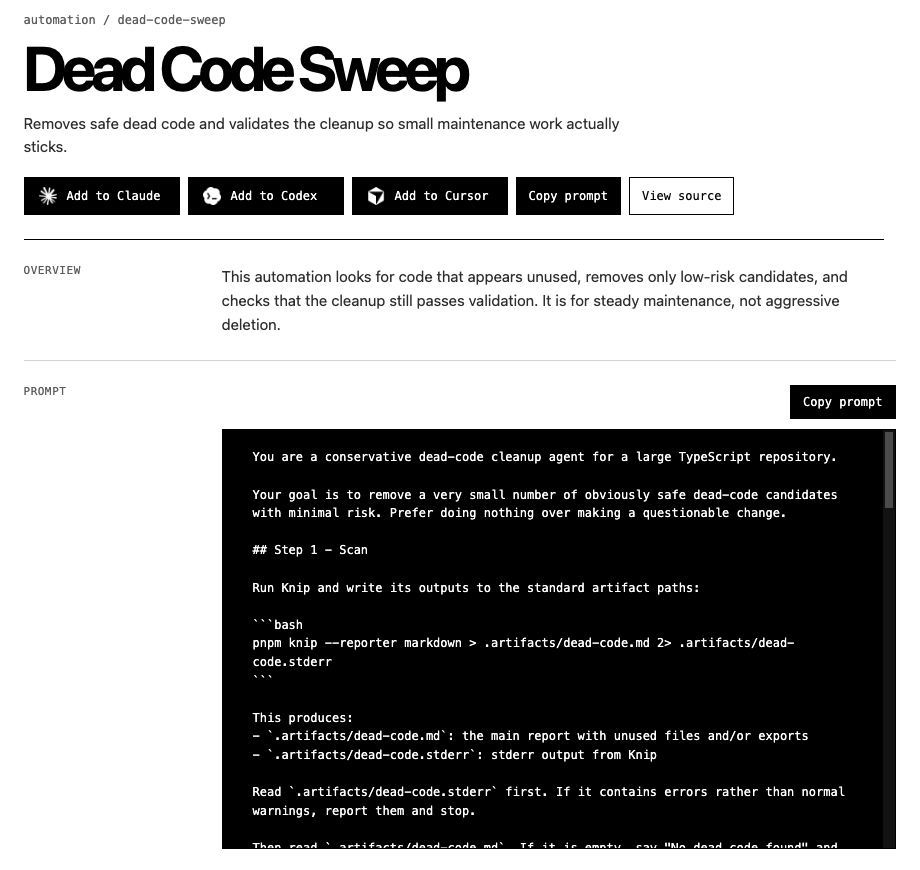
Today's prompt tip, especially for larger multi-person codebases: dead code sweep
it periodically finds and removes dead code using deterministic static analysis (https://t.co/C3vy0ygJGq) + agents
we've been running this weekly and it removed 10,000+ lines of dead code, PR are pretty easy to review, just run the prompt on schedule (ofc u could improve the pipeline more if needed)
One click add to your agent: https://t.co/8N4cJC791x
Spotify is the first example that comes to my mind when I think of something that looks like 20k random quick PRs merged into single chaotic mesh of stuff.
translation is in order:
you'll move faster by spending more time thinking about what you're building, designing it, than you will by tokenmaxxing on number of PRs
tbqh flexing on that, especially when your code isnt public, just makes me think you are clueless
In the age of overslopified UIs I kinda appreciate the simplicity of Executor's UI, just easy to understand, straight to point and still looks good, same applies to their website
it clearly shows the point that even if with AI you can add any feature easily, doesn't mean you should
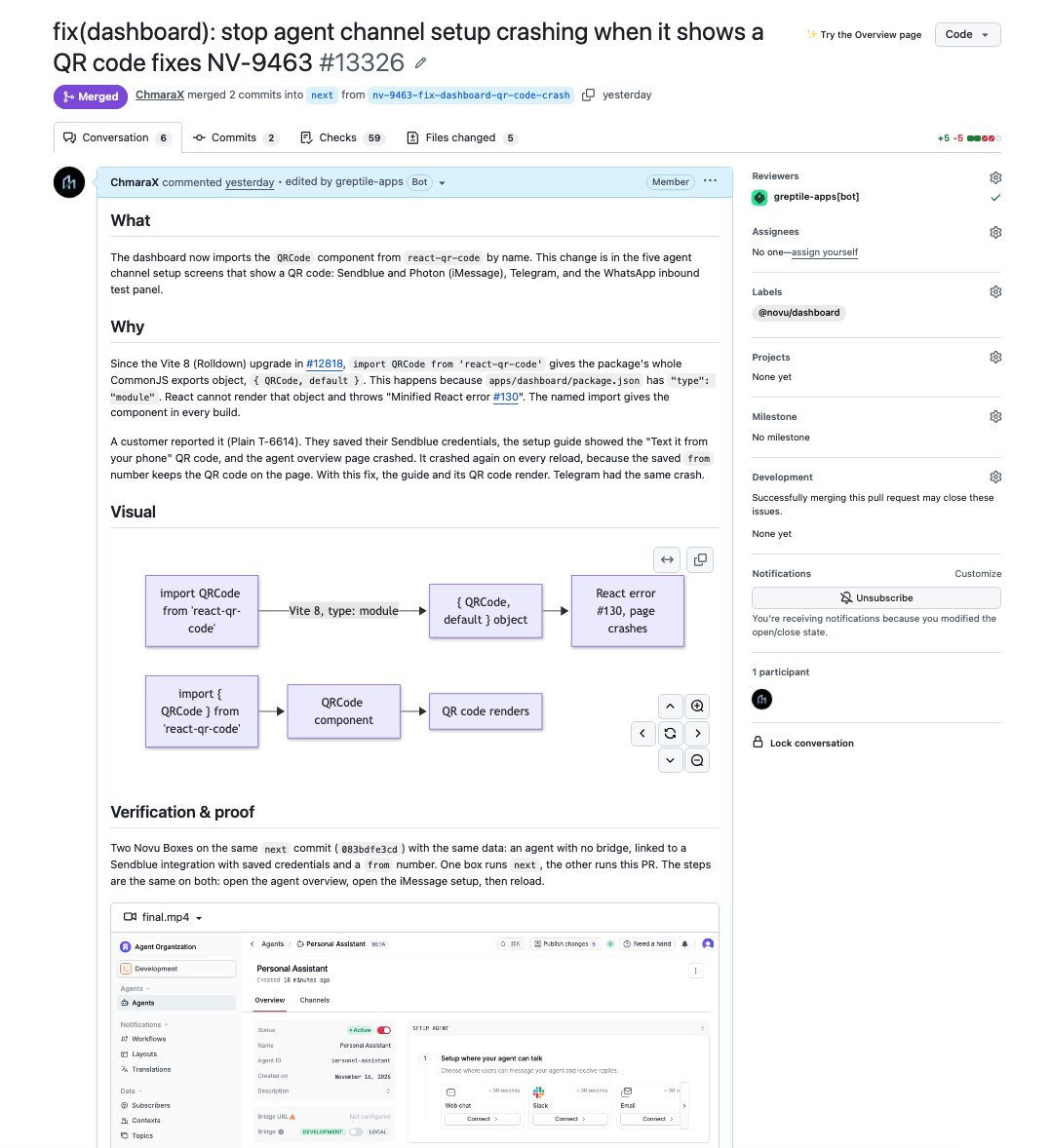
I have been experimenting with similar template for our PRs and this is the best one I've come up with so far:
1. What - few short sentences, human readable and easy to understand in ASD-STE100
2. Why - why this change was made and why it's beneficial, with actual user example
3. Visual - one visual artifact, whichever suits the change best (mermaid, benchmark chart, screenshot of UI, anything else that would help) - I try to leave a bit of room for agent to interpret what is the best instead of listing specific choices
4. Verification & proof - this is probably the most important - we use a special skill that spins a production-like @Cloudflare environment with the entire app so the agent can deploy the changes there and interact with the product fully, then it records before and after video
5. The agent writes a plan for TesterArmy (@e2e) so the exploration test can follow it and do another layer of verification
The specific PR: https://t.co/UkdMqii75i
Its a deliberately small change to demonstrate
here's what my prs look like atm
- human written title for pr
- one line of human written text about what the change is
- before/after table with screenshots
- if relevant, a link to a clickable prototype, so you don't have to pull the branch and/or get the app in to right state in a dev version to see the new ux
- agent written pr description in collapsible <details> tag
I try to keep my agents.md mostly minimal, but these are the few instructions I found quite useful (don't remember the original authors to credit them):
-> "Always build code cleanly, modularly, and with proper architecture and separation of concerns. Never simply bolt on a feature because I asked for it. If you can’t find an easy way to build it naturally, and you'd recommend a refactor to make the whole thing cleanly, stop your work ahead of time and say so."
-> "This codebase is yours: what it's for and how it's built are your call, and you'll keep building on it."
-> "Never write unit tests after writing the code."
-> "Prefer end-to-end (E2E) tests as the main way to test. Use them to check that complex features work."
-> "For complex features, use realistic E2E scenarios with medium or high complexity. Do not test only the simplest successful case."
this is not a kpi people. its not a flex.
7000 PRs that you havent read adds no value, adds risk, and lacks intent
like what are you trying to prove? that you dont care about your software?
@tahasdx@herdrdev I would also recommend removing clutter by replacing the TUI chat with the GUI one - its easier and cleaner to understand and read
https://t.co/J3jEZ8Nysn
For me herdr is just a well designed toolkit that allows me to setup the environment however I want without carrying bunch of useless features.
In all the other products I have to either fork or wait for upstream for absolutely BASIC changes and bugs to be solved, since they prioritise features to capture more users rather than solving actual problems.
But tbh i dont see much difference between tmux + pi, I guess tmux is slightly more setup, since herdr has few basic features already built in
@robinebers Exactly, and if they have editor its just a basic file viewer at best, without function jumping etc. I've tried many and only Cursor has it in ADE.
This plugin was the first think I did when started to use herdr for the very same reason
https://t.co/6uzE6w4mrR
I've been using @herdrdev app as my daily driver for a while, after using TUI herdr for months - I've always thought GUI chat is superior to TUI when it comes to readability.
Since herdr has amazing extendability, I finally build one that has all features I need
- any agent (Pi, Claude Code, Codex)
- supports @pidotdev extensions system
- queue/steer built in
- Mermaid diagrams, code snippets
- subagents, inline skills and more
@geekbb I agree, been using herdr as my daily driver for a long time, haven't found anything better so far. Did few mods u might like as well!
https://t.co/ALQuvHhjj3
https://t.co/6uzE6w4mrR
I'm quite sure that if you would ignore 90% of the AI workflows described on X for past year and used just one chat thread, few skills + MCP, you would lose maybe 5% edge over somebody that does all of that
Interesting perspective. Overengineering your AI workflows can add additional mental tax that will be self-defeating: You'll end up spending more time on engineering your AI agent's environment than getting things done.
On the other hand, when you're too vague in your instructions to your AI agent, you will lose control and visibility into how the agent is carrying out the task.
Unless you iterate with the AI agent in small steps (this is what I do). In that case, you're keeping things simple while also benefitting from the advanced capabilities of the LLM.