Some developers think Tasks create threads.
They don’t.
In .NET, work is executed by the ThreadPool, a shared pool of worker threads reused across the entire application.
Here’s the mental model that helps explain it.
When a request arrives in your ASP .NET Core app:
1️⃣ The work is placed into a task queue
2️⃣ A ThreadPool worker thread picks up the task
3️⃣ The thread executes the work
4️⃣ When the task finishes, the thread returns to the pool
Then it immediately picks up another task.
Threads are reused constantly.
That’s what makes the ThreadPool efficient.
But here’s where things go wrong.
If your code does blocking work, those threads can’t return to the pool.
Examples:
• .Result
• .Wait()
• synchronous database calls
• blocking HTTP calls
Now the thread stays stuck.
Under load, this creates a chain reaction:
Requests arrive
↓
Tasks enter the queue
↓
Threads are blocked
↓
The queue grows
↓
Latency spikes
This is called ThreadPool starvation.
Your server isn’t slow because .NET is slow.
It’s slow because all worker threads are busy waiting.
The key takeaway:
Tasks are not threads.
Threads execute tasks.
And when they’re done, they go back to the ThreadPool to execute the next one.
Unless you block them.
Curious: What’s the most common ThreadPool killer you’ve seen in production?
__
📌 Don't miss the next newsletter issue, 22,000 engineers will read it, join them: https://t.co/gI46R2Kc0c
♻️ Repost to others.
📂 You can save this post for later, and you should do it.
➕ Follow me to learn .NET and Architecture every day.
🚀 Thinking about a job switch? Don’t guess your skills. Test them.
BuildToDeploy Academy is now LIVE.
Free resources to help you assess, prepare & level up in:
⚡ .NET
☁️ Azure
🏗️ Architecture
🤖 AI | RAG | AI Agents | Agentic AI
🎯 Scenario-based Interview Assessments
No subscription. No paywall. Everything is FREE.
👉 Gauge your skills. Find your gaps. Prepare for what’s next.
🔗 https://t.co/XlUW2WszmG
#BuildToDeploy #Azure #DotNet #AI #SoftwareArchitecture #TechCareers
🌟 Launching my new course on Senior Azure Solution / Enterprise Architect - Azure 🌟
👩🎓🧑🎓 Enroll today and let’s grow together: https://t.co/6mBjFZwXSJ
#LearnWithBuild To Deploy Academy #NewCourseAlert https://t.co/6mBjFZwXSJ
AI Gateway Architecture on Microsoft Azure - Simplified Blueprint 🚀
Most teams jump into AI without a clear architecture.
That’s where things break.
Here’s a practical blueprint to build a scalable, secure AI gateway on Microsoft Azure:
🔹 Identity & Security First
Use Azure AD (Entra), Key Vault & Managed Identity to keep everything secure by design.
🔹 Central Gateway with APIM
Azure API Management acts as the control layer—routing, throttling, and governing all AI requests.
🔹 Event-Driven Processing
Azure Event Hub enables async + batch workloads for high-scale scenarios.
🔹 Seamless AI Integration
Connect to Azure OpenAI PTUs or LLM deployments via secure network layers.
🔹 Observability Built-In
Azure Monitor + Logs + Metrics → full visibility into usage, performance, and failures.
🔹 Actionable Insights
Dashboards, alerts, and automated actions ensure reliability at scale.
💡 Why this matters?
Because AI systems without governance = chaos.
This architecture ensures control, scalability, and production readiness.
If you're building AI systems on Azure, this is the layer most people miss.
𝗕𝗲𝗰𝗼𝗺𝗲 𝗯𝗲𝘁𝘁𝗲𝗿 𝗮𝘁 𝗔𝗜 𝗶𝗻 𝗷𝘂𝘀𝘁 𝟭 𝗺𝗶𝗻𝘂𝘁𝗲 𝗮 𝗱𝗮𝘆. 𝗝𝗼𝗶𝗻 𝗺𝘆 𝘄𝗲𝗲𝗸𝗹𝘆 𝗻𝗲𝘄𝘀𝗹𝗲𝘁𝘁𝗲𝗿 𝘄𝗵𝗲𝗿𝗲 𝗜 𝗱𝗼𝗰𝘂𝗺𝗲𝗻𝘁 𝘁𝗵𝗲 𝗿𝗲𝗮𝗹-𝘄𝗼𝗿𝗹𝗱 𝗷𝗼𝘂𝗿𝗻𝗲𝘆 𝗼𝗳 𝗔𝗜 𝘁𝗿𝗮𝗻𝘀𝗳𝗼𝗿𝗺𝗮𝘁𝗶𝗼𝗻.
👉 𝗦𝗶𝗴𝗻 𝘂𝗽 𝗳𝗿𝗲𝗲 now → https://t.co/Kj8zW959kp
Follow @AiswaryaVenkit1 for more AI insights.
Everyone talks about Claude Code.
Almost nobody uses it beyond basic prompts.
I spent 3 months going from beginner to power user.
Here's what separates the top 1% from everyone else in one cheatsheet:
☑️ 1. THE 5 BUILDING BLOCKS
Most people only know slash commands. There are 5 systems:
CLAUDE. md → Your project memory.
Slash Commands → Type / to trigger.
Skills → Auto-activate.
Hooks → Guaranteed execution.
Subagents → Parallel workers with isolated context.
The progression: Manual → Automatic → Guaranteed → Delegated.
☑️ 2. CONTEXT MANAGEMENT (The #1 Skill Nobody Talks About)
Context is fuel. Waste it, and Claude gets dumb.
→ Run /context to see your usage as a visual grid
→ Run /compact at 60K tokens to compress and stay fast
→ Run /clear between completely unrelated tasks
→ Offload exploration to subagents (keeps your main thread clean)
→ Never say "investigate everything", always scope the search
☑️ 3. CUSTOM COMMANDS & PLUGINS
Which slash commands do you use daily? Make them permanent.
Create in .claude/commands/:
.claude/commands/review. md
→ Description: "Review code quality."
→ Allowed tools: Read, Glob
→ Prompt: "Review this code for security and performance."
→ Usage: /review
Plugins bundle everything (commands + agents + skills + hooks + MCP servers) into a shareable package.
Browse: /plugin Create: Ask Claude to "Build me a plugin for code review."
✅ THE POWER USER CHECKLIST
Complete all 10, and you're in the top 1%:
□ Set up CLAUDE. md in every project
□ Create 3 custom slash commands you use daily
□ Install at least 2 MCP servers (GitHub + Slack)
□ Write 1 hook that auto-formats your code
□ Build a skill for your most repeated workflow
□ Use subagents for exploration, main thread for decisions
□ /compact at 60K tokens, /clear between unrelated tasks
□ Use Haiku for cheap subagents, Opus for hard problems
□ Try headless mode in one CI/CD pipeline
For more cheatsheets like this: 👇
→ Go to https://t.co/rnjW2PWRtc
→ Subscribe to my free newsletter (don't pay anything)
→ Get more free and daily Cheatsheets
♻️ Repost to help a developer in your network
Kubernetes is beautiful.
Every Concept Has a Story, you just don't know it yet.
In k8s, you run your app as a pod. It runs your container. Then it crashes, and nobody restarts it. It is just gone.
So you use a Deployment. One pod dies and another comes back. You want 3 running, it keeps 3 running.
Every pod gets a new IP when it restarts. Another service needs to talk to your app but the IPs keep changing. You cannot hardcode them at scale.
So you use a Service. One stable IP that always finds your pods using labels, not IPs. Pods die and come back. The Service does not care.
But now you have 10 services and 10 load balancers. Your cloud bill does not care that 6 of them handle almost no traffic.
So you use Ingress. One load balancer, all services behind it, smart routing. But Ingress is just rules and nobody executes them.
So you add an Ingress Controller. Nginx, Traefik, AWS Load Balancer Controller. Now the rules actually work.
Your app needs config so you hardcode it inside the container. Wrong database in staging. Wrong API key in production. You rebuild the image every time config changes.
So you use a ConfigMap. Config lives outside the container and gets injected at runtime. Same image runs in dev, staging and production with different configs.
But your database password is now sitting in a ConfigMap unencrypted. Anyone with basic kubectl access can read it. That is not a mistake. That is a security incident.
So you use a Secret. Sensitive data stored separately with its own access controls. Your image never sees it.
Some days 100 users, some days 10,000. You manually scale to 8 pods during the spike and watch them sit idle all night. You cannot babysit your cluster forever.
So you use HPA. CPU crosses 70 percent and pods are added automatically. Traffic drops and they scale back down. You are not woken up at 2am anymore.
But now your nodes are full and new pods sit in Pending state. HPA did its job. Your cluster had nowhere to put the pods.
So you use Karpenter. Pods stuck in Pending and a new node appears automatically. Load drops and the node is removed. You only pay for what you actually use.
One pod starts consuming 4GB of memory and nobody told Kubernetes it was not supposed to. It starves every other pod on that node and a cascade begins. One rogue pod with no limits takes down everything around it.
So you use Resource Requests and Limits. Requests tell Kubernetes the minimum your pod needs to be scheduled. Limits make sure no pod can steal from everything around it. Your cluster runs predictably.
The reading list that taught me how to think about agentic architecture.
Bookmark this.
1. Brewer's CAP Theorem (2000) — trade-off thinking
2. Netflix Hystrix docs — circuit breaker pattern
3. Martin Fowler: Saga Pattern — distributed rollback
4. The Twelve-Factor App — stateless service design
5. AWS Well-Architected Framework — blast radius thinking
6. "Thinking in Systems" — Donella Meadows
7. Designing Data-Intensive Applications — Kleppmann
8. Google SRE Book Ch.13 — cascading failures
9. OWASP LLM Top 10 (2025) — agent attack surfaces
10. Anthropic: Building Effective Agents (2024)
11. LangGraph docs — stateful agent patterns
12. Microsoft AutoGen paper — multi-agent orchestration
13. Gartner: Agentic AI Hype Cycle (2025)
14. EU AI Act Article 14 — human oversight requirements
Classic distributed systems stuff.
Applied to the next layer of the stack.
Follow for annotated breakdowns → @asmah2107
Copilot is powerful—but it gets dramatically better when you give it the right context.
Here are 4 practical context-engineering techniques to improve Copilot’s accuracy 🧵👇
It's because Claude trained on the code that those people wrote and perfected code for 37 years, that this C compiler was made possible.
In my work domain, almost none of the fun code is publicly available. When I ask an LLM to do something cute (which all top tier domain firms have sorted out), it's a sight to watch it fall over itself and generate garbage. Reports of the demise of Software Engineering and Software Engineers are premature. To quote Maverick in Top Gun 2 - "Maybe some day sir, but not today".
If you design distributed systems, you cannot ignore these patterns
(Explained in 2 minutes) 👇
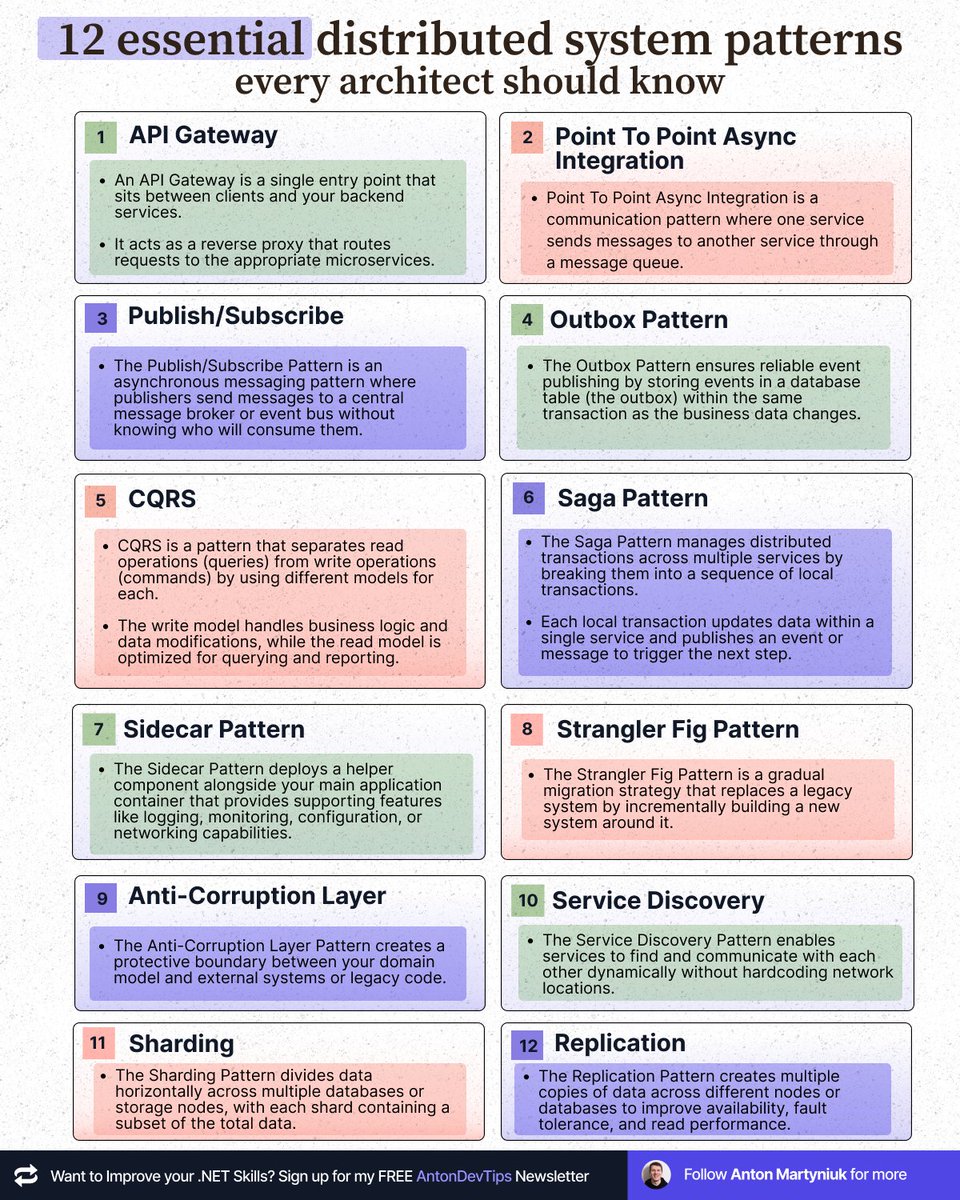
Here are 12 essential distributed system patterns every architect should know 👇
1. API Gateway
An API Gateway is a single entry point that sits between clients and your backend services. It acts as a reverse proxy that routes requests to the appropriate microservices.
2. Point To Point Async Integration
Point To Point Async Integration is a communication pattern where one service sends messages to another service through a message queue.
3. Publish/Subscribe
The Publish/Subscribe Pattern is an asynchronous messaging pattern where publishers send messages to a central message broker or event bus without knowing who will consume them.
4. Outbox Pattern
The Outbox Pattern ensures reliable event publishing by storing events in a database table (the outbox) within the same transaction as the business data changes.
5. CQRS
CQRS is a pattern that separates read operations (queries) from write operations (commands) by using different models for each. The write model handles business logic and data modifications, while the read model is optimized for querying and reporting.
6. Saga Pattern
The Saga Pattern manages distributed transactions across multiple services by breaking them into a sequence of local transactions. Each local transaction updates data within a single service and publishes an event or message to trigger the next step.
7. Sidecar Pattern
The Sidecar Pattern deploys a helper component alongside your main application container that provides supporting features like logging, monitoring, configuration, or networking capabilities.
8. Strangler Fig Pattern
The Strangler Fig Pattern is a gradual migration strategy that replaces a legacy system by incrementally building a new system around it.
9. Anti-Corruption Layer
The Anti-Corruption Layer Pattern creates a protective boundary between your domain model and external systems or legacy code.
10. Service Discovery
The Service Discovery Pattern enables services to find and communicate with each other dynamically without hardcoding network locations.
11. Sharding
The Sharding Pattern divides data horizontally across multiple databases or storage nodes, with each shard containing a subset of the total data.
12. Replication
The Replication Pattern creates multiple copies of data across different nodes or databases to improve availability, fault tolerance, and read performance.
Tomorrow, I'll share with 𝟭𝟴,𝟭𝟱𝟬+ people the detailed explanation of these patterns with visuals:
- How they work
- Benefits and Drawbacks
- Use Cases
📌 If you want to join us, subscribe to my weekly newsletter:
↳ https://t.co/0OVqo80kzv
——
♻️ Repost to help others learn essential system design patterns
➕ Follow me ( @AntonMartyniuk ) to improve your .NET and Architecture Skills
I love discussing : "Design a system for 1 million users."
Most jump to tech: "I'll use Kafka, Kubernetes, blah blah!"
Game over 🥵
I can tell you this is a red flag.
The best engineers start with a question, not a technology.
A question that reveals if they truly understand scale...
Most engineering teams screw up messaging because they don’t understand one thing:
Streams hold truth.
Queues do work.
When you get this wrong, your system bleeds.
I’ve seen $10M mistakes from teams who dump everything into queues:
“Just push the order to a queue and process it!”
Most Queues delete messages after work is done.
No history. No replay. No audit.
Just pain and guesswork.
On the other side, some teams fall in love with Kafka:
“We’ll stream EVERYTHING!”
Here’s the rule I wish someone told me early:
If the event changes the business → Stream
If the message is an action to perform → Queue
Streams = OrderPlaced, PaymentAuthorized, InventoryReserved
These are immutable facts.
They must be durable, replayable, ordered, and auditable.
Queues = SendEmail, CapturePayment, GenerateInvoice
These tasks exist temporarily.
They matter NOW, not 6 months from now.
Event enters the stream → workers derive jobs → queues execute tasks
Ledger first.
Assembly line second.
Everything else is technical debt disguised as cleverness.
What is a query plan (execution plan)?
If you understand this, you will master database performance tuning.
A query plan is a sequence of steps to access data in an SQL database.
Every SQL query you send to the database is converted into a query plan.
The high-level process is:
• SQL parsing
• SQL optimization
• Output query plan
The crucial component in this process is the Query Optimizer.
It's responsible for searching through the possible query plan search space and finding the optimal query plan.
There could be millions of combinations here. So it's not a simple problem.
How does this work?
In a cost-based Query Optimizer, every query plan has an associated cost.
The best query plan is the one with the lowest cost.
This is oversimplified, but you should get the idea.
And this all has to happen quickly, or performance will suffer.
Another optimization SQL engines do is cache frequently used query plans.
It's essential to write your queries so they can be cached.
For example, a query with parameters can be cached, and the query plan reused.
We underestimate the complexity of the database systems we use.
I analyzed my query plans to optimize my Outbox processor component.
This got me a blazing 70X performance improvement.
Here's how to use query plans for performance optimization: https://t.co/w7m8lECrvq
Drop a comment below if you like exploring query plans.
EXPLAIN ANALYZE for the win!
---
Sign up for the .NET Weekly with 72K+ other engineers, and get a free Clean Architecture template: https://t.co/mZnl6JZCIY
Ever wonder what your LINQ query is really doing under the hood? 🧐 With EFCore.Visualizer, you can inspect Entity Framework Core query plans right inside Visual Studio—no more jumping between tools. Supports SQL (cont) https://t.co/6CSLpTV5Kd
What if you could ask a database a question in plain English—and get the right results? 🤔
Sai Nitesh Palamakula shows how to combine Azure Cosmos DB, MCP, Semantic Kernel, and Azure OpenAI to make natural language queries a reality.
Read the post 👉 https://t.co/cgSEpyOiJ7
#AzureCosmosDB #AzureAI