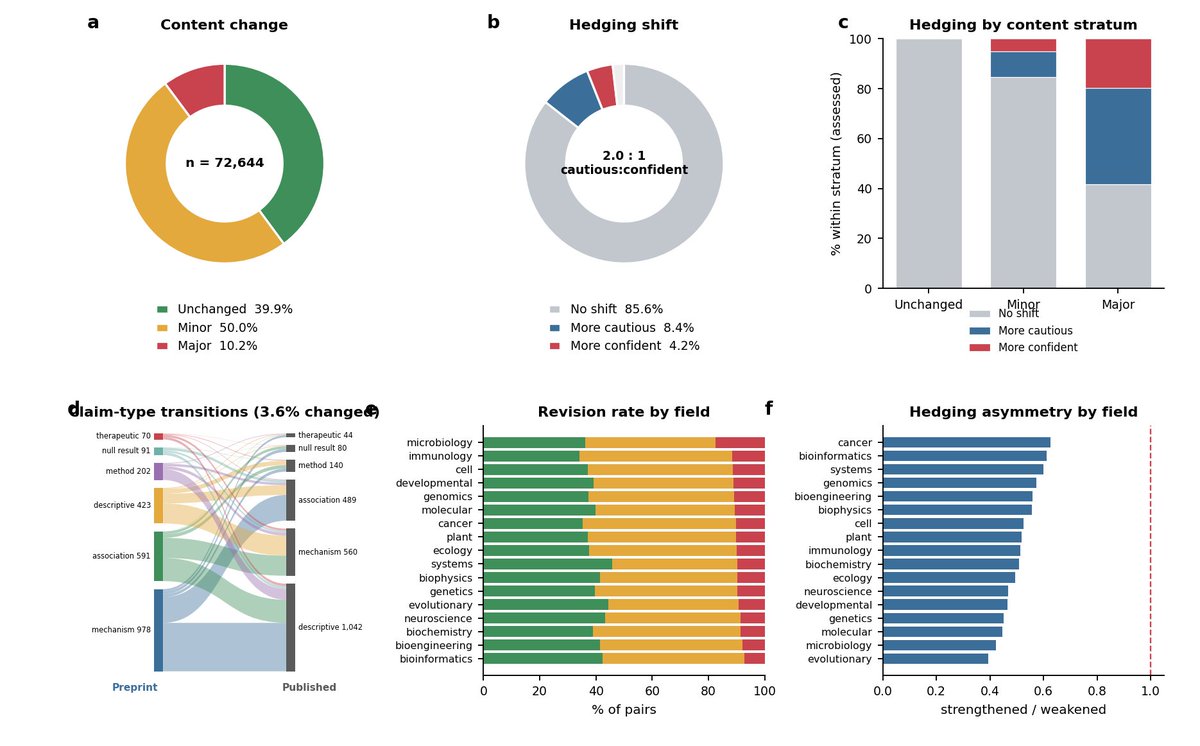
How much does a scientific claim actually change between the preprint and the final published paper?
We used a large language model to track it across all available 72,644 bioRxiv -> journal pairs from 2018 - 2025 in this new work with @HaoYin. 🧵
How we prompt AI is very different in 2026 than 2022 when ChatGPT came out.
I'm teaching a new course, AI Prompting for Everyone, to help you become an AI power user — whatever your current skill level.
It covers skills that apply across ChatGPT, Gemini, Claude, and other AI tools. How to use deep research mode for well-researched reports on complex questions. How to give AI the right context, including more documents and images than most people realize you can provide. When to ask AI to think hard for several minutes on important decisions like what car to buy, what to study, or what job to take. And how to use AI to generate images, analyze data, and build simple games and websites.
I also cover intuitions about how these models work under the hood, so you know when to trust an answer and when not to.
Along the way, you'll see flying squirrels, a creativity test, some of my old family photos, and fireworks.
Join me at https://t.co/tcQc4iJAJG
You're using Claude wrong (again).
Here's the 1-page checklist that fixes everything:
1. Save this image. It's 9 sections, 81 checkboxes.
2. Print it. Pin it next to your screen.
3. To copy my exact setup: https://t.co/psB7XxB2Y4
4. Don't pay anything. It's free in the welcome email.
---
1. Setup (the foundation).
☑ Pay for Pro at $20/month. Worth every cent.
☑ Download the desktop app. Not the browser.
☑ Opus 4.7 with Adaptive Thinking for complex task
☑ Claude 101: https://t.co/HNa5MrCLVU
2. Build your Context Folder.
☑ Create a folder called "Claude Cowork" on Mac.
☑ Add 3 subfolders: About me, Outputs, Templates.
☑ Write your about-me .md under 2,000 words.
☑ Master Claude Cowork: https://t.co/uWTpOI3Woc
3. Prompt like the top 1%.
☑ State what you want & what success looks like.
☑ Prompt "Use AskUserQuestion before you start."
☑ Edit messages instead of sending a follow-up.
☑ Better prompting: https://t.co/j1LATSJiat
4. Connect your tools.
☑ Settings → Connectors → Browse → click "Add."
☑ Gmail, Drive, Slack, Notion, Granola, Gamma.
☑ Turn off connectors you don't need for the task.
☑ Claude 101: https://t.co/jw2qdIcjnh
5. Create Skills with /commands.
☑ Add: "Use skill-creator to build a skill for [task]."
☑ Claude interviews you. Generates. You upload it.
☑ Add "do NOT use for" to every skill description.
☑ Build your first Skill: https://t.co/6cHYYfjXEA
6. Run Projects with memory.
☑ Create one Project per recurring deliverable.
☑ Upload one gold-standard example per Project.
☑ Save winning outputs as templates in a folder.
☑ Cowork + Projects: https://t.co/Q7AN9CZAbO
7. Design & Code without designers.
☑ Open claude .ai/design for landing pages.
☑ Upload a DESIGN .md brand file.
☑ Connect a free GitHub account for deployment.
☑ Claude Design 101: https://t.co/ZY8Fg5D2ea
8. Research like a pro.
☑ Turn on Web Search inside the prompt bar.
☑ Ask it to do 5 varied searches & identify gaps.
☑ Use Grok for real-time news Claude misses.
☑ Start here: https://t.co/77BmjbJREy
9. Master the token economy.
☑ Plan in chat first. Build in Cowork second.
☑ Convert PDFs & screenshots to markdown format
☑ Restart conversations every 20 messages.
☑ Stop hitting limits: https://t.co/j5fEzSH5br
♻️ Repost this to help someone stop using Claude wrong.
ggplot2 is one of those tools that completely changes how you think about data visualization.
A great introduction if you want cleaner and more expressive charts:
https://t.co/nU0RChfTap
#RStats#DataVisualization#DataScience#ggplot2#DataViz
This wasn't the case with previous image generators, but the LLM you select has a huge effect on GPT-imagegen-2 output. GPT-5.4 Thinking and GPT-5.4 Pro will produce much better images, especially for complex things.
This is, of course, not intuitive or explained anywhere.
It's finally out! The first benchmark of a dedicated AI manuscript reviewer.
When we first launched R3 in June, AI review was still taboo. Since then, more tools have launched and more researchers have started experimenting with AI on their papers!
But how do these tools actually compare, both to each other and to human reviews? We wanted to contribute a benchmark to help the field make sense of all the recent progress!
We compare publicly available human reviews with R3 and frontier LLMs on thousands of papers -- across social science, life science, and computer science research.
Our latest work is out in Briefings in Bioinformatics!
We benchmark variant callers and QC strategies using 60,532 multi-ancestry whole-genome sequences, providing practical guidance for large-scale WGS studies.
Read here: https://t.co/mFGOEwgfke
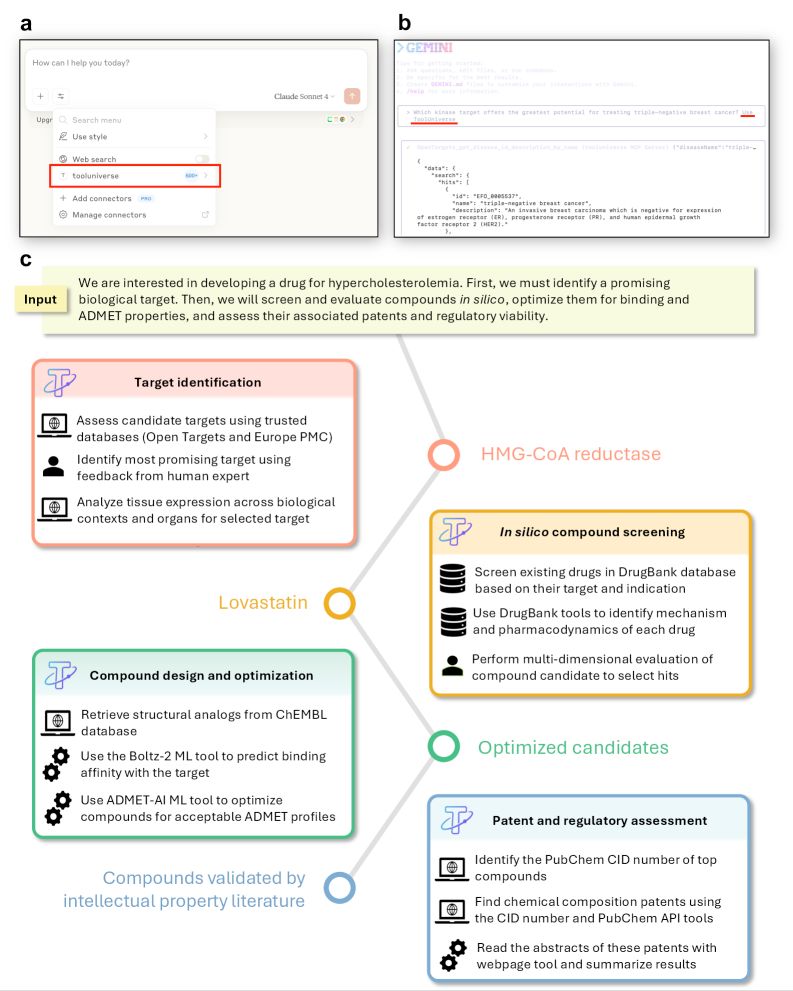
Someone created an interesting LLM pipeline to map drugs to genetic evidence from public resource, inspired by my Works In Progress article on human genetics and drug discovery.
I am yet to try this one myself, but the fact that someone outside the field got interested in genetics and went on to create this resource is the highest impact I can hope for my writing!
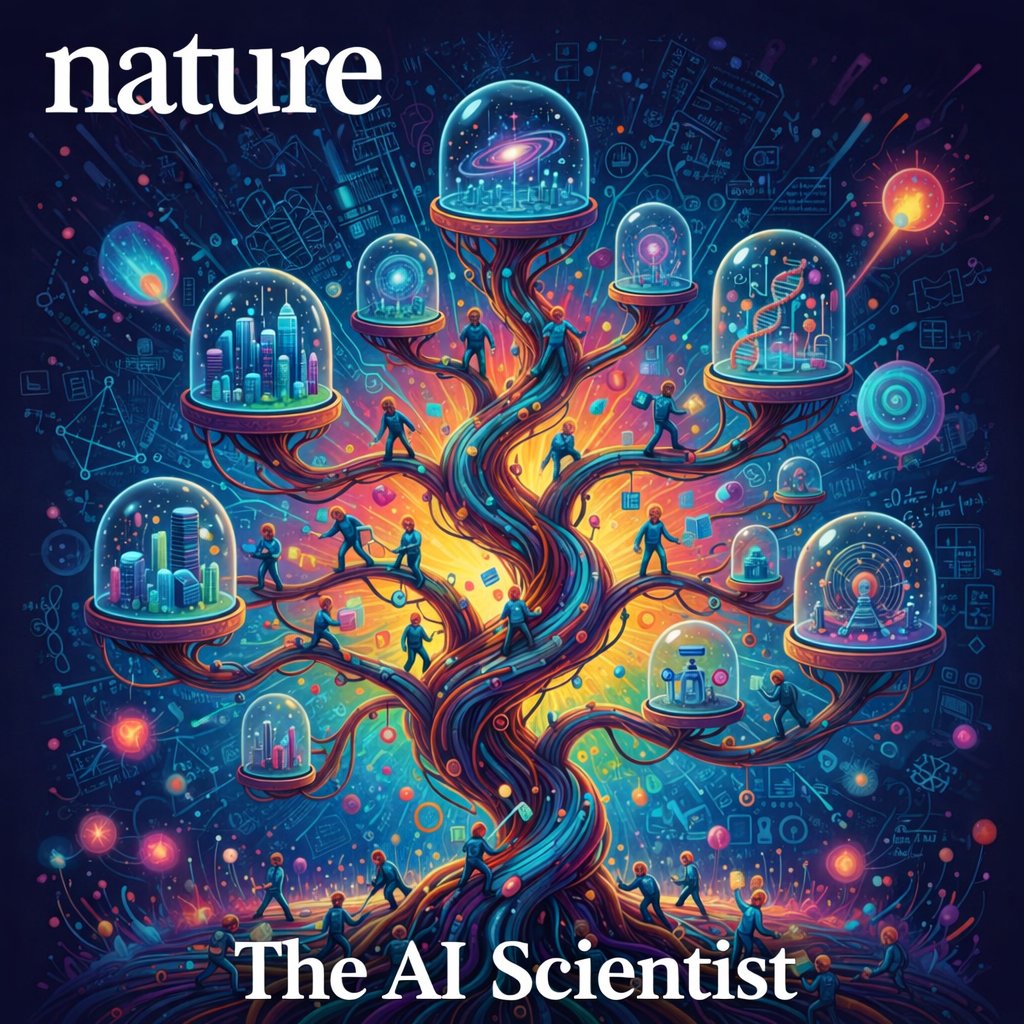
The AI Scientist: Towards Fully Automated AI Research, Now Published in Nature!!✨
Today in Nature we share a comprehensive technical summary of our work on The AI Scientist, including new scaling law results showing how it improves with more compute and more intelligent foundation models.
The AI Scientist autonomously creates its own research ideas, codes up and conducts experiments to test those ideas, creates figures to visualize the results, writes an entire scientific manuscript summarizing what it has discovered, and conducts its own “peer” review of the resulting paper. One of its papers–entirely AI generated–passed peer review at a top-tier AI conference workshop, a historic milestone marking the dawn of a new era of AI-accelerated scientific discovery. 🔬🧪✨🧬💡🔭
Paper https://t.co/Q6tfME4yst
Blog https://t.co/C43Ooy0kjP
Work done in collaboration with a great team from Sakana, Oxford, and my lab at UBC. Thanks and congratulations everyone!
@_chris_lu_@cong_ml@RobertTLange@_yutaroyamada@shengranhu@j_foerst@hardmaru
Introducing the Anthropic Science Blog.
Increasing the pace of scientific progress is a core part of Anthropic’s mission. The Science Blog will feature new research and stories of how scientists are using AI to accelerate their work.
Read the intro: https://t.co/1P9BDyX3xG
Become a Claude Certified Architect
Here is the complete resource list in one place:
Link to join: https://t.co/OXQyTmfCmb
Training courses: https://t.co/UaJzLeXKrP (13 free courses)
Cookbook: https://t.co/SLnSUT7xT1
Exam Guide: https://t.co/A2pbDcyGwa
Practice questions: https://t.co/90eXwUxiXQ (free)
MCP documentation: https://t.co/SbwZI0fjVz (free)
API documentation: https://t.co/9rmnLWypxc (free)
Partner Network: https://t.co/diT5OE6ePJ (free to join)
Personal Playbook someone created after the exam: https://t.co/qhXan3XVri
Don't use ChatGPT, Claude, or Google for research anymore.
Here are 10 NotebookLM prompts that analyze any document, find contradictions, and generate insights your professors missed (save this)
ever been here?
open overleaf → write a paragraph → "hmm...this needs a citation" → open 15 different tabs → skim 8 abstracts → find the 1 actually relevant paper → format bibtex → paste it back on overleaf
if so, i built a plugin just for you. meet openleaf:
→ reads your paper paragraph by paragraph
→ searches major academic databases
→ filters out irrelevant papers using ai
→ one click to add BibTeX to your .bib
you'll also find the 🤝 friendly and 🔥 fire reviewers there. i don't think i need to tell you what they do :)
free. open source. no account. no data collection.
works with ollama, openrouter, openai api and more.
https://t.co/XvX03iem38
dear algorithm, please show this to my fellow researchers in need 🙏
#overleaf #latex #opensource #academictwitter
I think this is a good way to visualize the AI race using the long-lived GPQA Diamond benchmark.
You can see how long OpenAI had the field to itself, the rise (and collapse) of Meta, the sudden catch-up (and then stagnation) of xAI, and the entry of open weights Chinese LLMs.
7/ The guide is free. https://t.co/2BobqT6U2X
If you're using Claude Code or https://t.co/WAs2UJrv2o without skills, you're re-typing the same instructions every session. Stop doing that.







![rubenhassid's tweet photo. You're using Claude wrong (again).
Here's the 1-page checklist that fixes everything:
1. Save this image. It's 9 sections, 81 checkboxes.
2. Print it. Pin it next to your screen.
3. To copy my exact setup: https://t.co/psB7XxB2Y4
4. Don't pay anything. It's free in the welcome email.
---
1. Setup (the foundation).
☑ Pay for Pro at $20/month. Worth every cent.
☑ Download the desktop app. Not the browser.
☑ Opus 4.7 with Adaptive Thinking for complex task
☑ Claude 101: https://t.co/HNa5MrCLVU
2. Build your Context Folder.
☑ Create a folder called "Claude Cowork" on Mac.
☑ Add 3 subfolders: About me, Outputs, Templates.
☑ Write your about-me .md under 2,000 words.
☑ Master Claude Cowork: https://t.co/uWTpOI3Woc
3. Prompt like the top 1%.
☑ State what you want & what success looks like.
☑ Prompt "Use AskUserQuestion before you start."
☑ Edit messages instead of sending a follow-up.
☑ Better prompting: https://t.co/j1LATSJiat
4. Connect your tools.
☑ Settings → Connectors → Browse → click "Add."
☑ Gmail, Drive, Slack, Notion, Granola, Gamma.
☑ Turn off connectors you don't need for the task.
☑ Claude 101: https://t.co/jw2qdIcjnh
5. Create Skills with /commands.
☑ Add: "Use skill-creator to build a skill for [task]."
☑ Claude interviews you. Generates. You upload it.
☑ Add "do NOT use for" to every skill description.
☑ Build your first Skill: https://t.co/6cHYYfjXEA
6. Run Projects with memory.
☑ Create one Project per recurring deliverable.
☑ Upload one gold-standard example per Project.
☑ Save winning outputs as templates in a folder.
☑ Cowork + Projects: https://t.co/Q7AN9CZAbO
7. Design & Code without designers.
☑ Open claude .ai/design for landing pages.
☑ Upload a DESIGN .md brand file.
☑ Connect a free GitHub account for deployment.
☑ Claude Design 101: https://t.co/ZY8Fg5D2ea
8. Research like a pro.
☑ Turn on Web Search inside the prompt bar.
☑ Ask it to do 5 varied searches & identify gaps.
☑ Use Grok for real-time news Claude misses.
☑ Start here: https://t.co/77BmjbJREy
9. Master the token economy.
☑ Plan in chat first. Build in Cowork second.
☑ Convert PDFs & screenshots to markdown format
☑ Restart conversations every 20 messages.
☑ Stop hitting limits: https://t.co/j5fEzSH5br
♻️ Repost this to help someone stop using Claude wrong.](https://pbs.twimg.com/media/HHJhLBia4AEAXAp.jpg)