Clean Architecture
(https://t.co/gKsnxwSEvK)
FluxNews is a news app using Jetpack Compose and provides real-time news updates and implements Clean Architecture
Real-world examples of data structures.
Data structures are the building blocks of software, helping to organize and store information efficiently.
They are not just theoretical concepts; they are used in many applications that we interact with daily.
Here are some real-world examples of how these data structures are used:
🔸 List
Online shopping cart — an ordered collection of items with the ability to access items at specific positions.
🔸 Linked List
Browser history — enables quick and efficient traversal backward and forward through the history.
🔸 Hash Table
Caching — Many caching algorithms, like in web browsers and content delivery systems, use hash tables to quickly look up values based on a key.
🔸 Stack
Undo functionality — Last In, First Out (LIFO) the last element added is the first one to be removed.
🔸 Queue
Printer Queue — follows the First In, First Out (FIFO) principle, print jobs are processed in the order they are received.
🔸 Graph
Social media network — helps in suggesting new friends, finding mutual connections, and disseminating posts through the network.
🔸 Matrix
Pathfinding — utilizes a two-dimensional array to represent a grid and determine the shortest path from one point to another.
🔸 Tree
File system — trees are hierarchical in nature, mirroring the organizational structure of directories and subdirectories. Many file systems are represented as trees with directories as nodes.
🔸 Heap
Priority queue — efficiently ensures that the element with the highest priority is always readily accessible.
Of course, these are just a few examples of the many data structures used in software engineering.
Understanding how and where to use these data structures is a fundamental skill for any software engineer to create effective and efficient solutions.
💭 I’d love to hear your thoughts. What data structures or use cases would you like to add? 💬
~~
Thank you to our partner Postman who keeps our content free to the community.
The importance of APIs in software development has grown so much and will continue to grow. Here's a great piece to learn about API design: https://t.co/PzTISJ0cns
Introducing Sora, our text-to-video model.
Sora can create videos of up to 60 seconds featuring highly detailed scenes, complex camera motion, and multiple characters with vibrant emotions.
https://t.co/YYpOAcrXQ3
Prompt: “Beautiful, snowy Tokyo city is bustling. The camera moves through the bustling city street, following several people enjoying the beautiful snowy weather and shopping at nearby stalls. Gorgeous sakura petals are flying through the wind along with snowflakes.”
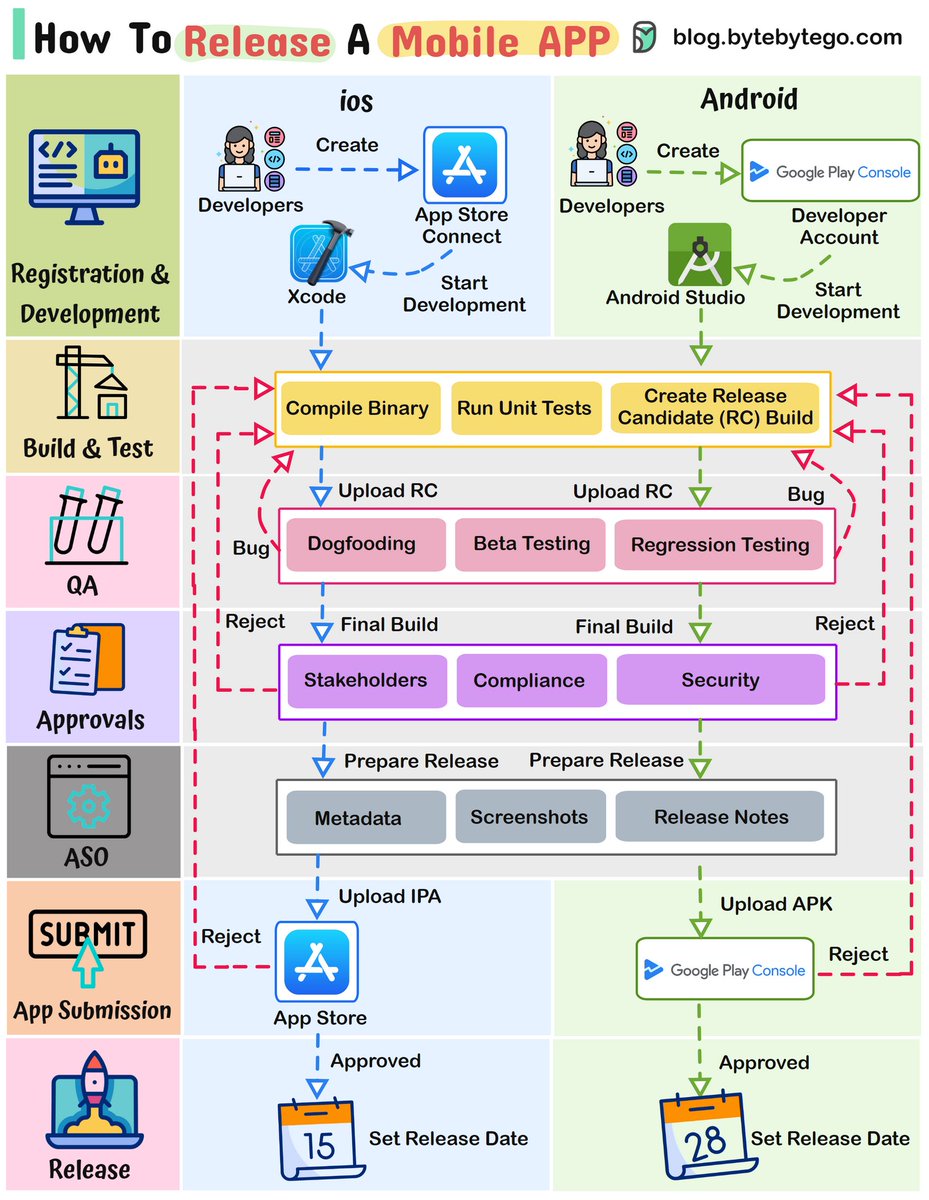
How To Release A Mobile App
The mobile app release process differs from traditional methods. Here is a simplified guide to the key stages:
1. Registration & Development (iOS & Android):
- Enroll as developer in Apple and Google programs to access tools and app stores
- Use native languages for each OS - Swift/Objective-C for iOS and Java/Kotlin for Android
- Or use cross-platform tools like React Native
2. Build & Test (iOS & Android):
- Compile app binary and test extensively on both platforms to confirm functionality
- Create a release candidate build for launch readiness
3. QA:
- Dogfood internally to surface any issues
- Enable beta access to collect user feedback
- Regression test
4. Internal Approvals:
- Get buy-in from stakeholders across business, technical and UX teams
- Ensure compliance to all app store policies and industry regulations
- Get security signoffs to safeguard user data
5. App Store Optimization (ASO):
- Refine metadata like titles and keywords for discoverability
- Prepare visually appealing screenshots and icons
- Draft release notes to highlight new features and updates
6. Submission To Stores:
- Submit iOS app through App Store Connect per Apple's process
- Submit Android app via Google Play Console based on their policies
- Address any changes requested pre-approval
7. Release:
- Upon approval, coordinate launch on iOS and Android
Over to you: Which stage of deployment did you find most complex? What helped overcome that?
–
Subscribe to our weekly newsletter to get a Free System Design PDF (158 pages): https://t.co/kNfv0DVDdf
How does Docker work?
The diagram below shows the architecture of Docker and how it works when we run “docker build”, “docker pull” and “docker run”.
There are 3 components in Docker architecture:
🔹 Docker client
The docker client talks to the Docker daemon.
🔹 Docker host
The Docker daemon listens for Docker API requests and manages Docker objects such as images, containers, networks, and volumes.
🔹 Docker registry
A Docker registry stores Docker images. Docker Hub is a public registry that anyone can use.
Let’s take the “docker run” command as an example.
1. Docker pulls the image from the registry.
2. Docker creates a new container.
3. Docker allocates a read-write filesystem to the container.
4. Docker creates a network interface to connect the container to the default network.
5. Docker starts the container.
--
Subscribe to our weekly newsletter to get a Free System Design PDF (158 pages): https://t.co/FIzCeaWsZV
Top 5 Kafka use cases
Kafka was originally built for massive log processing. It retains messages until expiration and lets consumers pull messages at their own pace.
Let’s review the popular Kafka use cases.
- Log processing and analysis
- Data streaming in recommendations
- System monitoring and alerting
- CDC (Change data capture)
- System migration
Over to you: Do you have any other Kafka use cases to share?
--
Subscribe to our weekly newsletter to get a Free System Design PDF (158 pages): https://t.co/uc5M7CdXXC
CI/CD pipelines — how do you optimize their performance?
CI/CD pipelines allow development teams to 𝗱𝗲𝗹𝗶𝘃𝗲𝗿 𝗰𝗵𝗮𝗻𝗴𝗲𝘀 𝗾𝘂𝗶𝗰𝗸𝗹𝘆 𝗮𝗻𝗱 𝗰𝗼𝗻𝗳𝗶𝗱𝗲𝗻𝘁𝗹𝘆.
Poorly performing pipelines lead to an increase in deployment times, opens up the risk of errors, and lowers developer productivity.
Before we explore the effective solutions to boost the performance of CI/CD pipelines, take a moment to revise the many components involved with the attached visual; this knowledge will help identify improvements.
Once you've reviewed that, let’s dive in:
The first step in optimizing any system is to analyze its processes and 𝗶𝗱𝗲𝗻𝘁𝗶𝗳𝘆 𝘁𝗵𝗲 𝗯𝗼𝘁𝘁𝗹𝗲𝗻𝗲𝗰𝗸𝘀 𝗮𝗻𝗱 𝗶𝗻𝗲𝗳𝗳𝗶𝗰𝗶𝗲𝗻𝗰𝗶𝗲𝘀.
A common culprit to poor performance is the 𝗹𝗮𝗰𝗸 𝗼𝗳 𝗽𝗮𝗿𝗮𝗹𝗹𝗲𝗹𝗶𝘀𝗺. Take a look at the processes that run in sequence and consider if they could instead run in parallel. This simple change could mean a drastic reduction in deployment times.
The order in which tests are executed is often an overlooked factor but something that can impact performance. While there are best practices to follow, the best approach will vary per project. It's important to find a balance between 𝗲𝗮𝗿𝗹𝘆 𝗳𝗲𝗲𝗱𝗯𝗮𝗰𝗸 𝗮𝗻𝗱 𝗲𝗳𝗳𝗶𝗰𝗶𝗲𝗻𝗰𝘆. If possible, 𝗼𝗻𝗹𝘆 𝗿𝘂𝗻 𝘁𝗲𝘀𝘁𝘀 𝘁𝗵𝗮𝘁 𝗿𝗲𝗹𝗮𝘁𝗲 𝘁𝗼 𝘁𝗵𝗲 𝘀𝗲𝘁 𝗼𝗳 𝗰𝗵𝗮𝗻𝗴𝗲𝘀; but be careful — don't overly complicate your test suite.
Another common culprit is the build process. Check the efficiency of your 𝗯𝘂𝗶𝗹𝗱 𝘀𝗰𝗿𝗶𝗽𝘁𝘀, 𝗿𝗲𝗺𝗼𝘃𝗲 𝘂𝗻𝗻𝗲𝗰𝗲𝘀𝘀𝗮𝗿𝘆 𝗱𝗲𝗽𝗲𝗻𝗱𝗲𝗻𝗰𝗶𝗲𝘀, 𝗮𝗻𝗱 𝗰𝗮𝗰𝗵𝗲 𝗮𝗿𝘁𝗶𝗳𝗮𝗰𝘁𝘀. Try to avoid any unnecessary processes, especially if the assets needed can be pulled from the previous build.
Finally, analyze and ensure the 𝗶𝗻𝗳𝗿𝗮𝘀𝘁𝗿𝘂𝗰𝘁𝘂𝗿𝗲 can support your pipeline. Ensure that it has adequate resources and can scale as needed.
A CI/CD pipeline is integral to any development process and one that impacts the development team’s day-to-day operations. It's important to invest time and effort to ensure your pipeline stays optimal as it can have an ongoing impact on the team’s productivity.