@ValorVDC@RevitNinja@johntpierson A lot of manufacturer content does look like a CAD or STEP body with connectors added just to make it placeable. Do you usually rebuild those as proper families, or only when the connectors start causing problems?
@Bim_Mentor Useful reminder that Rhino.Inside.Revit can write native walls and families instead of a round-trip. Curious where people still prefer Dynamo for the same work: is it mostly familiarity, or are there tasks where it stays cleaner?
@RobinCWolfson Manufacturer downloads are convenient until one fixture family weighs more than the floor plan. Do you usually rebuild a light version and keep the specs in parameters, or only do that after the model starts to slow down?
Find anything in Revit — just by asking.
Tired of digging through filters, schedules, and selection tools just to grab a few doors?
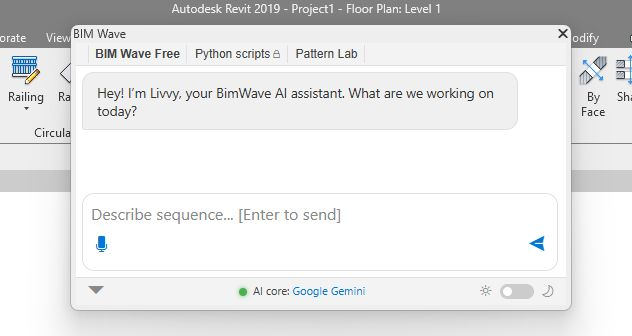
In this short demo, we use Bim Wave chat to:
- find doors with Mark containing 10
- then doors with Mark containing B
- and select them automatically with a simple rule.
No scripts. No clicks through endless menus. Just chat.
#Revit #BIM #AEC #DigitalConstruction #AECTech
After 6 months of building, I can finally show it.
BIM Wave is an AI chat for Revit. Ask complex questions about your model and get the elements right in the conversation.
It also has Revit autocomplete with semantic matching, so it understands what you mean in any language.
The core idea is simple: a UI that passes precise model parameters to AI, quickly and accurately.
Coming next: chips, rules, and actions (Photoshop-style macros). A technical demo is on the way.
Want early access? Drop a comment.
#Revit #BIM #AECTech #AI #BIMWave #Autodesk
@RobinCWolfson I don’t have a frequency to give, but one case stuck with me: the project base points matched, while the main grids were offset by just 1.5 mm. It was barely noticeable, and it took us a long time to trace a series of MEP issues back to that tiny mismatch.
@CorbinPatten How did you model the perforation pattern without making the family unnecessarily heavy? For elements like this, I’d also want to control the pattern dimensions parametrically.
@Anitek_RevitBIM Does the add-in create editable Revit buildings or context masses? Getting the levels and topography right from the start already makes a big difference when developing a competition model.
@HamidRozati I like that the section is treated as part of the deliverable, not just the 3D view. Did you model each cabinet as a separate parametric family, or combine assemblies into larger families?
@ValorVDC The continuous command is especially useful for repeated coordination work. How does the tool handle a slope on the connected pipes? Does it preserve the branch slope automatically?
Teaching AI to learn your #Revit rules on the fly. Instead of rewriting scripts, just give feedback in plain English: "Select everything." Livvy remembers it forever.
Tech demo with free AI access is coming. What Revit pain should we automate next?
👇
#Revit#BIM#BIMWave#AI
The best part? It allows lightweight models in the Gemini family to perform on par with top-tier solutions, with absolute, deterministic reliability.
The engine's foundation is fully complete. Now it’s time to implement features and prepare for the release!
The AI analyzes a complex user query, understands the task in its entirety - from start to finish - and instantly links the context using data tags (#tags).
I have finally achieved a 100% stable, lightning-fast working prototype of an AI copilot architecture that actually makes sense for real-world engineering.
At the core of my engine lies a general planning architecture.