GPT-6 Astra + @threejs is insane. We are way beyond static models. We are engineering living worlds in code now. There are no "3D model files" in this demo. Both trains are generated at runtime from Typescript/Three.js code using dimensions, profiles, and geometry functions. Wheel motion and explode/reassemble animations are also entirely code-driven. Runs super smooth inside the browser.
@Sentdex furthermore, we are too narrow-minded in our criteria for whether a planet could support life as we do not consider conditions that are too different than our own, however afaik there have been living organisms found in extreme conditions like volcanoes etc.
@Sentdex according to ChatGPT, in the Milky Way alone there are around 100 billion solar systems, and in the observable universe there are around 2 trillion galaxies like the Milky Way.. so imo this makes it statistically impossible for us to be alone..
@BHolmesDev at the end of the day, VS Code is way more mature, has a way bigger team behind it, way bigger community, and so many features, nothing could come close..
7 must-know strategies to scale your database.
1 - Indexing:
Check the query patterns of your application and create the right indexes.
2 - Materialized Views:
Pre-compute complex query results and store them for faster access.
3 - Denormalization:
Reduce complex joins to improve query performance.
4 - Vertical Scaling
Boost your database server by adding more CPU, RAM, or storage.
5 - Caching
Store frequently accessed data in a faster storage layer to reduce database load.
6 - Replication
Create replicas of your primary database on different servers for scaling the reads.
7 - Sharding
Split your database tables into smaller pieces and spread them across servers. Used for scaling the writes as well as the reads.
Over to you: What other strategies do you use for scaling your databases?
How do we design a secure system?
Designing secure systems is important for a multitude of reasons, spanning from protecting sensitive information to ensuring the stability and reliability of the infrastructure. As developers, we should design and implement these security guidelines by default.
The diagram below is a pragmatic cheat sheet with the use cases and key design points.
🔹 Authentication
- Design Points: Implement multi-factor authentication (MFA), use strong password policies, and consider biometric options.
- Use Cases: User logins for web applications, employee access to internal systems.
🔹 Authorization
- Design Points: Apply the principle of least privilege, use role-based access control (RBAC), and regularly review access rights.
- Use Cases: Granting specific data access levels in a CRM system, admin vs. user roles in a web application.
🔹 Encryption
- Design Points: Use TLS for data in transit, encrypt sensitive data at rest using strong encryption standards, and manage encryption keys securely.
- Use Cases: Encrypting database contents, securing communication between microservices.
🔹 Vulnerability
- Design Points: Regularly scan for vulnerabilities, promptly apply security patches, and use automated tools for continuous monitoring.
- Use Cases: Patch management in an IT infrastructure, vulnerability assessments in software development.
🔹 Audit & Compliance
- Design Points: Implement comprehensive logging, conduct regular security audits, and ensure compliance with relevant standards (e.g., GDPR, HIPAA).
- Use Cases: Logging access to patient records, compliance checks in financial systems.
🔹 Network Security
- Design Points: Use firewalls, segregate networks, employ intrusion detection/prevention systems (IDS/IPS), and secure DNS services.
- Use Cases: Protecting corporate networks, securing cloud environments.
🔹 Terminal Security
- Design Points: Secure endpoints with antivirus software, apply device management policies, and encrypt hard drives.
- Use Cases: Employee laptops, point-of-sale (POS) systems.
🔹 Emergency Responses
- Design Points: Develop an incident response plan, establish a security operations center (SOC), and conduct regular drills.
- Use Cases: Responding to a data breach, managing a DDoS attack.
🔹 Container Security
- Design Points: Use trusted base images, scan containers for vulnerabilities, and implement container runtime security.
- Use Cases: Deployment of microservices in Docker containers, Kubernetes cluster security.
🔹 API Security
- Design Points: Implement rate limiting, secure API endpoints with authentication, and validate input to prevent injection attacks.
- Use Cases: Public-facing REST APIs, internal API communications.
🔹 3rd-Party Vendor Management
- Design Points: Conduct security assessments of third-party vendors, establish secure data sharing policies, and monitor third-party access.
- Use Cases: Vendor risk assessments, secure integration with external services.
🔹 Disaster Recovery
- Design Points: Develop and test disaster recovery plans, implement data backup strategies, and ensure system redundancy.
- Use Cases: Recovery from a ransomware attack, data center outage response.
--
Subscribe to our weekly newsletter to get a Free System Design PDF (158 pages): https://t.co/uc5M7CdXXC
Problem: You want to access some React state outside of React, in plain JS/TS.
Solution: Move the state out of React. Put it in Zustand instead.
Zustand makes it easy to access state both inside and outside React. It's kinda like Redux, but MUCH simpler.
What is Elasticsearch, and how does it work?
Elasticsearch stands out as a key tool in search and analytics, valued for its real-time data processing.
This open-source engine is part of the ELK stack (elastic stack). It integrates seamlessly with data visualization tools and log processors which enhance its utility.
How elasticsearch works.
Elasticsearch uses an inverted index to facilitate rapid full-text searches, enabling fast and efficient data access. It works similarly to how a book index works.
Its distributed architecture not only enhances speed but also ensures high availability by sharding and replicating data across multiple nodes. Its powerful query DSL and efficient indexing mechanism support a wide range of search requirements, from simple to complex.
To get a better picture of how it works, let's look at its workflow:
1) Data ingestion
Elasticsearch begins by importing data in JSON format, whether directly inputted or processed via tools like logstash and beats.
2) Indexing
It then indexes this data, creating an inverted index to enable rapid text searches by linking terms to their locations in documents.
3) Sharding and replication
The system distributes data across nodes through sharding, with replication enhancing fault tolerance and availability.
4) Searching
The query DSL allows users to perform searches, accessing the inverted index to find relevant documents quickly.
5) Analysis and aggregations
Analysis of data and compilation are also made possible by elasticsearch, offering insights into trends and patterns.
6) Results retrieval
It retrieves and returns query results in near real-time.
Some key advantages of elasticsearch include exceptional scalability, real-time search capabilities, and an intuitive RESTful API, which enables effective large-scale data analysis.
Through its extensive log and event data analysis capabilities, it supports enhanced monitoring and diagnostics, which can help facilitate improvements in application security and performance.
Elasticsearch's applications are diverse, from enabling instant product searches on e-commerce platforms to facilitating real-time transaction analysis on financial systems. It's also crucial in monitoring and logging systems, where it aggregates and analyzes logs, offering a detailed view of system health and potential security threats.
Elasticsearch’s capabilities go beyond search. Supporting real-time data indexing and basic analytics through aggregation features makes it part of a toolset for big data analysis.
~~
A big thank you to our partner Postman who keeps our content free to the community.
📣 POST/CON, Postman's biggest API conference ever is on April 30 - May 1 in San Fransisco. A lot of knowledge being dropped. Take a look to see if it's for you: https://t.co/fIY9c5T7Qo
@housecor frontend nowadays is harder than backend so many people are not super proficient in it therefore they come up with subpar solutions both in terms of architecture and implementation itself
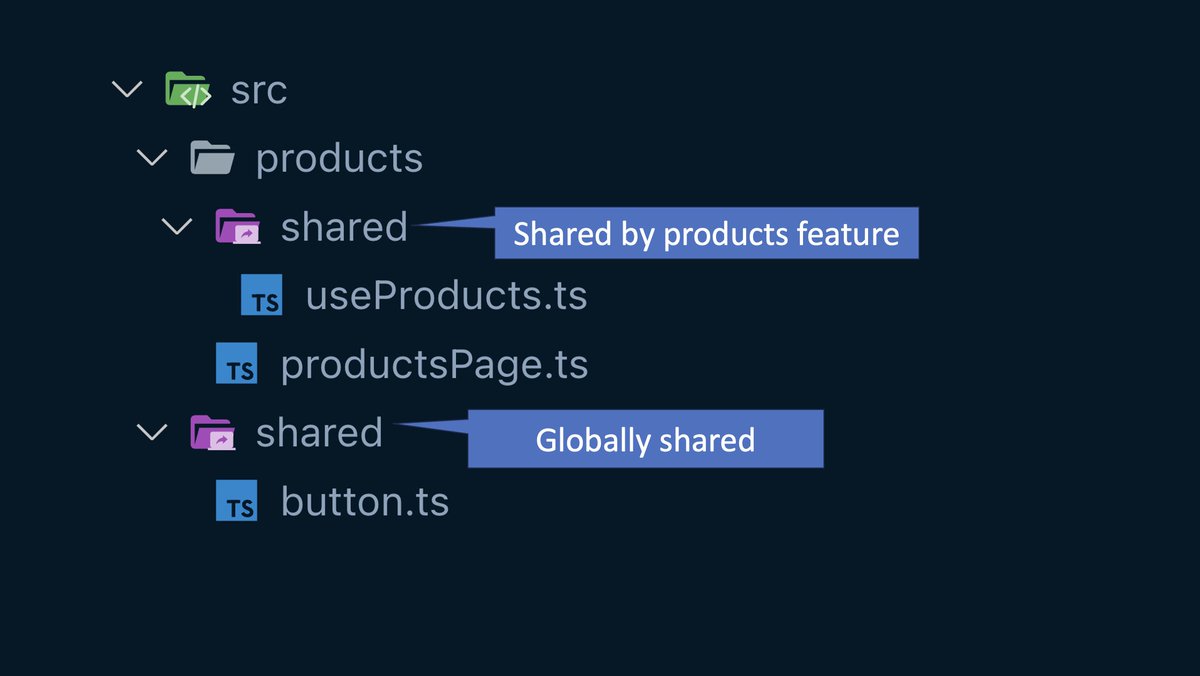
Folder pattern I’m enjoying: “Local” shared directories.
1. First, create a shared directory at the root. This contains code shared across the entire project.
2. Create a shared directory in specific subfolders for code that's shared by a subfolder.
This conveys when something is globally reusable vs only locally reusable.
Example: