a second browser, just for your ai agents. connect claude code, codex or any mcp agent, import your chrome logins in one click. free, open source, runs locally
@davis7 likely not yolo being broken. codex treats forced deletes as dangerous (rm -rf, and on windows Remove-Item, del or rd with -Force), and in its source no approval mode overrides that: they prompt, or get refused with prompts off
so a forced delete in cleanup stops every loop
@addyosmani one gotcha: claude code ignores CLAUDE_CODE_EXPERIMENTAL_CODE_MODE in project and local settings, so committing it to the repo's .claude/settings.json won't turn it on for your team. each person sets it in their shell or ~/.claude/settings.json
@mattpocockuk the multi version of step 2 is already built into claude code: AskUserQuestion shows you 2-4 options per question, up to 4 questions at a time, and you can attach a note to your pick or type your own answer instead, so it gets the why, not just the which
cloud browsers run your agent in a datacenter, where logging in is a pain and sites like x and linkedin block you for the datacenter ip
neo runs on your machine instead, so claude code or codex works in tabs signed in as you
free and open source:
https://t.co/bAIlN0zfil
claude code's /goal keeps it working until a condition you set is true
/goal all tests in tests/auth pass and lint is clean
after every turn a separate model checks that against the conversation and sends claude back if it isn't met. /goal clear stops it
@thsottiaux no update button? in the desktop app it's menu > check for updates, and on mac that menu is in the top menu bar. openai's help says to run it by hand even after an auto-update, then check again after restarting since there can be a second one
neo isn't a chrome replacement. it's a second browser that sits next to chrome, just for your agents
your logins come over in one click, claude code or codex connects over mcp, and you watch them work live or replay it later
free and open source:
https://t.co/bAIlN0zfil
@kylekane right, and one catch on a mac: in apple terminal you only hear terminal_bell with audible bell on, under settings > profiles > advanced
claude code can ring your terminal when it's waiting on you, no hook needed
set "preferredNotifChannel": "terminal_bell" in your settings
the default only sends desktop notifications in iterm2, ghostty and kitty, and does nothing in most other terminals
@OpenAIDevs the fixes from the preserved reasoning guide:
new tools go in an additional_tools item, not the tools param
effort changes go in a configuration_update item
openai's own compaction keeps the reasoning after it. a home-grown summary drops it unless it sits at the end of context
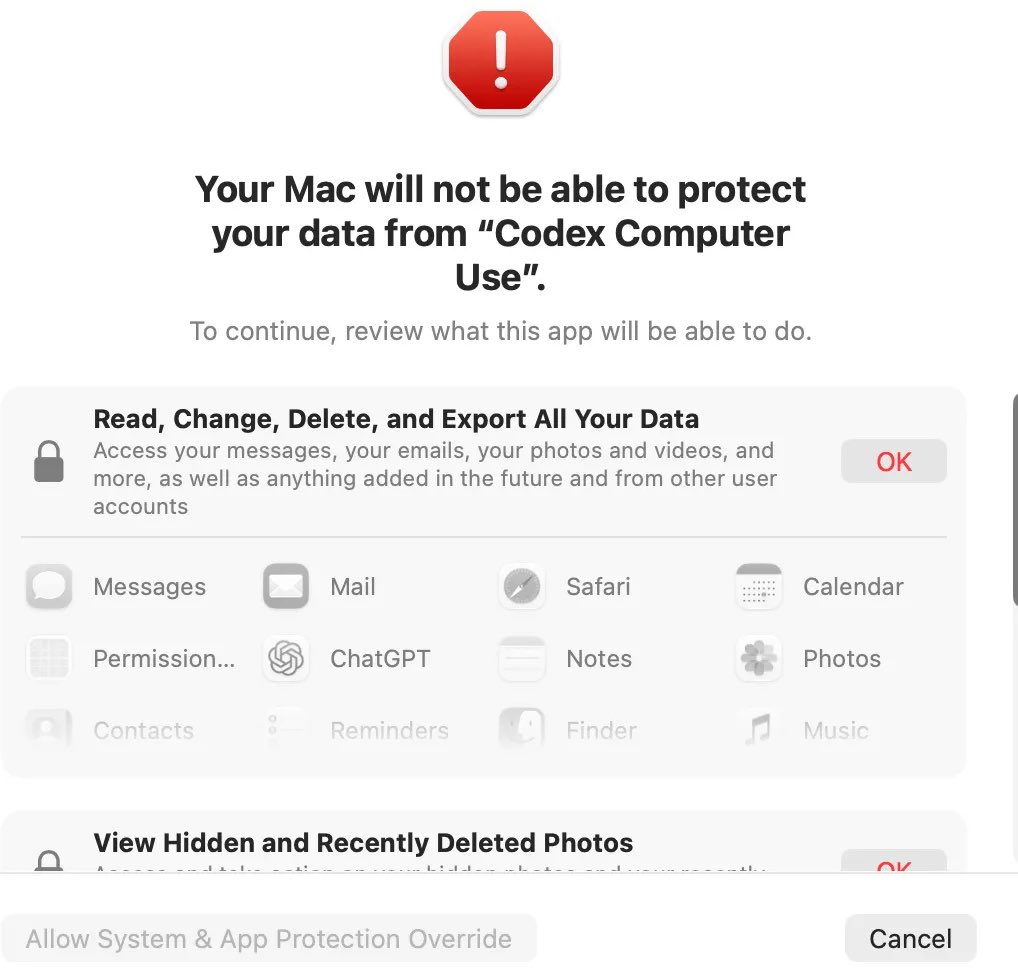
macos 27.3 now takes 14 steps to turn on chatgpt's computer use, up from four
we built browseros neo for the browser side of this: agents drive it over mcp, so the browser part never needs full mac control
As Apple develops its own computer-use agent, it’s making it harder for rival agents to control Macs. In macOS 27.3, enabling ChatGPT’s third-party computer-use support now requires 14 distinct steps, up from four. Apple cites security; Some users see anti-competitiveness.
gemini on mac can now take a task across your folders, apps and the web and work it in a live background window, so your screen and cursor stay yours
the catch: it's rolling out in the u.s., in english, to google ai plus, pro and ultra subscribers only
With computer use in the Gemini app for Mac, you can now hand off tasks across your folders, apps, and the web, while your screen and cursor stay yours.
Watch Gemini click, scroll, and type in a live background window, turning a quick sketch into a rigged 3D model in Blender.
give claude code a browser in one click
neo finds the agents on your machine. hit connect, restart the agent once, and it gets its own tabs with your logins
free and open source:
https://t.co/bAIlN0zfil
@OpenAIDevs if you want the perf-forensics part in your own repo, a codex skill is a folder with a markdown file: name + description in the frontmatter, steps below. put it in the repo's .codex/skills and it's repo-scoped
codex only sees the name and description until it loads the skill
@googlecloud for #1 in claude code, make the verifier read-only for real, not just by prompt
a subagent with tools: Read, Grep, Glob in its frontmatter can read the code but can't edit it, and claude code enforces that rather than asking nicely
@lvwerra preserving the rng across a port is the scary part
was the referee a differential test, same seeds through pybot and rsbot and diff the outputs, or did each agent own its own checks?
put Read(./.env) in claude code's deny list and it can't read the file, not with the Read tool and not with cat
a grep -r across the folder still gets through, the docs say so themselves
deny rules are claude code's check. the sandbox is the os's
@alexmichael the hook one matters more than it looks
a hook that exits 1, crashes or never starts is a non-blocking error, so the tool call just goes ahead
"onFailure": "block" flips that. without it, a broken safety hook fails open
@beamnxw the evidence record is where the browser step matters
a checkout run needs a signed-in session, then proof of each click
we built neo for that: claude code gets its own tabs with your logins, and every run saves a replay with a step-by-step timeline