Anthropic sacó un artículo contando cómo crearon Claude Code.
lo terminé de leer y estas fueron las partes que más me gustaron:
> empezaron a trabajar en esta idea en 2021. querían automatizar gran parte del trabajo de un dev cuando los modelos todavía eran muy limitados.
> antes de Claude Code existía una herramienta interna llamada clide. era bastante limitada, pero varios ingenieros cuentan que ya se sentía "como ver el futuro".
> varios de los problemas de agentes de los que hablamos hoy ya los estaban resolviendo en 2022. entendieron muy temprano que un agente no es solo un llm, sino todo el sistema que le permite trabajar: tools, terminal, ejecución de código, permisos, sandboxes, timeouts.
> dentro de clide tenían un experimento que lanzaba cientos de claude haiku en paralelo para analizar repositorios completos. ya estaban explorando patrones de paralelismo de agentes.
> el primer prototipo de claude cli se compartió en slack y recibió apenas dos o tres likes. en ese momento casi nadie entendía qué estaban construyendo.
> durante años siguieron construyendo, aunque el producto todavía no estaba listo. apostaban a que los modelos iban a mejorar y querían estar preparados cuando eso pasara.
> mantuvieron el equipo sorprendentemente chico. creen que eso evitó la sobreingeniería y, además, los obligó a usar claude para desarrollar cada vez más rápido.
> iteraban a una velocidad increíble. recibían feedback de usuarios y muchas veces publicaban una solución ese mismo día.
> cuando lanzaron la primera versión, la recepción fue bastante tibia. tenía bugs y a mucha gente solo le parecía una idea interesante.
> el verdadero punto de inflexión llegó con Claude 4. recién ahí sintieron que el producto estaba a la altura de la visión que tenían desde hacía años.
> hoy varios de los ingenieros cuentan que prácticamente ya no escriben código a mano. su trabajo pasó a ser dirigir y revisar el trabajo de claude code.
creo que lo más interesante del artículo es entender cuánto tiempo lleva construir un producto así.
no fueron unos meses ni un único avance en los modelos.
fueron años de prototipos, iteración, feedback y decisiones de producto.
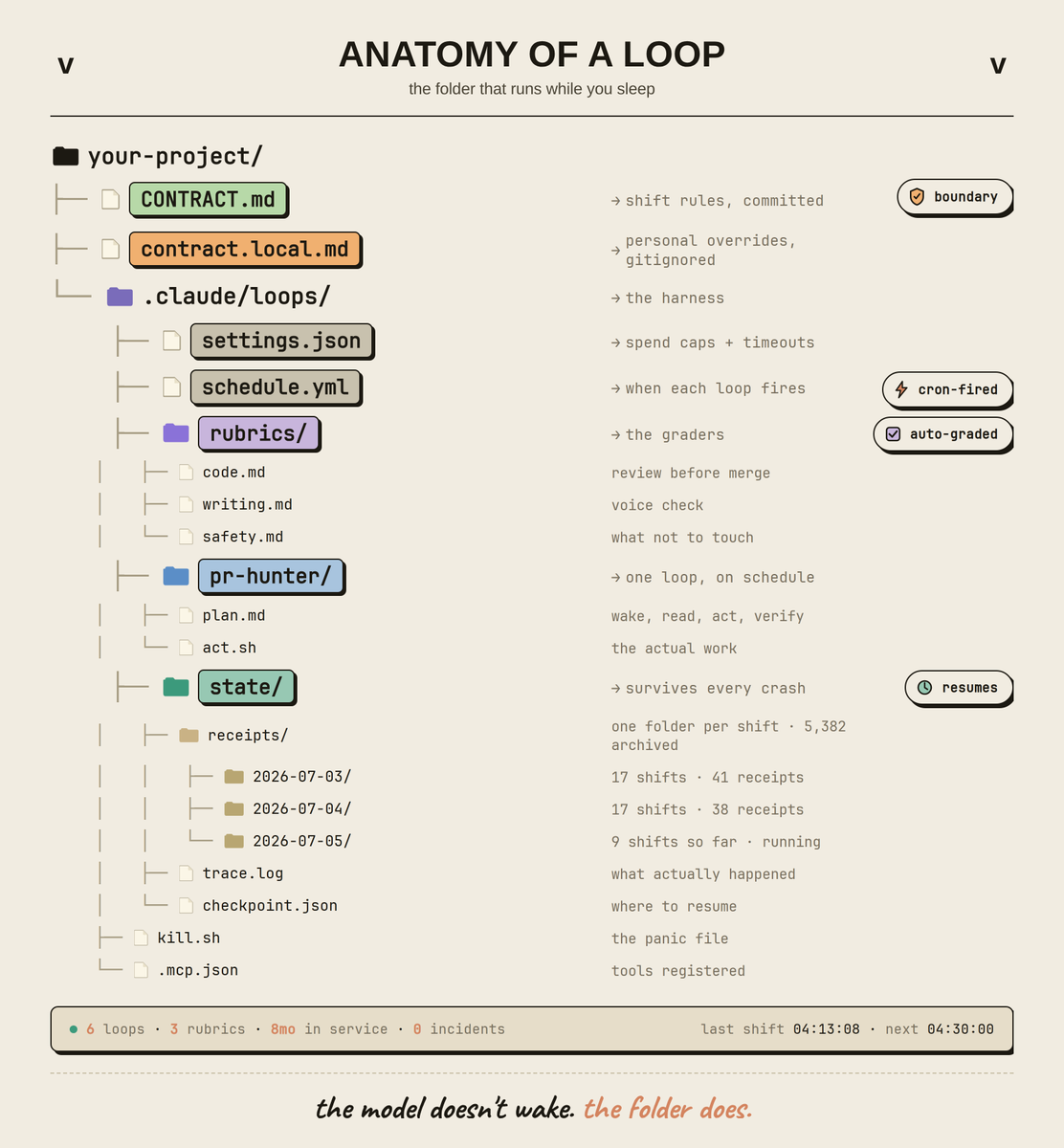
asked an anthropic engineer how his loops run on a closed laptop.
he didn't answer. he sent me one folder.
CONTRACT.md → schedule.yml → rubrics/ → state/checkpoint.json → receipts/2026-07-05/
five files. one shift. 5,382 shifts archived.
zero keystrokes since 20:41 yesterday. fourteen PRs opened, three rollbacks, six digests, all before he woke up.
no chat window. no "please can you". no follow-up.
the folder wakes. the contract is the boundary. the rubric is the judge. the checkpoint is the memory. the receipt is the proof.
that's the anatomy.
save the file tree below before he realizes i posted it.
Si crees que un agente solo sirve para desarrollar un proyecto, en realidad también te puede ayudar a mejorar el que ya tienes en producción.
Desplegar no es el final, mas bien es cuando empiezan las preguntas reales: ¿Cómo rinde tu app? ¿Google la está indexando bien? ¿Es accesible? ¿El código aguanta lo que viene?
Estas son las herramientas que uso para responder eso con reportes reales:
→ Lighthouse CLI: te da métricas de rendimiento, SEO y accesibilidad directo desde la terminal. El agente lee el reporte y te dice qué arreglar primero.
→ Claude Code: auditoría SEO completa de tu sitio en varios aspectos como velocidad, renderizado, opengraph, escritura de tu contenido y review de calidad de código con skills especializados.
→ @Test_Sprite : testing automatizado sobre tu app en producción, sin escribir los tests a mano. este es como un framework de testing combinado con una herramienta de QA mas IA.
→ Notion/Linear/Jira MCP: aquí se cierra el flujo, las herramientas anteriores te dan reportes pero tu agente puede convertir todos los hallazgos en tareas concretas en tu workspace que uses, llenando tu Notion, Linear, Jira o lo que uses para que puedas ir avanzando tarea por tarea después.
El resultado: en vez de suposiciones, tienes datos. Y en vez de una lista mental de pendientes, tareas priorizadas listas para trabajar.
Me pidieron que compartiera mi stack de IA.
Hace poco dije que en vez de perseguir cada novedad, mejor te vuelves muy bueno en el stack que ya tienes. Así que va el mío.
- Chat: Gemini.
- Desarrollo: Claude Code.
- Revisiones de código: CodeRabbit.
- Servidores MCP: Linear, DBHub, CircleCI, Chrome DevTools.
- Orquestación de sesiones: Orca.
Un stack pequeño que dominas le gana a uno enorme que apenas probaste.
¿Qué tiene tu stack de IA?
How to setup your Claude code project?
TL;DR
Most developers skip the setup and just start prompting. That's the mistake.
A proper Claude Code project lives inside a .𝗰𝗹𝗮𝘂𝗱𝗲/ folder. Start with 𝗖𝗟𝗔𝗨𝗗𝗘.𝗺𝗱 as Claude's instruction manual. Split it into a 𝗿𝘂𝗹𝗲𝘀/ folder as it grows. Add 𝗰𝗼𝗺𝗺𝗮𝗻𝗱𝘀/ for repeatable workflows, 𝘀𝗸𝗶𝗹𝗹𝘀/ for context-triggered automation, and 𝗮𝗴𝗲𝗻𝘁𝘀/ for isolated subagents. Lock down permissions in 𝘀𝗲𝘁𝘁𝗶𝗻𝗴𝘀.𝗷𝘀𝗼𝗻.
There are two .𝗰𝗹𝗮𝘂𝗱𝗲/ folders: one committed with your repo, one global at ~/.𝗰𝗹𝗮𝘂𝗱𝗲/ for personal preferences and auto-memory across projects.
The .𝗰𝗹𝗮𝘂𝗱𝗲/ folder is infrastructure. Treat it like one.
The article below is something I wrote three months ago, and it is still very much relevant.
It is a complete guide to 𝗖𝗟𝗔𝗨𝗗𝗘.𝗺𝗱, custom commands, skills, agents, and permissions, along with how to set them up properly.
Vale demasiado, demasiadisimo la pena tener tu repo de dotfiles.
Acabo de configurar un MacBook nuevo en 20m corriendo un solo comando.
Aquí dejo el mío como ejemplo: https://t.co/LjURetdrvy
There are layers of working with AI. Prompt engineering. Context engineering. Harness engineering. Loop engineering.
Layer 1 is prompt engineering. What you type into the chat window. How you word the instruction, what you ask for, what you tell it to avoid. This is where everyone starts. It matters, but few people go further.
Layer 2 is context engineering. Everything the model sees before your prompt. System instructions, reference files, conversation history, examples of good output. A mediocre prompt with great context beats a great prompt with no context every time.
Layer 3 is harness engineering. The code around the model. Tool routing, verification steps, retry logic, structured outputs. This is what makes AI reliable instead of just impressive. When the model checks its own work before returning it to you, that's the harness.
Layer 4 is loop engineering. The system runs itself. You set a goal and a stop condition. The loop prompts the model, checks the output, adjusts, and repeats without you. This is where you stop being the bottleneck entirely.
Each layer wraps the one before it. Better prompts help, but without context the model guesses. Context helps, but without a harness the output is inconsistent. A harness helps, but without a loop you're still manually triggering every run.
Full setup guide for all 4 layers using Fable 5 below.
¡Acaba de salir OpenWiki! Una herramienta para crear y mantener documentación de proyectos.
Y crea automáticamente las PR para mantener siempre actualizada la documentación.
Funciona con OpenAI, Claude, OpenRouter...
→ https://t.co/x0E11QHFVj
Most developers are still learning Claude Code.
The best ones are learning the tree behind it.
Everyone talks about prompts.
A few talk about context.
Almost nobody talks about the system that turns Claude Code into an autonomous engineering partner.
That's where Loop Engineering begins.
Think of it as a tree—not a prompt.
🌱 Goal
│
├── Understand
│
├── Plan
│
├── Context
│
├── Build
│
├── Test
│
├── Review
│
├── Improve
│
├── Memory
│
└── Repeat ↺
Every branch makes the next iteration smarter.
Instead of asking AI to write code...
...you build a system where Claude Code continuously:
→ understands the codebase
→ plans before coding
→ writes modular code
→ runs tests
→ reviews its own output
→ fixes failures
→ stores what it learned
→ starts the next iteration automatically.
That's why the biggest productivity jump isn't from better prompting.
It's from building better loops.
The developers who will dominate over the next few years won't be the fastest typists.
They'll be the ones who design the best engineering loops.
Prompt Engineering → Context Engineering → Loop Engineering
That's the evolution.
Save this Master Tree.
You'll come back to it every time you build with Claude Code. 🌱
> Opened Obsidian
> connected Claude Code or Kimi
> asked it one prompt
> "build me a second brain"
> it read every file I had
> wrote summaries, linked concepts, flagged contradictions
> 10-15 wiki pages updated from one article
> Kimi read dozens of files at once with 256K context
> Claude handled the deep reasoning
> cross-references already there
> synthesis already done
> every morning it briefs you on open tasks
> every PDF filed automatically
> nothing lost to a blank chat ever again
What's stopping you from building this?
The full A–Z guide is below.
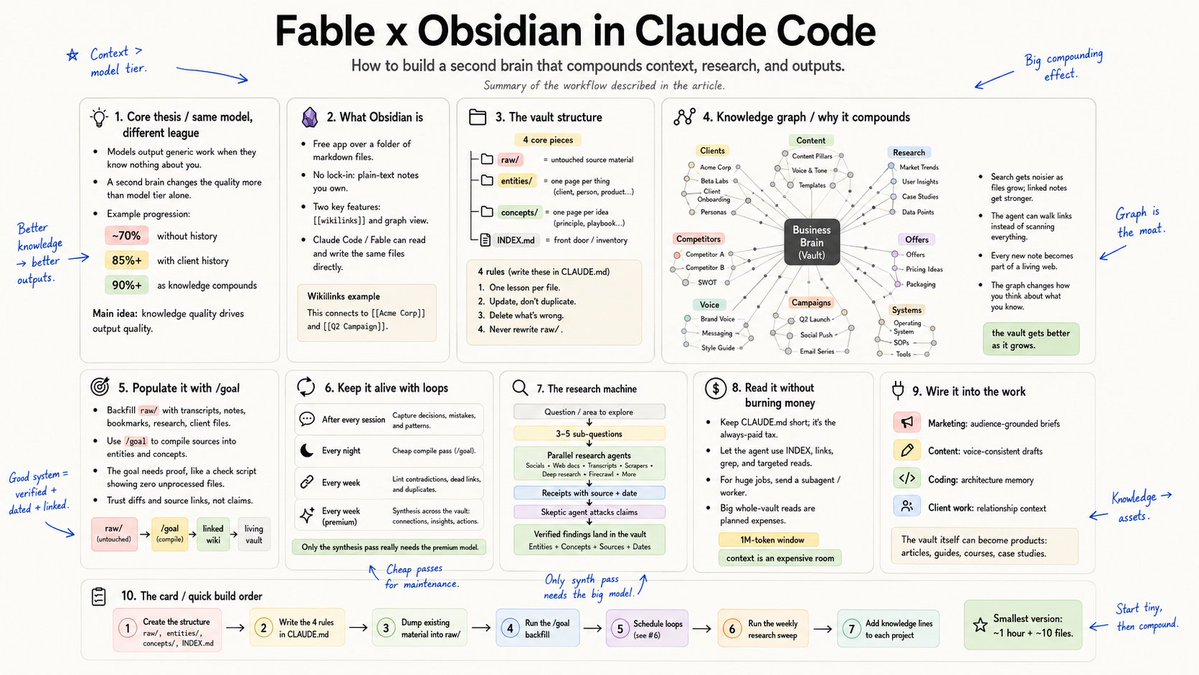
Fable x Obsidian inside Claude Code is literally insane...
and there will never be a better time to build a fully documented knowledge base because Fable is the world's best model at long-running tasks and orchestrating agents... which makes it EXCELLENT for research
you must run these 5 workflows today:
- populate your vault with competitor intel: content ideas, offers they're running, SEO/AEO strategies
- scrape the internet into your own swipe file so you never write weak copy again
- create and save reusable workflows/SOPs with proper versioning, so you can audit what worked and what didn't
- store every valuable agent output: plans, research, artifacts
- build your own library of important links: designs, videos, articles... anything your agent might need someday
the full setup is a 15min read:
El Loop Engineering es el siguiente paso después del Prompt Engineering
La mayoría de las personas aún usan Claude Code, Codex o Cursor como una chatbot:
1. Prompt
2. Esperar
3. Copiar
4. Corregir
5. Prompt otra vez
Este repo muestra el siguiente paso:
Dejas de hacer prompts al agente.
Diseñas el loop que le hace los prompts al agente por ti.
Incluye:
→ Loops de triaje diario
→ Loops de niñera de PR
→ Loops de barrido de CI
→ Loops de barrido de dependencias
→ Loops de redacción de changelog
→ Loops de limpieza post-merge
→ Loops de triaje de issues
También te da CLIs para:
• Escalar un loop
• Estimar el costo de tokens
• Auditar si tu repo está listo
• Agregar memoria/estado
• Agregar handoff humano
• Agregar gates de verificación
• Ejecutar agentes de manera segura a través de GitHub Actions
El Prompt Engineering se trataba de escribir mejores instrucciones.
El Loop Engineering se trata de construir un sistema donde los agentes siguen:
trabajando, verificando, corrigiendo y escalando sin que tú estés cuidando cada paso.
Esto es lo que parece la codificación con IA cuando deja de ser una sesión de chat y empieza a convertirse en un sistema operativo para equipos de software.
Enlace abajo👇
10 tips to cut your Claude Code token usage by 50%
1. Auto-context loading 50 files for a 30-line fix: $1.20/turn for tokens you'll never read. 80% input waste, every session
2. Running Opus on lint, format, and rename tasks: $0.60 for what Haiku nails at $0.02. 30x overpay on the cleanup tier
3. Tool call loops that re-send the full repo on every retry: 5x context cost per agentic flow. fixing these alone cuts 30-50% of bills
4. Sonnet as the default model: Kimi 2.6 matches its quality on most coding tasks at 1/6 the cost. defaulting to Sonnet in 2026 is leaving 60-70% on the table
5. Streaming responses on stable-prefix workflows: kills your prompt cache. you pay 10x for tokens that should have cost cents
6. "Just in case" file includes: 80,000-token prompts that should be 3,000. context bloat is the silent budget killer
7. Per-session knowledge rebuilding: 10 min writing a SKILL.md once vs paying agents to re-figure out your environment every run. $4 vs $0.30 per execution
8. Single-model setups: premium tier on every task is the most expensive mistake in AI coding right now
9. Asking 10 small questions one at a time: 10 separate input prefix charges vs one batched call. 70-90% savings on routine workflows
10. Buying Claude Pro + ChatGPT Plus + Cursor Pro: you seriously use one. the other two are habit, not utility
what actually compounds instead:
- context discipline (grep before fetching, always)
- prompt caching on every stable prefix
- multi-model routing (Kimi 2.6 default, Opus for the 10%)
- graduated skills via SKILL.md files
- profiling tool calls before optimizing prompts
- the routing mindset (right model for right task)
in 12 months, the gap between developers shipping on $200/month and $4,000/month budgets won't be skill
it'll be how well they route
bookmark this.
BUILD KARPATHY'S SECOND BRAIN WITH CLAUDE FABLE 5 + OBSIDIAN
Andrej Karpathy (openai co-founder) shared an architecture that turns Claude into a persistent second brain instead of a basic chat window
how it works:
> you point Claude Code at an Obsidian vault folder
> you drop articles, PDFs, or video transcripts into raw folders
> Claude reads the files, updates topic summaries, and cross-references everything
> the knowledge base compounds like interest instead of resetting on every new chat
the setup is simple:
> install https://t.co/0Hq2Bmgyug and create a local vault directory
> open the directory in Claude Code and paste Karpathy's wiki prompt:
> https://t.co/IyqbeVPjtb
> let the agent generate raw, wiki, and CLAUDE.md schema directories
> drop any text file into raw and tell the model to ingest it
> ask questions across the whole vault and query compiled summaries
this eliminates rag database overhead and keeps your local vault organized
how do you manage your local knowledge base?
A harnessed LLM agent, clearly explained!
Most people picture this as a model with tools bolted on. The real architecture inverts that relationship.
The model itself is deliberately thin. Intelligence gets pushed outward, and the harness composes it at runtime.
Three dimensions orbit the harness core:
- 𝗠𝗲𝗺𝗼𝗿𝘆 holds the state a model shouldn't carry in weights or context. Working context, semantic knowledge, episodic experience, and personalized memory each have their own lifecycle.
- 𝗦𝗸𝗶𝗹𝗹𝘀 hold procedural knowledge. This can cover operational procedures, decision heuristics, and normative constraints that specialize the general model per task.
- 𝗣𝗿𝗼𝘁𝗼𝗰𝗼𝗹𝘀 hold the interaction contracts. Agent-to-user, agent-to-agent, and agent-to-tools are three distinct surfaces with their own failure modes.
Between the core and these modules sit the mediators, like sandboxing, observability, compression, evaluation, approval loops, and sub-agent orchestration.
They govern how the harness reaches out and how state flows back in.
The useful question this framing unlocks is: for any new capability, where should it live?
- Stable knowledge goes to memory
- Learned playbooks go to skills
- Communication contracts go to protocols
- Loop governance goes to the mediators
Harness design becomes a question of what to externalize, and how to mediate it.
We wrote an article about the anatomy of Agent Harness, covering the orchestration loop, tools, memory, context management, and everything else that transforms a stateless LLM into a capable agent.
Read it below.
El kernel de Linux tiene 28 millones de líneas de código.
Han creado un MCP capaz de indexarlo por completo en solo 3 minutos.
Se llama Codebase Memory MCP y crea un grafo de conocimiento del repositorio para que los agentes de IA puedan entender el código sin recorrer archivo por archivo.
Esto es lo que consigue:
→ Reduce el consumo de contexto hasta un 99%
→ Responde consultas sobre el código en menos de 1 ms
→ Compatible con Claude Code, Cursor, Gemini CLI y muchos más
Lo más interesante:
Los agentes de IA suelen recorrer miles de archivos para entender un proyecto, consumiendo una enorme cantidad de contexto y tokens.
Codebase Memory MCP es open-source, ya supera las 24k stars en GitHub y reduce ese proceso a una fracción del coste.
Te dejo el repo en comentarios 👇
Menudo currazo, la verdad, muy top 👏
Si estáis empezando en el mundillo de la IA o incluso si sois expertos esto seguro que algo os descubre. Tiene de todo.
A ver si convencemos al bueno de @686f6c61 que nos de un buen workshop de esto en NaN. ¡Sería top! 🔥