Data empathy focuses on understanding the data. It considers the subjectivity introduced by humans into the data collection process and identifies biases. 1/n
Kelsey Hightower has one of the most inspiring stories in tech: he went from a technician installing DSL modems, through self-directed study and very hard work, to one of the very few Distinguished Engineer at Google whom Satya Nadella personally persuaded to join Microsoft.
Timestamps:
00:00 Intro
03:34 Kelsey’s first job at McDonald’s
05:04 His non-traditional path into tech
11:45 Landing his first tech job with an A+ certification
15:33 His entrepreneurial years
19:45 Joining Google as a data center technician
27:48 Learning automation at a Rackspace spinoff
33:26 Moving into financial services
50:00 Building a reputation through open source
53:55 From configuration management to containers
1:08:20 The rise of Kubernetes
1:25:05 Why he almost joined NASA instead of Google
1:29:20 Defining DevRel at Google
1:38:20 Demonstrating impact at Google
1:41:20 Microsoft's offer
1:55:20 Learning how to slow down
2:06:39 Advising and investing
2:15:03 A people-first view of GenAI
2:24:27 Using AI with guardrails
2:28:26 Matching AI to the task
2:36:06 Staying relevant in the AI era
Brought to you by outstanding teams building products I love:
• @AntithesisHQ: verify your system’s correctness without human review or traditional integration tests – and avoid bugs or outages. https://t.co/AKYm4cctss
• @sentry: application monitoring software considered “not bad” by millions of developers https://t.co/uoolyqTR6M
• @buildkite: CI software built to absorb whatever your coding agents throw at the build queue. OpenAI, Anthropic, Uber and others are customers: https://t.co/C05Ze9zzin
Three interesting learnings from Kelsey:
1. Side hustles and doing your own thing teach you business like no IC job can.
Before becoming a software engineer at Google, Kelsey was a manager for his comedian friend, operated a computer store, and did IT contracting. These gigs taught him logistics, planning, and about money. All this helped him be far more effective at talking with executives and acting as an executive sponsor inside Google.
2. Can you explain what your startup does without mentioning AI?
When Kelsey researches startups seeking his advice, he challenges founders to not say “AI” once. This means that they must explain the actual value their company creates. One unexpected benefit of this is that it often reveals there are easier, cheaper ways to achieve a goal than with AI.
3. It’s very rare to get an extra zero put on your compensation figure – but it happened.
Kelsey was a successful, well-paid Google engineer when Microsoft made him an offer that 10x’d his salary (!!). When Kelsey told Google he was planning to take the offer, it matched the offer, proving that his market value had massively increased. It shows that being well paid doesn’t necessarily mean you’re being paid at the correct market rate.
New short course: Fast & Efficient LLM Inference with vLLM, built in partnership with @RedHat and taught by @cedricclyburn.
Learn to quantize an open-source LLM, serve it with vLLM, and benchmark your deployment across speed, cost, and accuracy.
Free to enroll: https://t.co/czVwJBnLZ6
Everyone keeps saying AI gives them garbage. Anthropic just proved the problem is you, not the model.
This 24 minute video rebuilds one prompt from useless to flawless. Save it for the evening with tea - now that Opus 4.8 is here, getting this is everything.
Proxies help you test local experiences, collect public data, and run automated workflows at scale.
In this guide, @manishmshiva compares five proxy providers and where each works best.
You'll learn how to evaluate reliability, API quality, geo-targeting, session control, and cost predictability, too.
https://t.co/GvXi2a7chm
A system can appear healthy even when something is going wrong behind the scenes.
In this handbook, @irvingpictures shows you how to use Bash and Python for real-world DevOps automation.
You'll detect AWS cost spikes, trace service logs, find infrastructure drift, validate secret rotation, and automate canary rollbacks.
https://t.co/NFVhlxBs5z
I found 5 GitHub repos that solve Claude's biggest writing problem:
The robotic AI tone.
These repos make Claude write much more like a real human: (save this)
1) Humanizer: https://t.co/zsfRf1JpdJ
2) Humanize Writing: https://t.co/gaAwKfZPZz
3) Humanizer Skill: https://t.co/kbvvK9MIV6
4) Awesome Claude Prompts: https://t.co/KcG3HyUfge
5) Awesome Claude Skills: https://t.co/jBWiRPetAW
That's a wrap
Anthropic AI engineer just dropped a live masterclass on how to ship a team of production‑ready AI agents.
37 minutes. Free. From the Anthropic team.
here’s what she covers:
• 3 building blocks: brain, hands, sessions
• server-side loop, so nothing breaks on refresh
• agent teams shipping to production 10–15x faster
• why agents die before production
brain (persona) + hands (environment) + sessions = a production agent out of the box.
most people are still babysitting fragile agent scripts, while the people who figured this out ship agents that just stay running.
Watch this workshop, then read the full guide below.
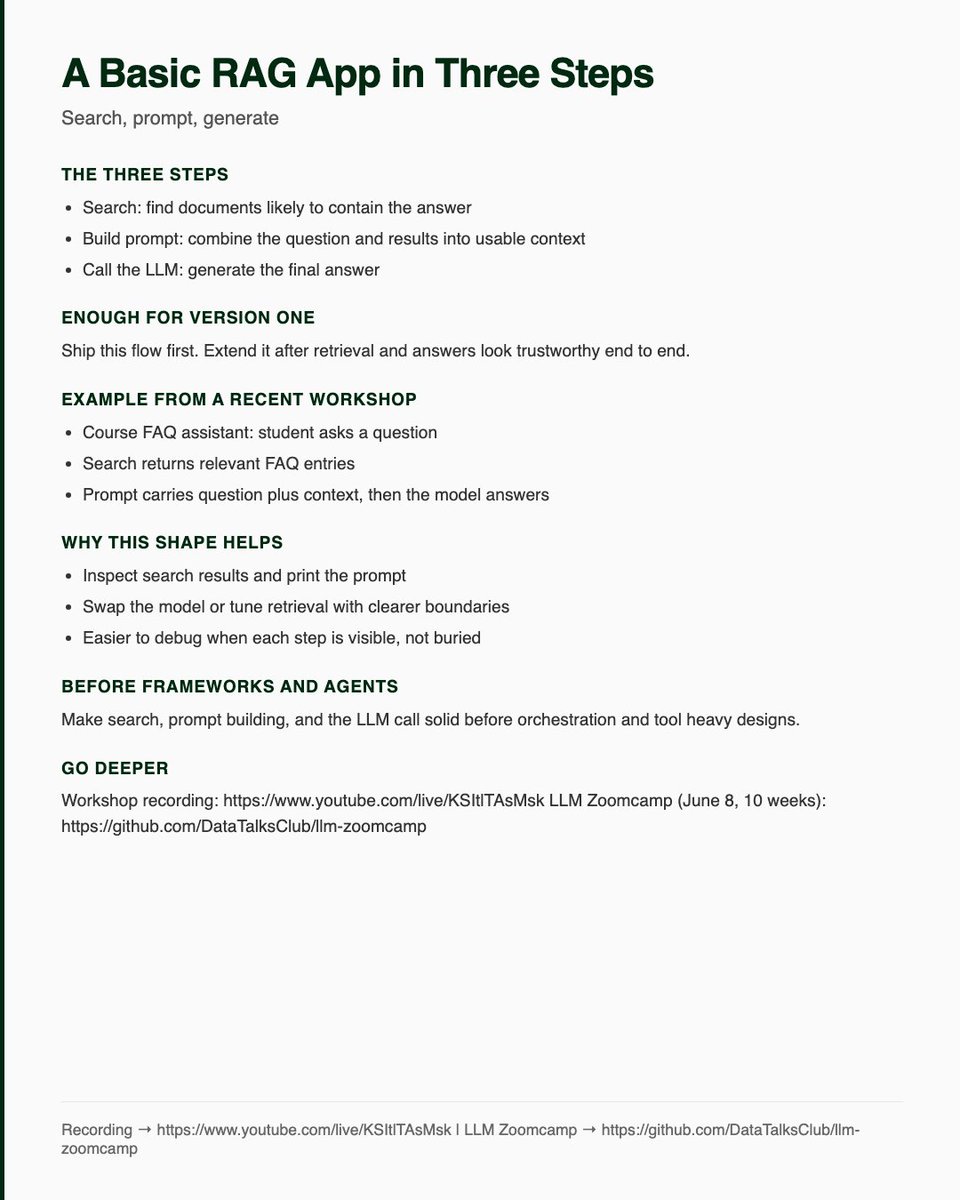
A basic RAG application is just three steps.
1. Search: Find documents that are likely to contain the answer.
2. Build prompt: Turn the user question and search results into context the model can use.
3. Call the LLM: Generate the final answer.
That’s enough for the first version.
In my recent workshop, we built this with a course FAQ assistant. A student asks a question, search returns relevant FAQ entries, we build a prompt with the question and context, and the LLM answers.
The useful part of this structure is that every step is visible.
You can inspect search results.
You can print the prompt.
You can change the model.
You can improve retrieval without touching the LLM call.
Before adding frameworks, agents, or orchestration, make sure these three functions work.
A simple RAG pipeline is much easier to debug when you can see each step.
Check out my workshop recording to build your first RAG application: https://t.co/VyhkmI8s2S
Want to go from LLM basics to a production-ready AI assistant in 10 weeks? Join my free LLM Zoomcamp that starts on June 8: https://t.co/HgDzeIw0O1
I just packaged 102 viral writing templates into 5 Claude Skills.
This is everything you need to:
• Write scroll-stopping hooks
• Create X content for yourself
• Ghostwrite content for high-paying clients
Comment "social" and I'll send it across (for free).
The Data Engineering Zoomcamp 2026 wouldn't have been possible without our sponsors.
A big thank you to:
- Kestra for supporting Module 2: Workflow Orchestration
- dlt for the Data Ingestion workshop
- Bruin for Module 5: Data Platforms
Your support made it possible for many people around the world to participate in the course and learn production data engineering skills.
Thank you for investing in the data engineering community.
20 platforms where you can learn any AI Course (for free).
Bookmark this:
1. Anthropic: https://t.co/ovzLkduLkU
Learn Claude, prompting, AI agents, MCPs, and practical AI workflows.
2. OpenAI: https://t.co/qMCnteghZd
Official courses on ChatGPT, AI literacy, prompting, and real-world AI applications.
3. Google: https://t.co/Kg7C1aV7ZS
Beginner-friendly AI courses, AI fundamentals, and productivity training.
4. Google Cloud: https://t.co/IL8wHXm8W1
Generative AI, Gemini, Vertex AI, RAG, and enterprise AI development.
5. Microsoft: https://t.co/HEgC8daySF
AI agents, Azure AI, Copilot, machine learning, and AI engineering paths.
6. IBM: https://t.co/ROESgvYcPN
AI foundations, prompt engineering, machine learning, and professional certifications.
7. AWS: https://t.co/9Tp6ZNh3JK
Bedrock, AI agents, generative AI applications, and cloud AI deployment.
8. Meta AI: https://t.co/EF45mOyY7T
Open-source AI, Llama models, research papers, and developer resources.
9. NVIDIA: https://t.co/HOjEvIN9ZL
Deep learning, AI infrastructure, GPU computing, robotics, and AI engineering.
10. DeepLearning AI: https://t.co/WOKe37Hjg8
Courses by Andrew Ng covering AI agents, LLMs, RAG, MCPs, and machine learning.
11. Hugging Face: https://t.co/NbZCFbQBNH
Open-source AI, transformers, model fine-tuning, and hands-on tutorials.
12. Stanford Online: https://t.co/HDlSWR9Odd
University-level AI, machine learning, computer vision, and robotics courses.
13. MIT OpenCourseWare: https://t.co/zqguQVfwYx
Free MIT lectures on AI, deep learning, mathematics, and computer science.
14. Harvard CS50 AI: https://t.co/cbLJIwzAx6
One of the best beginner-to-intermediate AI courses available online.
15. Fast ai: https://t.co/pQLqN22VJx
Practical deep learning with a strong focus on building real AI projects.
16. Kaggle Learn: https://t.co/tikpYc9Xzt
Short hands-on courses in machine learning, data science, and generative AI.
17. MongoDB AI Academy: https://t.co/rhVjL43Ug5
Learn vector databases, semantic search, AI apps, and RAG systems.
18. Databricks Academy: https://t.co/Hp1DpnYX4I
Data engineering, machine learning, AI pipelines, and enterprise analytics.
19. Snowflake University: https://t.co/eM0glxgarU
Data platforms, AI-ready architectures, and modern analytics workflows.
20. Redis University: https://t.co/wzoM7OB5kS
Vector search, caching, memory systems, and AI application infrastructure.
This list alone can take you from AI beginner to AI builder.
If you want to broaden your skills as a developer, learning about databases and SQL is a good way to go.
And this course from Harvard will teach you database and SQL basics to get you started.
You'll learn about querying and writing to databases, database design, and how to optimize and scale your DBs, too.
https://t.co/DAXipGvVxJ
List of 20 secret websites most people don't know about.
These websites can replace dozens of apps and solve your everyday problems: (Save this)
Research Papers: https://t.co/heBjS182vY
Reverse Email Lookup: https://t.co/Q8ogjAAuKk
Public Datasets: https://t.co/l2bRtCJQcI
AI Research Assistant: https://t.co/0F6sWbMJWT
Interactive Learning: https://t.co/orbCvNUfdB
Find Similar Sites: https://t.co/U4M6qSoE6H
Free University Courses: https://t.co/HGJpSgU7Gd
Website Time Machine: https://t.co/8PyXpuz9Q9
Search Hidden PDFs: https://t.co/WtTwH4VulJ
Visual Explanations: https://t.co/UpuSF9xRyx
Design Inspiration: https://t.co/RYfC8bKoFG
UI Components: https://t.co/Sl5UpcjN4R
Color Palettes: https://t.co/76IaXe76h1
Convert Anything: https://t.co/1cYvFRfwH4
Remove Backgrounds: https://t.co/QconMGXgl4
AI Presentation Maker: https://t.co/p3bl5AamxU
Mind Maps: https://t.co/o8CXjiPlMk
Image Upscaler: https://t.co/pjGgT3knln
Interactive Roadmaps: https://t.co/R6EcPyF839
Learn Anything: https://t.co/oXkLiu3tLP
That's a wrap.
With a traditional word processor, you act as the writer, layout designer, and typesetter.
LaTeX automates many design mechanics so you can focus on content.
In this 41-hour course, you'll learn document structure, math notation, citations, formatting, & more.
https://t.co/VH7COPTRFA