@svembu@Swapnil48704134 Great features. Note: I experienced poor voice capture using a webcam mic on Google TV. utilizing the mobile microphone should solve this problem and ensure better audio quality
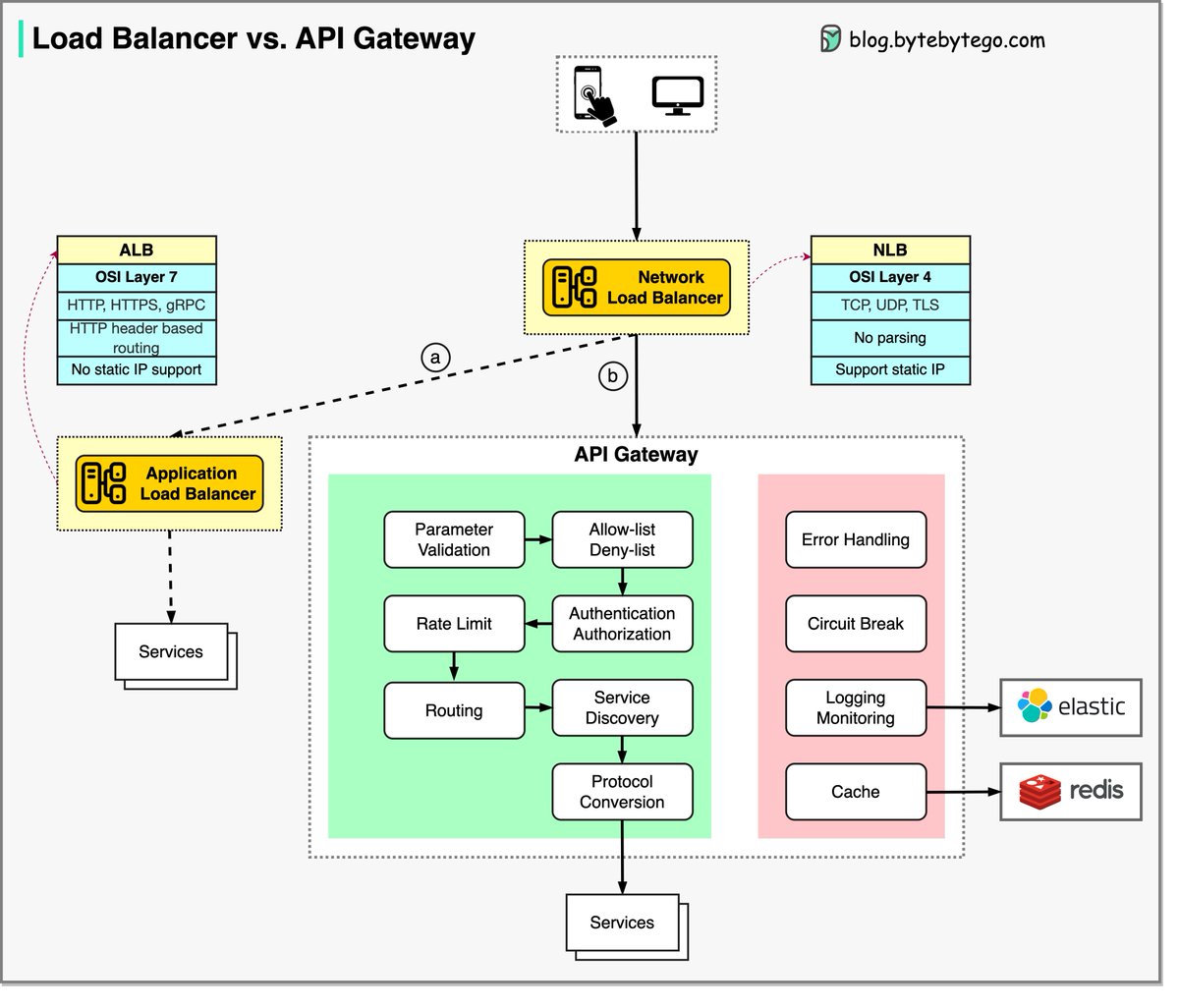
What are the differences between a load balancer and an API gateway?
First, let's clarify some concepts before discussing the differences.
1️⃣ NLB (Network Load Balancer) is usually deployed before the API gateway, handling traffic routing based on IP. It does not parse the HTTP requests.
2️⃣ ALB (Application Load Balancer) routes requests based on HTTP header or URL and thus can provide richer routing rules. We can choose the load balancer based on routing requirements. For simple services with a smaller scale, one load balancer is enough.
3️⃣ The API gateway performs tasks more on the application level. So it has different responsibilities from the load balancer.
The diagram below shows the detail. Often, they are used in combination to provide a scalable and secure architecture for modern web apps.
Option a: ALB is used to distribute requests among different services. Due to the fact that the services implement their own rating limitation, authentication, etc., this approach is more flexible but requires more work at the service level.
Option b: An API gateway takes care of authentication, rate limiting, caching, etc., so there is less work at the service level. However, this option is less flexible compared with the ALB approach.
Over to you: Which one should we use, a load balancer or an API gateway?
—
Subscribe to our weekly newsletter to get a Free System Design PDF (158 pages): https://t.co/eVEdOFSYPY
Storage Classes in Kubernetes
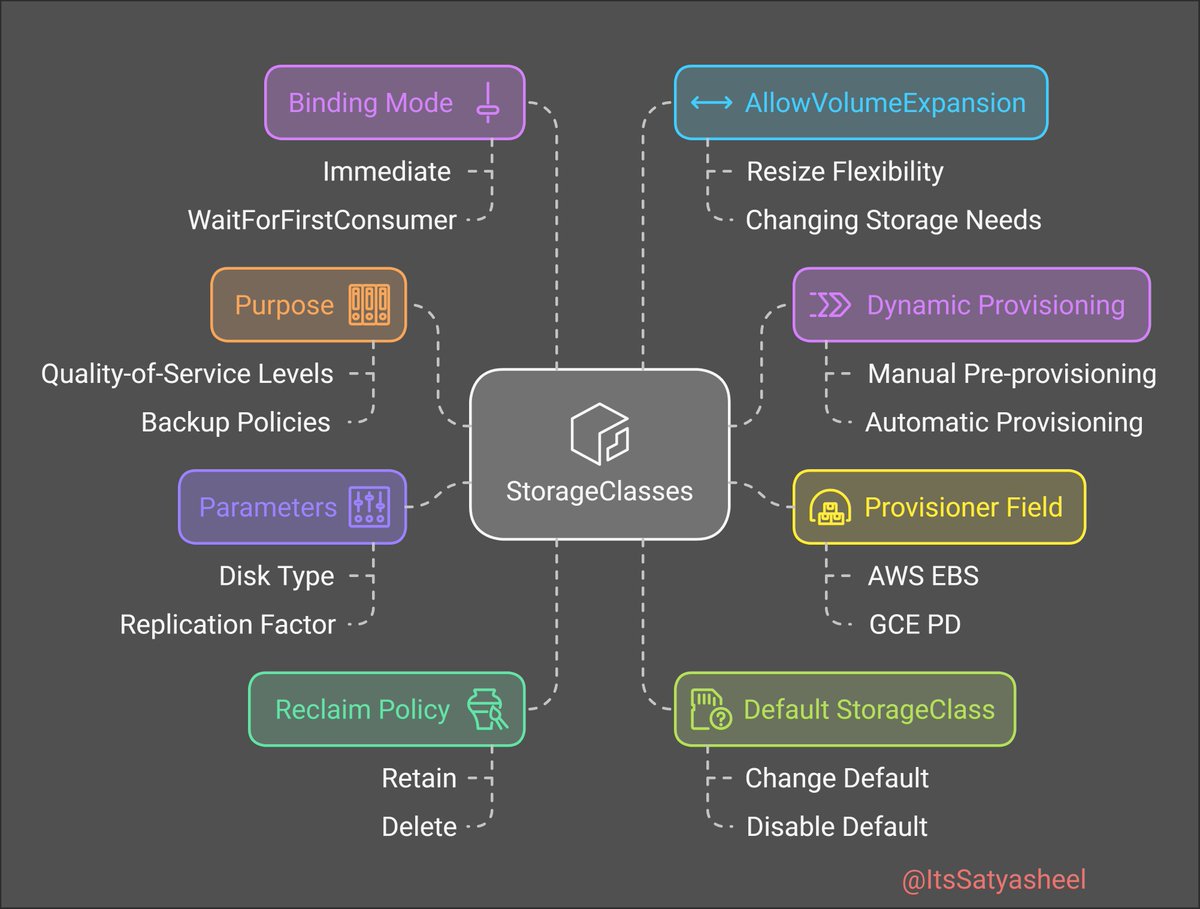
👉In Kubernetes, StorageClasses provide a mechanism for administrators to define various types of storage available within a cluster, enabling dynamic provisioning of Persistent Volumes (PVs) based on specific requirements.
👉By leveraging StorageClasses, Kubernetes clusters can efficiently manage diverse storage needs, ensuring that applications have access to appropriate storage resources dynamically and seamlessly.
👀Here are key points to understand about StorageClasses:
⚡️Purpose of StorageClasses: They allow administrators to describe different classes of storage, which can map to various quality-of-service levels, backup policies, or arbitrary policies determined by the cluster administrators.
⚡️Dynamic Provisioning: StorageClasses facilitate dynamic provisioning, where the system automatically creates a PV when a PersistentVolumeClaim (PVC) is made, eliminating the need for manual pre-provisioning.
⚡️Provisioner Field: Each StorageClass has a provisioner field that specifies the type of storage provisioner to use (e.g., AWS EBS, GCE PD, or a custom provisioner).
⚡️Parameters: The parameters field allows specifying configuration options for the provisioner, such as disk type or replication factor, tailoring the storage to specific needs.
⚡️Reclaim Policy: The reclaimPolicy field determines the behavior of the PV when released from its claim. Common policies include Retain, Recycle, and Delete.
⚡️Default StorageClass: A cluster can have a default StorageClass, which is used to provision volumes for PVCs that do not request a specific class. Administrators can change or disable the default as needed.
⚡️Binding Mode: The volumeBindingMode field controls when volume binding and dynamic provisioning occur. Modes include Immediate and WaitForFirstConsumer, affecting scheduling and resource allocation.
⚡️AllowVolumeExpansion: Setting
allowVolumeExpansion to true enables resizing of volumes associated with the StorageClass, providing flexibility to accommodate changing storage needs.
⚡️Custom StorageClasses: Administrators can create multiple StorageClasses to cater to different storage performance and cost requirements, offering users options to select storage that best fits their workload.
Projected Volume in Kubernetes
👉In Kubernetes, a Projected Volume allows combining multiple existing volume sources into a single directory within a Pod. This approach simplifies the management and consumption of different types of configuration and secret data.
👉By utilizing projected volumes, Kubernetes users can efficiently manage and access configuration data, secrets, and other essential information within their applications, promoting a more organized and secure deployment environment.
👁️Here are key points to understand about projected volumes:
➡️Definition: A projected volume merges several volume sources into the same directory, enabling containers to access diverse data from a unified location.
➡️Supported Volume Sources: The types of volume sources that can be projected include:
1.secret
2.configMap
3.downwardAPI
4.serviceAccountToken
5.clusterTrustBundle
➡️All sources must reside in the same namespace as the Pod.
➡️Configuration: To configure a projected volume, define a projected volume in the Pod specification, listing the desired sources under the sources field. Each source can specify specific items to include and their respective paths within the projected volume.
➡️Access Control: By consolidating sensitive data like secrets and service account tokens into a single volume, projected volumes facilitate streamlined access control and auditing within the application.
➡️Volume Mounts: Containers within the Pod can mount the projected volume at a specified path, allowing the application to interact with the combined data as if it were part of the container’s filesystem.
➡️Data Updates: When the underlying data in the source volumes (e.g., a ConfigMap or Secret) is updated, the projected volume reflects these changes, ensuring that the application accesses the most current information.
➡️Limitations: While projected volumes offer a convenient way to aggregate data, it’s essential to manage the size and number of items included to avoid excessive resource consumption within the Pod.
➡️Security Considerations: Carefully control access to the source volumes and the projected volume to prevent unauthorized access to sensitive information. Implement appropriate Kubernetes RBAC policies and Pod security contexts to enforce these controls.
➡️Use Cases: Projected volumes are particularly useful for aggregating configuration data, secrets, and service account tokens into a single directory, simplifying the application’s access to necessary information.
FusionCache v2 is finally out 🎉
I still can't believe it: months of work & experiments, tons of features, perf tuning & more.
The big themes are:
🏷️ Tagging
🧼 Clear()
Ⓜ️ Microsoft HybridCache support
The gargantuan release note has the jiucy details!
https://t.co/KVZEdeOcS3
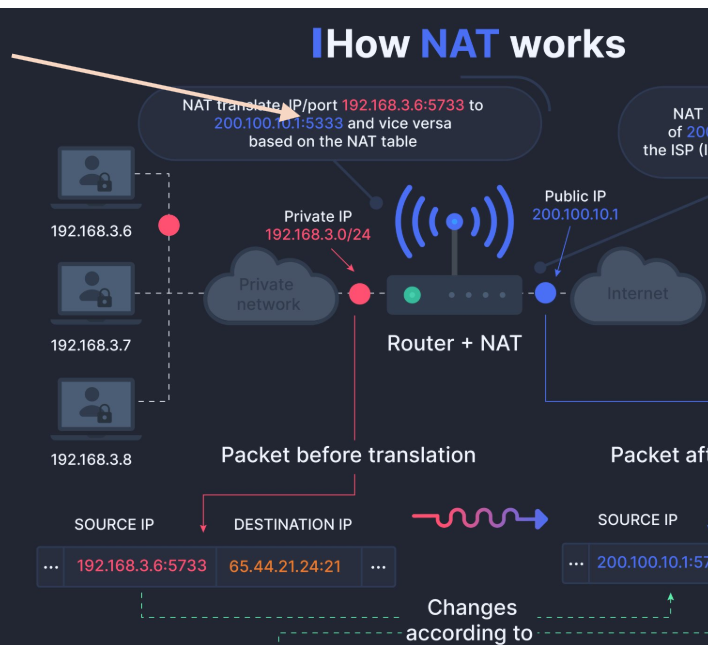
What is Port Forwarding, a.k.a. Port Mapping?
If you ran into this fancy term but were too afraid to ask, Port Forwarding is just a way to say that data addressed to one socket is redirected to another by an intermediary (e.g., a network router, a proxy process, or the kernel).
Are your Docker images huge and full of CVEs? 🐳
Multi-stage builds and careful base image selection can fix that.
Read my multi-stage builds intro to understand the How's and the Why's and get practical examples for Node.js, Go, Java, Rust, and PHP: https://t.co/U4qN8SaUv0
This YouTube course will teach you how to create visual representations of software systems using PlantUML's simple text-based language. 💻
Check out the course here: https://t.co/uJjNbpUl8E
#PlantUML#diagramming#softwaredevelopment#communication
@davidfowl
I am trying to implement TCP server that can receive & process MLLP frames based on your KestrelTcpDemo . It works for non TLS based connections. I want to support TLS but I didn't see any options in ListenOption to provide X509 certs.
https://t.co/IwaRc4e7EF