A paradox in robot learning:
robot policies are spatially dumb and data-inefficient but their image features are spatially robust and semantically rich.
Image encoders are spatially smart — features embed semantics + geometry + are multiview-consistent ...
but robot policies we build upon them are spatially dumb — hundreds of demos to learn simple pick+place and a small camera bump breaks them
To better bridge this gap, check out BIND: a new action head that binds each candidate robot action to its projecting 2D image feature(s)
BIND basically offers the network the info of '‘choosing this candidate robot action would move the robot EEF to this image feature."
Result: policies much more data efficient and robust to OOD viewpoints and OOD object positions (same rgb input, no 3D sensors, dense EEF trajectories out) 🧵
Sanity check policy done, 20 episodes using UMI grippers, using my BIND action head ✅
Policy isn’t great and left arm performance is worse, but for 20ep it’s a good sanity check that the arm and umi collection and inference setup works
Onwards! 🚀
Sharing our new work OpenTac; a tactile sensor + ecosystem that let’s you automatically design, customize, and deploy tactile skins on any robot surface!
Work led by @arikslep and in collaboration with a large group of robotics faculty new-and-not-new @JohnsHopkins. This also is my first preprint since I started my faculty position @JHUCompSci@HopkinsDSAI and setup SciPhy lab this Fall.
OpenTac is a piezoresistive robot skin that can accurately estimate normal and shear forces, can be adapted to sensorize any developable robot surface, and based on how sparse your contact is, adaptively readout at kilohertz-rate.
All of our software, hardware, and firmware is made available under open, permissive licenses for research or commercial use. 🧵
Bimanual arm prototype is assembled and running (scripted motion test, no AI/policy)
I designed/built this without knowing any CAD software, just claude-as-cad
Still a bit rough with exposed wires but good enough
Next up: use bimanual umi grippers to train simple policy
Thanks! well the trajectory is just a sequence of actions after all so it's some amount of both. i think it visibly encodes the trajectory because we a) supervise long action prediction windows so there's more than just the next short action chunk, and b) the action decoder is tiny so it's going to lay out the trajectory on the spatial features
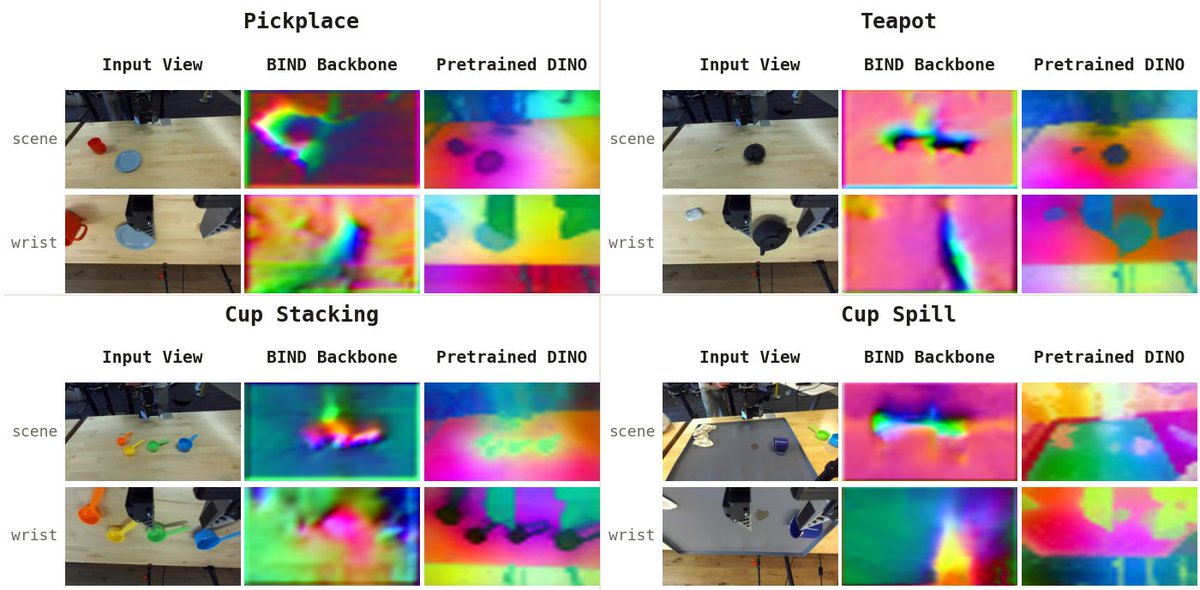
A cool thing about our BIND action head: the image features seem to better encode the full trajectories in their 2D feature maps
Here I’m plotting the feature map PCA from DINO with BIND action head vs at init: you can see the full trajectory of the task encoded in the feature maps
E.g. check out the top left cup stack, you can see the path from the EEF to the cup and from the cup to the plate;
For the teapot you can see even for the small teabag the path from the EEF from the teapot lid, to the place we drop the lid off on the right of the teapot, and from the teabag to the teapot
Here’s what I like about it: most of the heavy lifting of the action space is being done in the 2D image encoder rather than some beefy action head, which is good because we’re tapping into the backbone that sees the most data rather than our from-scratch action head weights
DINO features are so good at correspondence matching since they are spatially aware!
One reason why you should use BIND for policy-learning is the features are trajectory-aware!
Cool analysis from @omcamsmith on the BIND paper: https://t.co/CREF6EjJqW
A paradox in robot learning:
robot policies are spatially dumb and data-inefficient but their image features are spatially robust and semantically rich.
Image encoders are spatially smart — features embed semantics + geometry + are multiview-consistent ...
but robot policies we build upon them are spatially dumb — hundreds of demos to learn simple pick+place and a small camera bump breaks them
To better bridge this gap, check out BIND: a new action head that binds each candidate robot action to its projecting 2D image feature(s)
BIND basically offers the network the info of '‘choosing this candidate robot action would move the robot EEF to this image feature."
Result: policies much more data efficient and robust to OOD viewpoints and OOD object positions (same rgb input, no 3D sensors, dense EEF trajectories out) 🧵
that makes sense. i think we need an interface that allows you to tweak manually when you want and then ask an agent to take over otherwise
that was kind of the motivation of my claude-as-cad project but i think for you it'd need to be in more of a real CAD software like embedding something similar into fusion 360o
introducing claude-as-cad
i've been actually building robots and parts without knowing any CAD, using a claude-as-cad recipe -- here's how and you can too:
language-based prompting for CAD-agents is a good start, but it's imprecise -- these builds are difficult to steer exactly, among other issues
instead, you should have claude build you a claude-native CAD interface.
i've had success with this and found 3 important ingredients:
1. click to reference -- click any part of the build and the [3D coordinate, mesh face, object id] are copied to your clipboard to paste into chat
➡️ lets you be hyper-specific about what part you are referring to in chat
2. 3D primitive editor -- reposition/reorient any existing object; add a cube to the scene and scale/position for claude to use for reference
➡️ often times its hard to describe a position/transform in language and easier to illustrate it yourself to claude
3. hierarchical notes -- claude organizes separate builds into nested folders and writes skills that survive conversation compacting
➡️ saving different builds in folders with common skills, e.g. servo mounts, means once you get it right and save it, you can always reference it easily
link to install to your agent setup below ⬇️
@justmetolife agreed, otherwise you have to reprint many times to get it right . it’s pretty much the exact 1:1 render since we calibrate the camera pose and intrinsics relative to the camera sim object with the jig
here’s something small but useful I built with claude-as-cad:
I wanted the camera pose and intrinsics relative to some cheap-amazon camera’s CAD/step file
so I built a tiny camera calibration jig where it’s mounted relative onto some known place and observes some aruco board in a known place — from it we can get the camera pose and intrinsics relative to the mounting place
cad agent passed it to the calibration agent to write the detection script to run this automatically and save it
in addition to some policy use cases, one tricky thing is knowing where to place the wrist camera in CAD to make sure it has good observation
I had another agent make a localhost program where I can move/drag the camera around in mujoco and view the corresponding render of exactly what the wrist camera will observe when mounted
once I lock in the pose, the script sends the camera pose to the cad agent to update the EEF's wrist camera position with it
this is one example that I think illustrates why you want a proper CAD agent and interface across the full robotics stack
I haven't tried using that as the CAD source for the coding agent but we definitely could. i think the main 'recipe' part is just adding the click-to-reference interface and etc to openscad which looks easy since they already have a good viewer/interface
what have you been building with it and with which agent or just coding yourself?
https://t.co/ZDcIA21BQP
see more examples about the features above animated/interactive here on the website
these features obviously aren't exhaustively 1:1 with a CAD software, but I believe software in this AI age should meet you where you at your skill/need and customize the software on the fly : need an interactive fillet tool? add it, it's one prompt away! etc