O tempo passa, mas certos legados continuam ecoando pelo mundo.
Orgulho de ser o Time do Povo. Orgulho de ser Corinthians. 🏴🏳️
Thank you, Mayor Zohran Kwame Mamdani, for honoring Dr. Sócrates and the legacy of Democracia Corinthiana.
📹 The Morning Pitch / @nycmayor
#CulturalDoCorinthians
#VaiCorinthians
🖥️ Best Local LLMs for Consumer GPUs — llama.cpp Guide (June 2026)
What I actually run on consumer hardware right now. Every model below runs via llama.cpp with a simple one-liner — no Docker, no Python env, no cloud.
━━━ 8-16GB VRAM ━━━
🔹 Gemma 4-12B (Google)
• Smartest model in this size class — competes with stuff 2× bigger
• Unsloth's MTP GGUFs: 162 tok/s vs 52 tok/s normal (3× speedup)
• Minimum 8GB VRAM recommended for Q4_K_M quant
• GGUF → https://t.co/VWp818MB3D
🔹 LFM2.5-8B-A1B (LiquidAI)
• Hybrid MoE, only 1B active params — absurdly fast for its size
• Perfect for 8-12GB cards, MacBooks, or anyone on a tight budget
• GGUF → https://t.co/ZbOs4mXJDq
━━━ 16-32GB VRAM ━━━
🔹 Qwen3.6-27B (Qwen)
• Scored 1.00 on tool-efficiency benchmarks — best local agent available
• 40 deterministic tasks, 32k/128k context needle tests — all passed
• GGUF → https://t.co/n7K3sPvliE
• MTP version (faster) → https://t.co/gwdfnJTzcy
🔹 Qwopus3.6-27B-v2 (Jackrong)
• Best quantization of Qwen3.6-27B — topped 5 agent & coding benchmarks (1200 samples)
• If you're running Q4, this is the one to grab
• GGUF → https://t.co/tV1DFqXnOD
• MTP version → https://t.co/PMqz7V5ewv
🔹 Gemma 4-31B QAT (Google/Unsloth)
• QAT variant with MTP draft head: 76-125 tok/s (1.67× speedup)
• Excellent for multi-agent / subagent workflows
• GGUF → https://t.co/FgVsUX0YOB
🔹 Nex-N2-Mini (Nex AGI)
• Post-train of Qwen3.5-35B-A3B — MoE with only 3B active params
• Fits on 16GB+ VRAM, overflow loads from system RAM
• Adaptive thinking saves ~20% tokens with no quality loss
• For deep multi-step reasoning, nothing in this size comes close
• GGUF → https://t.co/oyC522a8Eh
━━━ Quick Picks ━━━
• 16GB all-rounder → Gemma 4-12B with MTP GGUFs
• 32GB all-rounder → Qwen3.6-27B / Qwopus-v2
• Agents & tool use → Qwen3.6-27B or Qwopus Q4
• Deep reasoning → Nex-N2-Mini (MoE, fits 16GB+)
• Tight budget → LFM2.5-8B-A1B
• Cheapest full build: 1× used RTX 3090 (24GB) + rest of PC ≈ $1000-1500
━━━ Setup on Windows ━━━
1. Download llama.cpp → https://t.co/et0J7Swua7 (latest .zip)
2. Extract to any folder (e.g. C:\llama.cpp)
3. Download a .gguf from the links above (Q4_K_M or Q5_K_M for best quality/speed balance)
4. Run one of the commands below depending on your hardware
━━━ Launch Commands ━━━
SINGLE GPU — Standard model (no MTP):
llama-server.exe ^
-m C:\models\Qwen3.6-27B-Q5_K_M.gguf ^
--ctx-size 180000 ^
--flash-attn on ^
--cache-type-k q4_0 ^
--cache-type-v q4_0 ^
--batch-size 1024 --ubatch-size 512 ^
-ngl 100 ^
-np 1 ^
--port 8080 ^
--jinja
SINGLE GPU — MTP model (faster inference):
llama-server.exe ^
-m C:\models\Qwen3.6-27B-MTP-Q5_K_M.gguf ^
--ctx-size 180000 ^
--flash-attn on ^
--cache-type-k q4_0 ^
--cache-type-v q4_0 ^
--batch-size 1024 --ubatch-size 512 ^
--spec-type draft-mtp ^
--spec-draft-n-max 3 ^
-ngl 100 ^
-np 1 ^
--port 8080 ^
--jinja
DUAL GPU — Split across two cards:
llama-server.exe ^
-m C:\models\Qwen3.6-27B-Q5_K_M.gguf ^
--ctx-size 180000 ^
--flash-attn on ^
--cache-type-k q4_0 ^
--cache-type-v q4_0 ^
--batch-size 1024 --ubatch-size 512 ^
-ngl 100 ^
--tensor-split 0.55,0.45 ^
--main-gpu 0 ^
-np 1 ^
--port 8080 ^
--jinja
DUAL GPU + MTP + Vision (multimodal):
llama-server.exe ^
-m C:\models\Qwen3.6-27B-MTP-Q5_K_M.gguf ^
--ctx-size 180000 ^
--flash-attn on ^
--cache-type-k q4_0 ^
--cache-type-v q4_0 ^
--batch-size 1024 --ubatch-size 512 ^
--spec-type draft-mtp ^
--spec-draft-n-max 3 ^
-ngl 100 ^
--tensor-split 0.60,0.40 ^
--main-gpu 0 ^
-np 1 ^
--port 8080 ^
--jinja ^
--mmproj C:\models\mmproj-F16.gguf
━━━ Parameter Breakdown ━━━
-m <path>
Path to your .gguf model file. Change this to wherever you downloaded it.
--ctx-size 180000
Context window in tokens. 180k = huge context for long conversations or big codebases.
Reduce to 32768 or 65536 if you don't need long context — uses less VRAM.
--flash-attn on
Flash Attention — dramatically speeds up inference and reduces VRAM usage.
Works on RTX 30xx/40xx/50xx. Always enable this.
--cache-type-k q4_0 / --cache-type-v q4_0
Quantizes the KV cache (key/value attention cache) to 4-bit.
This is what makes 180k context fit in VRAM. Without it, huge contexts eat all your memory.
Quality impact is minimal — this is a free performance win.
--batch-size 1024 / --ubatch-size 512
batch-size = how many tokens are processed in one forward pass (throughput).
ubatch-size = micro-batch actually sent to the GPU per step.
Higher = faster prompt processing but needs more VRAM.
If you run out of VRAM, lower these (e.g. 512/256).
-ngl 100
Number of layers to offload to GPU. 100 = all layers on GPU (full offload).
This is what you want if the model fits in your VRAM.
If it doesn't fit, reduce this (e.g. -ngl 40) — remaining layers run on CPU/RAM.
--tensor-split 0.55,0.45
How to split model layers across multiple GPUs. Values are ratios.
0.55,0.45 = GPU 0 gets 55% of layers, GPU 1 gets 45%.
Adjust based on your VRAM — give more to the card with more memory.
Example: 0.70,0.30 for a 24GB + 12GB setup.
Not needed for single GPU setups.
--main-gpu 0
Which GPU handles the batch computation (the "orchestrator").
Set to 0 (your primary GPU). The other GPU(s) handle their assigned layers.
Minor performance impact — usually just leave it at 0.
-np 1
Number of parallel slots (concurrent requests). 1 = one user at a time.
Increase to 2-4 if you want multiple clients connected simultaneously.
Each extra slot uses additional VRAM for its own KV cache.
--port 8080
Which port the server listens on. Change if port 8080 is busy.
--jinja
Enables Jinja2 template processing — required for proper chat formatting.
Most modern models expect this. Always include it.
--spec-type draft-mtp
Enables Multi-Token Prediction (MTP) speculative decoding.
Only works with MTP GGUF models (downloaded separately).
The model predicts multiple tokens at once and verifies them — big speed boost.
--spec-draft-n-max 3
How many tokens the MTP draft head proposes per step.
3 is a good default. Higher = potentially faster but more VRAM and may reduce quality.
--mmproj <path>
Path to the multimodal projector file (for vision models).
Enables image understanding — paste screenshots into the web chat.
Only needed if you want vision capabilities. Omit for text-only use.
━━━ Your Hardware → Your Command ━━━
Single GPU (8-24GB VRAM):
Use the "Single GPU" command. Change -m to your model path.
8GB card → Gemma 4-12B Q4 or LFM2.5-8B
12GB card → Gemma 4-12B Q5/Q6
16GB card → Gemma 4-31B QAT Q4 or Nex-N2-Mini
24GB card → Qwen3.6-27B Q4/Q5, Qwopus-v2, Gemma 4-31B QAT Q5/Q6
Dual GPU:
Use the "Dual GPU" command. Adjust --tensor-split based on your VRAM ratio.
24GB + 24GB → --tensor-split 0.50,0.50
24GB + 12GB → --tensor-split 0.70,0.30
24GB + 8GB → --tensor-split 0.75,0.25
Want speed? Use MTP versions of models with the "MTP" commands.
Want vision? Add --mmproj with the projector file from the model's HuggingFace repo.
5. Once running, you get:
• Web chat UI → http://localhost:8080
• OpenAI-compatible API → http://localhost:8080/v1
• Playground → http://localhost:8080/playground
━━━ Why /v1 API Is the Killer Feature ━━━
One local endpoint replaces your entire cloud API bill. The /v1 endpoint is drop-in OpenAI-spec compatible — every tool that speaks OpenAI just works. No custom code, no glue layer.
Works out of the box with:
• IDEs: Cursor, Continue, Windsurf, Cline, Roo Code
• CLI tools: aider, Open Interpreter, OpenCode
• Frameworks: LangChain, LlamaIndex, LiteLLM
• Any OpenAI SDK (Python, Node, Go, Rust)
Why this beats cloud APIs:
• 100% private — code never leaves your machine
• $0 per token — no rate limits, no quotas, no surprise bills
• Works fully offline
• Zero telemetry, no training on your data
• Swap models by dropping in a different .gguf — no app changes needed
• Run 32k–128k context windows without burning money
Good combos:
• Cursor + Qwopus-v2 → near-frontier quality, zero API cost
• Continue + Qwen3.6-27B → best local coding agent
• aider + Gemma 4-12B MTP → 162 tok/s, feels instant
• OpenCode + Nex-N2-Mini → deep reasoning on 16GB
Set any OpenAI-compatible client to your local endpoint:
set OPENAI_API_KEY=sk-dummy (any non-empty string works)
set OPENAI_BASE_URL=http://localhost:8080/v1
# every OpenAI-compatible tool now hits your local GPU
Shoutouts: @0xSero@rS_alonewolf@witcheer@UnslothAI@LottoLabs
🇧🇷 Modelo de IA aberta treinada no Rio com financiamento público ao longo do último ano pela @Prefeitura_Rio superando todos os outros modelos. Inteligência artificial não é uma coisa distante, estrangeira, de laboratório bilionário…não existe só pra fazer texto, imagens aleatórias.
O Rio acaba de disponibilizar um modelo aberto de inteligência artificial.
E o que isso significa?
Capacidade de analisar mais dados, responder mais rápido, entender problemas complexos sem depender de soluções compradas prontas lá fora. E com a https://t.co/xoUWa2LHUy interagir e atender melhor a população usando IA.
Significa pra quem ainda tinha alguma dúvida sobre o potencial do “Rio AI City” agora vai precisar olhar pra cá com muita atenção e seriedade. Energia, água em abundância, conectividade, talentos, construção de data centers e visão de futuro.
Hoje o mundo está falando de um modelo aberto de IA treinado no Rio. Engenharia brasileira. Soberania. Desenvolvimento tecnológico. Rio no centro do futuro.
Parabéns ao time da @Prefeitura_Rio com o IPLAN mostrando ao Brasil que é possível! Obrigado @eduardopaes por ter acreditado e iniciado o desenvolvimento desse projeto no último ano. Seguimos!
-
🇧🇷 An open AI model trained in Rio and publicly funded over the last year by @Prefeitura_Rio has just surpassed all other models.
Artificial intelligence is not something distant, foreign, or confined to billion-dollar labs. It is not just about generating text or random images.
Rio has just made an open artificial intelligence model publicly available.
And what does that mean?
It means greater capacity to analyze data, respond faster, and understand complex challenges without depending on off-the-shelf solutions developed abroad. It means @Prefeitura_Rio will be able to interact with and serve people better through AI.
For anyone who still had doubts about the potential of “Rio AI City,” it’s time to pay close attention. Clean energy, abundant water, connectivity, data center development, talents and a long-term vision for the future.
Today, the world is talking about an open AI model trained in Rio.
Brazilian engineering. Sovereignty. Technological development. Rio at the center of the future.
Congratulations to the entire @Prefeitura_Rio team, especially IPLAN, for showing Brazil that this is possible.
And thank you @eduardopaes for believing in and launching this project last year.
We keep moving forward. 🇧🇷
How do you get Claude Code to check its own work before handing it back?
Watch how you can encode your manual checks so Claude closes its own feedback loop:
one of the quotes i find most inspiring on a hard day:
"Whatever your hand finds to do, do it with all your might, for in the realm of the dead, where you are going, there is neither working nor planning nor knowledge nor wisdom"
Ecclesiastes 9:10
So many people are stuck doing boring work because they don't have the right background or aren't in the right community.
But now? Anyone can use ChatGPT for free. And it doesn't cost that much to access the superpowers of Claude Code and Codex. These tools giving people capabilities that used to belong only to highly trained engineers. It doesn't cost much to start building.
The people who are going to win, whatever their background, are the ones who just do things. Don't wait to be told.
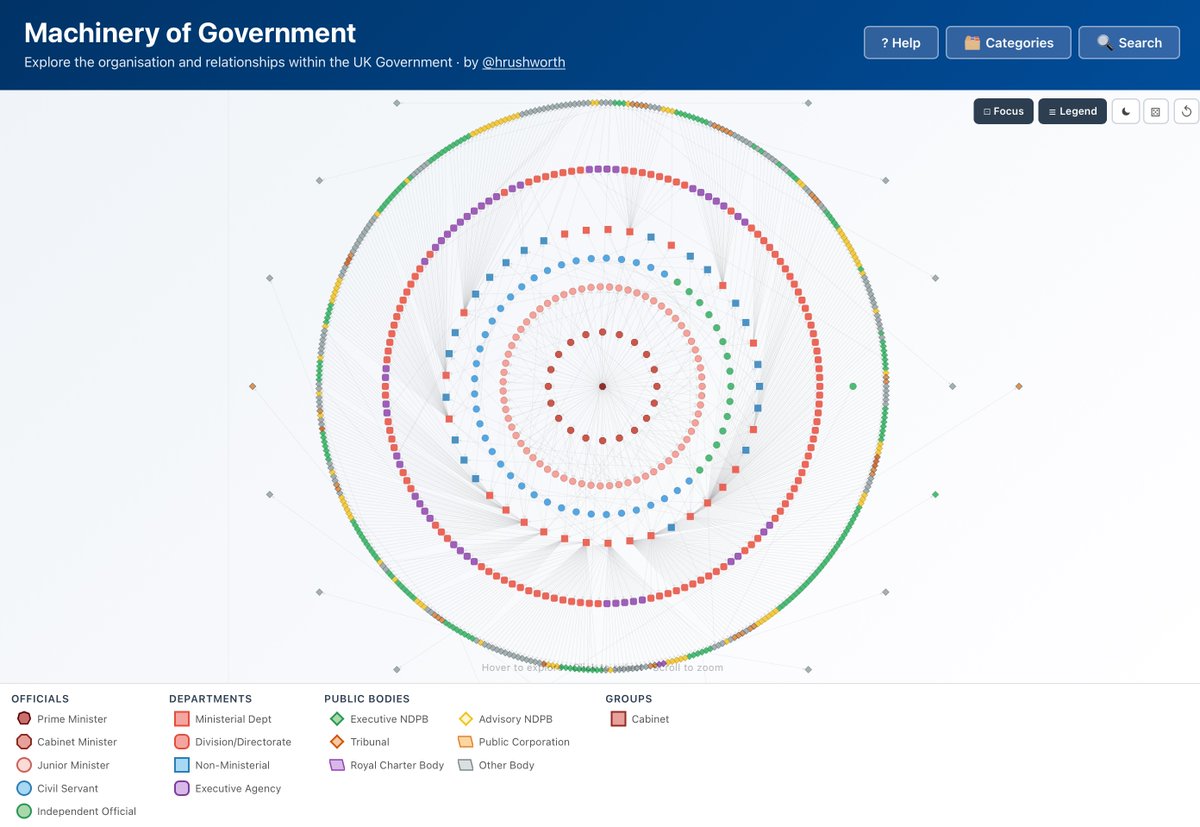
The British Government is a complicated beast. Dozens of departments, hundreds of public bodies, more corporations than one can count...
Such is its complexity that there isn't an org chart for it.
Well, there wasn't...
Introducing ⚙️Machinery of Government⚙️
Wow, this tweet went very viral!
I wanted share a possibly slightly improved version of the tweet in an "idea file". The idea of the idea file is that in this era of LLM agents, there is less of a point/need of sharing the specific code/app, you just share the idea, then the other person's agent customizes & builds it for your specific needs.
So here's the idea in a gist format: https://t.co/NlAfEJjtJV
You can give this to your agent and it can build you your own LLM wiki and guide you on how to use it etc. It's intentionally kept a little bit abstract/vague because there are so many directions to take this in. And ofc, people can adjust the idea or contribute their own in the Discussion which is cool.
Starting tomorrow at 12pm PT, Claude subscriptions will no longer cover usage on third-party tools like OpenClaw.
You can still use these tools with your Claude login via extra usage bundles (now available at a discount), or with a Claude API key.
Digging into reports, most of the fastest burn came down to a few token-heavy patterns. Some tips:
• Sonnet 4.6 is the better default on Pro. Opus burns roughly twice as fast. Switch at session start.
• Lower the effort level or turn off extended thinking when you don't need deep reasoning. Switch at session start.
• Start fresh instead of resuming large sessions that have been idle ~1h
• Cap your context window, long sessions cost more CLAUDE_CODE_AUTO_COMPACT_WINDOW=200000
We're rolling out more efficiency improvements, make sure you're on the latest version.
If a small session is still eating a huge chunk of your limit in a way that seems unreasonable, run /feedback and we'll investigate
LLM Knowledge Bases
Something I'm finding very useful recently: using LLMs to build personal knowledge bases for various topics of research interest. In this way, a large fraction of my recent token throughput is going less into manipulating code, and more into manipulating knowledge (stored as markdown and images). The latest LLMs are quite good at it. So:
Data ingest:
I index source documents (articles, papers, repos, datasets, images, etc.) into a raw/ directory, then I use an LLM to incrementally "compile" a wiki, which is just a collection of .md files in a directory structure. The wiki includes summaries of all the data in raw/, backlinks, and then it categorizes data into concepts, writes articles for them, and links them all. To convert web articles into .md files I like to use the Obsidian Web Clipper extension, and then I also use a hotkey to download all the related images to local so that my LLM can easily reference them.
IDE:
I use Obsidian as the IDE "frontend" where I can view the raw data, the the compiled wiki, and the derived visualizations. Important to note that the LLM writes and maintains all of the data of the wiki, I rarely touch it directly. I've played with a few Obsidian plugins to render and view data in other ways (e.g. Marp for slides).
Q&A:
Where things get interesting is that once your wiki is big enough (e.g. mine on some recent research is ~100 articles and ~400K words), you can ask your LLM agent all kinds of complex questions against the wiki, and it will go off, research the answers, etc. I thought I had to reach for fancy RAG, but the LLM has been pretty good about auto-maintaining index files and brief summaries of all the documents and it reads all the important related data fairly easily at this ~small scale.
Output:
Instead of getting answers in text/terminal, I like to have it render markdown files for me, or slide shows (Marp format), or matplotlib images, all of which I then view again in Obsidian. You can imagine many other visual output formats depending on the query. Often, I end up "filing" the outputs back into the wiki to enhance it for further queries. So my own explorations and queries always "add up" in the knowledge base.
Linting:
I've run some LLM "health checks" over the wiki to e.g. find inconsistent data, impute missing data (with web searchers), find interesting connections for new article candidates, etc., to incrementally clean up the wiki and enhance its overall data integrity. The LLMs are quite good at suggesting further questions to ask and look into.
Extra tools:
I find myself developing additional tools to process the data, e.g. I vibe coded a small and naive search engine over the wiki, which I both use directly (in a web ui), but more often I want to hand it off to an LLM via CLI as a tool for larger queries.
Further explorations:
As the repo grows, the natural desire is to also think about synthetic data generation + finetuning to have your LLM "know" the data in its weights instead of just context windows.
TLDR: raw data from a given number of sources is collected, then compiled by an LLM into a .md wiki, then operated on by various CLIs by the LLM to do Q&A and to incrementally enhance the wiki, and all of it viewable in Obsidian. You rarely ever write or edit the wiki manually, it's the domain of the LLM. I think there is room here for an incredible new product instead of a hacky collection of scripts.