Which latency numbers you should know?
Please note those are not precise numbers. They are based on some online benchmarks (Jeff Dean’s latency numbers + some other sources).
🔹L1 and L2 caches: 1 ns, 10 ns
E.g.: They are usually built onto the microprocessor chip. Unless you work with hardware directly, you probably don’t need to worry about them.
🔹RAM access: 100 ns
E.g.: It takes around 100 ns to read data from memory. Redis is an in-memory data store, so it takes about 100 ns to read data from Redis.
🔹Send 1K bytes over 1 Gbps network: 10 us
E.g.: It takes around 10 us to send 1KB of data from Memcached through the network.
🔹Read from SSD: 100 us
E.g.: RocksDB is a disk-based K/V store, so the read latency is around 100 us on SSD.
🔹Database insert operation: 1 ms.
E.g.: Postgresql commit might take 1ms. The database needs to store the data, create the index, and flush logs. All these actions take time.
🔹Send packet CA->Netherlands->CA: 100 ms
E.g.: If we have a long-distance Zoom call, the latency might be around 100 ms.
🔹Retry/refresh internal: 1-10s
E.g: In a monitoring system, the refresh interval is usually set to 5~10 seconds
Notes
-----
1 ns = 10^-9 seconds
1 us = 10^-6 seconds = 1,000 ns
1 ms = 10^-3 seconds = 1,000 us = 1,000,000 ns
--
Subscribe to our weekly newsletter to get a Free System Design PDF (158 pages): https://t.co/FIzCeaWsZV
𝗪𝗵𝗮𝘁 𝗶𝘀 𝘁𝗵𝗲 𝘀𝗶𝗻𝗴𝗹𝗲 𝗺𝗼𝘀𝘁 𝗵𝗲𝗹𝗽𝗳𝘂𝗹 𝘀𝘁𝗿𝗮𝘁𝗲𝗴𝘆 𝘁𝗼 𝗶𝗺𝗽𝗿𝗼𝘃𝗲 𝘆𝗼𝘂𝗿 𝗮𝗽𝗽'𝘀 𝗽𝗲𝗿𝗳𝗼𝗿𝗺𝗮𝗻𝗰𝗲?
It is to 𝗰𝗮𝗰𝗵𝗲 (𝗮𝗹𝗺𝗼𝘀𝘁) 𝗲𝘃𝗲𝗿𝘆𝘁𝗵𝗶𝗻𝗴! Caching stores copies of frequently accessed data in a readily accessible location, reducing access time and offloading primary data sources.
Advantages of caching are faster data retrieval, reduced load on primary data stores, and improved user experience.
Don't cache only database queries, as reading for cache is much faster than an API call.
How do you 𝗱𝗲𝗰𝗶𝗱𝗲 to cache something? The better question is, why not cache something?
Adding a cache comes with costs, so for each candidate, we need to 𝗲𝘃𝗮𝗹𝘂𝗮𝘁𝗲 the following:
🔹 Is it faster to hit cache?
🔹 Is it worth to store?
🔹 How often do we need to validate?
🔹 How many hits per cache entry will we get?
🔹 Is it local or shared cache?
Yet, cached data is stale, so there can be situations in which it is inappropriate.
To determine how successful your cache is, you can keep an eye on metrics like cache misses.
There are 𝗰𝗮𝗰𝗵𝗶𝗻𝗴 𝘀𝘁𝗿𝗮𝘁𝗲𝗴𝗶𝗲𝘀:
𝟭. 𝗖𝗮𝗰𝗵𝗲-𝗔𝘀𝗶𝗱𝗲: The application manually manages data storage and retrieval from the cache. Data is fetched from the primary storage on a cache miss and then added to the cache.
𝟮. 𝗥𝗲𝗮𝗱-𝗧𝗵𝗿𝗼𝘂𝗴𝗵: When a cache miss occurs, the cache automatically loads data from the primary storage. It simplifies data retrieval by handling cache misses internally.
𝟯. 𝗪𝗿𝗶𝘁𝗲-𝗔𝗿𝗼𝘂𝗻𝗱: Data is written directly to the primary storage, bypassing the cache. This strategy is effective when writes are frequent, and reads are less common.
𝟰. 𝗪𝗿𝗶𝘁𝗲-𝗕𝗮𝗰𝗸: Data is first written to the cache and later synchronized with the primary storage. This reduces the number of write operations but risks data loss if the stock fails before syncing.
𝟱. 𝗪𝗿𝗶𝘁𝗲-𝗧𝗵𝗿𝗼𝘂𝗴𝗵: Data is simultaneously written to both the cache and the primary storage, ensuring consistency but potentially increasing write latency. Ideal for scenarios where data integrity is crucial.
Do you use caching?
#softwaredesign
CAP, BASE, SOLID, KISS, What do these acronyms mean?
The diagram below explains the common acronyms in system designs.
🔹 CAP
CAP theorem states that any distributed data store can only provide two of the following three guarantees:
1. Consistency - Every read receives the most recent write or an error.
2. Availability - Every request receives a response.
3. Partition tolerance - The system continues to operate in network faults.
However, this theorem was criticized for being too narrow for distributed systems, and we shouldn’t use it to categorize the databases. Network faults are guaranteed to happen in distributed systems, and we must deal with this in any distributed systems.
You can read more on this in “Please stop calling databases CP or AP” by Martin Kleppmann.
🔹 BASE
The ACID (Atomicity-Consistency-Isolation-Durability) model used in relational databases is too strict for NoSQL databases. The BASE principle offers more flexibility, choosing availability over consistency. It states that the states will eventually be consistent.
🔹 SOLID
SOLID principle is quite famous in OOP. There are 5 components to it.
1. SRP (Single Responsibility Principle)
Each unit of code should have one responsibility.
2. OCP (Open Close Principle)
Units of code should be open for extension but closed for modification.
3. LSP (Liskov Substitution Principle)
A subclass should be able to be substituted by its base class.
4. ISP (Interface Segregation Principle)
Expose multiple interfaces with specific responsibilities.
5. DIP (Dependency Inversion Principle)
Use abstractions to decouple dependencies in the system.
🔹 KISS
"Keep it simple, stupid!" is a design principle first noted by the U.S. Navy in 1960. It states that most systems work best if they are kept simple.
Over to you: Have you invented any acronyms in your career?
–
Subscribe to our weekly newsletter to get a Free System Design PDF (158 pages): https://t.co/uc5M7CdXXC
@samsoniuk @BrunoLevy01 @a1k0n Finally, I used the openxc7 for my Kintex7. Thanks, @hansfbaier. First at 130MHz (pure distributed RAM) KianV Stealth RV32I 5-stage pipelining CPU written in pure SystemVerilog. Nice :) I love RISC-V.
Súper divertido post sobre cómo hackear el firmware de unos auriculares. Está escrito describiendo el proceso de investigación en detalle, como si fuese una peli de detectives. Me ha encantado. https://t.co/451bLhafG2
𝗛𝗼𝘄 𝘁𝗼 𝗟𝗲𝗮𝗿𝗻 𝗦𝘆𝘀𝘁𝗲𝗺 𝗗𝗲𝘀𝗶𝗴𝗻?
If you're working as a software developer and you want to move towards a software architect role, or you're preparing for coding interviews for more senior roles, systems design is an important skill you need to have. Without knowing it, you will have a hard time designing new software systems and understanding existing ones.
System design refers to 𝘁𝗵𝗲 𝗽𝗿𝗼𝗰𝗲𝘀𝘀 𝗼𝗳 𝗱𝗲𝗳𝗶𝗻𝗶𝗻𝗴 𝗮 𝘀𝘆𝘀𝘁𝗲𝗺'𝘀 𝗰𝗼𝗺𝗽𝗼𝗻𝗲𝗻𝘁𝘀. Architecture, modules, components, interfaces, and data are a few examples of these aspects. The process of defining, creating, and designing systems that suit the particular objectives and requirements of an organization is what you need to understand when it comes to system design.
To understand system design, you will need to know the following:
𝟭. 𝗣𝗲𝗿𝗳𝗼𝗿𝗺𝗮𝗻𝗰𝗲 𝘃𝘀 𝗦𝗰𝗮𝗹𝗮𝗯𝗶𝗹𝗶𝘁𝘆
𝟮. 𝗟𝗮𝘁𝗲𝗻𝗰𝘆 𝘃𝘀 𝗧𝗵𝗿𝗼𝘂𝗴𝗵𝗽𝘂𝘁 𝗮𝗻𝗱 𝗔𝘃𝗮𝗶𝗹𝗮𝗯𝗶𝗹𝗶𝘁𝘆 𝘃𝘀 𝗖𝗼𝗻𝘀𝗶𝘀𝘁𝗲𝗻𝗰𝘆 (𝘄𝗶𝘁𝗵 𝗽𝗮𝘁𝘁𝗲𝗿𝗻𝘀)
𝟯. 𝗔𝘃𝗮𝗶𝗹𝗮𝗯𝗶𝗹𝗶𝘁𝘆 𝗽𝗮𝘁𝘁𝗲𝗿𝗻𝘀
𝟰. 𝗕𝗮𝗰𝗸𝗴𝗿𝗼𝘂𝗻𝗱 𝗷𝗼𝗯𝘀
𝟱. 𝗗𝗼𝗺𝗮𝗶𝗻 𝗡𝗮𝗺𝗲 𝗦𝘆𝘀𝘁𝗲𝗺𝘀
𝟲. 𝗖𝗗𝗡𝘀
𝟳. 𝗟𝗼𝗮𝗱 𝗕𝗮𝗹𝗮𝗻𝗰𝗲𝗿𝘀
𝟴. 𝗖𝗮𝗰𝗵𝗶𝗻𝗴
𝟵. 𝗔𝘀𝘆𝗻𝗰𝗵𝗿𝗼𝗻𝗶𝘀𝗺
𝟭𝟬. 𝗖𝗼𝗺𝗺𝘂𝗻𝗶𝗰𝗮𝘁𝗶𝗼𝗻 𝗽𝗮𝘁𝘁𝗲𝗿𝗻𝘀
𝟭𝟭. 𝗣𝗲𝗿𝗳𝗼𝗿𝗺𝗮𝗻𝗰𝗲 𝗮𝗻𝘁𝗶𝗽𝗮𝘁𝘁𝗲𝗿𝗻𝘀
𝟭𝟮. 𝗠𝗼𝗻𝗶𝘁𝗼𝗿𝗶𝗻𝗴
𝟭𝟯. 𝗖𝗹𝗼𝘂𝗱 𝗱𝗲𝘀𝗶𝗴𝗻 𝗽𝗮𝘁𝘁𝗲𝗿𝗻𝘀
To learn this, here are some 𝗯𝗼𝗼𝗸𝘀 where you can start learning:
𝟭. 𝗦𝘆𝘀𝘁𝗲𝗺 𝗗𝗲𝘀𝗶𝗴𝗻 𝗜𝗻𝘁𝗲𝗿𝘃𝗶𝗲𝘄
One of the best books in this field, where you will learn how to design systems such as web crawlers or even YouTube.
Link: https://t.co/FS1xScwM1a
𝟮. 𝗗𝗲𝘀𝗶𝗴𝗻𝗶𝗻𝗴 𝗗𝗮𝘁𝗮-𝗜𝗻𝘀𝗲𝗻𝘀𝗶𝘁𝗶𝘃𝗲 𝗔𝗽𝗽𝗹𝗶𝗰𝗮𝘁𝗶𝗼𝗻𝘀
In this book, the author writes about different technologies used to store and process data. By reading it, you will gain insight into different algorithms used in the database world.
Link: https://t.co/FeB1UiM2qp
𝟯. 𝗛𝗲𝗮𝗱 𝗙𝗶𝗿𝘀𝘁 𝗗𝗲𝘀𝗶𝗴𝗻 𝗣𝗮𝘁𝘁𝗲𝗿𝗻𝘀
A great book on OO design patterns, written in a simple style with examples in Java.
Link: https://t.co/SiqEzg1Fug
𝟰. 𝗖𝗿𝗮𝗰𝗸𝗶𝗻𝗴 𝘁𝗵𝗲 𝗖𝗼𝗱𝗶𝗻𝗴 𝗜𝗻𝘁𝗲𝗿𝘃𝗶𝗲𝘄
It is a general-purpose coding interview book where the author shares her insights into programming interviews at big tech companies like Microsoft and Google. It covers all basic topics like algorithms, data structures, SQL, etc.
Link: https://t.co/j295Zvs8KW
𝟱. 𝗙𝘂𝗻𝗱𝗮𝗺𝗲𝗻𝘁𝗮𝗹𝘀 𝗼𝗳 𝗦𝗼𝗳𝘁𝘄𝗮𝗿𝗲 𝗔𝗿𝗰𝗵𝗶𝘁𝗲𝗰𝘁𝘂𝗿𝗲
As System Design is related to Software Architecture, this book will give you an introduction to how to architect software systems. This book examines architecture patterns, components, soft skills, modernity, architecture as engineering, and many more.
Link: https://t.co/nhNA8xXvDr
Check the System Design Roadmap in the image (by roadmap .sh).
#softwareengineering
HTTP status codes are three-digit numbers that are returned by a web server in response to a client's request made to the server via HTTP (Hypertext Transfer Protocol).
These status codes provide information about the outcome of the request, indicating whether it was successful, encountered an error, or needs further action. They are an essential part of the HTTP protocol, helping both clients (e.g., web browsers) and servers communicate effectively.
Here is a breakdown of some of the most common HTTP status codes:
1xx (Informational):
- 100 Continue: ✅ - The server has received the request headers and the client should proceed to send the request body.
- 101 Switching Protocols: 🔄 - The server is switching to a different protocol, as indicated in the "Upgrade" header field.
2xx (Successful):
- 200 OK: 👍 - The request was successful, and the server has returned the requested data.
- 201 Created: 🆕 - The request has been fulfilled, resulting in the creation of a new resource.
- 204 No Content: 📭 - The request was successful, but there is no data to return in the response.
3xx (Redirection):
- 301 Moved Permanently: 🚚 - The requested resource has been permanently moved to a different URL, and the client should update its bookmarks or links.
- 302 Found (or 307 Temporary Redirect): 🏃 - The requested resource can be found at a different URL temporarily.
- 304 Not Modified: 🔄 - The client's cached version of the resource is still valid; no need to transfer the same data again.
4xx (Client Error):
- 400 Bad Request: ❌ - The server cannot process the request due to client error, such as malformed syntax or invalid parameters.
- 401 Unauthorized: 🔐 - The client's request lacks proper authentication credentials.
- 403 Forbidden: 🚫 - The server understands the request but refuses to fulfill it due to authorization issues.
- 404 Not Found: 🕳️ - The requested resource could not be found on the server.
5xx (Server Error):
- 500 Internal Server Error: 🛠️ - The server encountered an unexpected error while processing the request.
- 502 Bad Gateway: 🌐❌ - The server, acting as a gateway or proxy, received an invalid response from an upstream server.
- 503 Service Unavailable: 🚧 - The server is temporarily unable to handle the request, often due to overloading or maintenance.
- 504 Gateway Timeout: ⌛❌ - The server, acting as a gateway or proxy, did not receive a timely response from an upstream server.
👍🏿 Subscribe to our newsletter -https://t.co/hxARDoA98l
#systemdesign #coding #interviewtips
𝗛𝗼𝘄 𝘁𝗼 𝗱𝗼 𝗰𝗼𝗱𝗲 𝗿𝗲𝘃𝗶𝗲𝘄𝘀 𝗽𝗿𝗼𝗽𝗲𝗿𝗹𝘆
An essential step in the software development lifecycle is code review. It enables developers to significantly enhance code quality. It resembles the authoring of a book. The story is written by the author, but it is then edited to ensure no mistakes like mixing up "you're" with "yours." Code review, in this context, refers to examining and assessing other people's code.
There are different 𝗯𝗲𝗻𝗲𝗳𝗶𝘁𝘀 𝗼𝗳 𝗮 𝗰𝗼𝗱𝗲 𝗿𝗲𝘃𝗶𝗲𝘄: it ensures consistency in design and implementation, optimizes code for better performance, is an opportunity to learn, and knowledge sharing and mentoring, as well as promotes team cohesion.
What to look for in a code review? Try to look for things such as:
🔹𝗗𝗲𝘀𝗶𝗴𝗻 (does this integrate well with the rest of the system, and are interactions of different components make sense)
🔹𝗙𝘂𝗻𝗰𝘁𝗶𝗼𝗻𝗮𝗹𝗶𝘁𝘆 (does this change is what the developer intended)
🔹𝗖𝗼𝗺𝗽𝗹𝗲𝘅𝗶𝘁𝘆 (is this code more complex than it should be)
🔹𝗡𝗮𝗺𝗶𝗻𝗴 (is naming good?)
🔹𝗘𝗻𝗴. 𝗽𝗿𝗶𝗻𝗰𝗶𝗽𝗹𝗲𝘀 (solid, kiss, dry)
🔹𝗧𝗲𝘀𝘁𝘀 (are different kinds of tests used appropriately, code coverage)
🔹𝗦𝘁𝘆𝗹𝗲 (does it follow style guidelines)
🔹𝗗𝗼𝗰𝘂𝗺𝗲𝗻𝘁𝗮𝘁𝗶𝗼𝗻, and more
Here are some good practices when doing a code review:
𝟭. 𝗧𝗿𝘆 𝘁𝗼 𝗿𝗲𝘃𝗶𝗲𝘄 𝘆𝗼𝘂𝗿 𝗼𝘄𝗻 𝗰𝗼𝗱𝗲 𝗳𝗶𝗿𝘀𝘁
Before sending a code to your colleagues, try to read and understand it first. Search for parts that confuse you.
𝟮. 𝗪𝗿𝗶𝘁𝗲 𝗮 𝘀𝗵𝗼𝗿𝘁 𝗱𝗲𝘀𝗰𝗿𝗶𝗽𝘁𝗶𝗼𝗻 𝗼𝗳 𝘄𝗵𝗮𝘁 𝗶𝘀 𝗰𝗵𝗮𝗻𝗴𝗲𝗱
This should explain what changes were at a high level and why those changes were made.
𝟯. 𝗔𝘂𝘁𝗼𝗺𝗮𝘁𝗲 𝘄𝗵𝗮𝘁 𝗰𝗮𝗻 𝗯𝗲 𝗮𝘂𝘁𝗼𝗺𝗮𝘁𝗲𝗱
Leave to the system everything that can be automated, such as checking for successful builds (CI), style changes (linters), automated tests, and some code smells and bugs (SonarQube).
𝟰. 𝗗𝗼𝗻'𝘁 𝗿𝘂𝘀𝗵
You need to understand what has changed. Every line of it. Read multiple times if needed, class by class.
𝟱. 𝗖𝗼𝗺𝗺𝗲𝗻𝘁 𝘄𝗶𝘁𝗵 𝗸𝗶𝗻𝗱𝗻𝗲𝘀𝘀
Never mention the person (you), always focus on changes as questions or suggestions, and leave at least one positive comment. Explain the "why" in your comments and give a suggestion on how to make it better.
𝟲. 𝗔𝗽𝗽𝗿𝗼𝘃𝗲 𝗣𝗥 𝘄𝗵𝗲𝗻 𝗶𝘁𝘀 𝗴𝗼𝗼𝗱 𝗲𝗻𝗼𝘂𝗴𝗵
Don't strive for perfection, but hold to high standards. Don't be a nitpicker.
𝟳. 𝗠𝗮𝗸𝗲 𝗿𝗲𝘃𝗶𝗲𝘄𝘀 𝗺𝗮𝗻𝗮𝗴𝗲𝗮𝗯𝗹𝗲 𝗶𝗻 𝘀𝗶𝘇𝗲
We should limit the number of lines of code for review in one sitting. Our brains cannot process so much information at once. The ideal number of LOC is 200 to 400 lines of the core at one time, which is usually 60 to 90 minutes.
What is your code review process? What works for you, and what does not?
The image is inspired by the original work of Gunnar Morling.
#softwareengineering #programming #systemdesign #developers #bestpractices
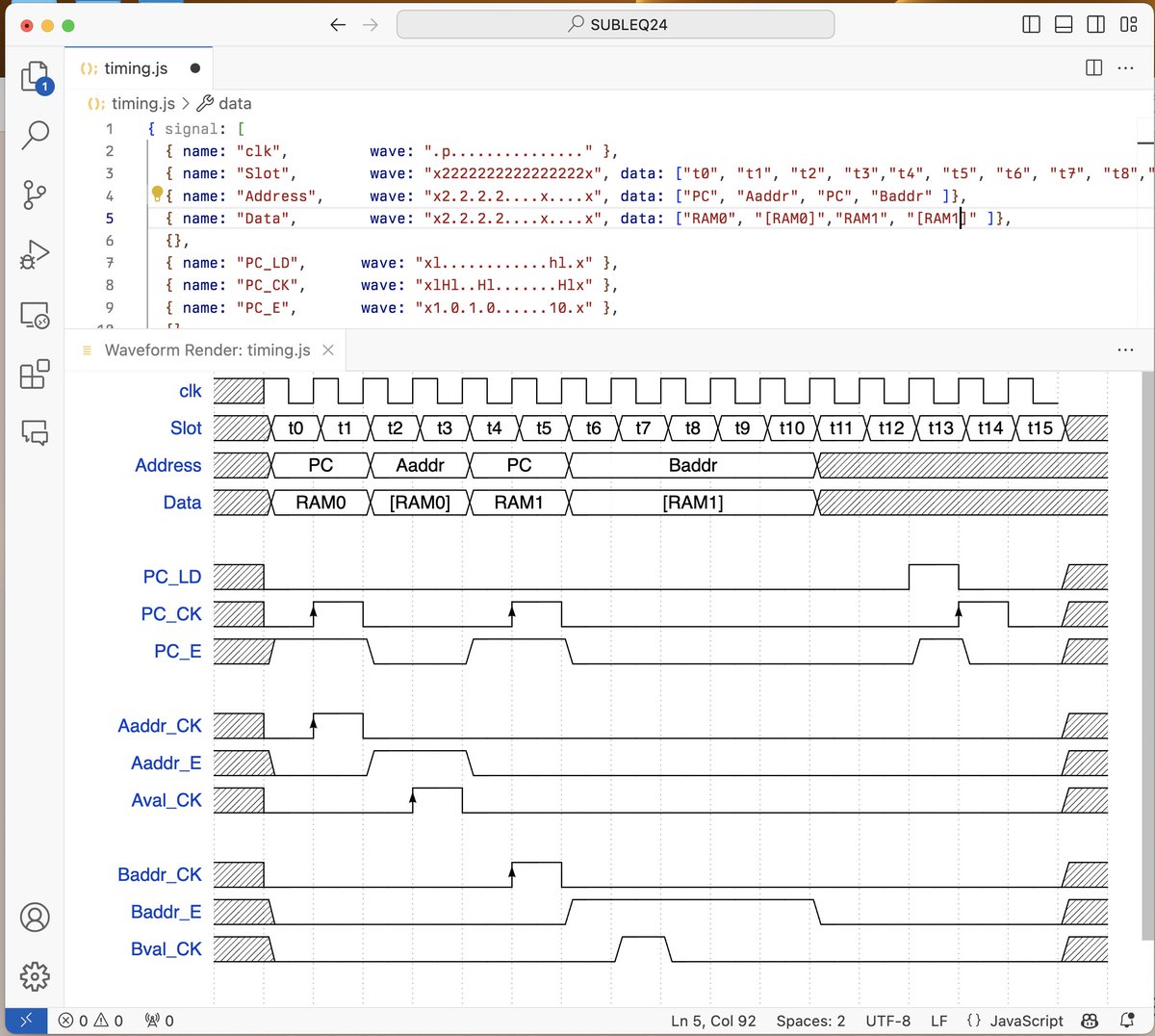
I love the @wavedrom plugin for VisualCode. It's so nice to be able to do timing diagrams right there and not have to use a standalone app or online service.
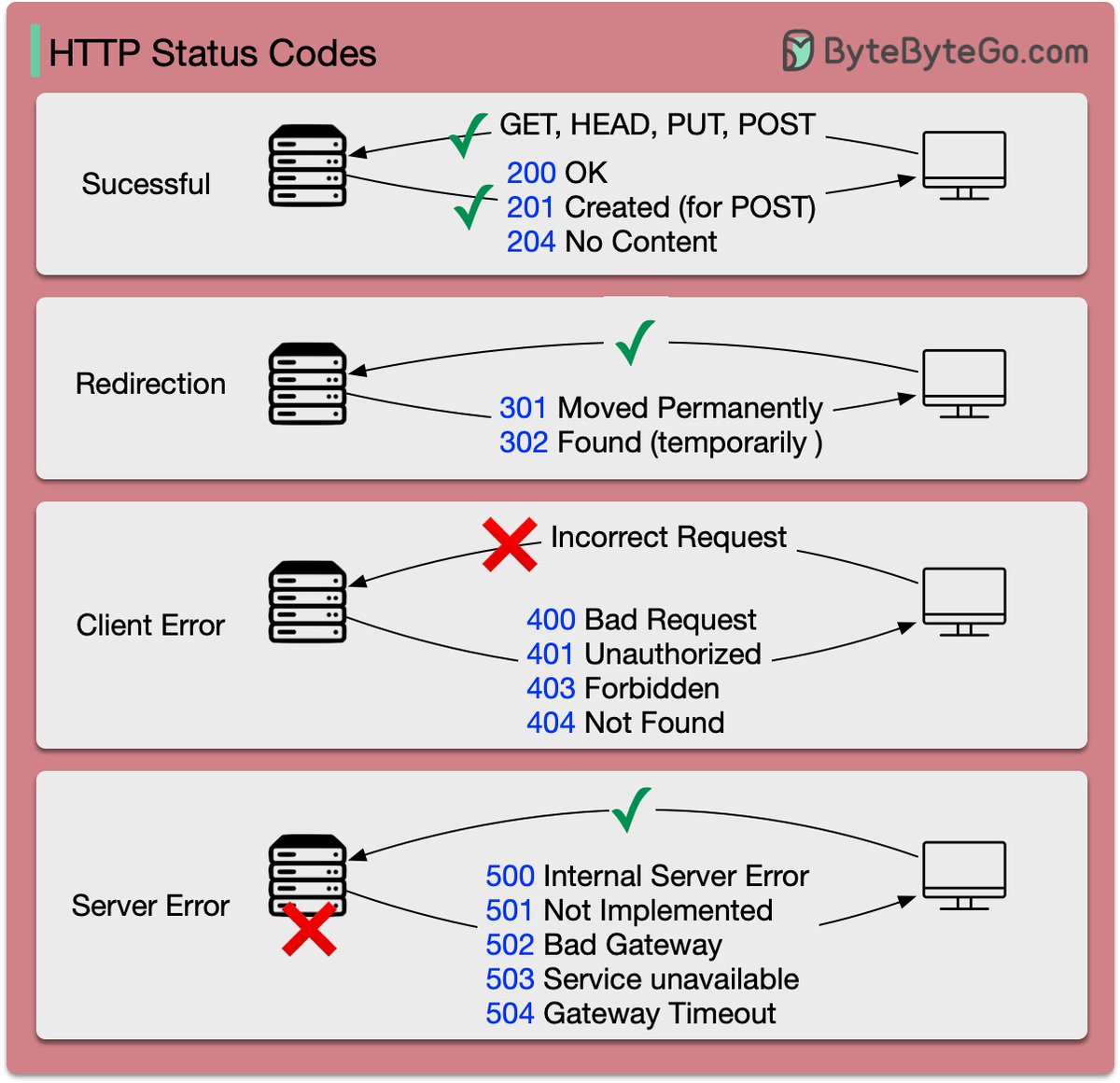
HTTP status codes you should know
The response codes for HTTP are divided into five categories:
Informational (100-199)
Success (200-299)
Redirection (300-399)
Client Error (400-499)
Server Error (500-599)
These codes are defined in RFC 9110. To save you from reading the entire document (which is about 200 pages), here is a summary of the most common ones.
–
Subscribe to our weekly newsletter to get a Free System Design PDF (158 pages): https://t.co/FIzCeaWsZV
My recommended materials for cracking your next technical interview:
Coding
- Leetcode
- Cracking the coding interview book
- Neetcode
System Design Interview
- System Design Interview book 1, 2 by Alex Xu
- Grokking the system design by Design Guru
- Design Data-intensive Application book
Behavioral interview
- Tech Interview Handbook (Github repo)
- A Life Engineered (YT)
- STAR method (general method)
OOD Interview
- Interviewready
- OOD by educative
- Head First Design Patterns Book
Mock interviews
- Interviewingio
- Pramp
- Meetapro
Apply for Jobs
- Linkedin
- Monster
- Indeed
Over to you: What is your favorite interview prep material?
–
Subscribe to our weekly newsletter to get a Free System Design PDF (158 pages): https://t.co/uc5M7Cdq84
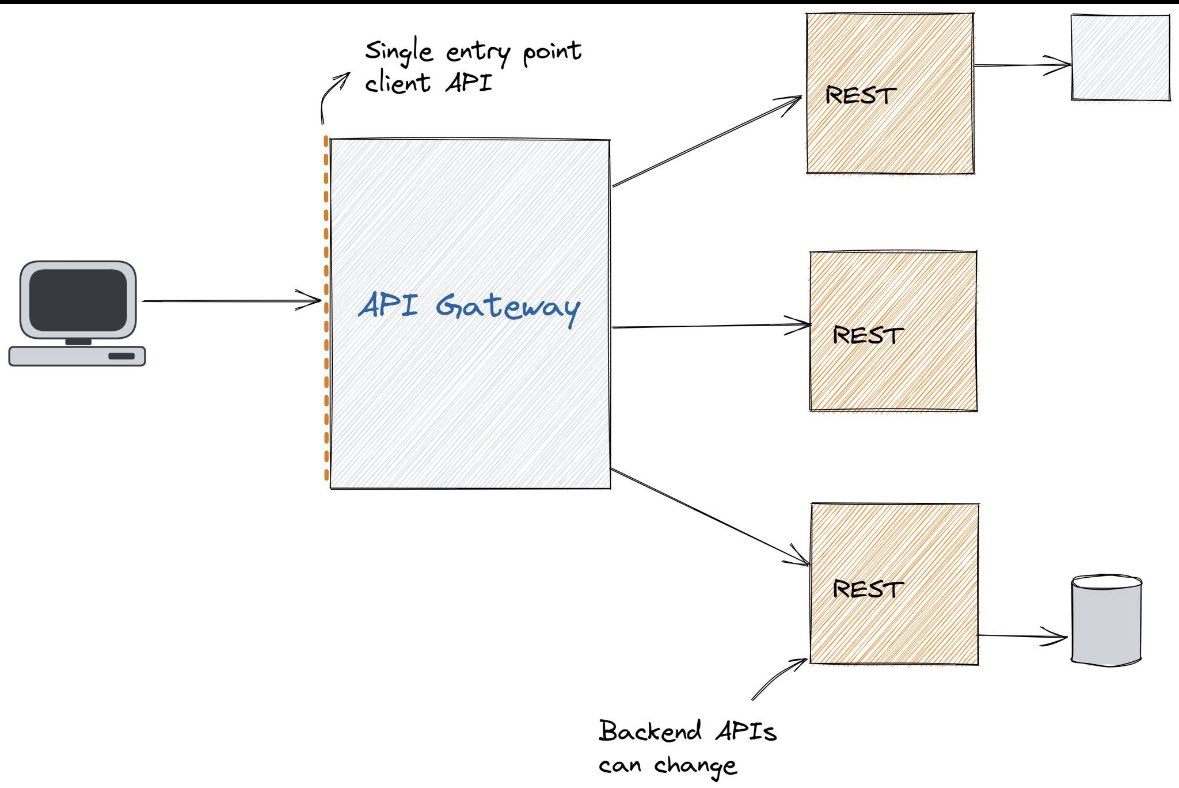
𝗪𝗵𝗮𝘁 𝗶𝘀 𝗮𝗻 𝗔𝗣𝗜 𝗚𝗮𝘁𝗲𝘄𝗮𝘆?
An API management tool known as an 𝗔𝗣𝗜 𝗴𝗮𝘁𝗲𝘄𝗮𝘆 sits between a client and a group of backend services. It performs the function of a reverse proxy by accepting all application programming interface (API) calls, aggregating the different services needed to fulfill them, and returning the right outcome.
By using API gateways, most enterprise APIs are deployed. User 𝗮𝘂𝘁𝗵𝗲𝗻𝘁𝗶𝗰𝗮𝘁𝗶𝗼𝗻, 𝗿𝗮𝘁𝗲 𝗹𝗶𝗺𝗶𝘁𝘀, 𝗮𝗻𝗱 𝘀𝘁𝗮𝘁𝗶𝘀𝘁𝗶𝗰𝘀 are typical duties that API gateways take care of on behalf of a system of API services.
An API service receives a remote request and responds to it. But in reality, nothing is ever that easy. When you host large-scale APIs, take into account 𝘃𝗮𝗿𝗶𝗼𝘂𝘀 𝗰𝗼𝗻𝗰𝗲𝗿𝗻𝘀:
✅ You use a 𝗿𝗮𝘁𝗲 𝗹𝗶𝗺𝗶𝘁𝗮𝘁𝗶𝗼𝗻 𝘀𝘆𝘀𝘁𝗲𝗺 𝗮𝗻𝗱 𝗮𝗻 𝗮𝘂𝘁𝗵𝗲𝗻𝘁𝗶𝗰𝗮𝘁𝗶𝗼𝗻 𝘀𝗲𝗿𝘃𝗶𝗰𝗲 to safeguard your APIs against abuse and excessive use.
✅ You implemented 𝗮𝗻𝗮𝗹𝘆𝘁𝗶𝗰𝘀 𝗮𝗻𝗱 𝗺𝗼𝗻𝗶𝘁𝗼𝗿𝗶𝗻𝗴 𝘁𝗼𝗼𝗹𝘀 because you want to know how people use your APIs.
✅ You should link to a 𝗽𝗮𝘆𝗲𝗺𝗲𝗻𝘁 𝘀𝘆𝘀𝘁𝗲𝗺 if your APIs are monetized.
✅ If you've chosen a 𝗺𝗶𝗰𝗿𝗼𝘀𝗲𝗿𝘃𝗶𝗰𝗲𝘀 𝗮𝗿𝗰𝗵𝗶𝘁𝗲𝗰𝘁𝘂𝗿𝗲, a single request can need calling hundreds of different programs.
✅ Your clients will still want to be able to access all your services in 𝗼𝗻𝗲 𝗹𝗼𝗰𝗮𝘁𝗶𝗼𝗻 even when you add new API services over time and retire others.
So, 𝗵𝗼𝘄 𝗱𝗼𝗲𝘀 𝗶𝘁 𝘄𝗼𝗿𝗸 in general:
1. API gateway receives an HTTP request from a client.
2. When received, it validates the request first.
3. API gateway checks with an identity provider about authentication/authorization.
4. The rate-limiting rules are then applied to the request.
5. The API gateway finds the backend services and routes the request.
Also, the API gateway can handle 𝗳𝗮𝘂𝗹𝘁𝘀 (𝗰𝗶𝗿𝗰𝘂𝗶𝘁 𝗯𝗿𝗲𝗮𝗸𝗲𝗿), 𝗯𝘂𝘁 𝗮𝗹𝘀𝗼 𝗱𝗼 𝗹𝗼𝗴𝗴𝗶𝗻𝗴, 𝗰𝗮𝗰𝗵𝗶𝗻𝗴 𝗮𝗻𝗱 𝗺𝗼𝗻𝗶𝘁𝗼𝗿𝗶𝗻𝗴.
An 𝗲𝘅𝗮𝗺𝗽𝗹𝗲𝘀 𝗼𝗳 𝗔𝗣𝗜 𝗚𝗮𝘁𝗲𝘄𝗮𝘆𝘀 are Apigee (now part of Google Cloud), Express Gateway and Tyk API Gateway. The primary public cloud providers offer API gateway tools specific to their platforms: Amazon API Gateway, Azure API Gateway, and Google Cloud API Gateway.
_______
If you like my posts, please follow me, @milan_milanovic, and hit the 🔔 on my profile to get a notification for all my new posts.
Learn something new every day 🚀!
#api #apidesign #microservices #softwareengineering #programming
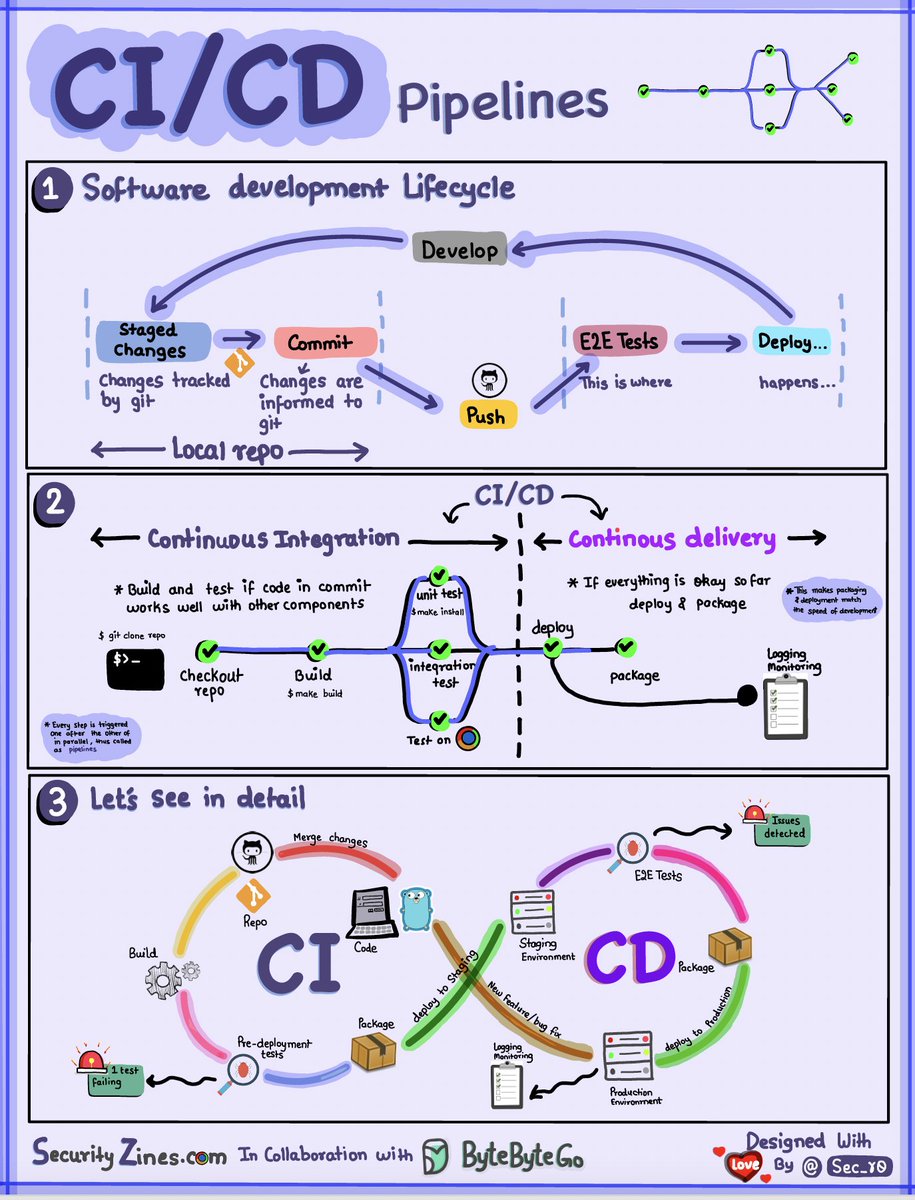
CI/CD Pipeline Explained to Kids
Section 1 - SDLC with CI/CD
The software development life cycle (SDLC) consists of several key stages: development, testing, deployment, and maintenance. CI/CD automates and integrates these stages to enable faster, more reliable releases.
When code is pushed to a git repository, it triggers an automated build and test process. End-to-end (e2e) test cases are run to validate the code. If tests pass, the code can be automatically deployed to staging/production. If issues are found, the code is sent back to development for bug fixing. This automation provides fast feedback to developers and reduces risk of bugs in production.
Section 2 - Difference between CI and CD
Continuous Integration (CI) automates the build, test, and merge process. It runs tests whenever code is committed to detect integration issues early. This encourages frequent code commits and rapid feedback.
Continuous Delivery (CD) automates release processes like infrastructure changes and deployment. It ensures software can be released reliably at any time through automated workflows. CD may also automate the manual testing and approval steps required before production deployment.
Section 3 - CI/CD Pipeline
A typical CI/CD pipeline has several connected stages:
- Developer commits code changes to source control
- CI server detects changes and triggers build
- Code is compiled, tested (unit, integration tests)
- Test results reported to developer
- On success, artifacts are deployed to staging environments
- Further testing may be done on staging before release
- CD system deploys approved changes to production
–
Subscribe to our weekly newsletter to get a Free System Design PDF (158 pages): https://t.co/4QcX8btXGL
𝗪𝗵𝗮𝘁 𝗶𝘀 𝗖𝗿𝗼𝘀𝘀-𝗢𝗿𝗶𝗴𝗶𝗻 𝗥𝗲𝘀𝗼𝘂𝗿𝗰𝗲 𝗦𝗵𝗮𝗿𝗶𝗻𝗴 (𝗖𝗢𝗥𝗦)?
Browsers use CORS to prevent websites from requesting data from different URLs. A request from a browser includes an origin header in the request message. The browser allows it if it gets to the server of the exact origin; if not, the browser blocks it.
We can deal with CORS issues on the backend. Cross-origin requests require that the values for origin and 𝗔𝗰𝗰𝗲𝘀𝘀-𝗖𝗼𝗻𝘁𝗿𝗼𝗹-𝗔𝗹𝗹𝗼𝘄-𝗢𝗿𝗶𝗴𝗶𝗻 in the response headers match and the server sets it. When you add an origin to the backend code, the CORS middleware only permits this URL to communicate with other origins and utilize it for cross-origin resource requests.
There are two ways to fix CORS issues:
𝟭. 𝗖𝗼𝗻𝗳𝗶𝗴𝘂𝗿𝗲 𝘁𝗵𝗲 𝗕𝗮𝗰𝗸𝗲𝗻𝗱 𝘁𝗼 𝗔𝗹𝗹𝗼𝘄 𝗖𝗢𝗥𝗦
The server can let all domains with 𝗔𝗰𝗰𝗲𝘀𝘀-𝗖𝗼𝗻𝘁𝗿𝗼𝗹-𝗔𝗹𝗹𝗼𝘄-𝗢𝗿𝗶𝗴𝗶𝗻: *. This turns off the same-origin policy, which is not recommended. Another option would be only to allow a particular domain, which is a better option, e.g., 𝗔𝗰𝗰𝗲𝘀𝘀-𝗖𝗼𝗻𝘁𝗿𝗼𝗹-𝗔𝗹𝗹𝗼𝘄-𝗢𝗿𝗶𝗴𝗶𝗻: 𝗵𝘁𝘁𝗽𝘀://𝘀𝗼𝗺𝗲𝗱𝗼𝗺𝗮𝗶𝗻.𝗰𝗼𝗺.
𝟮. 𝗨𝘀𝗲 𝗮 𝗣𝗿𝗼𝘅𝘆 𝗦𝗲𝗿𝘃𝗲𝗿
We can use a proxy server to call external API. It acts as a middleware between the client and the server. If the server doesn't return proper headers defined by CORS, we can add them to the proxy.
_______
If you like my posts, please follow me, @milan_milanovic, and hit the 🔔 on my profile to get a notification for all my new posts.
Learn something new every day 🚀!
#softwareengineering #programming #api #apidesign #techworldwithmilan
Google's ChatGPT alternative has just been updated.
Bard now has some features that don't exist on ChatGPT.
Here are the new features in Google Bard that change everything (available for free):
[Thread]
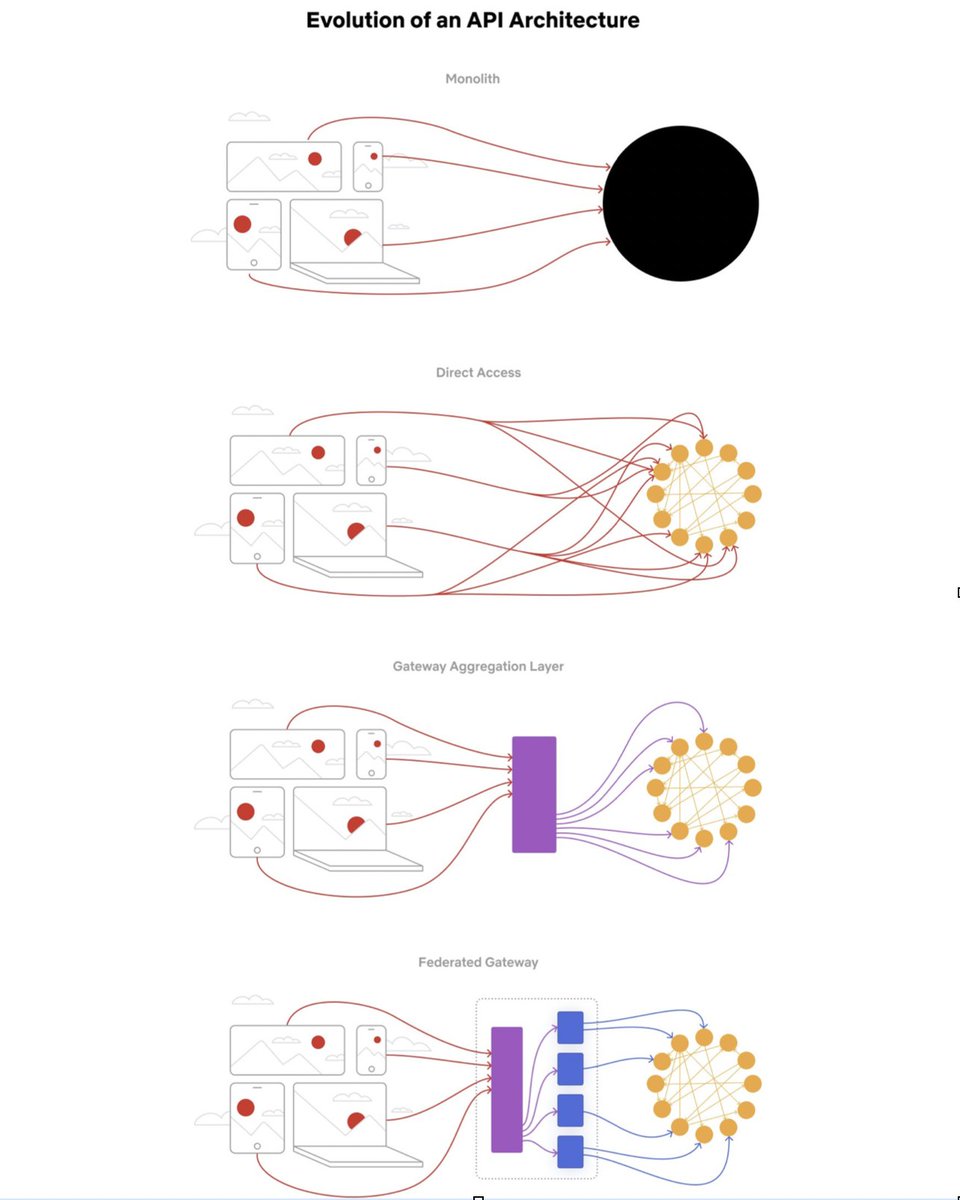
Evolution of the Netflix API Architecture.
The Netflix API architecture went through 4 main stages.
- Monolith
- Direct access
- Gateway aggregation layer
- Federated gateway
We explain the evolution in a 4-minute video.
Watch and subscribe here: https://t.co/6BA0546Z5v
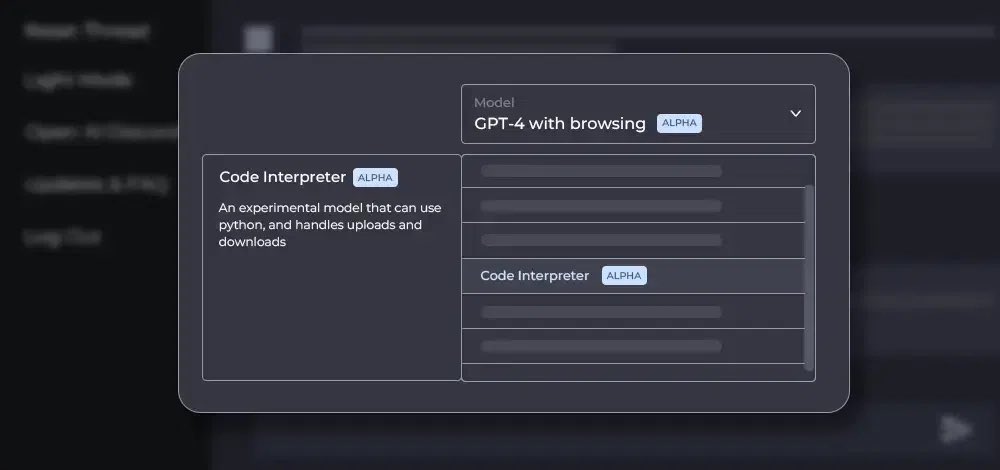
BREAKING: Code Interpreter will be available to all ChatGPT Plus users over the next week!
It can analyze data, create charts, edit files, perform math & much more.
Here are 10 mind-blowing examples of what is possible:
Simple pero útil.
Preguntas típicas de entrevistas de trabajo a Java developers:
🔗 https://t.co/a0I4gr3Vy6
JVM, modificadores de acceso, características principales, clase vs object, herencia, encapsulación...












![itsPaulAi's tweet photo. Google's ChatGPT alternative has just been updated.
Bard now has some features that don't exist on ChatGPT.
Here are the new features in Google Bard that change everything (available for free):
[Thread] https://t.co/spySSHZ5LR](https://pbs.twimg.com/media/F07f0rLWAAA9VaK.jpg)