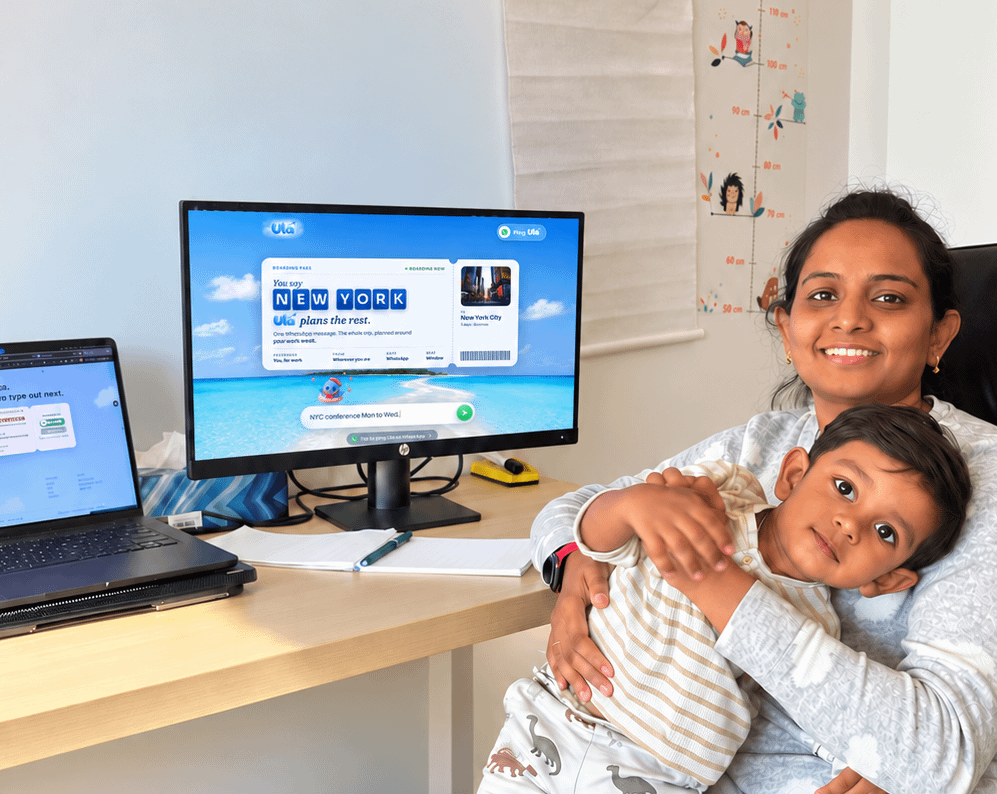
Turning 29 today ๐ฅณ
- Built two SaaS products.
- Became a first-time mom.
- Bootstrapped every line of code.
- Balanced baby milestones with user feedback.
My biggest lesson?
You can build slow, messy, beautiful things and still be on the right path.
Hereโs to a year of softness, strength, and showing up, as me.
Whatโs one life lesson you learned this year?
Problem Claude Code solves with Dynamic Workflows:
Default harness = plan + execute in same context window. Works for coding but breaks for long, complex, parallel tasks.
3 specific failure modes it fixes:
1. Agentic laziness - Claude stops at 20/50 items and calls it done
2. Self-preferential bias - Claude prefers its own output when asked to verify itself
3. Goal drift - Long sessions + compaction = original constraints get lost
How workflows fix it:
- Claude writes a custom JS harness on the fly for the specific task
- Spawns separate agents, each with their own context window + focused goal
- Can choose which model each sub-agent uses
- Can run agents in isolated worktrees
- If interrupted โ resumes from where it left off
Examples from the article:
- Mine flaky test root causes (run 50 times, form + test theories)
- Extract CLAUDE.md rules from 50 past sessions
- Find recurring Slack bugs with no tickets filed
- Tear apart business plan from investor/customer/competitor POV
- Rank 80 resumes + interview you for a rubric
- Rename a model across entire codebase
Key line: "Dynamic workflows often use more tokens - think carefully about when and how to use them."
Workflows are the biggest upgrade to Claude Codeโs capabilities since skills and subagents.
I dove deep into it with @sidbid to figure out best practices, examples and more. ย Iโm particularly excited about the non-technical tasks it enables for Claude Code.
Pain Point I feel daily is,
1. Switching between browser tabs when running agents across multiple machines wastes time
2. The web version lacks native speed and feel
3. Setting up remote environments (Mac Mini, VPS) makes config syncing difficult
4. Daily Hermes users lose productivity without a polished desktop experience
This release directly addresses these pain points.
Hermes Desktop benefits:
1. Full native desktop app - chats, skills, and configs come along automatically
2. Remote Gateway mode is fully supported - point it at a backend running on Mac Mini or any server
3. Available on all platforms (macOS, Windows, Linux)
4. Zero migration for existing users - just download and log in
This desktop version will be especially useful for client work involving multiple agent setups. The remote gateway mode is particularly valuable since heavy agents run on a Mac Mini in my current workflow.
Looking forward to a more stable version soon. Already testing the public preview.
The next evolution of Hermes Agent is here!
Introducing Hermes Desktop: everything you love about Hermes, now native on your machine.
First demoed in Jensen's GTC keynote, it's now in public preview.
Chasing a new agent framework every month instead of shipping is the most expensive mistake builders make right now.
Karpathy's dead list - what's already fading:
1. AutoGen, CrewAI, general agent frameworks.. demos break on real data
2. Agent marketplaces.. too abstract, no specific buyer
3. Benchmark leaderboards.. optimized for evals, not production
4. Horizontal "build any agent" platforms.. add abstraction, remove nothing
5. Per-seat pricing for agents.. wrong unit entirely
The tools that survive: narrow scope, real workflow, one measurable outcome.
Andrej Karpathy: "90% of what AI twitter tells you to learn will be dead in 6 months"
90% of what ai twitter tells you to learn dies in 6 months
senior engineers already stopped chasing it
the dead list: autogen, crewai, autonomous agent pitches, agent marketplaces, benchmark leaderboards, semantic kernel, dspy as a general framework, horizontal "build any agent" platforms, per-seat pricing for agents
the pattern is obvious. demos that break in production. hype that never ships. frameworks that go viral on monday and vanish by spring
what actually compounds:
context engineering
tool design
orchestrator-subagent pattern
eval discipline
the harness mindset. harness > model, always
mcp as the protocol layer
the edge isn't the newest framework. it's staying a few steps ahead until your signal becomes everyone's mass-opinion
book and study this
Garry built 540,000 lines of Rails to babysit an LLM.
That's the Foxconn factory he's describing.
Every retry loop, every validator, every guardrail, a bet that the model will fail.
Here's what most builders miss:
The old economics: model calls were expensive, code was cheap. So you wrote code to ration the model.
That equation flipped.
Models are cheap. Models write usable code. The architecture should flip too.
The new artifact:
1. A markdown file with the intent and the skill
2. Minimal code for the parts that must not hallucinate
3. A test
That's it.
This week I hit rate limits faster than expected.
Turns out it was a bug, not my usage.
Anthropic just reset limits for all Pro and Max users.
Good reminder: when something feels off with your tools, check if it's actually your fault.
Sometimes it isn't.
Its time to burn more token! ๐
We've reset 5-hour and weekly rate limits for all users on Pro and Max plans.
We fixed an issue that caused some Claude Code sessions to spawn excessive parallel subagents, burning through usage faster than expected.
My setup uses cloud Claude (Anthropic API) for the intelligence layer. But for local models, I've been testing with a client setup on Ollama.
For 16-18GB RAM, what's actually working:
Gemma 4 - Google's latest, punches above its weight at this RAM range. Good for summarization and note-linking.
Kimi 2.6 - Moonshot AI's model, surprisingly strong reasoning for its size. Works well for daily briefings and pattern-finding.
Both run via Ollama subscription - easiest way to get started. Just ollama pull gemma4 or ollama pull kimi and point your setup at localhost.
Most second brains are graveyards. You save 500 links and reopen none of them.
This setup works because the human does almost nothing:
1. Capture runs on autopilot. Articles, podcasts, voice notes land in one vault without you filing them.
2. One vault, every input. Nothing scattered across 6 apps.
3. A job runs at 6am, before you open your laptop.
4. The value is the connections between new notes and old ones, not the storage.
5. Output is 3 decisions, not 300 notes. It narrows to what you act on.
The real lesson is the architecture: a second brain only pays off when something reads it for you every day. Saving is easy. Synthesis is the product.
A better LLM will not save you if your knowledge lives in 6 tools nobody keeps in sync.
What a company brain actually needs:
1. One capture layer, so context is not stuck with whoever remembers where the doc lives.
2. Retrieval that returns the right doc, not just the most recent one.
3. A source-of-truth rank, so live CRM data beats a stale SOP.
4. Permissions built in, so the model only sees what each role should.
5. Corrections that feed back as rules, not buried in a thread nobody reads twice.
Most AI projects stall here, not at the model. Fix the inputs before you upgrade the model.
Every company is missing the same layer:
A company brain.
Right now, the memory of the business is scattered across calls, docs, Slack threads, dashboards, SOPs, and people's heads.
That's the part people miss when they talk about a company brain.
The value isn't a giant folder of company knowledge. Every company already has that.
The real advantage is the intelligence layer that sits between all that context and the work your team needs done.
This is the layer every AI-native company will need:
@Helix167791 Exactly this. The research already existed, 17 sections, live data from 5 sources. What changed was the output layer.
One prompt: 14-page handover PDF, Obsidian Canvas, both delivered to cofounders via WhatsApp.
Documentation became a system. Same data, different instruction.
Used this for the first time today on a real task.
The job: a 14-page Linkedmash product research handover + an Obsidian Canvas mapping the full user journey across 8 stages and 4 automation agents.
What happened:
1. One prompt with the word "workflow"
2. Claude built the orchestration plan itself
3. PDF agent and Canvas agent ran in parallel, no manual setup
4. Both delivered while I was doing something else
The catch: the brief still matters. Garbage in, garbage out. But the plan execution is now not your problem.
For multi-output tasks that used to take 3 hours manually - this changes the ceiling.
Excited to share our most powerful new Claude Code feature: dynamic workflows!
Mention "workflow" in a prompt and Claude will dynamically create an orchestration plan that it strictly follows, allowing you to confidently trust that every stage happens in the right order even across 100s of agents.
Imagine handing a complex task to your AI, stepping away, and coming back to it actually done.
That used to be a fantasy.
What changed with Opus 4.8:
1. Works independently for longer - fewer mid-task check-ins and handoffs back to you
2. Sharper judgment - better decisions without constant course-correcting
3. Honest about its own progress - says it is stuck instead of confidently going the wrong direction
The catch: you still need to write a tight brief. The AI got better, not telepathic.
For solo founders: this is the difference between delegating a task and babysitting one.
Introducing Claude Opus 4.8: it builds on Opus 4.7 with sharper judgment, more honesty about its own progress, and the ability to work independently for longer than its predecessors.
Available today at the same price.
Most people still treat AI coding agents like magic - paste code, get output, hope nothing breaks in prod.
But the real risk isnโt bad code. Itโs the quiet security holes that appear when agents edit files, run commands, and access your entire project without guardrails.
ClaudeDevs just dropped something that actually addresses this:
1. New official โsecurity-guidanceโ plugin for Claude Code
2. It gives the agent real-time context about security best practices while it works
3. Instead of retroactively finding vulnerabilities, the agent gets warned during generation itself
4. Works directly inside your existing Claude Code workflow.. no extra tools needed
5. Released as an official plugin, not some random community script
This is the difference between โit works on my machineโ and โthis wonโt get me hacked in 3 months.โ
If youโre already using Claude Code for real projects, this plugin should be one of the first things you install.
Weโve shipped a security-guidance plugin for Claude Code that helps identify and fix vulnerabilities as youโre writing code.
Available for all Claude Code users. Install from the plugin marketplace (/plugins).
Day 3 of harness engineering.
A harness engineering case study tracked one agent through 4 stages of additions.
Stage 1, empty repo: 20%
Stage 2, added AGENTS.md: 60%
Stage 3, added verification commands: 80%
Stage 4, added a progress file: 80 to 100%
Success rate went from 20% to near 100%. The model never changed.
20 to 100 via harness alone.
My clawd setup walked the same 4 stages over the last 6 months:
1. Stage 1, day one: just MEMORY.md and a vague hope
Chiti guessed at conventions, blurred project boundaries, started cold every session.
2. Stage 2, month two: CLAUDE.md per agent
Main Chiti, Chiti X, sub-agents each got their own. Chiti X learned the X content rules. Main Chiti stopped trying to draft tweets.
3. Stage 3, month four: the 6-item verification checklist
Runs before any tweet ships. Half the rule violations disappeared. Drafts started shipping clean.
4. Stage 4, month five: memory/YYYY-MM-DD.md daily logs
Every session writes what was done, decided, learned. Yesterday's log was 628 lines. Next session inherits the work instead of rebuilding context.
Each stage took a weekend to design and minutes per session to maintain.
The catch:
The stage I am still climbing is the environment subsystem. Twitter CLI got documented this week. OpenClaw cron health was untrusted last Tuesday. The stove is still being installed.
If your agent fails one out of every five tries, do not swap the model.
Add one piece of the kitchen.
Learning link: https://t.co/7mmh4r2C6q
Yesterday I learned the name for what I have been building for 6 months:
Harness engineering.
Todayโs key learning:
A capable model can still fail if the environment around it is weak.
Most agent failures are not model failures.
They are usually one of these:
1. The task was not specified clearly
2. The agent did not get enough context
3. The repo/environment was not ready
4. There was no verification loop
5. State was not preserved across sessions
This explains why the same model can feel useless in one setup and reliable in another.
The model is the horse.
The harness is everything that makes the horse useful:
instructions, tools, memory, tests, logs, cleanup, and feedback loops.
After running Chiti inside OpenClaw, this is exactly what I keep seeing.
Better models help.
But better harnesses compound.
Fair check. The harness lives in files, not tweets. I rarely post the plumbing.
Verification: a 6-item checklist runs before every Chiti X tweet ships. Character count, banned phrases, image attached, reply queued, schema compliance, post-state verified.
Observability: every Chiti session writes to memory/YYYY-MM-DD.md with decisions, outcomes, learnings. Yesterday's log was 628 lines.
Tweets are the output. The harness is the workshop.
Turns out the thing I've been building for 6 months has a name.
Harness engineering: the system around the agent that makes it reliable. Not the model. The constraints, state, verification, observability you build around it.
7 components every harness needs:
1. Constraints
A CLAUDE.md or equivalent. Tells the agent what it is, what it can do, what it must never do. Without this, every session starts cold.
2. State management
Memory across sessions. Mine lives in self/, memory/, logs/. Read at boot. Updated at wrap. Future sessions inherit the work.
3. Verification
Full-pipeline tests before declaring done. Premature closure is the silent killer. Agent says shipped. Nothing ran.
4. Observability
Logs of what the agent did, not just what you asked. Debug-able at 2am when something goes sideways.
5. Modular structure
One monolithic prompt file dies at 800 lines. Split by domain. Mine: main Chiti, Chiti X, sub-agents per task.
6. Clean state protocols
Every session resets cleanly. No leaked context. No half-written reminders carried into the next run.
7. Behavioral constraints
Rules the agent enforces on itself. No posting without approval. No spending without asking. Hard limits beat soft preferences.
The catch:
None of this lives in the model. All of it lives in files you write. Spend a weekend on the harness, not on the next framework drop.
If your agent only works in your hands at midnight after coffee, you don't have an agent. You have a vibe.
The site: https://t.co/7gI7X2PWYj
Worth bookmarking even if you've been building agents for a year. Especially if you have.
Yesterday I learned the name for what I have been building for 6 months:
Harness engineering.
Todayโs key learning:
A capable model can still fail if the environment around it is weak.
Most agent failures are not model failures.
They are usually one of these:
1. The task was not specified clearly
2. The agent did not get enough context
3. The repo/environment was not ready
4. There was no verification loop
5. State was not preserved across sessions
This explains why the same model can feel useless in one setup and reliable in another.
The model is the horse.
The harness is everything that makes the horse useful:
instructions, tools, memory, tests, logs, cleanup, and feedback loops.
After running Chiti inside OpenClaw, this is exactly what I keep seeing.
Better models help.
But better harnesses compound.
Turns out the thing I've been building for 6 months has a name.
Harness engineering: the system around the agent that makes it reliable. Not the model. The constraints, state, verification, observability you build around it.
7 components every harness needs:
1. Constraints
A CLAUDE.md or equivalent. Tells the agent what it is, what it can do, what it must never do. Without this, every session starts cold.
2. State management
Memory across sessions. Mine lives in self/, memory/, logs/. Read at boot. Updated at wrap. Future sessions inherit the work.
3. Verification
Full-pipeline tests before declaring done. Premature closure is the silent killer. Agent says shipped. Nothing ran.
4. Observability
Logs of what the agent did, not just what you asked. Debug-able at 2am when something goes sideways.
5. Modular structure
One monolithic prompt file dies at 800 lines. Split by domain. Mine: main Chiti, Chiti X, sub-agents per task.
6. Clean state protocols
Every session resets cleanly. No leaked context. No half-written reminders carried into the next run.
7. Behavioral constraints
Rules the agent enforces on itself. No posting without approval. No spending without asking. Hard limits beat soft preferences.
The catch:
None of this lives in the model. All of it lives in files you write. Spend a weekend on the harness, not on the next framework drop.
If your agent only works in your hands at midnight after coffee, you don't have an agent. You have a vibe.
The site: https://t.co/7gI7X2PWYj
Worth bookmarking even if you've been building agents for a year. Especially if you have.
@nicolasmoute Spec gating is the missing 8th. My planner can rewrite goals.md silently right now, that's the leak.
Cleanest fix I'd run: read-only on the spec, agent writes to proposals/, orchestrator reviews before merge.
Borrowing this.