AI-friendly is just friendly. In @ApacheGroovy 6, verified contracts like @Modifies & @Pure cut "what does this touch?" from 460 tokens to 12, & checkers catch the bugs generated code actually writes. My #CommunityOverCode Glasgow talk: https://t.co/RwieX51wt6
#groovylang#AI
Chatting to AI from @ApacheGroovy updated for LangChain4j 1.22, Spring AI 2.0.1, Embabel 1.5.3, Micronaut LangChain4j 2.2, Quarkus LangChain4j 1.14.2. Also examples for decl. HTTP client, concurrency, OpenRouter, LLMAO gateway & Jev! https://t.co/XYJqd2sNjC
#groovylang@TheASF
You'll see a bunch of cool demos of #Gemini 4 Argon today 😆
I like to use #LLMs to learn new things.
@ApacheGroovy released version 6: a big milestone.
I asked @antigravity & Argon to create an interactive site to learn about the latest features:
https://t.co/Vvq9CBxj6d
Versions 6.0.0 & 5.1.3 of @ApacheGroovy are available for download! Thanks to all involved!
Nearly 600 fixes and improvements in Groovy 6 vs 5!
Downloads:
https://t.co/MHHlF70YSC
Groovy 6 Release notes:
https://t.co/mHDrrMHgu3
#groovylang@TheASF
Chatting to AI from @ApacheGroovy blog post updated: Groovy 6, JDK 25, LangChain4j 1.20, Spring AI 2.0, Embabel 1.5, Micronaut LangChain4j 2.2,
Quarkus LangChain4j 1.13, Ollama4j 1.1.7.
Now with Micronaut tools & native examples.
https://t.co/XYJqd2sNjC
#groovylang#AI@TheASF
To celebrate some recent Apache releases (@Apache MINA & @ApacheCommons RNG) & the imminent pre-release of Groovy 6, let's create a stock ticker hub combining MINA's high-performance, high-scalability networking & Groovy's new async features:
https://t.co/0r30FtxpXN
#groovylang
A proposed enhancement, targeted for @ApacheGroovy version 6, adds native async/await as a language-level feature.
𝘼𝙨𝙮𝙣𝙘𝙝𝙧𝙤𝙣𝙤𝙪�� 𝙘𝙤𝙙𝙚 𝙞𝙣 𝙖 𝙨𝙚𝙦𝙪𝙚𝙣𝙩𝙞𝙖𝙡, 𝙧��𝙖𝙙𝙖𝙗𝙡𝙚 𝙨𝙩𝙮𝙡𝙚.
Read more about it & provide feedback:
https://t.co/ElkarvMlqj
Spock 2.4 has been released 🖖
After three years and seven milestones, Spock 2.4 lands just in time for the holidays, packed with new testing goodies. 🎁
Curious? See here: https://t.co/8EhWIH302E
What’s your favorite addition?
#groovylang
Quick Linux Tip🐧
You can enable timestamps in your bash command history to see when you ran previous commands. This can be useful for tracing what you were working on and when.
To add timestamps to your history, just set the HISTTIMEFORMAT environment variable like so:
$ export HISTTIMEFORMAT="%F %T "
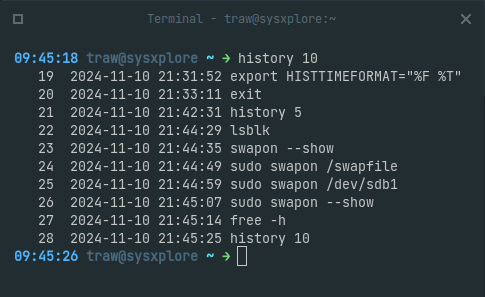
Now when you view your history or grep through it, you'll see a timestamp next to each command indicating when it was run:
$ history | tail -n 5
Or to save a couple of keystrokes:
$ history 5
The format "%F %T" shows the date and time, but you can customize it to your liking.
Note: This does not put historical timestamps on commands you executed before setting HISTTIMEFORMAT and also this only works in bash.