My article made it to the Top 30 at the Azure developer stories organized by @KonfHub Thanks @KonfHub for the opportunity and platform You can visit my article at
@azdevindia @AzConfDev #dotnet#azure#Serverless
https://t.co/hs4LwdM6EG
A Biology Professor Said:
"Your Belly Is A Storage Of Cortisol Waste. Clear It With One Routine Before Bed.. And Your Life Will Change."
Here's The 9 Minute Fix He Provided:
𝗗𝗼𝗻'𝘁 𝘀𝗵𝗶𝗽 𝗦𝗶𝗴𝗻𝗮𝗹𝗥 𝘁𝗼 𝗽𝗿𝗼𝗱𝘂𝗰𝘁𝗶𝗼𝗻
Before reading this information 👇
Don't ship SignalR to production until you understand how JWT authentication actually works.
It's not the same as securing a REST API.
There's one critical difference that catches most developers off guard.
Here's what you need to know:
By default, any client can connect to a SignalR hub and call its methods.
❌ You can't tell who is connected
❌ Anyone can call any hub method, including admin operations
❌ Sensitive data gets streamed to whoever connects
❌ No audit trail of user actions
Adding `[Authorize]` to your hub class is step one.
But it's not enough on its own.
In a standard REST API, the client sends the token in the Authorization header.
📌 But SignalR uses WebSockets and Server-Sent Events.
When a browser opens a WebSocket or SSE connection, it cannot set custom HTTP headers.
→ The browser sends the JWT token as a query string parameter instead: `?access_token=<token>`
→ The JWT middleware doesn't read query strings by default
→ You need to configure the OnMessageReceived event to extract the token manually
Without this event handler, every browser connection silently fails with a 401.
Even when the user has a perfectly valid token.
This is the one thing most SignalR tutorials skip entirely.
📌Once JWT is wired up, there are 6 things you must get right:
1. Suppress URL logging → ASP .NET Core logs request URLs by default.
Your tokens end up in log files in plain text.
One config change fixes this.
2. Always use HTTPS → The token travels in the query string.
Without HTTPS, anyone on the network can read it.
3. Lock down CORS → CORS protections don't apply to WebSocket connections.
Never use `AllowAnyOrigin()` in production.
4. Handle token expiration → JWT is validated once, at connection time.
An expired token can stay connected indefinitely.
Set `CloseOnAuthenticationExpiration = true`.
5. Don't expose ConnectionId → It's an internal identifier.
Leaking it in hub methods or API responses can open impersonation risks.
6. Limit message sizes → SignalR uses per-connection buffers.
Without limits, malicious clients can exhaust server memory.
Most developers wire up SignalR for real-time features and move on.
The authentication layer gets added as an afterthought.
👉 I published the complete guide with full code examples:
→ JWT setup with the OnMessageReceived event handler
→ Role-based authorization on hub methods
→ Connecting from JavaScript and .NET clients
→ All 6 security best practices with production-ready code
📌 Read the full article here:
↳ https://t.co/nSUF9zobwC
Which of these 6 security rules were you already following in your projects? Let me know in the comments 👇
——
♻️ Repost to help other .NET developers ship secure SignalR apps
➕ Follow me ( @AntonMartyniuk ) to improve your .NET and Architecture Skills
#Metabolism सुधारायला practical क्रम काय असावा? हा order का महत्त्वाचा आहे
Metabolism सुधारायचा म्हटलं की
लोक सगळं एकदम बदलायचा प्रयत्न करतात.
पण शरीर क्रम (sequence) ओळखतं.
चुकीच्या क्रमाने केलेले प्रयत्न
काम करत नाहीत उलट थकवतात.
म्हणून हा practical, medical क्रम समजून घ्या.
1️⃣ आधी observe , लगेच बदल नाही
पहिले 7–10 दिवस
भूक, झोप, थकवा, हालचाल
फक्त observe करा.
Observation शिवाय correction अंधारात असतं.
2️⃣ Timing आधी सुधारा, content नंतर
काय खातो याआधी
कधी खातो हे सुधारलं
तर hormones शांत होतात.
Timing हा पहिला lever आहे.
3️⃣ रोजची हालचाल (NEAT) स्थिर करा
Gym नंतर येतो.
आधी दिवसभर शरीर हलणं
ही metabolic गरज आहे.
बसणं कमी झालं की insulin sensitivity सुधारते.
4️⃣ झोप fix करा , सगळ्याचा पाया
झोप बिघडलेली असेल
तर diet, exercise काहीच टिकत नाही.
Sleep is not optional therapy.
5️⃣ Muscle activation सुरू करा
Heavy exercise नको.
पण muscle वापर सुरू झाला
तर sugar uptake सुधारतो
आणि fat burning शक्य होतं.
6️⃣ मग diet मध्ये सूक्ष्म बदल
Crash dieting नाही.
Small, sustainable changes.
Metabolism overload सहन करत नाही.
7️⃣ Stress ला outlet द्या
Stress टाळता येत नाही.
पण त्याचा निचरा आवश्यक आहे.
निचरा नसेल तर शरीर defensive राहतं.
8️⃣ Tracking सुरू करा , numbers नाही, trends
एक आकडा नाही.
Pattern पाहा
काय केलं की काय बदलतंय?
Tracking म्हणजे clarity.
9️⃣ Reports नंतर पहा, आधी नाही
Reports उशिरा बदलतात.
आधी शरीर बदलतं.
Sequence उलटा केला
तर निराशा वाढते.
🔟 योग्य वेळी guidance घ्या
Metabolism सुधारणा
trial-and-error वर सोडली
तर वेळ जातो.
योग्य क्रमासाठी guidance उपयोगी ठरते.
माझा अनुभव
Metabolism सुधारणा म्हणजे
“काय करायचं” इतकंच नाही
“कधी आणि कुठल्या क्रमाने”
हे जास्त महत्त्वाचं.
चुकीचा क्रम = कमी परिणाम.
योग्य क्रम = टिकाऊ बदल.
पुढच्या posts मध्ये
या प्रत्येक टप्प्यावर
नेमकं कसं करायचं ते पाहू.
👉 तुमच्यासाठी सध्या
सगळ्यात कठीण टप्पा कोणता वाटतो?
कॉमेंटमध्ये लिहा.
Dr Ravindra L. Kulkarni,
MD, DNB, FSCAI (Cardiology)
Just For Hearts
Follow 👉 @KulkarniRL
Consult 👉 94229 91576 ,
94229 89425
( WhatsApp message only )
#Metabolism #Sugar #BP #Obesity #JustForHearts #TheMetabolicFiles #Reversal #ChronicCare
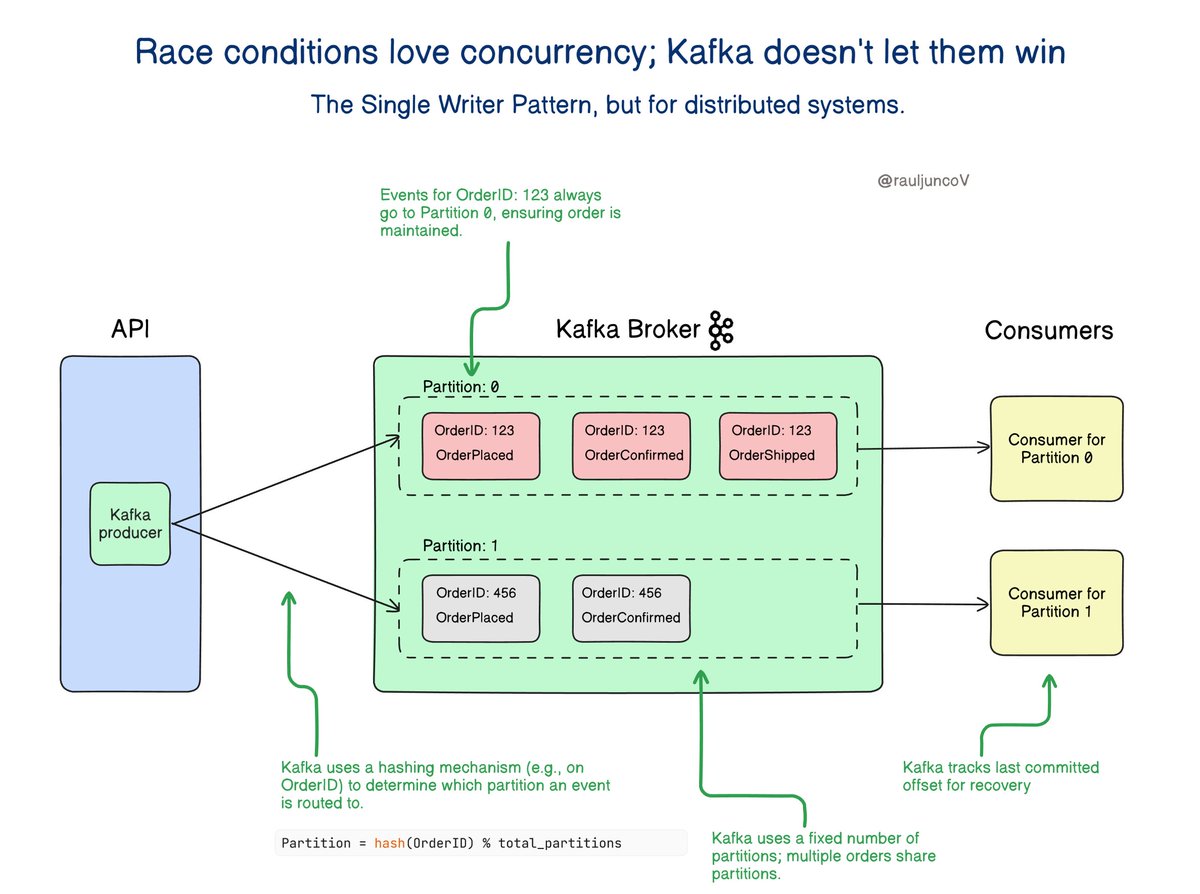
Race conditions love concurrency, but Kafka doesn’t let them win.
The Single Writer pattern, applied to distributed systems.
Anyone who’s worked with real-time data knows how painful out-of-order events can be.
One misstep and your system state is toast.
What Is the Single Writer Pattern?
The Single Writer pattern makes sure that only one entity writes or processes data at a time to avoid conflicts and maintain consistency.
Kafka applies this idea at the partition level.
Within a consumer group, only one consumer processes a given partition at any moment.
No clashes. No interleaving. Just ordered, deterministic processing.
How Kafka Implements It?
Kafka splits topics into partitions.
Each partition is assigned to only one consumer at a time.
One consumer processes all messages from a partition in order, which keeps the sequence right and avoids race conditions.
Real-World Example: E-commerce Order Events
Imagine an e-commerce platform receiving events like:
• OrderPlaced
• OrderConfirmed
• OrderShipped
All events for a specific order are routed to the same partition, ensuring they’re processed in order without needing a separate partition for every order.
One consumer processes the events in the correct order, so the system doesn’t ship an order before confirming it.
Fault Tolerance Without Compromising Order
If a consumer fails, Kafka reassigns its partitions to another consumer.
The new consumer starts from where the last one left off, keeping the order right and avoiding repeated work.
Key Takeaways
• Kafka enforces the Single Writer pattern at the partition level.
• This ensures order-preserving, race-free processing in distributed systems.
• Failover is handled gracefully, with consumers resuming from committed positions.
Stop fighting concurrency, design for it.
Event ordering isn’t a nice-to-have.
It’s foundational for correctness in distributed systems.
How are you handling ordering in production today: keys, idempotency, outbox, transactions?
Late nights, screen time, noise, and stress are wrecking our sleep.
On Your Health DeKoded with @ManikaRaikwar, top neurologists decode India’s sleep crisis — and how to fix it.
Watch full episode now:
#SleepCrisis#IndiaHealth#SleepTips
@AxisBank@AxisBankSupport
The worst service of it's kind axis is providing to the customer connected to them for last 11 years cannot contact a relation ship manager from mobile app home loan is stuck for 1.5 months pathetic pathetic pathetic
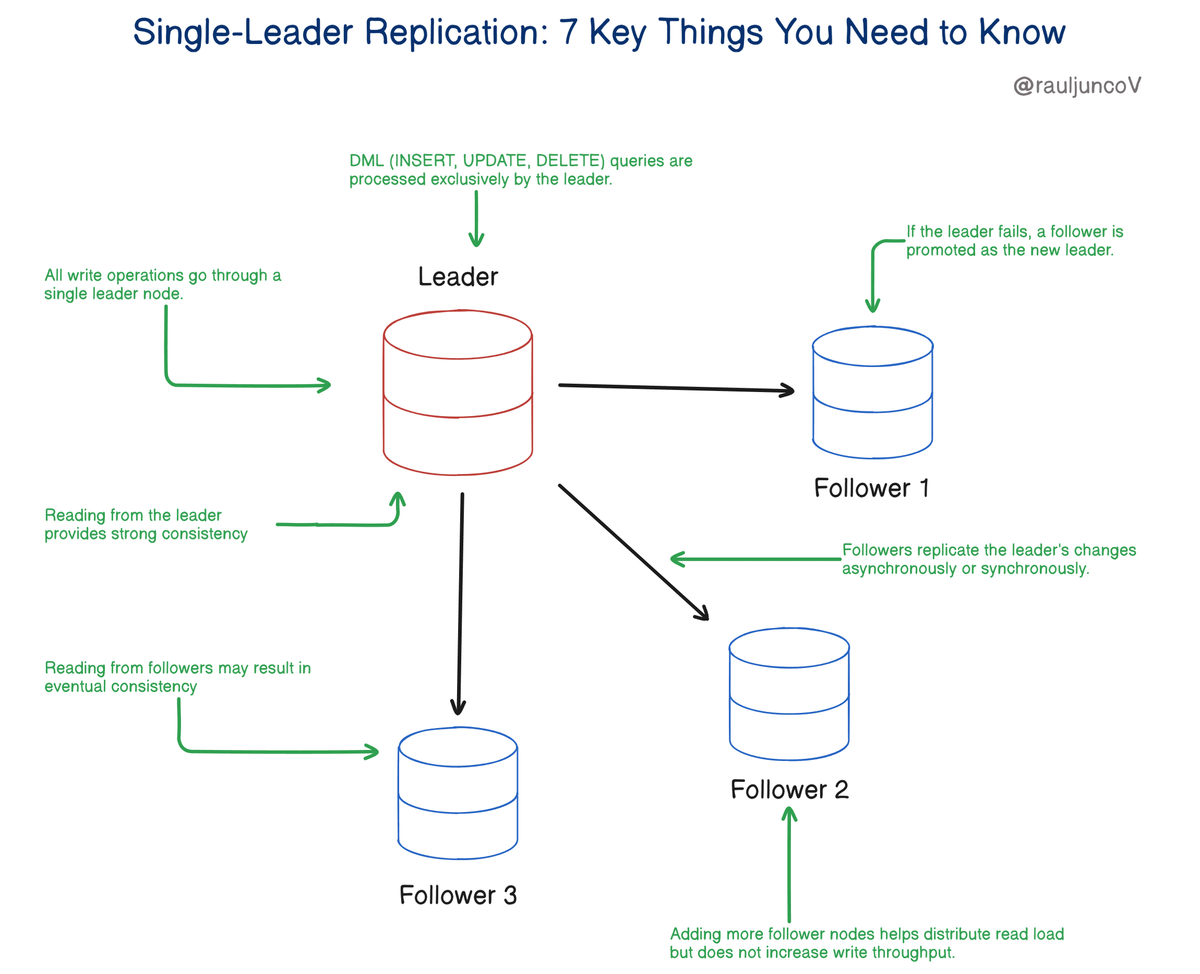
Single-Leader replication is about scaling reads, not writes.
7 Key Things You Need to Know.
1. Single-Leader Replication Scales Reads, Not Writes
• All write operations go through a single leader node.
• Adding more follower nodes helps distribute read load but does not increase write throughput.
2. Writes Happen Only on the Leader
• DML (INSERT, UPDATE, DELETE) queries are processed exclusively by the leader.
• Followers replicate the leader’s changes asynchronously or synchronously.
3. Followers Can Serve Stale Reads Due to Replication Lag
• Asynchronous replication introduces replication lag, where followers might return outdated data.
• Synchronous replication ensures up-to-date reads but can slow down write performance.
4. Failover Mechanism Handles Leader Failure
• If the leader fails, a follower is promoted as the new leader.
• Failover can be manual or automated using tools like Patroni (PostgreSQL) or MySQL Group Replication.
5. Consistency Depends on Read Source
• Reading from the leader provides strong consistency (always fresh data).
• Reading from followers may result in eventual consistency (stale data possible).
6. Failover and Recovery Are Not Instant
• Promoting a new leader takes time, leading to downtime unless automated failover is in place.
• After recovery, the old leader may rejoin as a follower, but this requires proper orchestration.
7. Not Ideal for Write-Heavy Workloads
• Since all writes go through a single leader, it can become a bottleneck in high-write scenarios.
• Write-heavy applications should consider multi-leader replication or sharding instead.
"Scaling reads is easy; scaling writes is hard. The moment your leader becomes the bottleneck, replication alone won’t save you."








![AntonMartyniuk's tweet photo. 𝗗𝗼𝗻'𝘁 𝘀𝗵𝗶𝗽 𝗦𝗶𝗴𝗻𝗮𝗹𝗥 𝘁𝗼 𝗽𝗿𝗼𝗱𝘂𝗰𝘁𝗶𝗼𝗻
Before reading this information 👇
Don't ship SignalR to production until you understand how JWT authentication actually works.
It's not the same as securing a REST API.
There's one critical difference that catches most developers off guard.
Here's what you need to know:
By default, any client can connect to a SignalR hub and call its methods.
❌ You can't tell who is connected
❌ Anyone can call any hub method, including admin operations
❌ Sensitive data gets streamed to whoever connects
❌ No audit trail of user actions
Adding `[Authorize]` to your hub class is step one.
But it's not enough on its own.
In a standard REST API, the client sends the token in the Authorization header.
📌 But SignalR uses WebSockets and Server-Sent Events.
When a browser opens a WebSocket or SSE connection, it cannot set custom HTTP headers.
→ The browser sends the JWT token as a query string parameter instead: `?access_token=<token>`
→ The JWT middleware doesn't read query strings by default
→ You need to configure the OnMessageReceived event to extract the token manually
Without this event handler, every browser connection silently fails with a 401.
Even when the user has a perfectly valid token.
This is the one thing most SignalR tutorials skip entirely.
📌Once JWT is wired up, there are 6 things you must get right:
1. Suppress URL logging → ASP .NET Core logs request URLs by default.
Your tokens end up in log files in plain text.
One config change fixes this.
2. Always use HTTPS → The token travels in the query string.
Without HTTPS, anyone on the network can read it.
3. Lock down CORS → CORS protections don't apply to WebSocket connections.
Never use `AllowAnyOrigin()` in production.
4. Handle token expiration → JWT is validated once, at connection time.
An expired token can stay connected indefinitely.
Set `CloseOnAuthenticationExpiration = true`.
5. Don't expose ConnectionId → It's an internal identifier.
Leaking it in hub methods or API responses can open impersonation risks.
6. Limit message sizes → SignalR uses per-connection buffers.
Without limits, malicious clients can exhaust server memory.
Most developers wire up SignalR for real-time features and move on.
The authentication layer gets added as an afterthought.
👉 I published the complete guide with full code examples:
→ JWT setup with the OnMessageReceived event handler
→ Role-based authorization on hub methods
→ Connecting from JavaScript and .NET clients
→ All 6 security best practices with production-ready code
📌 Read the full article here:
↳ https://t.co/nSUF9zobwC
Which of these 6 security rules were you already following in your projects? Let me know in the comments 👇
——
♻️ Repost to help other .NET developers ship secure SignalR apps
➕ Follow me ( @AntonMartyniuk ) to improve your .NET and Architecture Skills](https://pbs.twimg.com/media/HHJo3ISXQAAS-8y.jpg)