@xmyttle does tool context survive when you swap engines mid-session? that's where a clean abstraction either holds or you start seeing the model differences
She just posted her first $900.
No agency, no employees, no funnel. One person, one laptop, one Claude Code setup.
Skip to 1:40 in her video - that's the moment she says the number out loud. $900, from an automation agency she started as a complete beginner.
While she was closing that first client, another founder used the exact same tool for something else. He fired a $370,000 engineering team.
Backend, frontend, QA, DevOps, architect, product manager, tech writer. Seven roles, one terminal.
Same tool, two completely different outcomes, same reason.
Most people use Claude Code to answer questions in a chat window. A few people give it a process instead.
That gap is the entire difference between "helpful assistant" and "replaces a team."
CLAUDE.md = the rules
Subagents = the roles
Hooks = the automation
You = the direction
The model didn't get smarter, the workflow did.
If you're still copy-pasting prompts and hoping for the best, you're not behind on AI. You're behind on structure.
Bookmark this, follow for the exact setup.
unified analytics + execution without context-switching hits different. signal processing flows straight to orders—no intermediate friction, that's the abstraction.
EMAMA expands execution capabilities.
⠀
Users can now trade directly on Hyperliquid with access to 200+ instruments within a unified analytics and execution environment.
⠀
The integration connects market analysis, signal processing, and order execution into a single workflow — removing the need to switch between platforms during active trading.
⠀
Key capabilities:
🔘direct execution on Hyperliquid
🔘200+ tradable instruments
🔘integrated analytics + multi-timeframe signals
🔘unified trading terminal with risk-aware execution
⠀
This release is part of the broader transition toward a fully integrated market infrastructure — where analytics and execution operate as a single system.
⠀
✅Available now:
https://t.co/Za2IN9PXt8
⠀
#EMAMA #Hyperliquid #Crypto
Grok 4.5 is the First Real Sign That xAI Wants the Coding Agent Lane
While everyone is watching Codex vs Claude Code
Grok is being trained directly for code and agents, with Cursor in the loop.
That matters because Cursor is not just another IDE.
It is the place where millions of real coding sessions happen.
-> trained with Cursor
-> available in Cursor
-> reportedly tied to the SpaceX / Anysphere acquisition
-> built for long-horizon engineering, not chat demos
--------------------------------------------------------
Early numbers are not small either.
-> 83.3% on Terminal Bench 2.1
-> 78% on SWE-Bench Multilingual
-> 64.7% on SWE-Bench Pro
-> 62% on DeepSWE 1.0
CursorBench showed 66.7% at about $1.51 per task
The interesting part is not just raw score.
It is the loop.
IDE usage becomes training signal.
Training improves the coding model.
Better model brings more users back into the IDE.
Not a side quest. This is xAI entering the agent war through the developer workflow.
What do you think, can Grok actually compete with Codex and Claude Code here?
stopped chasing cheaper models. reasoning shallowness always catches up in edge cases. depth might cost more tokens, but context thrashing costs way more time.
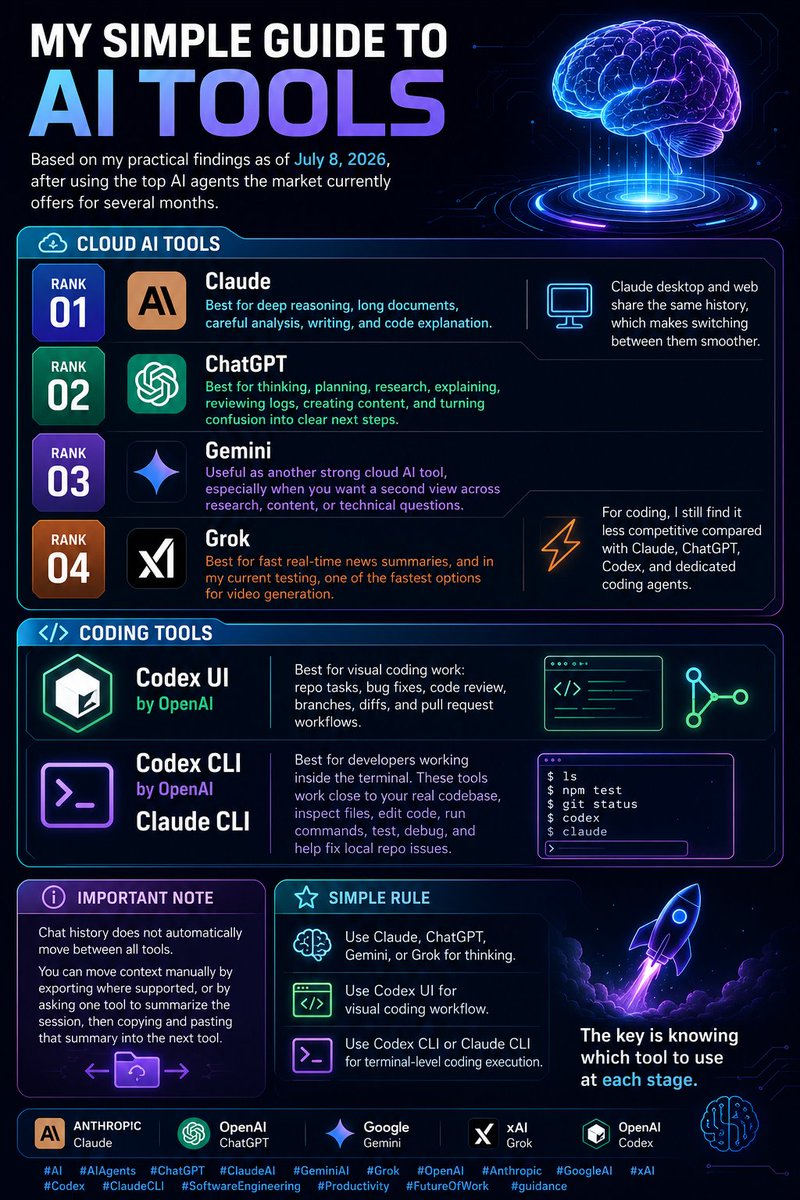
My simple guide to AI tools, based on my practical findings as of July 8, 2026, after using the top AI agents the market currently offers for several months.
Cloud AI tools
Rank 01: Claude
Best for deep reasoning, long documents, careful analysis, writing, and code explanation.
Claude desktop and web share the same history, which makes switching between them smoother.
Rank 02: ChatGPT
Best for thinking, planning, research, explaining, reviewing logs, creating content, and turning confusion into clear next steps.
Rank 03: Gemini
Useful as another strong cloud AI tool, especially when you want a second view across research, content, or technical questions.
Rank 04: Grok
Best for fast real-time news summaries, and in my current testing, one of the fastest options for video generation.
For coding, I still find it less competitive compared with Claude, ChatGPT, Codex, and dedicated coding agents.
Coding tools
Codex UI by OpenAI
Best for visual coding work: repo tasks, bug fixes, code review, branches, diffs, and pull request workflows.
Codex CLI by OpenAI / Claude CLI
Best for developers working inside the terminal. These tools work close to your real codebase, inspect files, edit code, run commands, test, debug, and help fix local repo issues.
Important note
Chat history does not automatically move between all tools.
You can move context manually by exporting where supported, or by asking one tool to summarize the session, then copying and pasting that summary into the next tool.
Simple rule:
Use Claude, ChatGPT, Gemini, or Grok for thinking.
Use Codex UI for visual coding workflow.
Use Codex CLI or Claude CLI for terminal-level coding execution.
The key is knowing which tool to use at each stage.
Footnote:
From my practical use, the underlying models seem to follow a mostly linear ranking trend. Claude models are usually ahead overall, while OpenAI models remain the second-best choice and sometimes outperform Claude on specific tasks. With ChatGPT specifically, it also feels like the allocated working tokens and task-handling capacity are higher than most competitors, which can make it stronger for longer, more complex workflows.
#AI #AIAgents #ChatGPT #ClaudeAI #GeminiAI #Grok #OpenAI #Anthropic #GoogleAI #xAI #Codex #ClaudeCLI #SoftwareEngineering #Productivity #FutureOfWork #guidance
Apple’s latest Hello Developer – July 2026 is out!
A great monthly roundup for every Apple developer featuring the latest tools, documentation, developer stories, learning resources, and updates from across the Apple ecosystem.
If you’re building for iOS, macOS, iPadOS, watchOS, or visionOS, it’s worth bookmarking and checking every month. Staying updated is just as important as writing code.
What’s your favorite update from this month’s edition?
#Apple #AppleDeveloper #iOS #macOS #Swift #SwiftUI #Xcode #WWDC26 #AppDevelopment #Developer
https://t.co/WhKzbfaCtX
👋 Hey Builders !
I'm looking to connect with people building in:
🍽️ SaaS
🤖 AI & AI Agents
⚡ Automation
💻 Developer Tools
📱 Web Apps & Product Development
🚀 Startups & Tech
I'd love to see what you're building.
Drop your product, startup in the comments 👇
Let's connect, share ideas, and help each other grow. 🚀
better internal types sound boring until you're deep in a codebase and your editor actually knows what it's doing. these are the wins that actually compound.
🐆 Keeta GitHub PR Merged
📦 Repo: node-rs
🔀 PR #32: Feature: Improve Typing
🌿 Branch: feat/improve-typing → main
👤 Originally opened by: @sephynox
🧠 Overview:
This pull request appears to tighten up the project’s internal code types, which can help the Keeta bot and related tools behave more consistently and catch mistakes earlier.
The public description is brief and says it “improves typing in bindings and client,” with two commits also mentioning improved typing and cleanup. This appears to be a technical/internal update with limited public details.
- Likely aimed at making developer tools more reliable by being clearer about what kind of data the code expects.
- No user-facing feature is described in the PR summary.
@Codydearkland@SpaceXAI how much of that came down to error messaging? honestly feels like tools that stick around obsess over feedback clarity before anything else. curious what other pattern got the most love?
@anupamrjp dev tools grab me most—what's one build/deploy friction you solved that nobody talks about? best abstractions are the ones that just disappear into your workflow.
@sevnthbeing@threejs curious how the dx feels bridging threejs rendering with native os features. did you find a clean abstraction or is there friction?
THE DISORIENTING VELOCITY OF AGENTIC CODING
the developers who built the tool are already living in a different timeline
Anthropic just published the oral history of how they created Claude Code
the metrics of this shift are staggering:
> Boris Cherny writes zero lines of manual code as of winter 2025
> Igor Kofman warns that three months of progress in 2026 will dwarf years of 2024 work
> early engineers like Ben Mann and Shauna Kravec automated the entire terminal shell loop
if the creators of the models do not write their own code anymore, the old workflow is dead
bookmark the full chronological history of how we got here
Claude Fable 5 skill generated $6,163 from one client
A single custom skill - visibility-engineering - built in hours delivered real revenue. No generic prompt. No template.
Key moves:
- Reverse-engineered real organic search queries from Google Search Console
- Converted them into natural prompts people actually type into AI overviews and ChatGPT
- Used Fable 5's official prompting guide + Skill Creator tool
- Fed research, docs, and specs directly into terminal workflow
Result: The skill decodes how dominant platforms engineer visibility, then flips it into legitimate client moves. One 193-page dossier turned into $6k payout.
Fable 5 handles long-running, complex tasks better than prior models. Smart scaffolding and memory make production-grade skills feasible fast.
Save this workflow before pricing shifts.
@davj@austinywang@lawrencecchen so how'd you solve the 'which one finished' problem—is it baked into the ui or does it require checking logs/dashboard? feels like that distinction is the whole game for whether it actually changes how you work.
Most people run one AI agent trying to do everything and wonder why outputs stay inconsistent.
Hermes Agent fixes that by acting as the control center. Free. Open source. Installs from GitHub.
GLM 5.2 connects through the terminal and gets assigned to multiple specialized agent profiles instead of forcing one model to handle it all.
The result is specialization that beats generalization in every production workflow.
Key setup from the video:
- Install Hermes Agent and connect your preferred model (GLM 5.2 works seamlessly).
- Create distinct agent profiles, each with one focused role: research, analysis, content generation, execution.
- Route tasks intelligently through the central control layer so nothing falls through the cracks.
- Enable persistent memory across all agents so context never resets between sessions.
- Set up the scheduler for autonomous runs while you sleep.
Specialized agents deliver sharper results because each one masters its narrow domain. No more diluted performance from context overload. The control center coordinates handoffs cleanly, maintains quality, and compounds improvements over time.
This stack turns scattered experiments into a reliable AI operation. Builders who implement it properly stop fighting tools and start scaling real output.
One control center. Multiple specialists. Consistent leverage that compounds daily