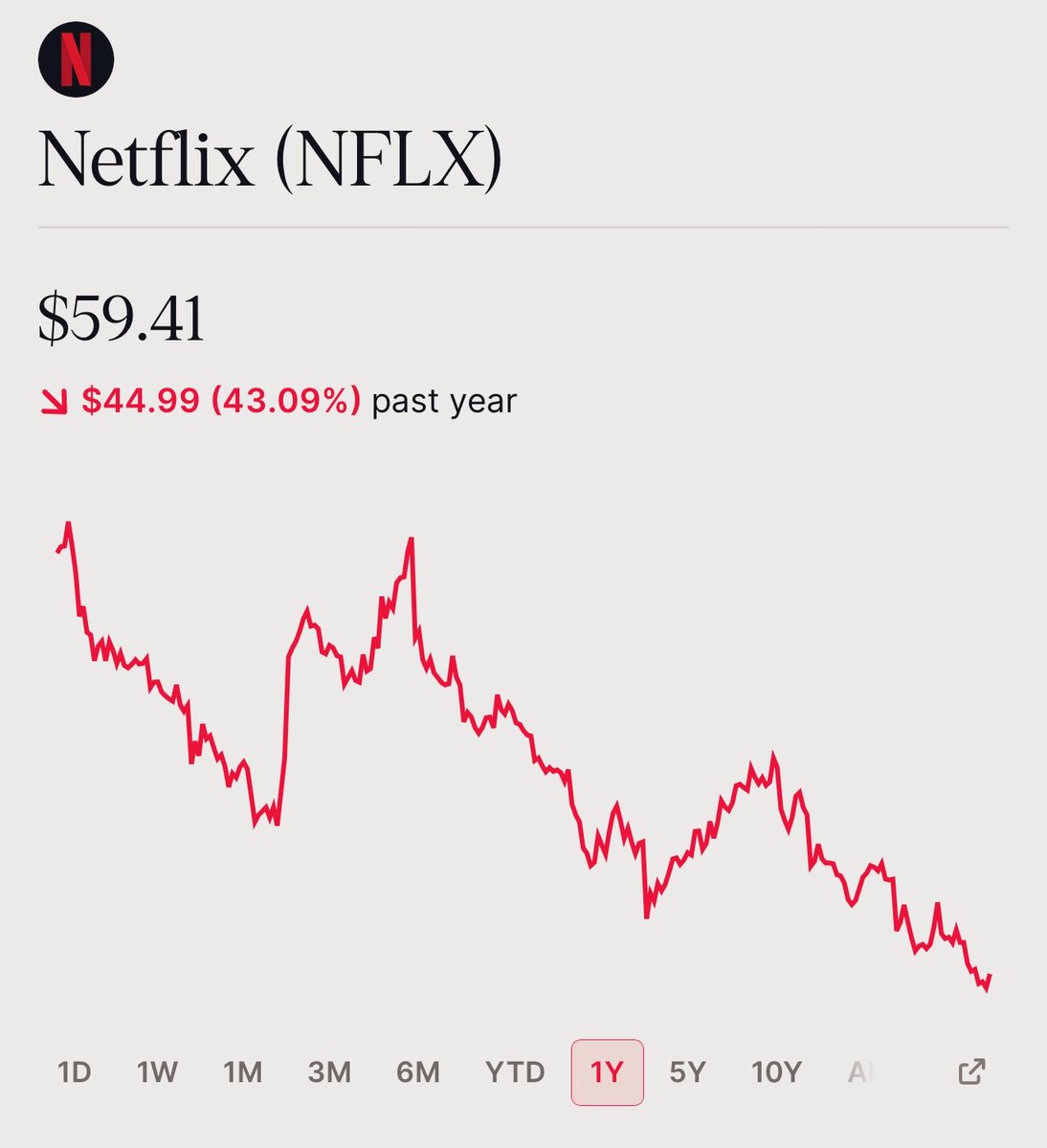
@Breadddman Bread man I thought you were a noble man. I remember where you came from lol no hate all love ❤️ hope breadwomen and the bakery is well
Crazy to see guys who hyped you up turn on you when they got their hands on the excel skylits😂 @Glitch_Trades
We’re entering a strange period in American history where having actually been somewhere, having read an entire book, and having taken your own photograph might become marketable skills again.
The internet is inadvertently making ordinary human experiences valuable.
BREAKING: Almost 130,000 Canadians have died on medical waiting lists since 2018.
Last year was the worst one yet. 29,468 people died waiting for surgery, a diagnostic scan or a specialist.
And it keeps going up every year… free healthcare huh?
I asked Claude to populate a Civilization-style game map with real data from the US. Opus 5.5 downloaded and parse a ton of public data and 7 hours and 45K lines of code later... it works :)
- 31 real data sources including Census, BEA, BLS, EIA, NOAA, USGS, DoD, NPS, FAA, FEMA, CDC...
- Real elevation, land cover, GDP, jobs, power plants, mines, ports, airports, bases, parks, universities, freight flows, disasters; all reconciled onto one 25 km hex grid.
- The data is converted into Civilization language, e.g. Gold yield is GDP. A city's districts are its real industry specializations: San Jose gets a Campus, Detroit is "Motor city". Its citizens are its real workforce: 1 in 4 San Jose workers are engineers, coders or scientists, against 1 in 14 nationally. Wonders are chosen by published rules, such as national parks by visitor numbers and universities by R&D spending, etc etc.
- 19 lenses (income, degrees, faith, disasters…), a City View for 524 metros, and nine advisors plus an Explorer. The Explorer turns any column for any of 3,100+ counties into a table and scatter plot, linked to the map.
- Claude decided to skip a few states and territories sry
- Built using Claude Code desktop app, Opus 5.5 on medium and turning on ultracode.
It's deployed here: https://t.co/QMhmafXMj5 and the "?" has the source link too. I don't exactly know where I was going with this but it's really fun to browse and play with. Possibly it can be expanded or built into a game. I only have half of my weekly Claude quote left though so someone else will have to take over :D. Claude also made a trailer:
the reason why american ai labs try to sabotage you if you do anything ml related and try so desperately to make ml sound so complex and spooky
is because they are retards and they don’t want you to find out that they are retards and that ml research and model training is actually so easy
it’s literally scammer logic once you realize
they are scamming all of you and tricking you into thinking that they are doing something mystical and complex and dangerous and that you should bow before them and give them all your data and rights
they are scamming the whole world and people barely even realize yet
Anthropic says it cut CPU usage per request by about 70% and memory usage by more than 80% after migrating its Messages API from Python to Rust, with Claude writing much of the code.
Median time to first token also fell by about 20%, according to an Anthropic engineering blog post. The service stayed online throughout the switch.
We see the U.S. government is active in $NVDA during after-hours trading. On Thanksgiving Eve, no less.
Watch the announcement of a government stake come Friday morning at 11 a.m., while everyone is out Black Friday shopping.
ECOM INDUSTRY IS GOING TO F*CKING CHANGE FOREVER
just found a untapped ECOM format, 5M views on his first 4 videos and $50k in product sales.
and yk whats crazy? he pulled this number just by organically promoting it.
so i made this one with claude opus x blender
$0 spent on ai video gens
send this prompt to your claude code to recreate this
Build me a reusable Blender project that makes short, low-poly comedy videos where my product is part of the joke. Use the attached video as the reference for the look, camera work, timing, and product reveal. Use Claude Code to write and run the Blender Python. I want an editable .blend file and a finished vertical MP4.
What I’ll give you
A reference video
A photo of my product and, if available, the original logo or print artwork
My brand name, website, and any exact wording that needs to appear
Optionally, a skit idea, character models, voices, or music
If I give you a skit, use it. Otherwise, come up with three short ideas and build the one where the product fits most naturally. If I haven’t supplied a website, leave it off the end card. Keep the project runnable with placeholder assets and clearly identify anything I should replace.
Start with the joke
Write an everyday situation where one person takes something a little too seriously. Give them one habit, one prop, and one oddly specific reason for what they’re doing. A friend asks the obvious question. The lead answers like it’s the most normal thing in the world.
In the reference, the habit is leaving early, the prop is a folding chair, and the reason is that the hardware store opens at 7. The shirt makes sense because of all three. Find that same connection for my product. For example, if I’m selling a gym bag, the guy could pack lifting straps, a belt, and chalk just to help his friend carry one box upstairs.
Keep it to one setup and one punchline. Give each line enough time to say out loud. Nobody explains the product or says “link in bio” during the scene.
Build the first episode in four shots
Target 720 × 1280, 30 fps, 524 frames. Use this timing as the starting point. Adjust the dialogue cues to the actual voice recordings.
Frames 1–135 | Introduce the situation. Start with the lead already doing something. Frame them close enough to read their expression and recognize the product. Let a friend enter from the edge of the frame. Give the lead a small reaction before they answer. Add one short POV caption near the top for this shot only.
Frames 136–270 | Show the habit. Cut wide enough to see the lead’s hands, feet, and prop. Have them do one deliberate physical thing that gives away the joke. Show the whole action, including picking the object up. This is where the viewer should start figuring out what kind of person this is.
Frames 271–419 | Land the line. Cut to a doorway or another clear exit. Put the friend’s shoulder in the foreground and keep the lead’s face visible. The friend asks one short question. The lead gives a specific, deadpan answer and walks out. Hold on the friend for a beat. Add a short red game-style status message tied to the joke.
Frames 420–524 | Reveal the product. Hard cut to warm daylight. Use the same character, outfit, and product. Frame the product clearly and make one slow camera move. Bring in the brand name, then the supplied URL or CTA. Keep both away from the product artwork.
Match the Blender look
Aim for an early-2000s console cutscene. The reference has angular, human-shaped characters, recognizable faces, chunky hair, loose clothes, simple scenery, and slightly stiff movement. Use simple geometry for the silhouettes and small texture maps for facial and clothing details. Keep the shirt loose enough that its front print stays readable.
If usable rigged characters are already in the project, reuse them. Otherwise, build simple articulated characters with distinct hair, faces, hands, shoes, and clothes. Give each speaking character a usable jaw or mouth control. A background party can feel alive with three guests, a table, a fence, and a few warm string lights. Reuse that set across angles so the door stays where the viewer expects it.
For clothing, put my actual artwork on the garment using UVs or a decal that follows the mesh. Use the same material in every shot. For a handheld product, match its shape and colors from the photo and apply the supplied label to its surface. Check the print from the render camera for mirroring, stretching, and hands covering it.
Animate the little things
Create separate camera setups and switch between them with timeline markers. Keep the first three cameras mostly still. Let the characters provide the movement. Save the slow orbit or push-in for the end card.
Keyframe the moments viewers notice: eyes moving toward the friend, a glance at the wrist, a hand closing around a handle, the weight shift before standing, and the friend turning after the lead leaves. For a pickup, keep the prop on its surface until contact, then attach it to the hand while preserving its position. Plant the feet during the lift. Keep listening characters moving just enough to look present.
Add captions, game overlays, and sound
Use small pixel-style text for the clock and a status meter in opposite top corners. Choose a meter that fits the story. For a party it can be “social battery.” Change its value on the action that earns the change. Keep it readable on a phone.
Use short subtitle lines with a dark outline. Give the friend pale blue captions and the lead warm yellow. Put them below the action with room above the bottom edge. Time them to the spoken lines and keep them off the product. Make overlays editable using Blender’s sequencer or a separate overlay scene.
Use supplied dialogue first. If a local text-to-speech tool is available, use it for scratch voices. If neither is available, finish a captioned version and export the dialogue with cue times for recording. Add simple sounds for visible actions like a chair snapping shut or a door clicking. If music is supplied, keep it low enough to hear the punchline.
Make it reusable and actually render it
Keep the product artwork path, brand text, dialogue, subtitle cues, HUD values, and shot timings in one episode.json file. Build from it with a readable https://t.co/wtwQJjH5Sk using Blender’s bpy API. Detect the installed Blender version and use a compatible Eevee setup. Keep asset paths relative and pack external textures into the .blend.
Run Blender in background mode and render a low-resolution preview first. Inspect one frame from each shot plus the exact frame where the hand takes the prop. Fix camera clipping, floating objects, unreadable text, and any mirrored logo before the final render. Render the full frame sequence, combine it with the audio, and export an H.264 MP4. Verify that it plays, has the intended duration, and includes the final CTA frame.
Deliver the editable .blend, the final MP4, https://t.co/wtwQJjH5Sk, episode.json, and one short command I can use to make the next episode. If Blender or an asset is unavailable, say exactly which outputs you produced and what still needs rendering.
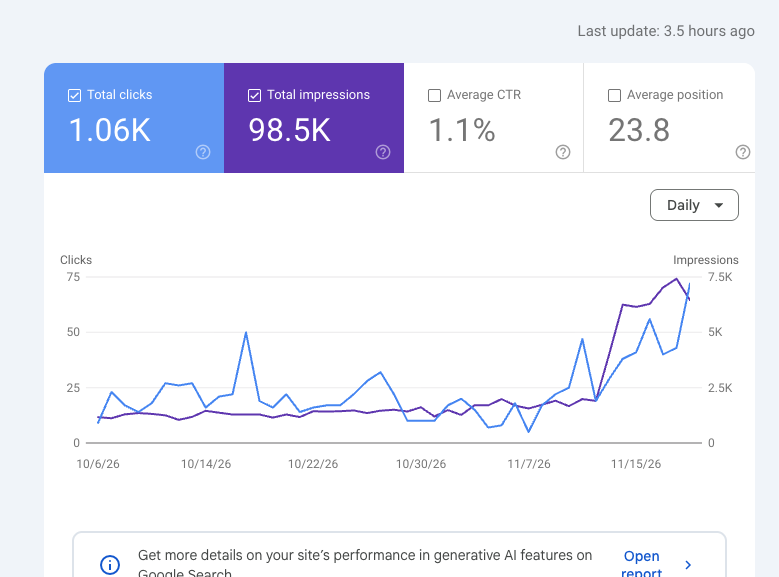
This is the quickest win you can have now in SEO:
Do this every 28 days
1/ go to google search console
2/ select the last 28 days
3/ export the archive with the data
4/ go to claude and attach the data, and use this prompt:
I have attached a Google Search Console (GSC) export for my website covering the past 28 days.
Analyze the data and identify keywords ranking between positions 10–30 that are not adequately covered in the content of my existing pages.
For each keyword:
* Identify the best existing page to target (URL).
* Check the actual page content to confirm the keyword or topic is missing or insufficiently covered.
* Suggest where and how to incorporate it (H2, paragraph, FAQ, etc.).
* Provide a short example of content that could be added.
Avoid keyword cannibalization, group related keywords targeting the same page, and prioritize opportunities based on impressions, relevance, and potential to reach the top 10.
Deliverable: Export a CSV with these columns:
Keyword | Position | Impressions | Clicks | Target Page URL | Content Recommendation | Suggested Content | Priority
Only include relevant opportunities. Do not invent data or recommend adding keywords that are already adequately covered.
5/ implement these changes to your articles
6/ reindex
do this for your sites, every 28 days and see your clicks go up