@alikali68 Worth checking which images are missing it. Decorative images should have an empty alt on purpose, so a raw count of missing alt text can overstate the real problem.
@icemays Solid list. One habit that ties it together: one main landmark per page, and a skip link to it as the first thing you can tab to, so keyboard users can jump past the nav on every page.
@progriso On captions: auto-generated ones are a good start, but give them a pass for names, numbers and product terms. Those are the words they get wrong most, and usually the ones that matter most.
@Denis_skripnik Agreed. A quick first pass anyone on a team can do: fill out the signup form with the keyboard only, then submit it empty. If the error doesn't say which field and focus doesn't move there, that's ticket one.
@toddkedwards Nice. For drag and drop, the simplest keyboard way we've seen is a Move up and Move down button on each item, plus a short status message saying where it landed. The drag itself can stay as is.
@_InfoStar_ Worth checking hover and focus states too. A Book now button can pass at rest and turn pale on hover, and placeholder text inside form fields is often the faintest text on the page.
@waqas514472 Good list. One more for the dialog check: when it closes, focus should land back on the button that opened it. If it jumps to the top of the page, keyboard users have to tab all the way back down.
@Focotik For anyone wondering where to start on a small site: fix the template first. Header, nav, footer and the contact form show up on every page, so one fix there clears the same issue everywhere at once.
@DevDome_com Worth checking the other states too, not just the default: hover, focus, disabled and visited link colors often get picked later and slip under 4.5:1. Text sitting on a photo or gradient needs a check at its lightest spot.
@NatashaKirio4o Agreed. If I had to pick one habit from that list: every input gets a real label element, not just placeholder text. The placeholder disappears the moment someone starts typing, and so does the hint about what the field wants.
@vardeverkstudio Nice list. One more for the category card: if the image is the only thing inside the link, its alt text becomes the link's name. So it should say where the link goes ("Linen shirts"), not describe the photo.
@nickshiftlives Good one to pair with it: set the browser window to 320px wide, or zoom to 400% on a 1280px screen. Text should reflow into one column with no sideways scrolling. That's the reflow check (1.4.10), and sticky headers are the usual thing that eats the screen.
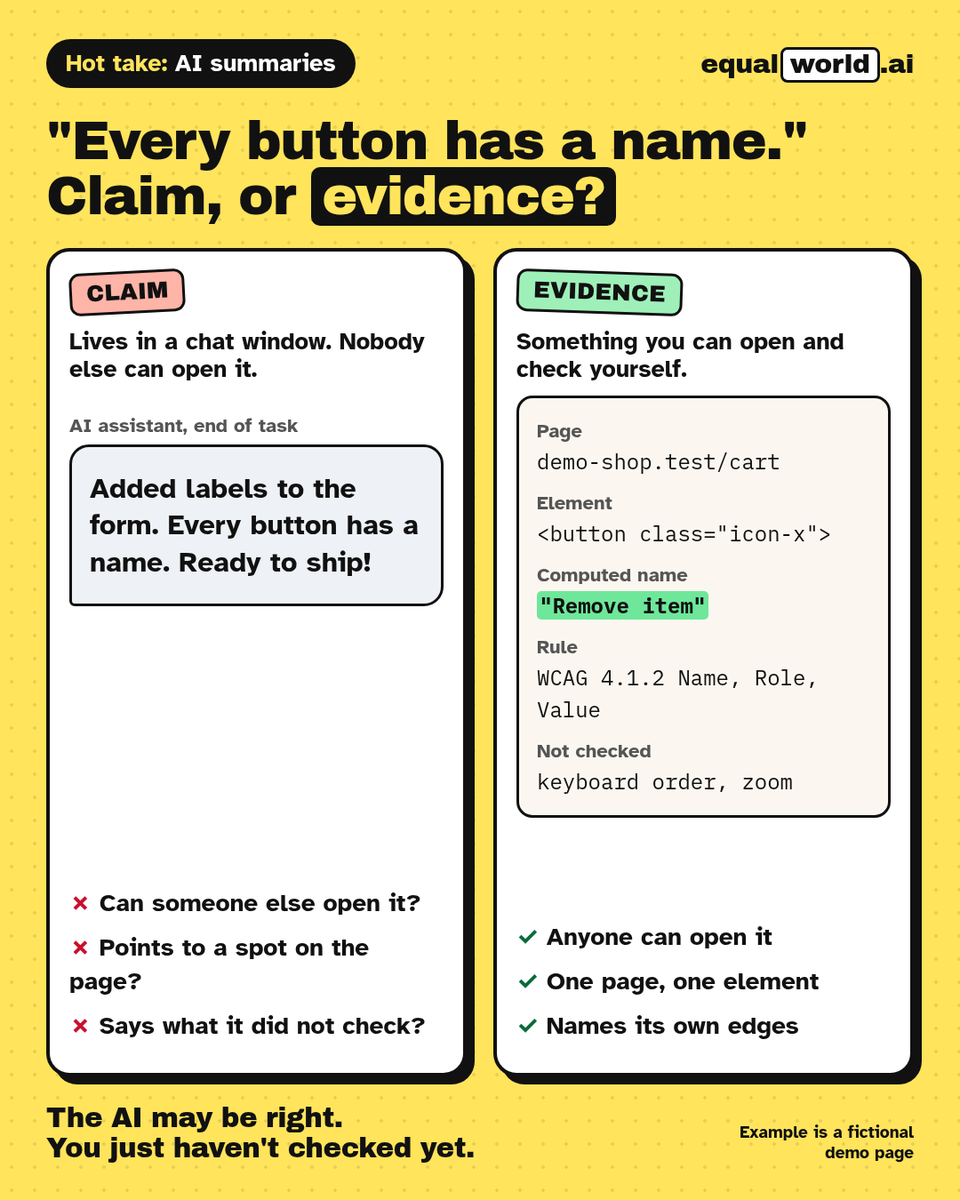
Did your AI assistant prove every button has a name?
It said so. That's a claim. Evidence is something you can open: the page, the element, the rule, and what it didn't check.
Hot take: an AI summary is where checking starts, not where it ends.
@marcusdburnette The review step is the key part. The same storefront photo might need "Our Elm Street location" on a contact page and alt="" on a blog post where the caption already says it.
@CookAston79984 Breaking the form is the underrated one. Worth adding a check that each error message is tied to its field (aria-describedby) and that focus moves to the first error, so the problem isn't only shown in red.
@rubisinghpanwar The tell that it went wrong: a link styled as a button that opens a modal, or a button that navigates. Screen readers announce the role, so people expect one thing and get the other.
@DarshanD3v B. Drag-only reordering fails 2.5.7 Dragging Movements, so add up/down buttons or a move menu. A passes on the spacing exception, paste is fine, and links inside a sentence are exempt from target size.
@jvmediadesign Same goes for charts. Put the one takeaway in the alt ("Bookings doubled from May to August") and keep the full numbers in a table or text next to it, so nobody has to sit through every data point read aloud.
@SouthBayCoder Plus one. Small gotcha: a <button> inside a form defaults to type="submit", so add type="button" to anything that shouldn't submit. Saves a lot of "why did my form just send" bugs.