@danmall As a new dad, one of the biggest stressors of late is making the most of my time so I’m worried I’d spend a lot of time setting up a site / preparing infra and have trouble finding clients.
@danmall The biggest risks being financial stability early on vs lack of control and creative freedom. Also missing the opportunity to learn/work with a great team is a big one.
Ask someone to define design, and they’ll likely list outputs—buildings, logos, products, apps—or fall back on process platitudes. But these narrow views miss what makes design essential today.
Throughout history, new technologies have opened new fields of expression and expanded what's possible. Every time a new technology came in, at least half were left behind loving the old craft or worrying about the future. Those who embrace the discomfort, understand how the tool can be wielded will continue to create novel ideas and change culture,
With the printing press, those who mastered textual literacy created profound societal impact. In those early days, this literacy was an essential differentiator.
Just as the printing press democratized knowledge creation, AI is commoditizing access to intelligence and with it redefining technical execution. This is now widely accepted. AI can generate endless ‘perfect’ outputs, and its reasoning capabilities will only expand. Design’s tools will change but design’s essence remains distinctly human: creation guided by feeling & relationships rather than pure logic, and the judgment to know what’s worth creating.
Design literacy—combining curiosity, studied curation, personal conviction, and craft—will become as vital as verbal literacy.
This way of seeing and thinking becomes a new differentiator. It’s a new type of intelligence and design that will separate those who thrive from those who fade into the noise. I see this type of design everywhere in my work with founders, engineers, salespeople, and investors—they are all designers in their own right. It is innate—it just needs to be unlocked.
The best founders already understand this. In a world where anyone can build, they know what to build, who it’s for, and why it must exist.
Full essay linked in the comments below ↓
As I was interviewing candidates for my “designer who can ship” position, I asked a few how they picked typefaces. One person’s answer stood out above the rest. They shared their screen to show me a folder of inspiration on their hard drive. Dear reader: the folders structure was immaculate. In that moment, I immediately realized I was talking to a professional.
What is it about a clean workspace that signals expertise?
Let’s look to another industry that values cleanliness in a workspace: food service. Renowned chef Thomas Keller describes the value of mise en place:
“Being organized is a skill to develop… Good organization is all about setting yourself up to succeed. It means getting rid of anything that would interfere with the process of making a recipe or preparing an entire meal.”
Here’s the system I use to organize the files on my computer:
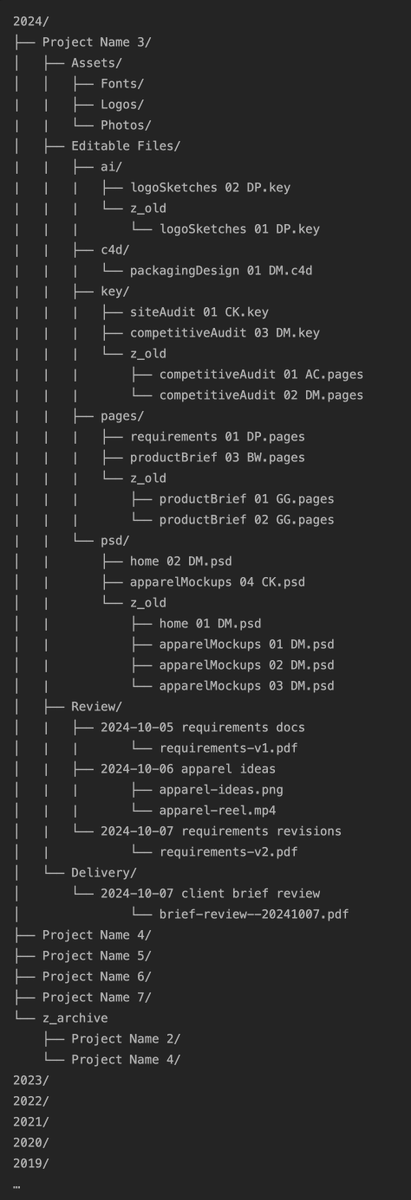
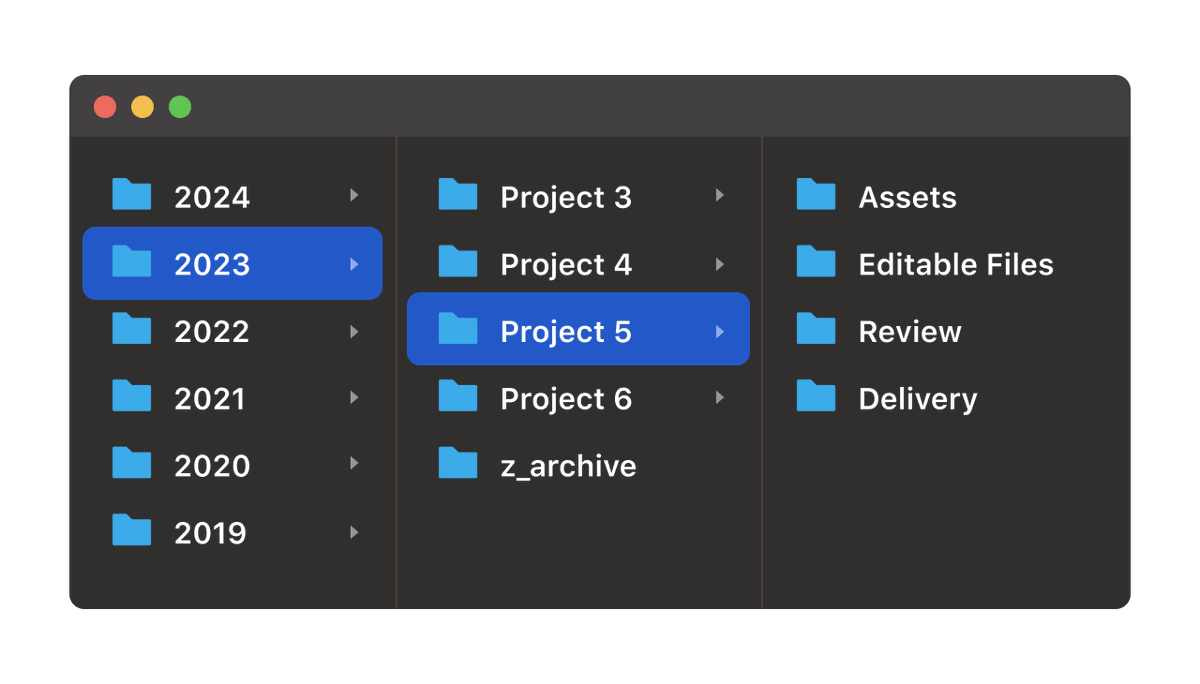
In general, the way I think about my work is that everything is a project. Every year, I do multiple projects. So, the organizing principle is that every year gets a folder, and every project is a folder inside that year.
Every project has this specific structure:
Assets: already-created files that I use in the course of the work. I start with fonts, logos, and photos. I might also have music for podcast projects, stock footage for video projects, brand guidelines, access documents, and more. If I’m working with clients, the initial goodie bag of files they send me is usually the stuff that goes in here.
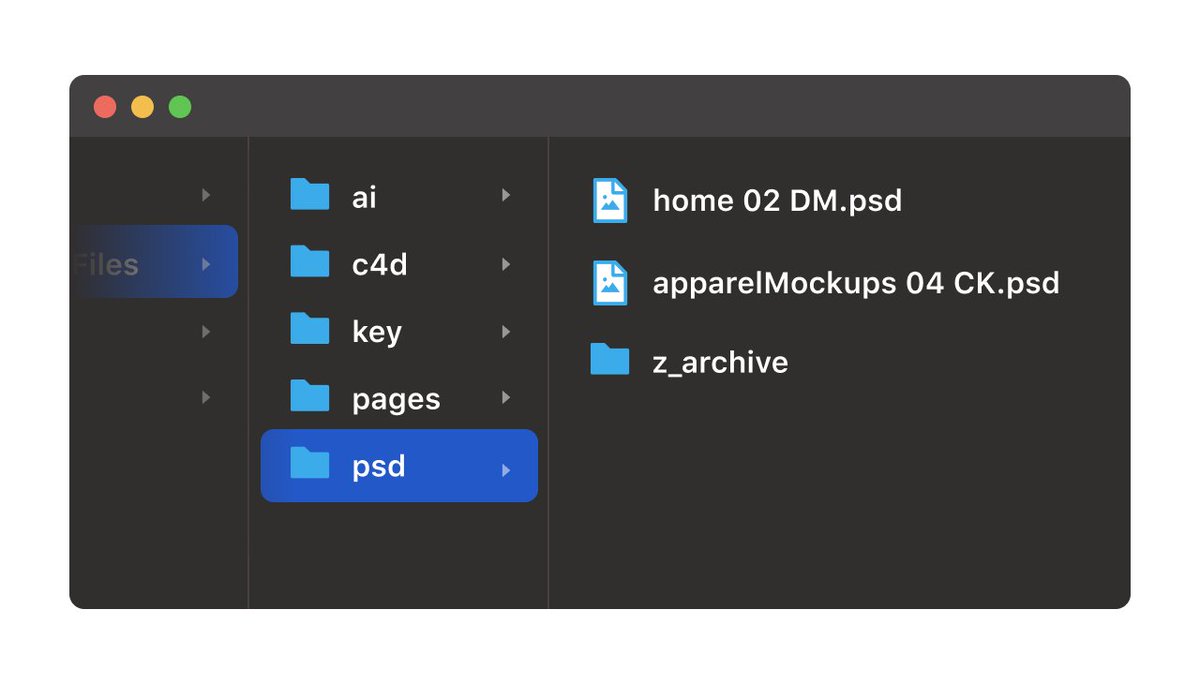
Editable Files: Any layered files that might need editing, organized by file type/file extension. Basically any files that I’m actively working on and/or iterating over. This folder has gotten smaller over time for me as more source files move to the cloud and autosave. Even so, for some projects, I’ll save aliases to cloud files to their respective folder because I’m working in them so often.
Review & Delivery: Probably my favorite part of this structure. Editable files are great but they’re not always the best way to share something with someone. The best way is usually a rendered and/or export flat file, something like PNGs, PDFs, MP4s, etc. When designers export comps, they often send them to the Desktop or Documents in a way that tends to clutter those spaces. My first favorite thing about the Review folder is that it give you a place to put those exports. My second favorite things about the Review folder is that you can quickly browse the entire project in chronological order by navigating through the Review folder and using Quick Look. This is much easier than looking through source files to find something you might be looking for. Delivery is like the Review, except specific to more “final” things. When I’m working with clients, the Delivery folder is only the stuff I’ve delivered to them, whereas Review is for things I want to review internally with my team before the client sees it. It’s common for me to copy some things from Review to Delivery, and I like the redundancy of having it in both places.
The filename format goes {{ FILE CONCEPT }} {{ VERSION NUMBER }} {{ INITIALS OF LAST PERSON TO WORK ON IT }}. It’s a helpful version of a pseudo file check-in/check-out system, especially if you’re working simultaneously with multiple people using a shared drive.
Here’s the entire file and folder structure at a glance.
Could you see yourself using this? What kinds of file folder organization have you found useful?