Claude vient de sortir les "Skills".
On en a créé 10 pour le SEO.
Voici comment transformer Claude en équipe SEO complète :
(sans code, sans clé API)
La plupart des gens utilisent l'IA pour le SEO comme un chatbot.
Tu poses une question, tu obtiens un conseil générique, tu copies-colles, tu recommences.
Le souci : ce conseil n'est pas basé sur TES données, et il ne fait pas le boulot à ta place.
Seul souci : La plupart des gens font encore leur SEO à l'ancienne, lentement, à la main.
Voilà ce qui se passe généralement :
→ Ils jonglent avec 5+ outils SEO qui ne communiquent pas entre eux
→ Ils paient 100€+/mois pour des dashboards qu'ils n'ouvrent presque jamais → Ils copient-collent entre ChatGPT, Search Console et des Google Sheets toute la journée
→ Ils obtiennent des "best practices" génériques qui marchent pour personne → Résultat : des heures de boulot inutile, zéro mouvement réel sur les positions
Ce n'est PAS comme ça que le SEO devrait marcher en 2026.
Les Claude Skills changent tout. Chaque skill est un expert SEO spécialisé qui lit tes vraies données et fait le boulot. Toi tu fais juste glisser, déposer, et demander.
Les 10 skills que tu reçois :
On-page & contenu :
→ meta-optimizer : réécrit les title tags + meta descriptions qui se font vraiment cliquer
→ internal-linker : trouve les pages orphelines et suggère des liens depuis ton contenu existant
→ content-gap : compare ta page au top 10 des SERP, te dit ce qui manque
→ schema-generator : génère un balisage schema valide pour n'importe quel type de page
→ cannibalization-finder : repère les pages qui se battent pour le même mot-clé
Technique & GSC :
→ gsc-auditor : récupère tes données Search Console, fait remonter les quick wins
→ ctr-booster : trouve les pages avec beaucoup d'impressions mais un faible CTR
→ robots-checker : détecte les problèmes d'indexation avant qu'ils te coûtent du trafic
→ keyword-clusterer : regroupe tes requêtes en clusters thématiques → backlink-analyzer : note ton profil de liens, repère les liens toxiques
Comment les utiliser :
→ Glisse le dossier que je t'envoie dans Claude
→ Connecte ta Google Search Console
→ Dis-lui ce dont tu as besoin
→ Il lit la skill, puis s'occupe de ton SEO
Pas de setup compliqué. Pas de clé API. Pas de code. Juste glisser, déposer, demander.
Ce que c'est : 10 experts SEO spécialisés qui tournent dans Claude, gratuitement.
Ce que c'est PAS : une énième liste de "meilleurs prompts ChatGPT pour le SEO".
-----
Tu veux les 10 skills ?
1. Follow moi
2. Commente "CLAUDE" en-dessous
3. Reposte ça
The AI Search Content Optimization Checklist [With Google Sheets to copy/paste] 👇
I’ve created an AI Search Content Optimization Checklist, going through the most important aspects to take into account to optimize your content for AI search answers along with their importance and how to take action, going through:
1. Optimize for Chunk-Level Retrieval
2. Optimize for Answer Synthesis
3. Optimize for Citation-Worthiness
4. Optimize for Topical Breadth and Depth
5. Optimize for Multi-Modal Support
6. Optimize for Content Authoritativeness Signals
7. Optimize for Personalization Resilient Content
8. Optimize for content crawlability and indexability
Check it out and access the Google Sheets here:
https://t.co/e87HMPhDce
[Thread SEO technique]
Google fait encore des siennes, une fois de plus, ou comme d'habitude, pourrions nous dire si nous étions méchants.
En ce moment, c'est le fameux paramètre ?srsltid= qui nous emmer**
Explications et solutions ⬇️
New recommended lead events are now available in #GA4:
close_convert_lead
close_unconvert_lead
disqualify_lead
generate_lead
qualify_lead
working_lead
https://t.co/yxEkel0n0Q
I want to give a big shout out to my guy @dejanseo who was my anonymous source for the algo docs leak.
He found them weeks before us and even got a Google Bug Bounty for turning the leak in.
Here's his story in own words:
https://t.co/9VAeLbkCc1
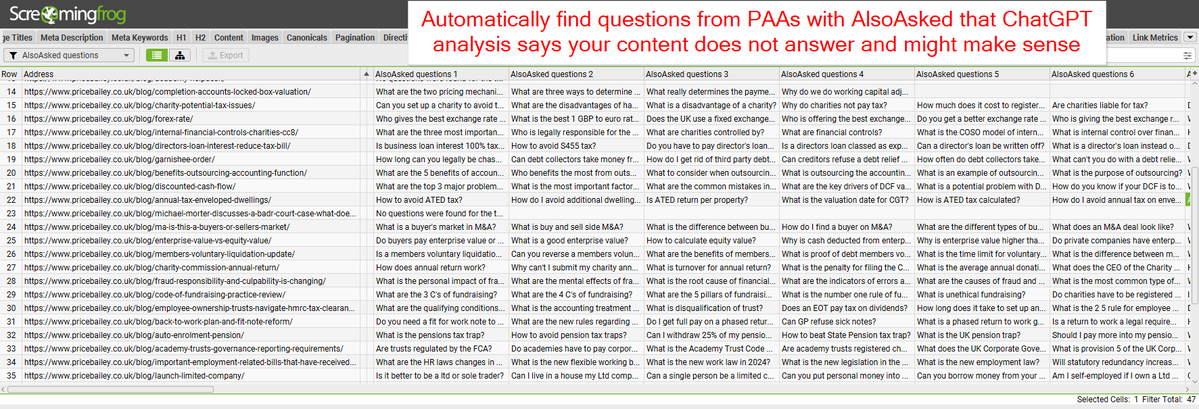
⚡️ Automatically audit & find potential unanswered questions in your content with this custom JS ⚡️
🐸@screamingfrog + ❓@alsoasked + 🤖ChatGPT
1) Find questions from @alsoasked from H1
2) Asks ChatGPT which questions are not answered
3) Shows directly in crawl!
Download ⬇️
New post from the king on @screamingfrog's new custom JavaScript extractions why it's a game changer for SEO
I give you: Vector Embeddings Is All You Need
https://t.co/UIzMZpmBQn
Last week, at #SMXMunich I presented on a giant problem in web marketing:
ATTRIBUTION
It's driven marketers, CFOs, & brands mad, chasing ad spend that claims attribution over every other investment. Thanks to some hard-won research, I *think* we can change minds here
1/3
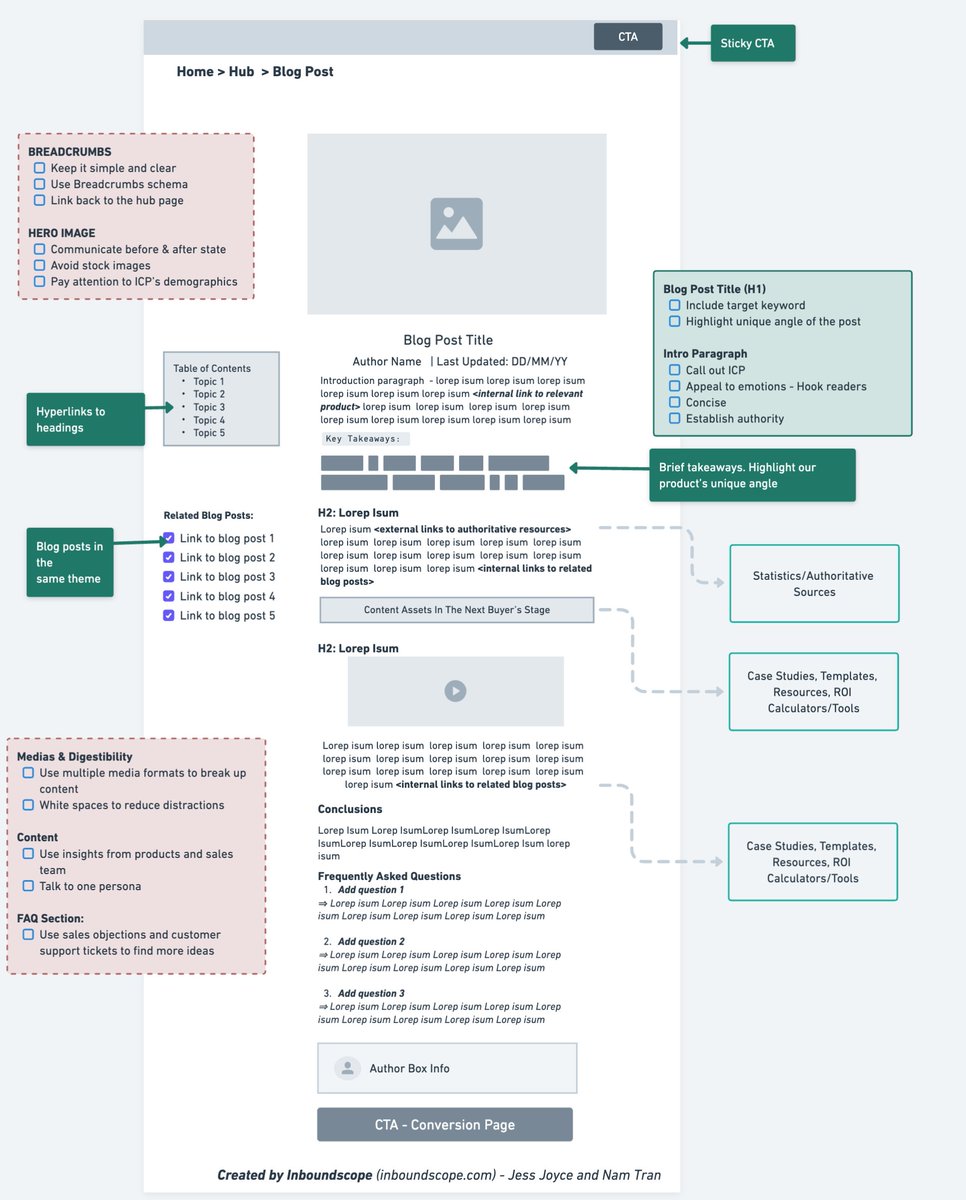
Steal our Authority Blog Structure to turn it into a revenue-generating machine.
How? Here are some mistakes you need to avoid:
- Focusing on SEO over customers
- Obsessing on what the competitors do
- Forcing call to action wherever you can
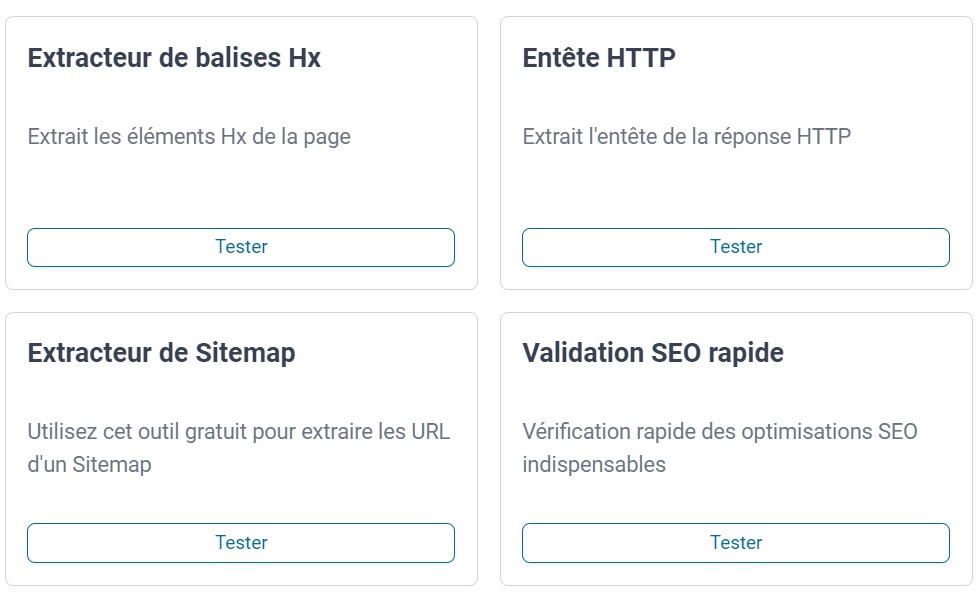
On lance une ToolBox SEO (gratuite)
https://t.co/RMkmyGdfVS
Extracteur Hx
Entête HTTP
Comparer des listes
Extracteur URL de SITEMAP
Analyse SEO
Générateur Sitemap
Compteur mots/caractères
Extracteur d'URL
Générateur d'URL SEO
Combinaison de KW
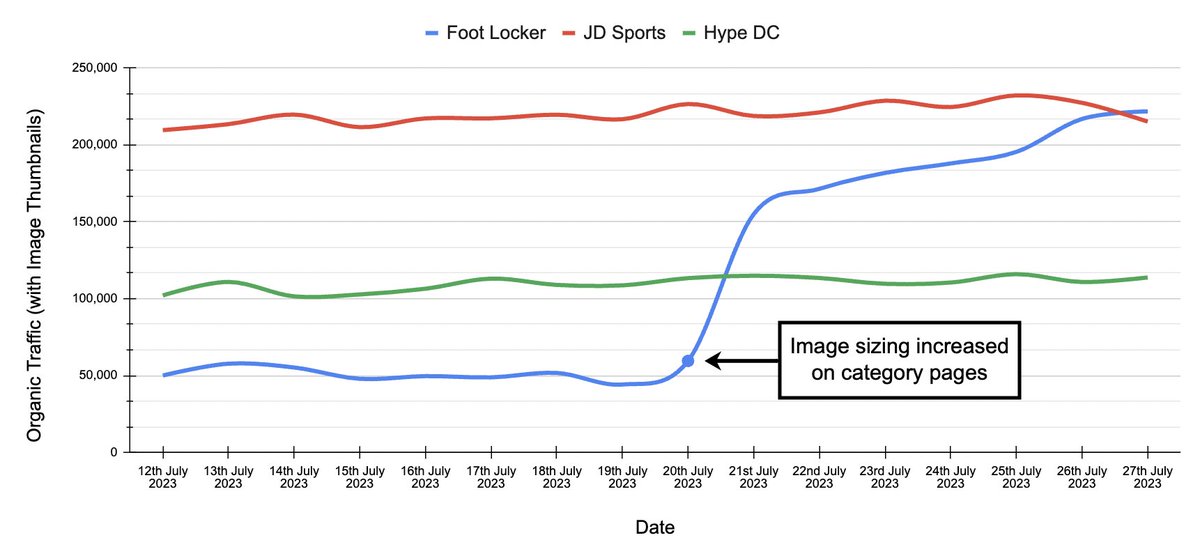
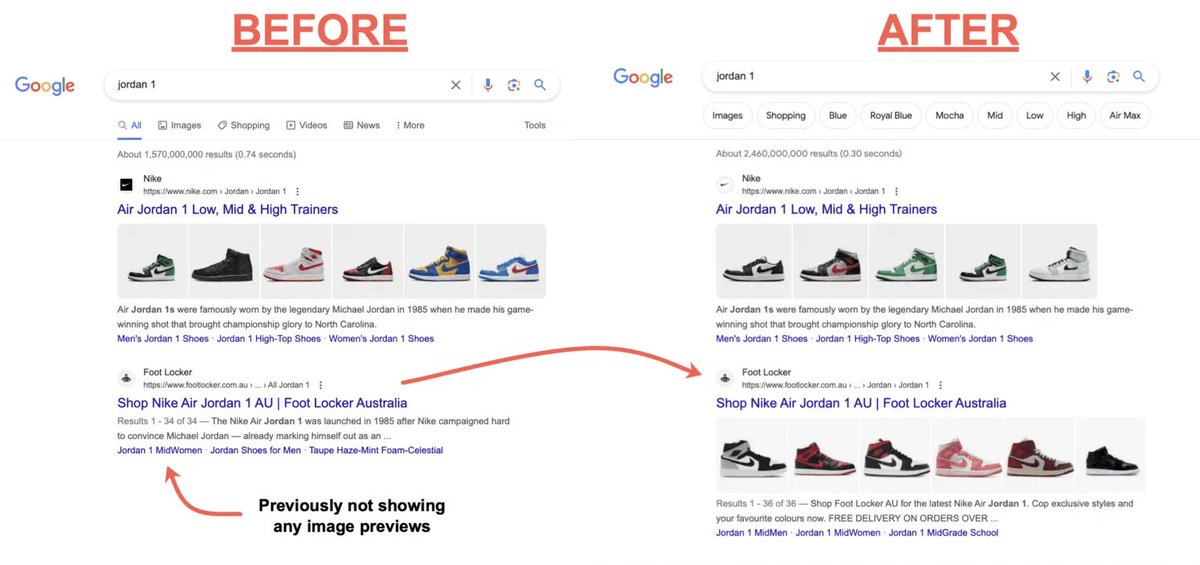
Foot Locker was able to increase their image thumbnails on Google by 343% for category pages with this one simple change.
They received a significant uptick in images being indexed, resulting in them surpassing key local competition with their previews.
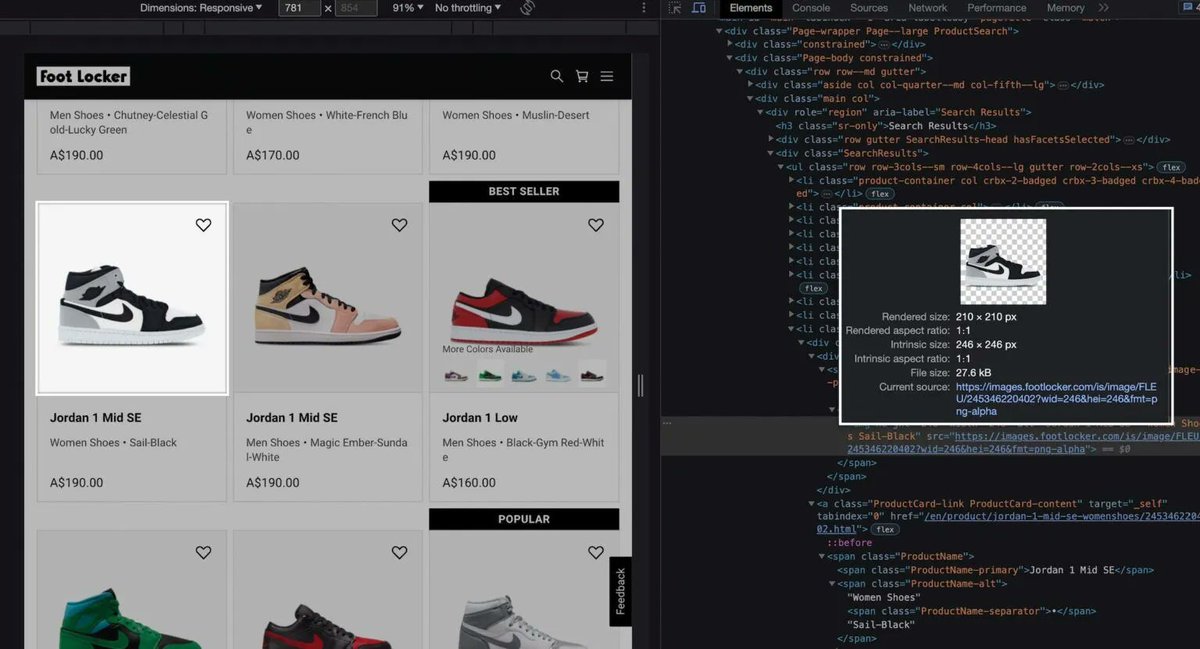
The change involved them increasing the size of the image in their category page sever side rendered HTML (pre-JS), going from 67x67 to a minimum requirement of 200x200.
Google was previously able to crawl the images on their category pages, but they weren't committing them to their index due to how small the resolution was.
Benefits to Foot Locker from this change include an improved CTR, and also having more important content being indexed for core pages, which correlates well with improved rankings.
With technical SEO, it is sometimes the simplest change that can have the greatest impact. In the case of Foot Locker, increasing the size of the indexable images resolved the issue.
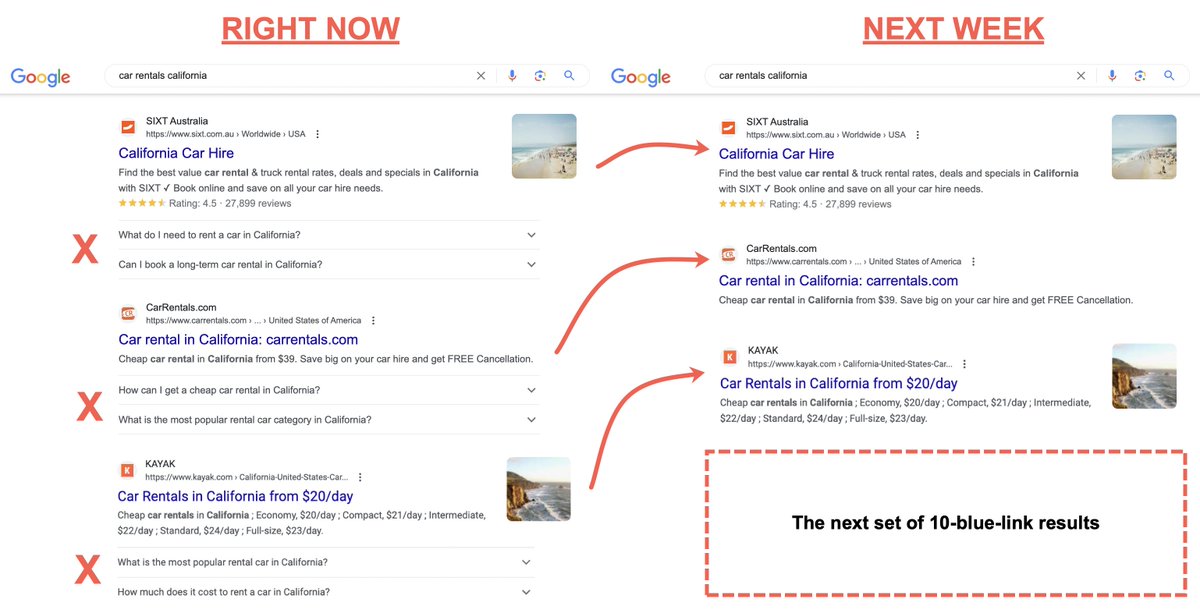
Google has now decided to stop showing FAQ Schema rich results for the vast majority of sites.
This rich result type is used across many large sites on the web, so you can expect a significant drop as of next week when the changes kick in.
FAQ rich results first rolled out in May of 2019, with many early-adopters going all-in on the implementation, with the treatment taking up considerable space at the time (showing up to 4 rows of questions by default).
Over time, Google has slowly introduced changes to the treatment, preventing more than 2 rows of questions appearing, and more recently making drastic changes to its visibility for certain queries and device types.
This now brings us to todays announcement. Google will no longer show the FAQ treatment in most cases, with the exception being for well-known Government or Health sites. With there potentially being room for others, but that seems like it'll be very rare.
The removal of this rich result type was inevitable. It was never used in a way that put users first, and it seems Google has finally come to this realisation 4 years later.
Google's advice is that no changes need to be made on the end of site owners. But personally I wouldn't be wasting time adding this markup to pages anymore, as there would be no measurable benefit in doing so – unless you're a well-known Government or Health site!
For more details on this change (along with changes to How-to rich results), you can read Google's blog post here: https://t.co/X9ASnZ1VPj
#seo #searchengineoptimization #google
Looking to improve the ranking for your keywords in weeks instead of months?
Here's an internal linking playbook I've applied for over 50 SaaS companies in the last 15+ years.
It should teach you more than any SEO course out there.
//Bookmark to use later//
15 Things you must do as soon as you set up a new #GA4 property to minimize data loss and data corruption:
1) Change the data retention setting of your GA4 property from 2 months to 14 months so that you do not lose user-specific data for inactive website users in GA4 after every 2 months.
2) Link your GA4 property to a BigQuery project so that you start storing data in your BigQuery project ASAP.
3) Link your GA4 property to your Google Search Console account to start populating your GA4 reports with search console data asap.
Bonus Tip >> Use the 'Bulk Data Export' feature so that you start storing search console data in your BigQuery project ASAP.
4) Link your GA4 property to your Google Ads account, as Google ads data does not flow retroactively into your GA4 reports.
5) Disable automatic form tracking (via enhanced measurement), as it is completely way off and will skew your event data for good.
6) Change the reporting identity to 'device based' to minimize the negative impact of data threshold on GA4 reports.
7) Change the session timeout setting in GA4 to 7 hours and 55 minutes.
8) Change the 'Adjust timer for engaged sessions' setting to 60 seconds. So a session would not be recorded as engaged until it is at least 60 seconds long.
9) Filter out internal traffic so that the traffic generated by you or your employees and other service providers (like your developer) is not recorded and reported by GA4.
10) Configure the List unwanted referrals to prevent them from being reported as referral traffic.
11) Remove all unwanted query parameters from your page path ASAP to reduce the impact of '(other)' in GA4 reports.
12) Activate Google Signals.
Disabling Google signals is not recommended, esp. if you use GA4 audience for Google Ads.
"If you disable collection of Google-signals data, you will not have access to cross-platform reporting, remarketing lists based on Analytics data, advertising reporting features, or demographics and interests." - Google.
"If you disable the collection of Google-signals data, then the same user could be counted multiple times across different devices, as Google Signals measures users across devices."- Me
13) Set up the GA4 test property so that you start collecting data in it ASAP. A GA4 test property is a duplicate of your live GA4 property but is used only for testing purposes.
14) Set your conversion window to 7 days for Acquisition conversion events and 30 days for all other conversion events for click-through conversions to get the most accurate reporting possible in GA4.
15) If you run a high-traffic website, make sure you are not collecting unnecessary event data, esp. at the expense of business-critical information. This can help you not exceed the data API quota limits and/or the daily BigQuery export limits.
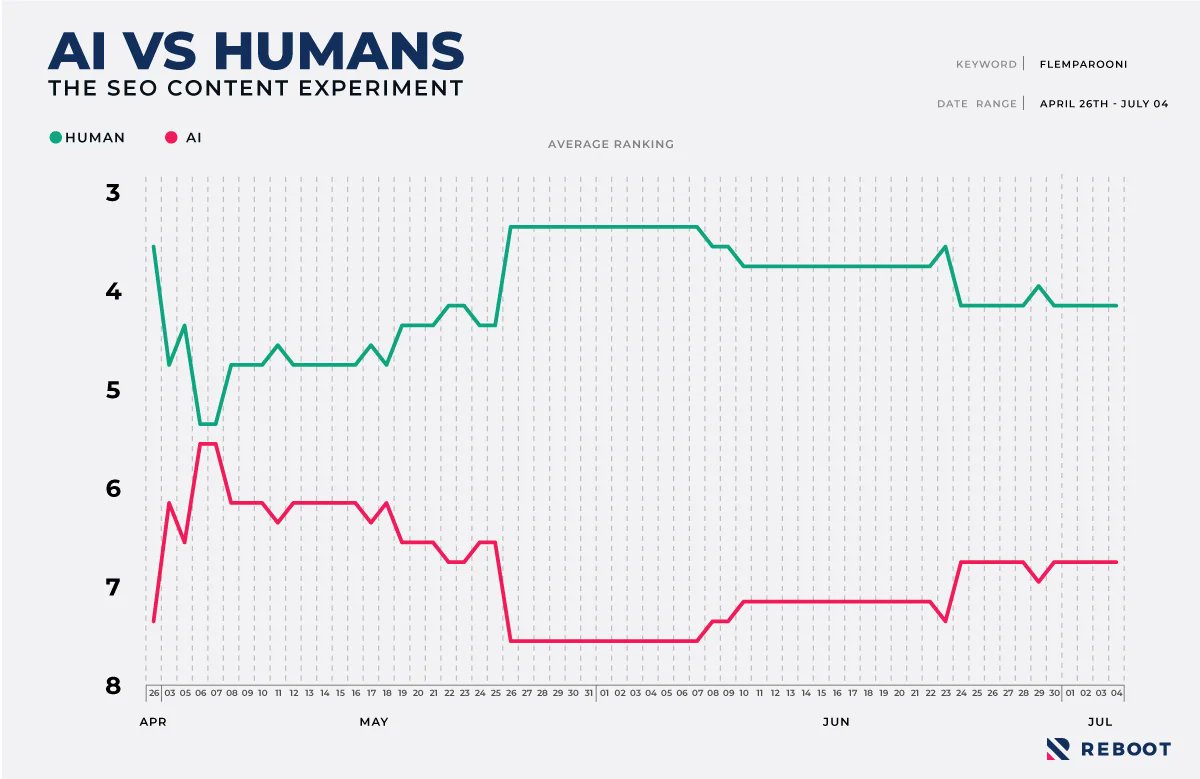
Fascinating SEO Experiment: Will AI content rank better/worse on Google than human-generated?
@sissons_oliver and team painstakingly created 2 sets of *nearly* identical content (you gotta see it)
• 5 URLs by AI
• 5 URLs by humans
Human content won top rankings, but not 100%




![aleyda's tweet photo. The AI Search Content Optimization Checklist [With Google Sheets to copy/paste] 👇
I’ve created an AI Search Content Optimization Checklist, going through the most important aspects to take into account to optimize your content for AI search answers along with their importance and how to take action, going through:
1. Optimize for Chunk-Level Retrieval
2. Optimize for Answer Synthesis
3. Optimize for Citation-Worthiness
4. Optimize for Topical Breadth and Depth
5. Optimize for Multi-Modal Support
6. Optimize for Content Authoritativeness Signals
7. Optimize for Personalization Resilient Content
8. Optimize for content crawlability and indexability
Check it out and access the Google Sheets here:
https://t.co/e87HMPhDce](https://pbs.twimg.com/media/GtlYZhNWwAAc7fE.jpg)