🚨 Windows Users
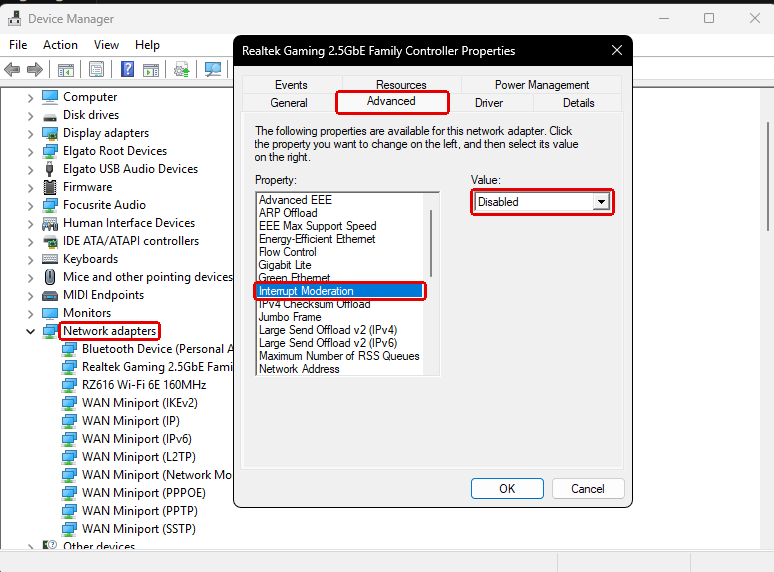
Your Ethernet adapter might be causing your packet loss
Heres how to check
1. Press Windows + R
2. Type devmgmt.msc and hit Enter
3. Open Network adapters, right click Ethernet, then 4. Properties
5. Open the Advanced tab, set Interrupt Moderation to Disabled
🚨 NVIDIA Users
Your NVIDIA App settings might be COSTING you performance
Here’s the fix ⬇️
1. Open NVIDIA App
2. Go to Graphics → Global Settings
3. Match the settings shown below
HIGH PING? WINDOWS COULD BE USING YOUR INTERNET IN THE BACKGROUND
Windows can use your connection to download and share Windows Update data.
Go to:
Settings → Windows Update → Advanced options → Delivery Optimization
Turn OFF:
Allow downloads from other devices
Less background network usage.
Follow @ultimatetweakk for more FPS, Ping & Delay optimizations
PATCH NOTES - AIMFLARE 🔥
Agora o treino parece MAIS AINDA o jogo real:
🌐Nova física : ambiente 3D e muito mais fluidez.
🏃♂️Movimentação: Chega de ficar parado! Agora dá pra andar enquanto atira.
🎨Creator Studio: Ferramentas renovadas para criar seus próprios mapas/treinos.
🔫Skins Premium: Inspecione suas armas favoritas durante o treino.
Teste agora e nos diga o que achou :
🔗 https://t.co/G9X67Ipjwq
🚨 Windows Users
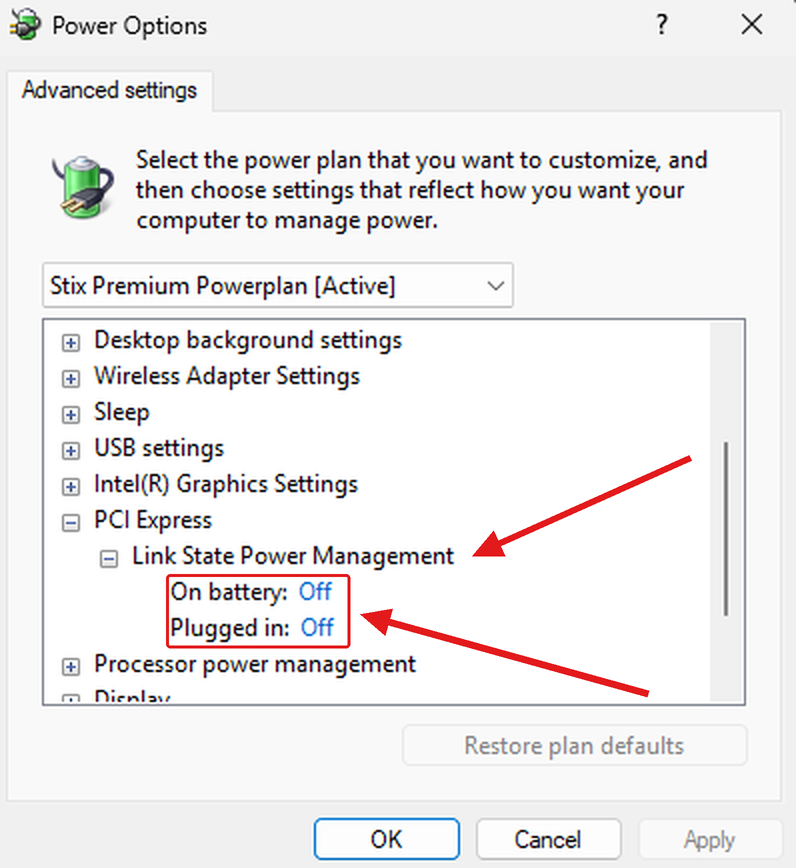
Your PCIe slot might be POWER SAVING mid game
Here's how to check ⬇️
1. Press Windows + R
2. Type powercfg.cpl and hit Enter
3. Click Change plan settings, then Change advanced power settings
4. Open PCI Express and set Link State Power Management to Off