

Top Tweets for #Microinteractions

Make it fast ❌
Make it look fast ✅
Whilst PIN entry does require some back-end processing, users often perceive the app as lagging.
To counteract this I created a micro-interaction which gives a sense of quicker processing.
#MicroInteractions #UIDesign #FigmaMotion
Toggle interaction. Too long. The ON animation overshoots and the OFF is flat.
It took quite a few attempts (10 toggles in total) to get that just right.
Designed in Figma Motion.
Is this feeling tactile or two frames?
#MicroInteractions #UIDesign #FigmaMotion
Today I made my very first micro-interaction! And I’ve watched it about 40 times now.
To be completely honest is it flowing or am I just overly happy with it?
#MicroInteractions #UIDesign #FigmaDesign #MotionDesign #UIUXDesign #InteractionDesign #DesignerLife #LearningInPublic

@Bamidele_XVerse @moovexyz Exactly. Even a seamless flow fails if users are left guessing. Microinteractions, clear CTAs, and progressive disclosure can turn confusion into confidence, and dropouts into conversions.

When I wrote articles for an AI app builder, I learnt a lot about what makes for a good user experience. So let me drop a few:
- Microinteractions enhance the experience by a lot
- Make it frictionless
- If you can, provide the Google login option
- Do user tests and watch session replays to find where they got stuck. Users will rarely ever tell you where they feel stuck or what they didn’t like.

things done:
> integrated codeforces api
> defined api routes
> caching using redis
> improved some microinteractions in the UI
the problem i faced today is that for recent submissions of a group on codeforces i have to find a way to get those submission, let's find it 🙌

- You can now bookmark your favorite inspirations.
- Mobile responsiveness is fixed.
https://t.co/2C11zu93HZ
I just realized that eventually I'll have to turn them all into Figma files....😭
Some might be impossible, because they're purely motion and microinteractions, and Figma's motion feature is not yet advanced.
I've seen some of the craziest and best design works on the internet. And I want to have them all on https://t.co/seaRmnGZsV.
From graphic arts and posters to design portfolios, UI/UX, microinteractions, motion design, landing pages, mobile apps, operating systems, product launches, show reels, and interactive novels, across various sources and websites.
I have 6 folders of Chrome bookmarks all worth 9-10 years of binge browsing for inspiration.
I keep visiting most of them, only to realize they change a lot over the years.
Sometimes there was a really good inspiration design I liked, and now it's lost to the void, forever.
Design inspiration that I, or anyone else could have used.
That's the main reason why I'm building Supershipped.
I have a new direction for Supershipped.
My goal is to make it the biggest design inspiration library in the observable universe.
https://t.co/h2VcgRCDHx


@mohn93 clearer UX first imo. if the user can see the original is still there, then microinteractions become comfort, not decoration

I always avoided trimming in Screen Studio. Took me a while to figure out why: the UX makes you feel like the trimmed parts are gone forever. No sense of how much you cut or where.
In the alternative I'm building, fixing this is a top priority. Trimming should feel safe and reversible.
WDYT makes trimming feel better — clearer UX or better microinteractions?
#FlutterDev
#buildinpublic
#UX

@darekgusto Yeah thats true man. Microinteractions are more in demand now. And it keeps changing tbh and we have to keep up with it.

Check out the prompt below and enjoy the output 😎
You are my personal brand strategist, creative director and senior frontend developer. Based on everything you know about me, create a personal homepage that feels like the website I would have if someone truly understood my work, ambitions, personality, projects and direction. This should not be a resume. This should not be a generic portfolio. This should feel like a sharp personal landing page for a founder, builder, expert or creator. Your job: 1. Infer my positioning. 2. Infer my tone of voice. 3. Infer what topics, projects and ideas I keep coming back to. 4. Turn that into a premium one-page website. Build it as a complete static website using HTML, CSS and JavaScript. The page should include: - a strong hero section with a memorable headline - a short personal positioning statement - a “What I’m really building” section - a “Projects, signals and proof” section - a “Recurring themes” section based on what I often talk about - a “What AI noticed about me” section - a “Now / Next” section - placeholder cards for projects, links and media - tasteful advanced animations - responsive design - dark mode - smooth scroll - microinteractions - polished visual hierarchy Style direction: - modern, premium, slightly futuristic - not startup-template generic - not corporate - not cheesy - more like a founder/operator personal site - strong typography, spacious layout, subtle motion Important: - Do not invent hard facts. - If you are unsure, label something as an assumption. - Make the copy specific, honest and useful. - Avoid AI clichés like “unlock your potential”, “revolutionize”, “game-changer”, “seamless”, “cutting-edge” unless truly justified. Generate the full code.

Built this moon tracker in Figma! 🌕 Inspired by MOONLIT app, it uses drag triggers for real-time UX choreography.
#UIUX #Figma #MotionDesign #Microinteractions

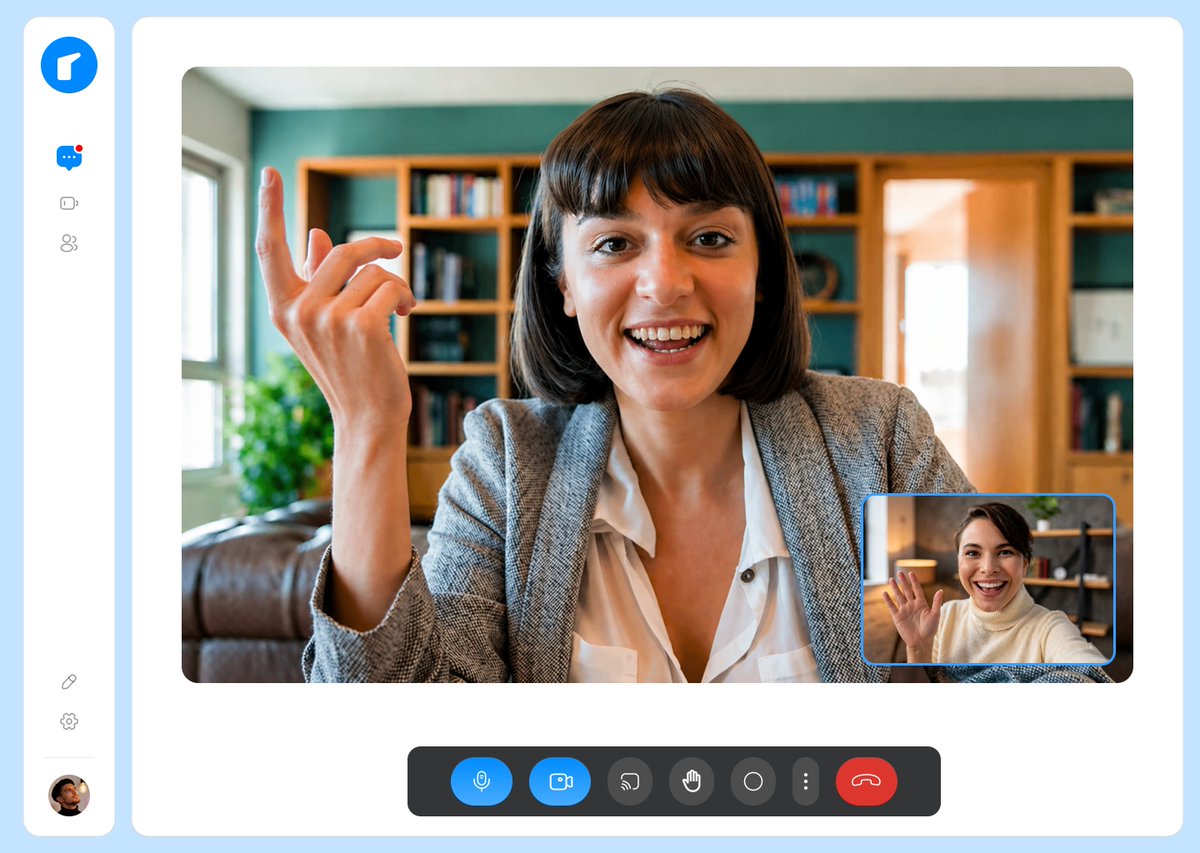
One-on-one video experience, elevated.
Picture-in-picture done right.
Controls where you expect them.
Everything feels effortless.
Small details, big impact.
#ProductDesign #UX #UIUX #MicroInteractions #DesignDetails #UserExperience

Microinteractions won’t fix a bad product…
but they make a good one feel great.

I’ve been building something new 👀
Ousi UI — a modern, composable UI system for @vuejs (Flutter coming soon)
• Microinteractions focused
• Better DX
• Native feel
• Tailwind CSS v4
⭐ https://t.co/CcFwq1RYKp
🌐 https://t.co/JwzA12Pvhn

Not another challenge though
Just showing up consistently
Maybe another one soonest sha ✌️
#microinteractions #uidesign #uxdesign #prototyping
Day 30/30
This is where I draw the curtains. Not to go to sleep, but to refresh and stay focused
A wise man once said "It takes 21 days to build a habit"
Thank you my amazing viewers ❤️
#30daysuichallenge #uidesign #uiux #interactiondesign
Day 26/30
Microinteractions in Figma are small, purposeful animations or visual feedbacks (like button hovers, toggles, or likes) that enhance UX by providing instant response to user actions in prototypes.
#30daysuichallenge #uidesign #uiux #interactiondesign
Day 25/30
The designed of a real estate firm landing page I worked on
I like how attention was paid to simplicity and soft use of colors
#30daysuichallenge #uidesign #uiux #interactiondesign

It's Sunday! @learnframer i'm halfway there! 🔥
𝗗𝗮𝘆 𝟭𝟱 𝗼𝗳 𝗿𝗲-𝗹𝗲𝗮𝗿𝗻𝗶𝗻𝗴 𝗳𝗿𝗮𝗺𝗲𝗿 𝘂𝗻𝘁𝗶𝗹 𝗶 𝗴𝗲𝘁 𝗺𝘆 𝗳𝗶𝗿𝘀𝘁 𝗴𝗶𝗴
Today I built a hover preview image animation.
When you hover on an element, a preview image smoothly appears.
Simple interaction… but it makes the website feel alive.
Small details like this are what turn a normal website into a premium experience.
Still building every day.
Design → Build → Improve.
#BuildInPublic #Framer #NoCode #WebDesign #MotionDesign #MicroInteractions #DesignTwitter
𝐃𝐚𝐲 𝟏𝟒 𝐨𝐟 𝐫𝐞-𝐥𝐞𝐚𝐫𝐧𝐢𝐧𝐠 𝐟𝐫𝐚𝐦𝐞𝐫 𝐮𝐧𝐭𝐢𝐥 𝐢 𝐠𝐞𝐭 𝐦𝐲 𝐟𝐢𝐫𝐬𝐭 𝐠𝐢𝐠
Today I experimented with a horizontal smooth scroll animation.
The goal was to make content move naturally as users navigate across sections, instead of feeling abrupt or static.
What I learned:
• Smooth horizontal movement helps guide attention
• Transitions make the interface feel more fluid
• Small motion details improve the overall experience
Animations are not just for aesthetics. They help users understand where they are and where they are going.
Still learning.
Still refining.
#UIDesign #UXDesign #MicroInteractions #DesignLearning #BuildInPublic #ProductDesign
𝗗𝗮𝘆 𝟭𝟯 𝗼𝗳 𝗿𝗲-𝗹𝗲𝗮𝗿𝗻𝗶𝗻𝗴 𝗳𝗿𝗮𝗺𝗲𝗿 𝘂𝗻𝘁𝗶𝗹 𝗶 𝗴𝗲𝘁 𝗺𝘆 𝗳𝗶𝗿𝘀𝘁 𝗴𝗶𝗴
In order to get more grounded in framer, I focused on optimization for different screens. A website might look perfect on desktop, but the real test is how it behaves on tablet and mobile.
So today was about refining:
• Breakpoints
• Spacing adjustments
• Section behavior across screens
• Text readability on smaller devices
• Keeping animations smooth across layouts
Because great websites aren’t just designed for one screen. They’re designed for every screen.
Still building. Still improving.
#BuildInPublic #Framer #NoCode #WebDesign #ResponsiveDesign #UIDesign #UXDesign #ProductDesign #DesignSystems #DigitalDesign #TechCreators #DesignJourney #CreativeGrowth #StartupDesign

@upsidedownadi @framer Love that creativity! Random components can really spark joy in design. Keep those microinteractions coming!✨ #FramerMagic

𝐃𝐚𝐲 𝟏𝟎 𝐨𝐟 𝐫𝐞-𝐥𝐞𝐚𝐫𝐧𝐢𝐧𝐠 𝐟𝐫𝐚𝐦𝐞𝐫 𝐮𝐧𝐭𝐢𝐥 𝐢 𝐠𝐞𝐭 𝐦𝐲 𝐟𝐢𝐫𝐬𝐭 𝐠𝐢𝐠
Still deep in the world of micro-interactions.
Today I built a checkbox animation, a small interaction, but one that makes a big difference in how an interface feels.
Instead of a static check, I added motion so the action feels responsive and satisfying.
When a user clicks something, the interface should respond in a way that feels alive.
Still learning. Still refining the details.
#BuildInPublic #Framer #NoCode #WebDesign #MicroInteractions #MotionDesign
𝗗𝗮𝘆 𝟵 𝗼𝗳 𝗿𝗲-𝗹𝗲𝗮𝗿𝗻𝗶𝗻𝗴 𝗳𝗿𝗮𝗺𝗲𝗿 𝘂𝗻𝘁𝗶𝗹 𝗶 𝗴𝗲𝘁 𝗺𝘆 𝗳𝗶𝗿𝘀𝘁 𝗴𝗶𝗴
Today I focused on icon animations and experimented with creating a signature animation using the pen tool.
It’s one of those small details that can instantly make a website feel more personal and premium.
This challenge keeps teaching me that the difference between a normal website and a great one often comes down to motion and tiny interactions.
Still building. Still learning.
#BuildInPublic #Framer #NoCode #WebDesign #MotionDesign #MicroInteractions
𝗗𝗮𝘆 𝟴 𝗼𝗳 𝗿𝗲-𝗹𝗲𝗮𝗿𝗻𝗶𝗻𝗴 𝗳𝗿𝗮𝗺𝗲𝗿 𝘂𝗻𝘁𝗶𝗹 𝗶 𝗴𝗲𝘁 𝗺𝘆 𝗳𝗶𝗿𝘀𝘁 𝗴𝗶𝗴
Happy Sunday!
Today I focused on icon animation.
I animated a progress stepper from start to finish and recorded the whole process.
What looked like a small element actually took a lot of thinking:
How the icon transitions
How the progress flows
How the motion feels natural
These tiny details are what make interfaces feel alive and premium.
Still building. Still learning.
#BuildInPublic #Framer #NoCode #MotionDesign #WebDesign

Second component to hit the marketplace this week 💫
Meet: the Multi State Button – A refined button with subtle microinteractions.
Breakdown comming next week!
💬 Comment “Button” and i’ll dm you the component.
🫶 Make sure you’re following
Day 07/30
Designing an interactive add/delete selection
I heard designer charge to do microinteractions separately. Is that true? 🤔
Thank you for viewing 😇
#30DaysUIChallenge #UIDesign #UIUX #InteractionDesign #Dior
Day 06/30
Math in Figma? 😱
Most designers still don’t know this hidden cheat code!
Just type basic math straight into any number field.
Example:
1200/4=300 → 4 perfect columns
Basic school math 😊
#30DaysUIChallenge #UIDesign #UIUX #InteractionDesign
have you ever misspelled hello for hellp.?? i did a few days ago..and i realised just moving a little to the right can make so muchch difference made a little component for the same in @Framer
#madeinframer #microinteractions
This little drop down interaction i created today in @framer ..
what can we improve.?
#madeinframer #microinteractions

Last Seen Hashtags on Sotwe
Trends for you
Most Popular Users

Elon Musk 
@elonmusk
240.1M followers

Barack Obama
@barackobama
118.6M followers

Cristiano Ronaldo
@cristiano
114.4M followers

Donald J. Trump
@realdonaldtrump
111.7M followers

Narendra Modi
@narendramodi
106.9M followers

Rihanna
@rihanna
98.6M followers

NASA
@nasa
92.1M followers

Justin Bieber
@justinbieber
91.7M followers

KATY PERRY
@katyperry
89.9M followers

Taylor Swift
@taylorswift13
83.9M followers

Lady Gaga
@ladygaga
75.4M followers

Virat Kohli
@imvkohli
73.3M followers

Kim Kardashian
@kimkardashian
70.8M followers

YouTube
@youtube
68.6M followers

Neymar Jr
@neymarjr
66.3M followers

Bill Gates
@billgates
65.2M followers

Selena Gomez
@selenagomez
63M followers

The Ellen Show
@theellenshow
62.1M followers

CNN
@cnn
61.7M followers

X
@x
60.6M followers