

Top Tweets for #Nextcloud

Calif, one of the firms that found PHP2Shell, lists the apps it confirmed pre-auth RCE on: WordPress, Drupal, Joomla, Magento, MediaWiki, Nextcloud, phpMyAdmin, Roundcube, Laravel, Symfony, WHMCS.
Free outside check for any site: https://t.co/lRbVw5GgFX #PHP2Shell


Collabora flaw lets attackers backdoor Nextcloud servers https://t.co/Li6vZWh8DS

@agustin_kassis Yo ando con NextCloud


currently working replacing my icloud with immich + Nextcloud

@sandeepdev_code Obsidian + Nextcloud + Claude (dev an thinking) + pi (copywriting) + hermes (website interaction)

It’s ironic to see a company loudly advocating for EU sovereignty while their "product" is just deploying open-source tools like Mattermost and NextCloud on EU data centers, no actual product development involved.
Meanwhile, we’re fighting an uphill battle to win the sovereignty debate by building our own sovereign solutions from the ground up.
Makes me wonder: Is the service business really easier than creating true B2B SaaS?

2. Self-Hosting (my favorite + biggest unlock)
Stop being the product. Run your own versions of the tools you actually use.
Examples:
• Files & photos → Nextcloud
• Movies/TV → Jellyfin
• AI/chat → Self-hosted models (PewDiePie even runs his own)
Why it’s powerful: No data harvesting. No targeted ads. No algorithm noise. You own your data and your tools true digital sovereignty.
PewDiePie said it completely changed how he relates to tech.
Beginner path:
Start with a cheap VPS (Hostinger/Hetzner ~$5/mo) + Docker. Or go full homelab with a Raspberry Pi.
It has a learning curve, but once you do it you’ll never want to go back (same feeling as self-custody in crypto).
Privacy + peace of mind is addictive.
2. Self-Hosting (my favorite)
Ditch Big Tech’s free services. Run your own
(Nextcloud for files, Jellyfin for media, even your own AI).
You’re no longer the product. No targeted ads, no tracking, no algorithm noise.
Start easy: Hostinger VPS + Docker
(one-click apps) or a Raspberry Pi.
PewDiePie says it changed how he sees tech you own it now.
Privacy + peace unlocked.

Joplin is an open-source note-taking app with Markdown support and sync across devices using your own cloud (Nextcloud, Dropbox, etc.) or Joplin Cloud.
https://t.co/02lrF97FKK

35 مفت ٹولز جن کے بارے میں بڑی ٹیک کمپنیاں نہیں چاہتیں کہ آپ جانیں:
1۔ LibreWolf — فائر فاکس جیسا براؤزر، مگر پرائیویسی پہلے سے زیادہ محفوظ۔
2۔ Brave — ایسا براؤزر جو اشتہار لوڈ ہونے سے پہلے ہی بلاک کر دیتا ہے۔
3۔ Whonix — ایسا آپریٹنگ سسٹم جو آپ کی شناخت چھپانے کے لیے بنایا گیا ہے۔
4۔ Tails — یو ایس بی سے چلنے والا سسٹم، استعمال کے بعد کوئی نشان نہیں چھوڑتا۔
5۔ Njalla — ڈومین خریدنے کی سروس جو شناخت محفوظ رکھتی ہے۔
6۔ I2P — خفیہ نیٹ ورک، ٹور سے بھی زیادہ نجی۔
7۔ Freenet — سنسرشپ سے محفوظ فائل شیئرنگ نیٹ ورک۔
8۔ RetroShare — محفوظ اور خفیہ رابطے کا پلیٹ فارم۔
9۔ Jitsi — بغیر اکاؤنٹ ویڈیو کال، ڈیٹا جمع نہیں کرتا۔
10۔ Element — چیٹ ایپ، جہاں پیغامات نجی رہتے ہیں۔
11۔ Session — میسجنگ ایپ، فون نمبر کی ضرورت نہیں۔
12۔ Threema — ایسی چیٹ ایپ جو سرور پر کچھ محفوظ نہیں رکھتی۔
13۔ Standard Notes — محفوظ نوٹس ایپ، مکمل انکرپشن کے ساتھ۔
14۔ Joplin — اوپن سورس نوٹس ایپ، اینڈ ٹو اینڈ انکرپشن کے ساتھ۔
15۔ Syncthing — بغیر کلاؤڈ کے ڈیوائسز کے درمیان فائل شیئرنگ۔
16۔ Nextcloud — اپنا ذاتی کلاؤڈ، اپنی مرضی کے سرور پر۔
17۔ Tutanota — محفوظ ای میل سروس، عام ای میل کا متبادل۔
18۔ Disroot — مفت ای میل، کلاؤڈ اور چیٹ ایک ساتھ۔
19۔ AnonAddy — اصل ای میل چھپانے کے لیے لامحدود ای میل ایڈریس۔
20۔ 33Mail — فوری طور پر کئی ای میل ایڈریس بنائیں۔
21۔ Disconnect — دیکھیں کون آپ کو آن لائن ٹریک کر رہا ہے اور روکیں۔
22۔ PrivacySpy — کمپنیوں کی پرائیویسی پالیسی کو آسان انداز میں جانچتا ہے۔
23۔ ToS;DR — مشکل شرائط و ضوابط کا آسان خلاصہ۔
24۔ 2FAS — اوپن سورس ٹو فیکٹر سیکیورٹی ایپ۔
25۔ KeePassXC — پاس ورڈ منیجر، انٹرنیٹ سے جڑا نہیں رہتا۔
26۔ LessPass — بغیر محفوظ کیے ریاضی کے ذریعے پاس ورڈ بناتا ہے۔
27۔ CryptPad — گوگل ڈاکس جیسا مگر مکمل پرائیویسی کے ساتھ۔
28۔ HedgeDoc — مل کر لکھنے کی ایپ، بغیر ٹریکنگ۔
29۔ LibRedirect — یوٹیوب، ٹوئٹر اور ریڈٹ کو زیادہ نجی ورژن پر لے جاتا ہے۔
30۔ Surveillance Report — معلوم ٹریکنگ ویب سائٹس کی فہرست۔
31۔ The Markup — بڑی ٹیک کمپنیوں کی نگرانی پر تحقیقاتی خبریں۔
32۔ Ghostery — ہر خفیہ ٹریکر کو دکھاتا اور روکنے میں مدد دیتا ہے۔
33۔ Pixelfed — انسٹاگرام جیسا پلیٹ فارم، بغیر اشتہار۔
34۔ Mastodon — ٹوئٹر کا متبادل، کسی ایک کمپنی کے کنٹرول میں نہیں۔
35۔ SearXNG — اوپن سورس اور نجی سرچ انجن۔
کہا جاتا ہے کہ اوسطاً ایک شخص کو ایک وقت میں تقریباً 47 ویب سائٹس پر ٹریک کیا جا رہا ہوتا ہے۔
یہ تمام ٹولز مفت ہیں۔
اسے محفوظ کریں، دوسروں کے بھی کام آ سکتا ہے۔


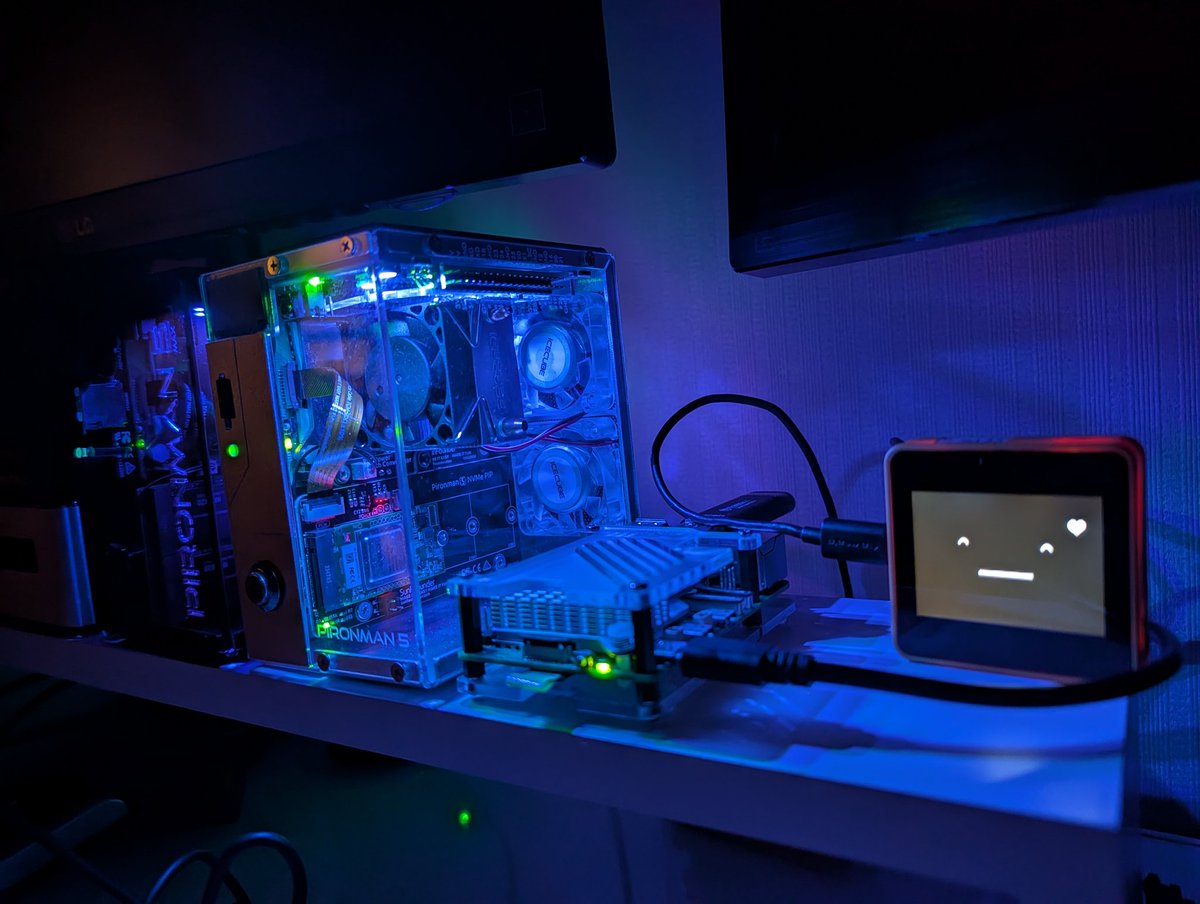
I have three Raspberry Pis at home. Each has a different role. 🏠
📊 My Raspberry Pi configuration:
🖥️ Raspberry Pi 5 (8GB) — Main Server
• Runs multiple services continuously using Docker
• Nextcloud, Immich, Grafana, Stirling-PDF…
• 24/7 operation with NVMe SSD + Pironman 5 case
• Power consumption: Approx. 8W
🤖 Raspberry Pi 4 (4GB) — Robot-mounted unit
• Mounted in a PiCrawler (four-legged spider robot)
• Real-time processing of camera footage
• Autonomous movement powered by battery
📡 Raspberry Pi 3A+ (512MB) — IoT Sensor Terminal
• Plant monitoring with soil moisture + temperature/humidity sensors
• Sends data to the Pi 5 server
• Low power consumption for continuous operation
The total electricity cost for all three is about 500 yen per month.
"Server," "Robot," "IoT"
Dividing them by purpose simplifies the configuration of each unit.
How many Raspberry Pis do you own? Please tell me how you use them!
🔥 Raspberry Pi Projects, Guides and Tutorials
https://t.co/LeR94swk4Q
#RaspberryPi #HomeServer

Did you Believe in Full privacy 100% privete
Ka tambaya: Shin akwai wani "dayake" (device ko technology) da ke da full private? A gaskiya, ba a samu cikakken "full private" technology 100% ba, saboda yawancin hardware (kamar chips, modems, ko baseband a wayoyi) suna da ɗan sirri ko backdoors da ba za a iya kawar da su gaba ɗaya ba.
Amma akwai mafi kyawun zaɓuɓɓuka da ke ba da matakin highest privacy da security idan ka yi amfani da su da kyau (de-googled, open-source, no telemetry, encryption, da sauransu).
1. Smartphones (Wayoyi) Mafi mahimmanci ga yawancin mutaneGrapheneOS akan Google Pixel (Pixel 8, 9, ko sababbi kamar Pixel 10 series): Wannan shine mafi kyawun zaɓi a yanzu ga privacy da security. Yana de-Googled gaba ɗaya (ba ya haɗa da Google servers ba), yana da strong sandboxing, verified boot, da updates na dogon lokaci.
Ba ya aiki da Google Play Services ba sai ka saka sandboxed version idan kana buƙata.
CalyxOS ko /e/OS akan Pixel ko wasu wayoyi kamar Fairphone: Suna kama da Graphene amma suna da ɗan sauƙi ga masu farawa, tare da wasu pre installed privacy apps.
Librem 5 daga Purism ko PinePhone: Waɗannan suna da hardware kill switches (zana microphone, camera, WiFi, da modem). Suna gudana akan Linux-based OS kamar PureOS ko PostmarketOS.
Suna da "fuller" hardware level privacy, amma ba su da kyakkyawan performance kamar Pixel, kuma apps ba su da yawa.
Shawara: Idan kana son sauƙi + mafi kyawun privacy, ka sayi Pixel ka saka GrapheneOS (suna da web installer mai sauƙi). Ka guji stock Android, iOS, ko Samsung saboda suna tattara bayanai.
2. Laptops/ComputersPurism Librem laptops ko wasu da ke gudana akan Coreboot/Libreboot (firmware mai buɗe ido, ba da proprietary blobs ba).
System76 ko Framework Laptop tare da Linux (Fedora, Debian, Qubes OS, ko Linux Mint).
Qubes OS: Yana raba tsarin zuwa "qubes" (separated VMs) don keɓe apps – mafi kyawun don high-risk users.
Mafi kyawun: Ka guji Intel Management Engine (ME) ko AMD PSP idan zai yiwu ta hanyar tsofaffin hardware ko AMD platforms da ke da open-source firmware.
3. Messaging Apps (Chat)Signal: Mafi kyawun gaba ɗaya end-to-end encryption (E2EE), ƙarancin metadata, open-source, ba ya buƙatar email. Ko da hukuma ba za ta iya karanta chats ɗinka ba.
Threema ko Session: Don ƙarin anonymity (ba phone number ba).
Ka guji WhatsApp, Telegram (default), ko iMessage saboda metadata ko ba cikakken E2EE ba.
4. Email da wasu ServicesProton Mail (Switzerland): E2EE, zero-access (ba su iya karanta mails ɗinka ba), tare da VPN, Drive, da Calendar.
Tuta Mail: Mai kyau kuma, E2EE by default.
Mullvad ko Proton VPN don browsing (no-logs, cash payment har).
Browser: Mullvad Browser ko Tor Browser + Brave (tare da tracker blocking).
5. Wasu Privacy ToolsSearch: DuckDuckGo, Brave Search, ko Mojeek (ba ya track ka ba).
Password Manager: Bitwarden (open-source).
File storage: Proton Drive ko self-hosted Nextcloud.
Advanced: Tor network, VeraCrypt don encrypting files, da homomorphic encryption ko zero knowledge proofs a wasu apps (amma waɗannan suna ci gaba a bincike).
Me ya sa ba "full private" ba?Hardware level: Baseband processors, Intel/AMD firmware, ko cellular networks suna iya leaking.
Convenience vs Privacy: Idan ka yi amfani da Google/Apple ecosystem, kana ba da bayanai. Mafi kyawun privacy yana buƙatar ɗan effort (saka custom OS, guji cloud, etc.).
Trade-offs: GrapheneOS yana da kyakkyawan security amma ba ya da wasu Google apps ba sai ka saka alternatives (F-Droid, Aurora Store).
Yadda za ka fara: Ka fara da Signal da Proton Mail sauƙi kuma yana ba da babban ci gaba.
Idan kana son waya: Ka nemo Pixel ka saka GrapheneOS.
Don full stack: Ka canza zuwa Linux desktop + de-Googled phone + VPN + Tor lokacin da kake buƙata.
@creptosolutions @MidnightNtwrk


Nextcloud keeps timing out on your VPS? The real fix is usually PHP-FPM, Redis locking, cron jobs, NGINX and MariaDB — not the app itself.
Full guide here 👉 https://t.co/Eum11Z240v
#SelfHosted #Nextcloud #Linux #VPS
Nextcloud timing out?
It's not the app. Fix PHP-FPM, Redis locking, cron & NGINX first.
👉 https://t.co/iUYnQDZtrt
#ServerSpan #Nextcloud #Linux #SelfHosted #VPS #ServerAdmin #OpenSource #PHPdev #MariaDB #Redis #SysAdmin

Nextcloud timing out on VPS?
It’s not the app — fix PHP-FPM, Redis locking, cron, NGINX, MariaDB & reverse proxy first.
Full guide here https://t.co/Eum11Z240v
#Nextcloud #SelfHosted #Linux #VPS #SysAdmin #OpenSource
Nextcloud timing out?
It's not the app. Fix PHP-FPM, Redis locking, cron & NGINX first.
👉 https://t.co/iUYnQDZtrt
#ServerSpan #Nextcloud #Linux #SelfHosted #VPS #ServerAdmin #OpenSource #PHPdev #MariaDB #Redis #SysAdmin

OpenClaw folks: I’ve been using a custom Nextcloud Talk messaging plugin for very effective agent management: rooms for each agent, rooms for all agents, some mention-gated and some not, reply/thread awareness, native media and voice note sending / receipt, and AI-powered room control (so six agents don’t reply at once if I address only a few — and they do join back in when I tell them to).
Do other messaging solutions give you this level of intelligent agent-to-agent and user-to-agent functionality for natural, collaborative office-like and human-like communications and work? I have some clients who I was going to give my Nextcloud talk custom plugin, and I was thinking of becoming a Nextcloud Talk maintainer for Openclaw as nobody else is working on it, but I wonder if my clients would be even better served by something else.
Are you still accessing your home server services via HTTP? 🔓
You can get a free SSL certificate with Let's Encrypt. Certbot has an automatic renewal feature, but you'll need to reload your web server after renewal and check for renewal failures, so be sure to check regularly.
💡 Why do I need HTTPS on my home server?
✅ Browser warnings will be eliminated.
✅ Passwords and personal information will be encrypted.
✅ Many services, such as Nextcloud and Vaultwarden, require HTTPS.
🔧 Obtain with Certbot (official client):
sudo apt install certbot
sudo certbot certonly --standalone -d https://t.co/WUITqgrCDv
⚠️ --standalone will have Certbot itself listen on port 80. Your server must be reachable from the Internet via that domain. If your existing web server is using port 80, you'll need to suspend it.
Using a public domain name is usually the easiest option. For local use only, you can also set up and trust a private CA (such as smallstep).
Are you enabling HTTPS on your home server? Let's Encrypt / self-signed certificate / still HTTP / VPN only?
🔥 Top 6 Raspberry Pi eBooks V1
https://t.co/W1rLX7mwlg
#RaspberryPi #homeserver

Are you getting enough cloud storage space? ☁️
By installing Nextcloud on a Raspberry Pi, you can have your own personal cloud storage running at home. Unlimited storage capacity. Only electricity costs (¥150-200/month).
💡 What you can do:
✅ Automatic file synchronization from PC and smartphone
✅ Automatic backup of smartphone photos
✅ Calendar and contact management (CalDAV/CardDAV)
✅ Collaborative document editing (Collabora Online integration)
✅ Expandable storage capacity with USB SSD (1TB or 2TB)
✅ 2FA login protection
🐳 Docker Compose (AIO version recommended):
docker compose up -d
→ The setup wizard completes the initial setup.
GitHub Stars 28,000+. Used worldwide, from personal use to businesses.
The peace of mind of having your data at your fingertips is a value that cloud services lack. Using it in conjunction with other services is also recommended. It's also convenient for keeping only important data at your fingertips. How do you manage your files? Cloud only / Self-hosted / Both / No particular management?
🔥 Top 6 Raspberry Pi eBooks V1
https://t.co/W1rLX7mwlg
#RaspberryPi #HomeServer

Nextcloud es una nube privada self-hosted alternativa a Google Drive o Dropbox.
Te da control total de tus datos con archivos, videollamadas, calendario y edición de documentos en una sola plataforma.
https://t.co/N6qZ3W1WR7

The era of passive chatbots is ending.
OpenClaw is a personal AI assistant you run on your own devices. It answers you on the channels you already use (WhatsApp, Telegram, Slack, Discord, Google Chat, Signal, iMessage, BlueBubbles, IRC, Microsoft Teams, Matrix, Feishu, LINE, Mattermost, Nextcloud Talk, Nostr, Synology Chat, Tlon, Twitch, Zalo, Zalo Personal, WebChat). It can speak and listen on macOS/iOS/Android, and can render a live Canvas you control. The Gateway is just the control plane — the product is the assistant.
If you want a personal, single-user assistant that feels local, fast, and always-on, this is it.
A real personal AI operator.
👉 https://t.co/TTFBlBJV4U
#AI #Agents #OpenSource #Automation #LocalAI

My unpopular opinion now a days is that AI isn't gonna eat every SaaS' launch.
The moat is price vs how much time you need to spend to get up your replacement for a SaaS and then maintain it.
If you charge $500 a month for something that can be created via AI, you will see AI eating up your business.
If you charge $10 a month for your app, you will be mostly on safe side.
There are tons of open source solutions that are pretty solid to SaaS yet SaaS are doing billions per year.
Nextcloud + email server can replace all of google workspace, no one is doing it.
Free alternatives to Slack are available but they are billion dollar company.
If the cost of subscription is lower than the cost of time, people will stick with you product.

@dazzBuilds where is nextcloud?

Prefer more control? Here are some 👇
🌐 Decentralized Cloud Storage Platforms
These platforms distribute your data across many independent nodes instead of storing it in one company’s data centers. This improves privacy, censorship resistance, and user control.
🚀 Key Decentralized Networks
1. Filecoin
A widely used decentralized storage network built on the IPFS protocol.
Files are split, encrypted, and stored across a distributed network of storage providers.
Storage providers are incentivized via the FIL token.
👉 Good for long-term storage and large datasets.
2. Storj DCS
Decentralized storage that’s S3-compatible (similar to Amazon S3 but decentralized).
Data is encrypted, sharded, and spread across many nodes worldwide.
Users can integrate it easily into apps that already use AWS S3 APIs.
👉 Excellent for developers and apps migrating from traditional cloud.
3. Sia (Siacoin)
A marketplace where users rent out unused disk space and pay in the SC token.
Files are redundantly split and stored across multiple hosts.
Known for cost-effectiveness and privacy.
👉 Good for personal backups and archival storage.
4. IPFS (InterPlanetary File System)
A content-addressed peer-to-peer file system.
Not a full “cloud storage provider” by itself, but powers many decentralized apps and storage layers (like Filecoin).
👉 Great for distributed sharing and hosting static data.
5. Arweave
Focuses on permanent data storage — you pay once to store data forever.
Often used for archiving important records, websites, or immutable logs.
👉 Ideal for historical or permanent archives.
6. Akash Network
A decentralized cloud marketplace that can include storage and compute resources.
Providers sell unused capacity, and users can deploy services in a decentralized ecosystem.
👉 Useful if you want more than just storage (e.g., decentralized apps).
📌 Traditional Decentralized-Feeling Alternatives
These aren’t fully blockchain-decentralized, but offer more control / privacy than Google Drive / iCloud:
Nextcloud (self-hosted) – run your own cloud instance on your server or Raspberry Pi.
Internxt – privacy-first cloud storage with file sharding and encryption before upload (not fully blockchain, but user-controlled encryption).

Which is the best Cloud Storage service?

Joplin es una aplicación de código abierto para tomar notas que permite capturar ideas y acceder a ellas de forma segura desde cualquier dispositivo. Es compatible con Markdown y permite sincronizar las notas mediante servicios en la nube propios (como Nextcloud o Dropbox) o a través de Joplin Cloud.
https://t.co/VaCd8X2I6O
#opensource #evernote #notion #gratis #nosubscription


@beepmatz Nextcloud is what you're seeking for https://t.co/z682GhtRcH

@rozzabuilds 4 CPU / 8GB is plenty. OpenClaw itself is lightweight.
I run mine on 8 vCPU / 22GB, but that's because I'm also running Dokploy, PostgreSQL, Gitea, n8n, Nextcloud etc etc on the same box.
If it's isolated, 4/8 will be fine.
Last Seen Hashtags on Sotwe
familytransfers
Seen from United States
cowgirl
Seen from Turkey
NSFW
Seen from United States
ImPaulsive
Seen from United States
ควยหนุ่มโรงงาน
Seen from Thailand
cantho #some
Seen from France
หีดำ
Seen from Thailand
thundr
Seen from Netherlands
ayulatifah
Seen from Malaysia
tnwo
Seen from United States
Trends for you
Most Popular Users

Elon Musk 
@elonmusk
240.1M followers

Barack Obama
@barackobama
118.6M followers

Cristiano Ronaldo
@cristiano
114.4M followers

Donald J. Trump
@realdonaldtrump
111.7M followers

Narendra Modi
@narendramodi
106.9M followers

Rihanna
@rihanna
98.6M followers

NASA
@nasa
92.1M followers

Justin Bieber
@justinbieber
91.7M followers

KATY PERRY
@katyperry
89.9M followers

Taylor Swift
@taylorswift13
83.9M followers

Lady Gaga
@ladygaga
75.4M followers

Virat Kohli
@imvkohli
73.3M followers

Kim Kardashian
@kimkardashian
70.8M followers

YouTube
@youtube
68.6M followers

Neymar Jr
@neymarjr
66.3M followers

Bill Gates
@billgates
65.2M followers

Selena Gomez
@selenagomez
63M followers

The Ellen Show
@theellenshow
62.1M followers

CNN
@cnn
61.7M followers

X
@x
60.6M followers