@armkotolyan@ChadAppDev Yep you are right. They would let you call your app chrome in title. Let you use chrome app icon to mislead users as well.
@AppStore review guidelines violations are allowed to insiders
I am 110% sure that app reviewers are taking kick backs.
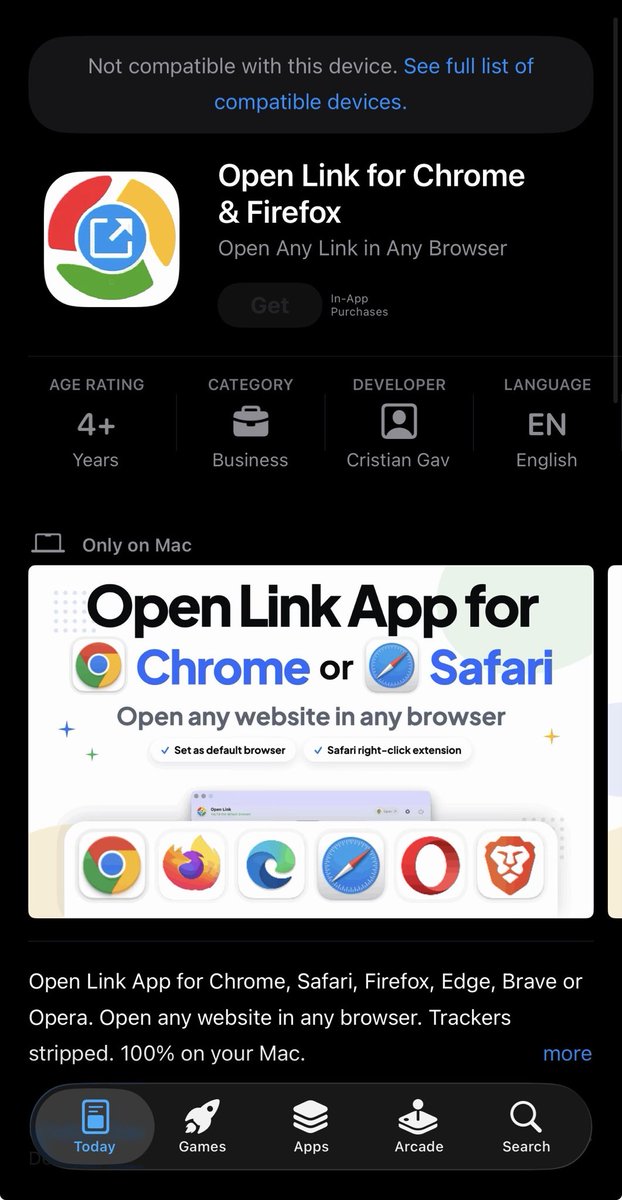
Look at that misleading app icon 🤯
Who is approving these apps? @AppStore@Apple
#1 app on mac AppStore in business category is in violation of at least these app review guidelines:
4.1 (c)
2.3.9
5.2.1
2.3.7
Developer code of conduct:
4.1(b)
5.6.3
You search for “google chrome” and the first thing you see is this app. Thats clearly misleading users for actual google chrome.
Apple, this deserves closer look and review.
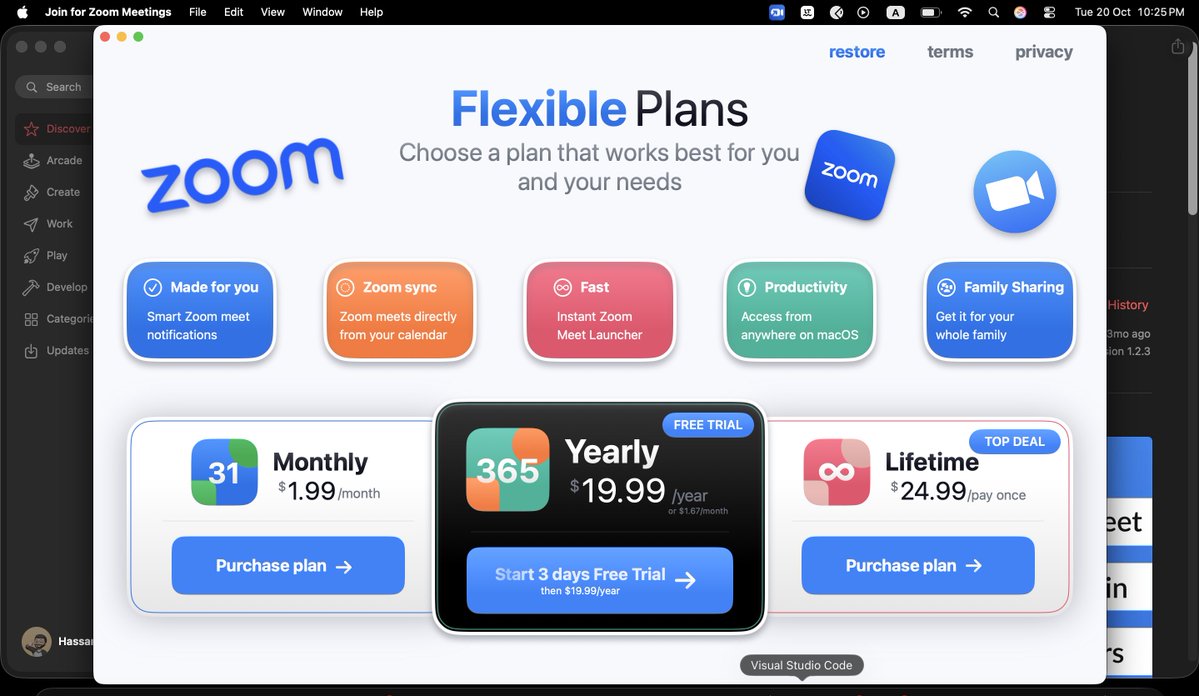
These Apps are impersonating @MicrosoftTeams and @Zoom by calling them "Join for" Teams/Zoom.
- Both apps use same naming format < Join (Verb) for Teams/Zoom >
- Apps are misleading users into downloading, by using similar looking App icons, Graphics, trademarked terms, colour schemes, screenshot formats and text.
- At one point the Teams app literally had "Microsoft Teams" in title and screenshots. App review team can confirm this on their end.
- All updates on both apps are submitted for review with "critical bug fixes" as review notes, to bypass or subvert the regular app review process.
- Both apps show hard paywall and ask for rating right at launch so users can't realise that its not an official app before paying
- There are hundreds of user reviews where users are bashing actual @MicrosoftTeams and @Zoom which shows that these apps are misleading users.
App Review Guidelines: 4.1(a), 4.1(b), 4.1(c), 5.2.1, 2.3.7, 2.3.3, 2.3.9, 2.3.1(a), 5.2.2
Developer Code of Conduct: 5.6, 5.6.2
@Apple@AppStore
Apps 🔍:
Teams: https://t.co/8UP38n3EEW
Zoom: https://t.co/MB869iF5ZU
#MacAppStore #AppStore #teams #microsoft #zoom #ScamApps #ConsumerProtection #CyberSecurity
@AppStore@Apple these 2 impersonating and fraudulent apps presenting themselves as @Zoom & @MicrosoftTeams have been removed from sale by the developer.
But their paywall packages are still loading and purchases are working.
Which shows that the fraudulent apps are trying to again cheat the system, continuing to charge users with recurring subscriptions and keep making money. But on the surface they just disappeared from @AppStore@AppStore This should be investigated,
❓Why removed from sale? What are they hiding?
❓Why the in app purchases and user subscriptions are still active?
❓How were these approved by review team multiple times in last year?
❓What is the loop hole or flaw in appstore review process that was exploited by these apps?
Apps 🔍:
Teams: https://t.co/wINLrukNKE…
Zoom: https://t.co/wINLrukNKE…
#MacAppStore #AppStore #teams #microsoft #zoom #ScamApps #ConsumerProtection #CyberSecurity
Apple, this deserves closer look and review.
These Apps are impersonating @MicrosoftTeams and @Zoom by calling them "Join for" Teams/Zoom.
- Both apps use same naming format < Join (Verb) for Teams/Zoom >
- Apps are misleading users into downloading, by using similar looking App icons, Graphics, trademarked terms, colour schemes, screenshot formats and text.
- At one point the Teams app literally had "Microsoft Teams" in title and screenshots. App review team can confirm this on their end.
- All updates on both apps are submitted for review with "critical bug fixes" as review notes, to bypass or subvert the regular app review process.
- Both apps show hard paywall and ask for rating right at launch so users can't realise that its not an official app before paying
- There are hundreds of user reviews where users are bashing actual @MicrosoftTeams and @Zoom which shows that these apps are misleading users.
App Review Guidelines: 4.1(a), 4.1(b), 4.1(c), 5.2.1, 2.3.7, 2.3.3, 2.3.9, 2.3.1(a), 5.2.2
Developer Code of Conduct: 5.6, 5.6.2
@Apple@AppStore
Apps 🔍:
Teams: https://t.co/8UP38n3EEW
Zoom: https://t.co/MB869iF5ZU
#MacAppStore #AppStore #teams #microsoft #zoom #ScamApps #ConsumerProtection #CyberSecurity
Apple, this deserves closer look and review.
These Apps are impersonating @MicrosoftTeams and @Zoom by calling them "Join for" Teams/Zoom.
- Both apps use same naming format < Join (Verb) for Teams/Zoom >
- Apps are misleading users into downloading, by using similar looking App icons, Graphics, trademarked terms, colour schemes, screenshot formats and text.
- At one point the Teams app literally had "Microsoft Teams" in title and screenshots. App review team can confirm this on their end.
- All updates on both apps are submitted for review with "critical bug fixes" as review notes, to bypass or subvert the regular app review process.
- Both apps show hard paywall and ask for rating right at launch so users can't realise that its not an official app before paying
- There are hundreds of user reviews where users are bashing actual @MicrosoftTeams and @Zoom which shows that these apps are misleading users.
App Review Guidelines: 4.1(a), 4.1(b), 4.1(c), 5.2.1, 2.3.7, 2.3.3, 2.3.9, 2.3.1(a), 5.2.2
Developer Code of Conduct: 5.6, 5.6.2
@Apple@AppStore
Apps 🔍:
Teams: https://t.co/8UP38n3EEW
Zoom: https://t.co/MB869iF5ZU
#MacAppStore #AppStore #teams #microsoft #zoom #ScamApps #ConsumerProtection #CyberSecurity
Here is some more evidence for the @AppStore team, of the 2 fraudulent apps impersonating @MicrosoftTeams and @Zoom
Forcing users into paying with paywall right after launch, before they realise it’s not the official apps. Review prompt shows right after the launch to get the rating asap.
@AppStore@Apple really need to improve the App review guidelines enforcement. How can an app call itself “Microsoft Teams” or “Zoom”
Reviews shared above are literally bashing the actual software providers, which shows that the users are being mislead by metadata of these apps.
#MacAppStore #AppStore #teams #microsoft #zoom #ScamApps #ConsumerProtection #CyberSecurity
Apple, this deserves closer look and review.
These Apps are impersonating @MicrosoftTeams and @Zoom by calling them "Join for" Teams/Zoom.
- Both apps use same naming format < Join (Verb) for Teams/Zoom >
- Apps are misleading users into downloading, by using similar looking App icons, Graphics, trademarked terms, colour schemes, screenshot formats and text.
- At one point the Teams app literally had "Microsoft Teams" in title and screenshots. App review team can confirm this on their end.
- All updates on both apps are submitted for review with "critical bug fixes" as review notes, to bypass or subvert the regular app review process.
- Both apps show hard paywall and ask for rating right at launch so users can't realise that its not an official app before paying
- There are hundreds of user reviews where users are bashing actual @MicrosoftTeams and @Zoom which shows that these apps are misleading users.
App Review Guidelines: 4.1(a), 4.1(b), 4.1(c), 5.2.1, 2.3.7, 2.3.3, 2.3.9, 2.3.1(a), 5.2.2
Developer Code of Conduct: 5.6, 5.6.2
@Apple@AppStore
Apps 🔍:
Teams: https://t.co/8UP38n3EEW
Zoom: https://t.co/MB869iF5ZU
#MacAppStore #AppStore #teams #microsoft #zoom #ScamApps #ConsumerProtection #CyberSecurity
@harshil Same @AppStore reviewers have approved these fake @MicrosoftTeams and @Zoom apps, Multiple updates sent marked as “Critical bug fixes” and got approved💀💀
Apple, this deserves closer look and review.
These Apps are impersonating @MicrosoftTeams and @Zoom by calling them "Join for" Teams/Zoom.
- Both apps use same naming format < Join (Verb) for Teams/Zoom >
- Apps are misleading users into downloading, by using similar looking App icons, Graphics, trademarked terms, colour schemes, screenshot formats and text.
- At one point the Teams app literally had "Microsoft Teams" in title and screenshots. App review team can confirm this on their end.
- All updates on both apps are submitted for review with "critical bug fixes" as review notes, to bypass or subvert the regular app review process.
- Both apps show hard paywall and ask for rating right at launch so users can't realise that its not an official app before paying
- There are hundreds of user reviews where users are bashing actual @MicrosoftTeams and @Zoom which shows that these apps are misleading users.
App Review Guidelines: 4.1(a), 4.1(b), 4.1(c), 5.2.1, 2.3.7, 2.3.3, 2.3.9, 2.3.1(a), 5.2.2
Developer Code of Conduct: 5.6, 5.6.2
@Apple@AppStore
Apps 🔍:
Teams: https://t.co/8UP38n3EEW
Zoom: https://t.co/MB869iF5ZU
#MacAppStore #AppStore #teams #microsoft #zoom #ScamApps #ConsumerProtection #CyberSecurity
Apple, this deserves closer look and review.
These Apps are impersonating @MicrosoftTeams and @Zoom by calling them "Join for" Teams/Zoom.
- Both apps use same naming format < Join (Verb) for Teams/Zoom >
- Apps are misleading users into downloading, by using similar looking App icons, Graphics, trademarked terms, colour schemes, screenshot formats and text.
- At one point the Teams app literally had "Microsoft Teams" in title and screenshots. App review team can confirm this on their end.
- All updates on both apps are submitted for review with "critical bug fixes" as review notes, to bypass or subvert the regular app review process.
- Both apps show hard paywall and ask for rating right at launch so users can't realise that its not an official app before paying
- There are hundreds of user reviews where users are bashing actual @MicrosoftTeams and @Zoom which shows that these apps are misleading users.
App Review Guidelines: 4.1(a), 4.1(b), 4.1(c), 5.2.1, 2.3.7, 2.3.3, 2.3.9, 2.3.1(a), 5.2.2
Developer Code of Conduct: 5.6, 5.6.2
@Apple@AppStore
Apps 🔍:
Teams: https://t.co/8UP38n3EEW
Zoom: https://t.co/MB869iF5ZU
#MacAppStore #AppStore #teams #microsoft #zoom #ScamApps #ConsumerProtection #CyberSecurity
Apple, this deserves closer look and review.
These Apps are impersonating @MicrosoftTeams and @Zoom by calling them "Join for" Teams/Zoom.
- Both apps use same naming format < Join (Verb) for Teams/Zoom >
- Apps are misleading users into downloading, by using similar looking App icons, Graphics, trademarked terms, colour schemes, screenshot formats and text.
- At one point the Teams app literally had "Microsoft Teams" in title and screenshots. App review team can confirm this on their end.
- All updates on both apps are submitted for review with "critical bug fixes" as review notes, to bypass or subvert the regular app review process.
- Both apps show hard paywall and ask for rating right at launch so users can't realise that its not an official app before paying
- There are hundreds of user reviews where users are bashing actual @MicrosoftTeams and @Zoom which shows that these apps are misleading users.
App Review Guidelines: 4.1(a), 4.1(b), 4.1(c), 5.2.1, 2.3.7, 2.3.3, 2.3.9, 2.3.1(a), 5.2.2
Developer Code of Conduct: 5.6, 5.6.2
@Apple@AppStore
Apps 🔍:
Teams: https://t.co/8UP38n3EEW
Zoom: https://t.co/MB869iF5ZU
#MacAppStore #AppStore #teams #microsoft #zoom #ScamApps #ConsumerProtection #CyberSecurity
Apple, this deserves closer look and review.
These Apps are impersonating @MicrosoftTeams and @Zoom by calling them "Join for" Teams/Zoom.
- Both apps use same naming format < Join (Verb) for Teams/Zoom >
- Apps are misleading users into downloading, by using similar looking App icons, Graphics, trademarked terms, colour schemes, screenshot formats and text.
- At one point the Teams app literally had "Microsoft Teams" in title and screenshots. App review team can confirm this on their end.
- All updates on both apps are submitted for review with "critical bug fixes" as review notes, to bypass or subvert the regular app review process.
- Both apps show hard paywall and ask for rating right at launch so users can't realise that its not an official app before paying
- There are hundreds of user reviews where users are bashing actual @MicrosoftTeams and @Zoom which shows that these apps are misleading users.
App Review Guidelines: 4.1(a), 4.1(b), 4.1(c), 5.2.1, 2.3.7, 2.3.3, 2.3.9, 2.3.1(a), 5.2.2
Developer Code of Conduct: 5.6, 5.6.2
@Apple@AppStore
Apps 🔍:
Teams: https://t.co/8UP38n3EEW
Zoom: https://t.co/MB869iF5ZU
#MacAppStore #AppStore #teams #microsoft #zoom #ScamApps #ConsumerProtection #CyberSecurity
Geçen hafta Claude ile 6 saatimi dijital ayak izimi silmeye ayırdım.
Adım, telefonum ve adresimin bulunduğu 47 kaydı sildirdim. Kullanmadığım 12 eski hesabı tamamen kapattım.
Nasıl yaptım, adım adım anlatıyorum:
@onmyway133@indieapplove Go to https://t.co/sdySetWn6i support > contact us > app review > report an app > select 4.1
Add all the details, there is no option of attachments but you can send a google drive link with all the evidence compiled into one pdf or screenshots
found 51 apps removed from the App Store in the last 30 days!!
15 were AI photo/video editors, including Glam AI, PhotoDirector and Parrot.
I’d look at which apps disappeared before deciding a niche is worth entering.
@MartinTale They saw onboarding, and a hard paywall.
Show them results of the “intent” they downloaded the app for and then show hard paywall.
For instance, background remover app. Let them remove the background and see it actually works and then show hard paywall