Ingeniero de anthropic:
“No se trata de que tú le hagas prompt a Claude, se trata de que construyas un sistema que se haga prompt a sí mismo.”
Este es, sin duda, uno de los workflows más potentes que he visto en mucho tiempo.
En el video desmonta exactamente cómo la mayoría está usando Claude mal:
- El 14% que pierdes en CLAUDE.md antes de escribir una sola palabra
- Los plugins que el 95% de la gente ni siquiera ha instalado
- El setup de caching que mantiene un 95% de hit rate y lo hace casi gratis
- Por qué empezar cada chat desde cero es la forma más lenta de usar Claude
Si llevas más de un mes usando Claude y nunca has salido de la ventana de chat, estás usando un solo proyecto cuando podrías estar dirigiendo un equipo entero de ellos.
En vez de ver otro capítulo de una serie, mira esto.
Guárdalo ya, antes de que se pierda en el feed.
New video: Custom JavaScript variable in Google Tag Manager.
In this video, I will show 3 use cases where this variable can be useful.
https://t.co/3twmp5oZM2
#googletagmanager#gtmtips
😱 Google AI has quietly released an SEO consulting service for free.
"Gemini 1.5 Pro 002" model (which you can access via Google AI Studio) can provide SEO recommendations (for both desktop and mobile) for meta elements, content, speed, UX, keywords, and technical SEO and suggest content strategy improvements based on the uploaded video of your website.
I tested this tool. The SEO recommendations provided by AI to me are very generic. Maybe because the video I uploaded wasn't detailed enough or the prompt I used wasn't good enough.
But it should give you an idea of where the AI is heading. After devouring informational websites, AI is coming for consulting services.
.
.
I have been saying repeatedly for years, that if a big part of your job involves doing repetitive manual tasks and/or following checklists/SOPs, it will be fully automated. It is just a matter of time.
Now, take a close look at your day-to-day work and see how many repetitive tasks you carry out each day that do not require much thinking but just follow a checklist or SOP (Standard Operating Procedure).
If another person gets hold of your checklists/SOPs, can they easily replace you?
If the answer is yes, you will soon be replaced by a plug-in or software.
.
.
The skills you possess right now will most likely still be required in the near future. That's the good news.
However, you, as a human being, are not guaranteed to be required to have those skills.
.
.
Digital analytics is one of the future-proof careers, most likely for another 10-15 years.
Now, you may be thinking about machine learning. Can't it replace digital analysts? Yes, it can, but the probability is very low.
SaaS companies have been trying to create tools to automate gaining insights for over a decade but have had no success. Even with the advent of AI, there is still no significant progress in this field.
The reality is that machines are not good at understanding the context in which data should be analyzed & interpreted.
The factors required to understand the context (like an organization's collective know-how and interaction with other human beings…) are often outside the digital realm.
You can not create a checklist or an SOP to find and understand the context in which data should be analyzed and interpreted.
.
.
Different people can analyze and interpret the same data differently, even if you give them the same checklist.
It all depends upon the context in which the data is interpreted. If you understand the context better, your data interpretation will be more accurate.
.
.
Unless AI reaches singularity (which is unlikely to happen anytime soon), human beings will be required to oversee the overall operation and make strategic decisions.
Now the question is whether you will be one of those few lucky human beings the machines will still require.
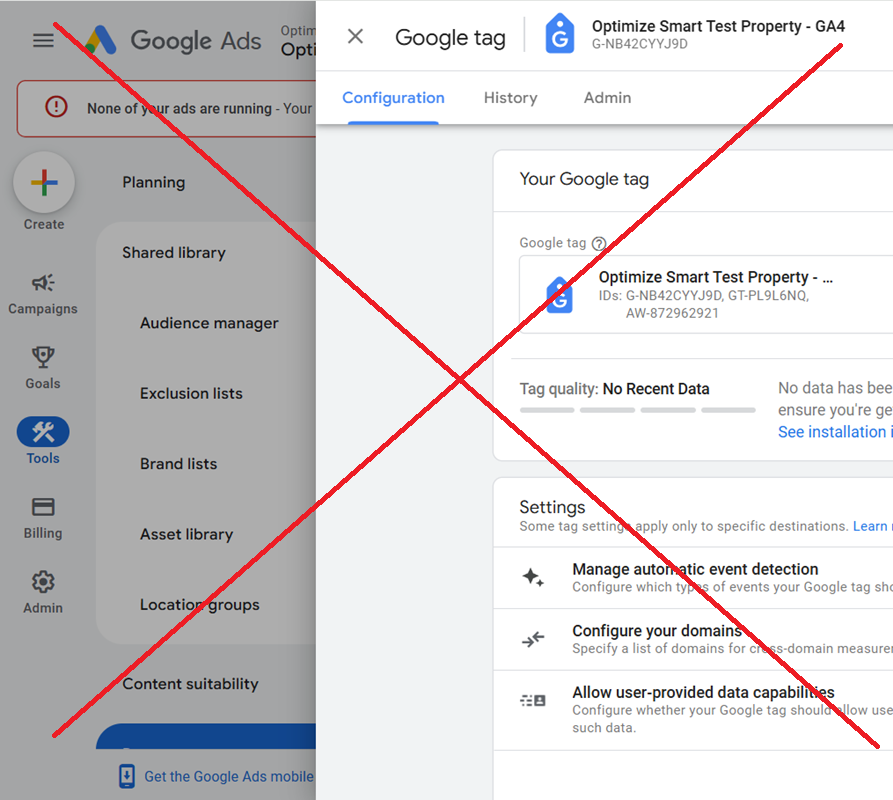
💀 ☠ 💥 You should not configure Google tag settings simultaneously via GTM, Google Ads, and #GA4. The Google documentation regarding this is not very clear, and many users make mistakes.
For example, while setting up enhanced conversions for leads via Google Tag Manager, Google asks you to configure Google Tag settings via Google Ads.
For other tracking setups, Google may ask you to configure Google Tag via GTM or GA4.
.
.
But if you have been configuring Google Tag settings via GA4 property, you should continue configuring that way even when setting up enhanced conversions for leads in Google Ads.
So, if you have been managing ‘automatic event detection’ via GA4 property, don’t start managing it via Google Ads just to set up enhanced conversions for leads.
.
.
When you configure Google Tag simultaneously via GA4, Google Ads, and GTM, conflicting tag configurations can occur, increasing the risk of data integrity issues.
The key is to maintain a single source of configuration for your Google Tag settings.
.
.
So, if you have been using GA4 for configuring Google Tag settings continue to do so.
Do not start using GTM or Google Ads to configure your Google Tag later.
.
.
If you have to use different platforms for Google Tag configuration, make sure there are no conflicting configurations.
Remember that Google documentation is not always clear or correct, and AI tools regurgitate the content I and other content developers write.
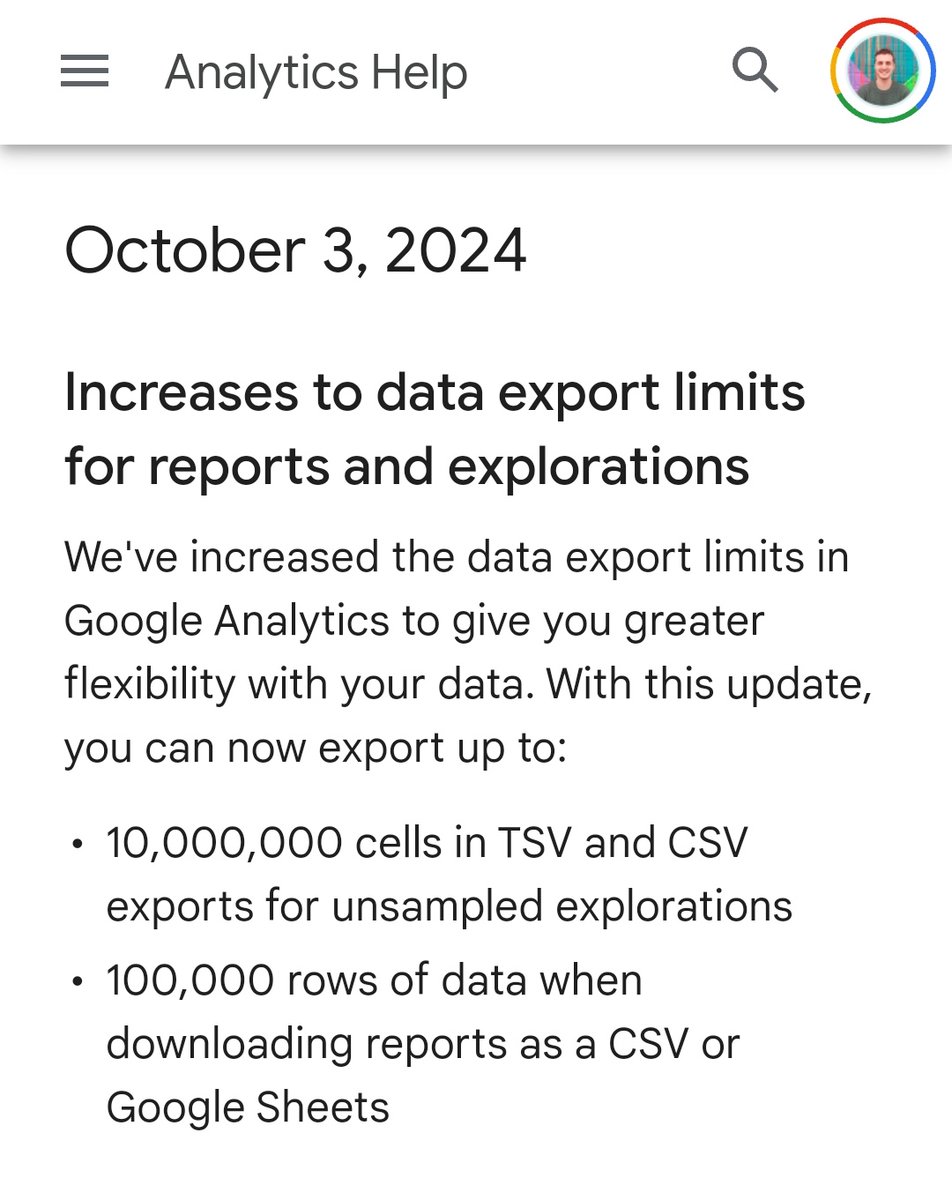
🆕 GA4 - Aumentan en los límites de exportación de datos
•10,000,000 celdas en exportaciones TSV y CSV para exploraciones sin muestreo (GA4 360).
•100,000 filas de datos al descargar informes en formato CSV o Google Sheets.
Muchos SEOs creen que al hacer un 301 el contenido se mueve sin más consecuencias: ¡Y no podrían estar más equivocados!
Vengo a contaros lo que pasa cuando haces un 301. Reevalución del contenido, pérdida de señales, snippets,... ¿quieres sabe más? ⬇️
https://t.co/aJ9v3f3Vgc
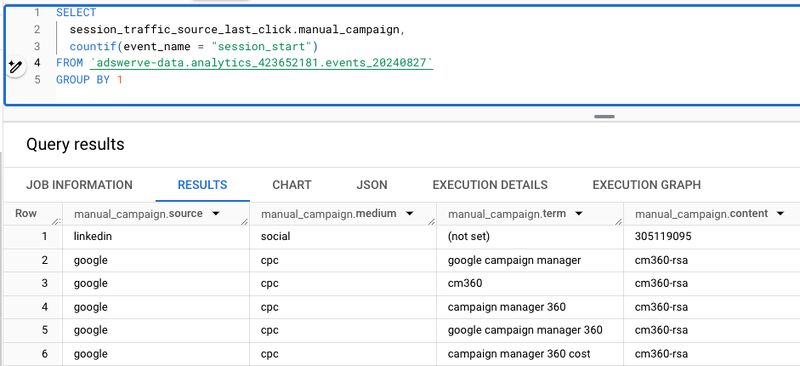
#BigQuery now allows the usage of the GROUP BY and SELECT DISTINCT with arrays and structs!
In the screenshot below I GROUP BY all session traffic source fields with using a singlestruct.
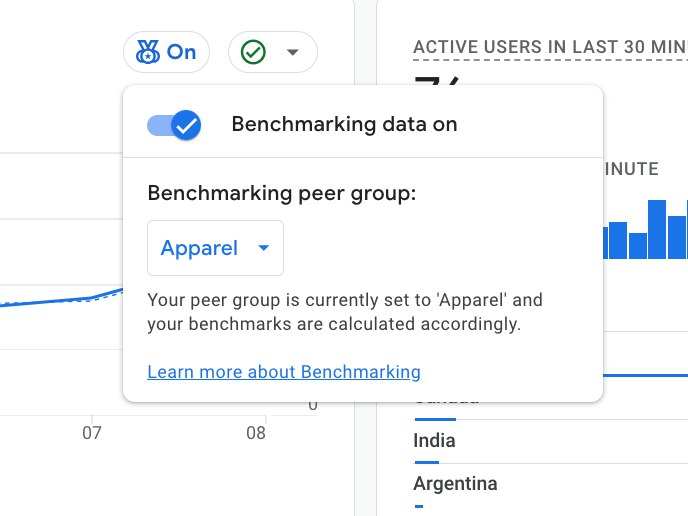
🆕 GA4 - Benchmarking
Lanzan la funcionalidad Benchmarking, que permite comparar el rendimiento de tu negocio con otros del mismo sector.
Para acceder, activa Modeling contributions & business insights en Admin > Account Settings. Aunque por ahora, no parece estar disponible 🕵️♂️
Very nice update to Google Tag Manager’s custom template APIs - you can now write unit tests for complex APIs that return an object (Firestore, LocalStorage…).
https://t.co/MBHmjoTsqm
Google ha lanzado la “First Party Mode” en versión beta.
Permite utilizar reglas de reescritura en el dominio propio del sitio web para redirigir el tráfico de etiquetas de Google a través de un end point personalizado (ej. https://t.co/so8ZB5Ly5j).
Esto se aplica tanto a la carga de librerías (gtm.js, gtag.js) como a las solicitudes de Google Tag (ej. GA4 /collect/).
El objetivo principal es evitar los bloqueadores de anuncios, aunque esto podría llevar a que el dominio sea marcado como CDN de MarTech en el futuro.
Los Beneficios incluyen una política de seguridad de contenido más estricta y la posibilidad de ocultar la IP del usuario final.
I'm so excited! For the first time in 15 years, there is a blog post written on the Analytics Ninja Blog by someone other than me. 🎉 🎉 🎉
@JamesCottrill_ provides a walk through for how to automatically CLUSTER the GA4 BigQuery events_* table.
https://t.co/AkDyEQTu4q
GTM ISSUE: Since some months ago,I've got a client were the event parameters were not mapped in an 30%-ish of the page_view events.This happens randomly, not easy way to replicate. Today I found out that Google returns a different GTM Container Code Base each time. Keep Reading👇
HOLY S***
🤯
This is a potentially huge change. I just ran a query to make an estimate of how much this might cost (today) for one of my clients, and it was $135. Per day. (i.e. $49,275 per year).
“First Party Mode”, a new feature from Google that allows routing Google Tag requests through a same-origin setup, is now in Beta.
https://t.co/T7wGhqi2k3
I’m working on an article that explores the inner mechanisms of this.
#measure#google
The following two implementation mistakes are the source of most errors in your #GA4 reports. If you could fix them, your tracking will be mostly accurate.
***1) An event tag firing before the GA4 configuration tag (aka Google Tag). ***
In GA4, the configuration tag establishes the initial connection between your website (or app) and your GA4 property.
It acts as the foundation for all other event tags.
Without the configuration tag firing first, subsequent event tags may not have the "context" they need to attribute sessions and traffic sources accurately.
.
.
If an event tag fires before the configuration tag, it tries to send data to GA4 without the foundational parameters set by the configuration tag.
As a result:
>> The event might not be tied to the correct user (due to missing or incorrect 'client_id').
>> The event may not have the necessary session context ('session_id').
>> Traffic source attribution might be missing or inaccurate, leading to the source/medium being displayed as (not set) / (not set) and eventually 'unassigned' traffic.
Ensure that your GA4 configuration tag has a higher firing priority than your event tags in GTM.
So, even if both the tags are set to fire on the same trigger, the configuration tag will fire first.
.
.
.
*** 2) The missing 'session_start' event. ***
In GA4, the 'session_start 'event should be triggered whenever a new session starts.
Without the 'session_start' event, GA4 might not recognize user interactions as belonging to a distinct session and may have difficulty attributing interactions to a specific source or medium.
This can result in source/medium data appearing as (not set) / (not set), leading to "unassigned" traffic.
.
.
Note: There is always a possibility of a certain percentage of GA4 sessions missing the ‘session_start’ event for no apparent reason, and you may not always be able to fix this issue.
As a result, you can minimize (not set)/unassigned issues, but you may not be able to fix them 100%.
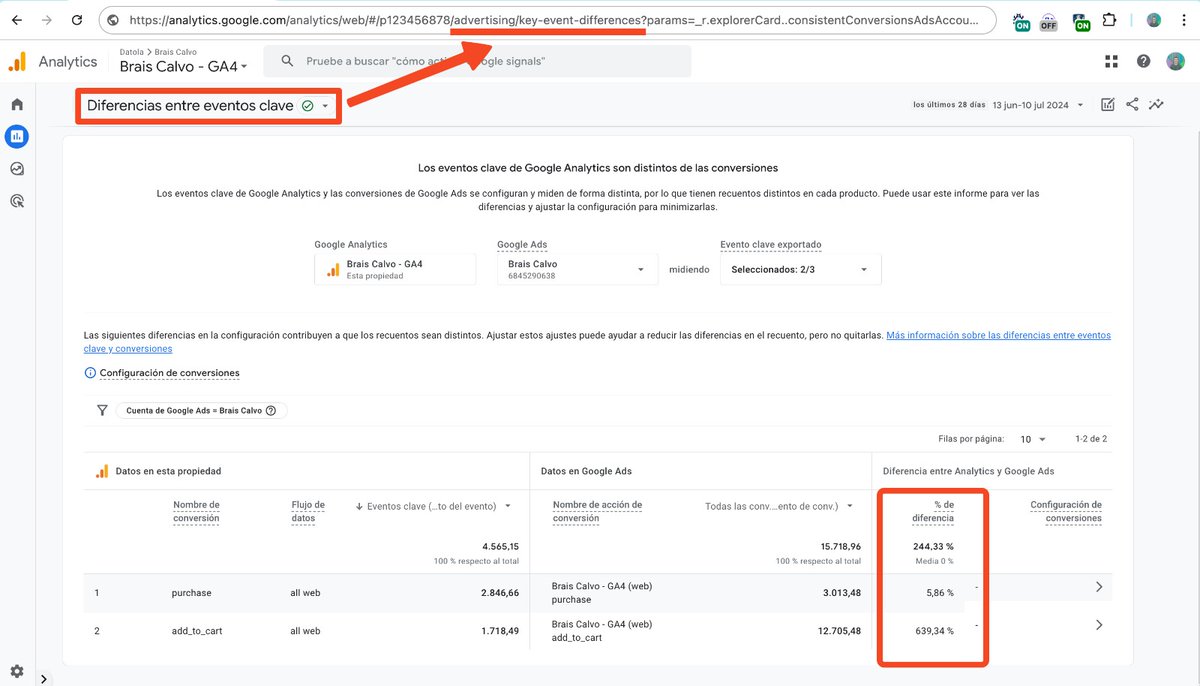
📊 GA4 - Informe "Diferencias entre conversiones"
🕵️♂️ GA4 tiene oculto, pero disponible en muchas propiedades este informe que permite comparar las conversiones exportadas a Google Ads y explica las discrepancias entre ambas plataformas.
Nine guaranteed methods to overcome the daily #GA4 BigQuery Export limit...
One of the biggest complaints I often hear from GA4 users is hitting the daily BigQuery export limits.
Standard GA4 properties have a BigQuery export limit of 1 million events /day for daily (batch) exports.
But that still may not be enough for many businesses. Here are my solutions.
1) Re-evaluate your tracking requirements.
Do you really need to track all events at such granularity at the GA4 property level?
Audit your GA4 property once again and find and remove events that are not business-critical information.
Track fewer events.
.
.
2) Send more information via parameters than via events, as it can help reduce the event volume.
This is because parameters are not counted as separate events, which can help you send more data without hitting the event limit.
.
.
3) Find and fix duplicate events to reduce the event volume and avoid hitting the event limits.
Duplicate events are events that are sent multiple times to your GA4 property.
Various factors, such as technical errors, user behaviour, or bugs in your tracking code, can cause them.
.
.
4) Specify the data streams and/or events to exclude from daily export that you don’t really need, thus potentially overcoming the daily export limit.
.
.
5) Use streaming export, which allows you to send more than 1 million events per day.
The number of events for streaming export is not limited.
Make sure that your BigQuery project has enough storage space and quota to handle the streaming export.
You can incur additional costs for using streaming export.
.
.
6) Use a third-party tool to export GA4 data to BigQuery.
These tools can often handle larger volumes of data than the native GA4 BigQuery export.
.
.
7) Track different parts of the website via different GA4 properties.
This involves creating multiple GA4 properties, each with its own BigQuery export.
Each GA4 property will have its own separate limit of 1 million events per day.
That way, you can send more than 1 million events per day without exceeding the export limit.
.
.
8) Utilize server-side tagging solutions.
Filter and aggregate events on the server before sending them to GA4.
For example, you could combine multiple small interaction events into a single larger event before sending it to GA4.
Process and transform data on the server to reduce the number of parameters or event types being sent to GA4.
This allows you to consolidate data before it reaches GA4.
Imagine tracking every button click individually.
With server-side tagging, you could combine all button clicks within a timeframe (e.g., 5 seconds) into a single "user interaction session" event.
This significantly reduces the total event count exported, potentially bringing it under the 1 million limit.
.
.
9) Upgrade to GA4 360 if everything else fails.
GA4 360 has a higher BigQuery export limit of billions of events per day.
New video. This time, I will explain what the Conversion Linker tag is, its settings, and when to use it.
https://t.co/Qm2h5F1ztw
#googletagmanager#gtmtips